A good desktop subwoofer can add impact to games, depth to music, and cinematic weight to movies without requiring a full-size home theater system. The right choice depends on your desk space, connection options, listening distance, and tolerance for bass that may travel through walls.
This roundup includes complete 2.1 computer speaker systems as well as standalone powered subwoofers, covering affordable USB models, wireless-friendly setups, and higher-output options for more demanding desktop audio.
Best 10 Subwoofers for Desktop Setups Picks for 2026
Powerful Wired Pick

- THX-certified 2.1 audio with 200W peak power
- 6.5-inch ported subwoofer for forceful bass
- Plug-and-play 3.5mm connectivity
Best For: Powerful desktop gaming, movie, and music audio
Wireless Control Pick
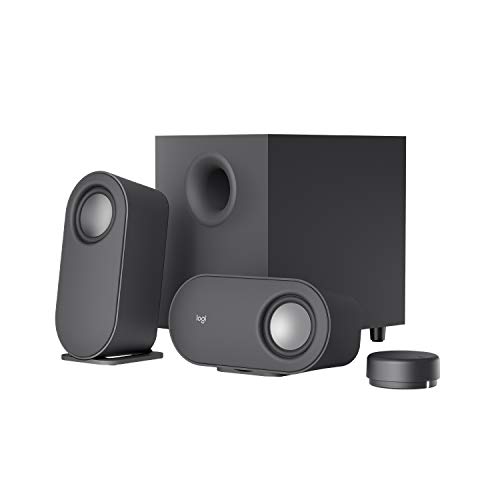
- Bluetooth, USB, and 3.5mm inputs
- Wireless control dial with 30m line-of-sight range
- Down-firing subwoofer with 20W bass output
Best For: Flexible multi-device desktop listening
Value Bass Pick

- 62W peak power with 30W RMS output
- 5.25-inch down-firing, ported subwoofer
- Control pod includes bass and headphone controls
Best For: Affordable wired desktop and console audio
Compact RGB Pick

- Compact design with customizable RGB lighting
- USB, Bluetooth 5.3, and 3.5mm connectivity
- Up to 15W RMS with standard power
Best For: Space-saving RGB desktop setups
Feature-Rich Desktop Sound

- Dedicated subwoofer with 80W peak power
- Bluetooth 5.4, USB, USB-C, and AUX inputs
- DSP tuning, RGB lighting, and control knob
Best For: Flexible multimedia desks and gaming setups
Deep Bass Upgrade
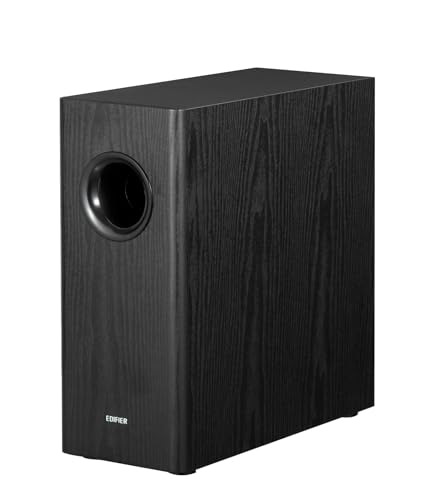
- 8-inch woofer with 70W RMS output
- 35Hz response and adjustable low-pass filter
- RCA integration with phase control and auto-standby
Best For: RCA-equipped desktop or bookshelf speaker systems
Compact Starter Pick

- 2.1 system with 18W peak and 9W RMS output
- Four-inch side-firing subwoofer
- Control pod plus dedicated bass adjustment
Best For: Everyday computer audio in a compact workspace
High-Power Upgrade

- Six-inch powered subwoofer with 210W maximum output
- Front-firing design with 33Hz listed response
- Auxiliary and RCA connectivity options
Best For: Powerful bass in desktop, stereo, or home-theater systems
Powerful Wired Pick – Klipsch ProMedia 2.1 THX
The Klipsch ProMedia 2.1 is a strong choice among subwoofers for desktop setups when you want room-filling sound and pronounced bass without assembling separate components. Its 6.5-inch side-firing, ported subwoofer, THX certification, and 200 watts of peak power suit gaming, movies, and music.
Best For: Desktop users who prioritize powerful wired audio and an easy plug-and-play setup.
Pros:
- THX-certified 2.1 system with 200 watts of peak power.
- 6.5-inch side-firing, ported subwoofer delivers bass you can feel.
- Includes a convenient control pod with volume and subwoofer gain controls.
- Works with computers, TVs, music players, and gaming consoles through a 3.5mm input.
Cons:
- Wired connectivity offers less placement flexibility than Bluetooth systems.
- The subwoofer is relatively substantial for a compact desktop.
The ProMedia 2.1 stands out when maximum output and bass impact matter more than minimalist size or wireless convenience.
Wireless Control Pick – Logitech Z407 Bluetooth 2.1
The Logitech Z407 is one of the more flexible subwoofers for desktop setups, combining a down-firing subwoofer with Bluetooth, USB, and 3.5mm connections. Its wireless control dial and dual-position satellite speakers make it practical for desks that serve multiple devices.
Best For: Users who want convenient wireless control, multiple inputs, and adaptable speaker placement.
Pros:
- 20-watt ported, down-firing subwoofer produces deep bass with digital signal processing.
- Wireless control dial works from up to 30 meters line of sight.
- Connects up to three devices through Bluetooth, micro USB, and 3.5mm input.
- Satellites can stand vertically or lie horizontally.
Cons:
- Its 40W RMS output is below the Klipsch system’s listed peak-power rating.
- The subwoofer itself remains wired despite the wireless control dial and Bluetooth support.
The Z407 is a well-rounded desktop option for switching between computers, mobile devices, and entertainment sources without reaching behind the desk.
Value Bass Pick – Cyber Acoustics CA-3610 2.1
The Cyber Acoustics CA-3610 offers a straightforward wired solution for shoppers comparing subwoofers for desktop setups on a practical budget. Its 5.25-inch down-firing subwoofer, 62 watts of peak power, and control pod provide useful bass adjustment for music, movies, games, and general computer use.
Best For: Budget-conscious desktop users who want simple wired audio with dedicated bass and volume controls.
Pros:
- 62 watts of peak power and 30 watts RMS from a 2.1 configuration.
- 5.25-inch down-firing subwoofer has a tuned port for deeper bass.
- Control pod includes volume, bass, 3.5mm input, and headphone jack.
- Compatible with computers, consoles, smartphones, tablets, and other 3.5mm sources.
Cons:
- Connectivity is wired and relies on an auxiliary input.
- It lacks Bluetooth and USB audio connections.
- The plastic enclosure is less premium than systems using more substantial materials.
The CA-3610 is a sensible pick when you want dedicated subwoofer output and convenient headphone access without paying for wireless features.
Compact RGB Pick – Creative Pebble X Plus 2.1
The Creative Pebble X Plus is a space-conscious option among subwoofers for desktop setups, pairing a compact subwoofer with RGB-lit satellite speakers. USB audio, Bluetooth 5.3, and 3.5mm AUX connectivity give it flexibility, while a suitable 30W-or-higher USB PD adapter can increase its output.
Best For: Modern desktop setups that value compact styling, RGB lighting, and versatile connectivity.
Pros:
- Compact 2.1 design with customizable RGB lighting and six presets.
- Supports USB audio, Bluetooth 5.3, and universal 3.5mm AUX.
- Provides up to 15W RMS and 30W peak using its standard configuration.
- Optional 30W-or-higher USB PD adapter can raise output to 30W RMS and 60W peak.
Cons:
- The USB PD adapter needed for maximum output is not included.
- The compact subwoofer is designed for punchy bass rather than the output of larger systems.
- Bluetooth range is listed at 10 meters.
The Pebble X Plus makes the most sense when desk space and appearance matter nearly as much as sound, especially for USB-C-equipped computers and RGB-focused setups.
Budget Desktop Bass – Logitech Z313
The Logitech Z313 is a straightforward 2.1 option for shoppers seeking subwoofers for desktop setups without a complicated installation. Its wired subwoofer, 25-watt RMS output, 3.5mm auxiliary connection, and included control pod make it practical for everyday computer, MP3 player, or television audio.
Best For: Basic desktop listening, casual movies, and users who want simple wired controls.
Pros:
- Dedicated compact subwoofer adds bass to desktop audio.
- 25 watts RMS provides a practical level of output for personal listening.
- Convenient wired control pod and 3.5mm auxiliary connectivity.
Cons:
- Uses wired connectivity rather than Bluetooth.
- Offers fewer connection and lighting features than newer desktop speaker systems.
The Z313 focuses on affordability and ease of use rather than extensive customization. It is a sensible pick when you want a compact 2.1 speaker system with a dedicated bass unit and minimal setup requirements.
Feature-Rich Desktop Sound – Bluedee 2.1 Speakers
The Bluedee 2.1 system combines a dedicated subwoofer with flexible connections, making it a versatile choice among subwoofers for desktop setups. It supports Bluetooth 5.4, USB-A, USB-C, and 3.5mm AUX, while DSP tuning, an all-in-one control knob, and selectable RGB lighting add convenience for work, music, movies, and gaming.
Best For: Modern desk setups that need multiple inputs, adjustable lighting, and higher stated output.
Pros:
- Dedicated subwoofer and 80-watt peak power support fuller desktop audio.
- Bluetooth 5.4, USB-A, USB-C, and 3.5mm AUX provide flexible connectivity.
- DSP tuning, RGB lighting, and a multifunction control knob add usability.
- Includes an 18-month warranty.
Cons:
- RGB lighting may not suit minimalist workspaces.
- The subwoofer is wired, even though the system supports Bluetooth.
With its broad connection options and desk-oriented controls, the Bluedee system is well suited to users who switch between computers, mobile devices, and other sources. Its feature set is more expansive than a basic 2.1 package, while the dedicated bass unit keeps low frequencies separate from the satellite speakers.
Deep Bass Upgrade – Edifier T5s Powered Subwoofer
The Edifier T5s is a standalone powered subwoofer for desktop or bookshelf speakers with a compatible subwoofer output or RCA connection. Its 8-inch long-throw woofer, 70-watt RMS Class-D amplifier, 35Hz frequency response, adjustable low-pass filter, and phase selector make it a more substantial bass upgrade than an all-in-one computer speaker package.
Best For: Desktop or bookshelf speaker owners who want deeper, adjustable bass through RCA connections.
Pros:
- 8-inch woofer and 70-watt RMS output support powerful low frequencies.
- Adjustable 30Hz–160Hz low-pass filter and 0°/180° phase selector aid system matching.
- Built-in amplifier, auto-standby, and included RCA and 3.5mm-to-RCA cables simplify setup.
- 18mm MDF cabinet is designed to reduce resonance.
Cons:
- Requires speakers or an amplifier with a compatible RCA or subwoofer connection.
- Large and heavy compared with compact computer speaker subwoofers.
- No wireless connectivity.
The T5s is best viewed as a dedicated bass component rather than a complete desktop speaker system. Its size, controls, and RCA-based integration make it a strong fit for listeners building a more substantial desktop or bookshelf setup, provided the existing speakers support the required connection.
Compact Starter Pick – Cyber Acoustics CA-3090
For shoppers seeking subwoofers for desktop setups, the Cyber Acoustics CA-3090 is a compact wired 2.1 speaker system with an 18W peak rating and 9W RMS output. Its four-inch side-firing subwoofer and separate control pod suit everyday computer audio without requiring much desk space.
Best For: Personal computer, laptop, and general multimedia listening in a compact workspace.
Pros:
- Includes a four-inch side-firing subwoofer and two-inch satellite drivers.
- Control pod provides convenient power and volume adjustment.
- Dedicated bass volume control is located on the subwoofer.
- Includes a one-year limited manufacturer warranty.
Cons:
- Wired connectivity requires a corded power source.
- Its 9W RMS output is intended for modest desktop listening rather than large rooms.
The CA-3090 is a straightforward choice when you want a complete desktop speaker system with a separate subwoofer and simple controls. It prioritizes convenience and compact size over high-powered output or wireless flexibility.
High-Power Upgrade – Audioengine S6 Mini Subwoofer
Among subwoofers for desktop setups, the Audioengine S6 Mini stands out for its 210W powered output and six-inch front-firing driver. It is larger and heavier than typical computer speakers, but its compact subwoofer design can add substantial bass to a desktop, stereo, or home-theater system.
Best For: Desktop listeners, gamers, and home-theater users who want powerful, deeper bass from a dedicated subwoofer.
Pros:
- Six-inch driver with a listed 210W maximum output.
- Front-firing design and 33Hz listed frequency response support bass-focused listening.
- Supports auxiliary and RCA connectivity, with compatibility with the Audioengine W3 wireless adapter.
- Backed by a three-year warranty.
Cons:
- At 15.4 pounds, it is less portable and desk-friendly than compact computer speaker systems.
- It is a dedicated mono subwoofer, so separate speakers or a receiver are needed for a complete setup.
- Its floor-standing form may require space beside or under a desk.
The S6 Mini is the performance-oriented option in this group. Choose it when bass impact matters more than minimal size, and confirm that your existing desktop audio equipment has a suitable auxiliary or RCA connection.
USB Desktop Value – OR O R O W S211 USB 2.1 Speakers
The OR O R O W S211 is a USB-powered 2.1 system for shoppers comparing subwoofers for desktop setups on a budget. Its 16W output, compact subwoofer, wooden enclosure, and USB power make it practical for computers, laptops, and spaces where preserving an AC outlet matters.
Best For: PC users who want an affordable, USB-powered 2.1 setup with stronger bass than basic built-in computer speakers.
Pros:
- USB-powered design can free an AC outlet and supports flexible placement.
- Includes a subwoofer and two satellite speakers in a 2.1 configuration.
- Thick wooden enclosure is designed to reduce noise and distortion.
- Small subwoofer can fit under a desk or bed.
Cons:
- Its 16W system output is suited to small spaces rather than high-volume room filling.
- USB connectivity may limit compatibility with setups that lack a suitable USB power source.
- The listed 100Hz frequency response suggests less deep bass than larger subwoofers.
The S211 makes the most sense for practical desktop use where USB power, compact placement, and low cost are priorities. Its wooden construction and 2.1 layout add appeal, but listeners seeking very deep or powerful bass should consider a larger powered subwoofer.
How We Picked These Subwoofers for Desktop Setups
We selected products that are practical for near-field listening at a desk and compared them by system design, power claims, connectivity, subwoofer size, controls, and intended use. The list includes compact 2.1 speaker packages for simple upgrades, along with standalone powered subwoofers for users who already own suitable desktop speakers.
Because manufacturer power ratings are not always measured in the same way, wattage is treated as a rough comparison rather than a guarantee of volume or bass quality. Placement flexibility, input compatibility, and real-world desk requirements matter just as much.
Quick Comparison
- Best all-around 2.1 system: Klipsch ProMedia 2.1 THX Certified Computer Speaker System.
- Best for wireless convenience: Logitech Z407, with Bluetooth, USB, and analog inputs plus a wireless control pod.
- Best compact USB-C option: Creative Pebble X Plus.
- Best budget-focused choices: Logitech Z313, Cyber Acoustics CA-3090, and OROW S211.
- Best standalone upgrade: Audioengine S6 for buyers who already have compatible speakers.
- Best for a larger bass enclosure: Edifier T5s, with an 8-inch woofer and dedicated powered-subwoofer design.
Key Buying Factors for Subwoofers for Desktop Setups
System Type and Compatibility
A complete 2.1 system includes the subwoofer and satellite speakers, making it the simplest choice for a laptop, desktop PC, or monitor setup. A standalone model requires speakers or an amplifier with the appropriate output and may need additional cables or adapters. Confirm that your source and speakers support the required 3.5mm, RCA, USB, Bluetooth, or subwoofer connection before buying.
Size, Placement, and Bass Control
Measure the space under or beside your desk. A compact subwoofer is easier to position, while a larger cabinet may deliver deeper, stronger bass but occupy valuable floor area. Look for a separate volume or bass control when possible, since near-field listening often needs less low-end output than a living-room setup.
Power and Listening Habits
More stated wattage does not automatically mean better sound. Consider how close you sit, how large the room is, and whether you listen quietly or at high volume. For office work and casual gaming, a modest 2.1 system may be sufficient; music, action games, and movies can justify a more capable enclosure.
Noise, Neighbors, and Desk Vibration
Deep bass can transmit through floors and walls, especially when the subwoofer sits directly on a hard surface. Use moderate levels and consider an isolation pad or stable platform if vibration becomes distracting. A front-facing control pod or remote is also useful when the subwoofer is positioned out of reach.
Who Should Buy Which Subwoofers for Desktop Setups?
Choose an integrated 2.1 package if you want a straightforward replacement for basic monitor or laptop audio. The Klipsch, Logitech, Cyber Acoustics, Creative, Bluedee, and OROW systems suit buyers who need speakers and bass in one purchase, with the best match determined by available space, inputs, and budget.
Choose the Edifier T5s or Audioengine S6 if you already own speakers you like and want to add deeper low frequencies. These standalone options require more careful compatibility and placement checks, but they can be the better long-term path for an upgraded desktop audio system.