A four-bay enclosure gives you room to combine multiple drives for higher capacity, redundancy, or both. The right choice depends on whether you need a full network-attached storage system, a simpler USB direct-attached enclosure, or a DIY chassis.
Below, we compare 10 options across performance, connectivity, drive compatibility, RAID features, cooling, and ease of use so you can match the enclosure to your storage workflow.
Best 10 Nas Enclosure with Four Bays Picks for 2026
Best Overall NAS
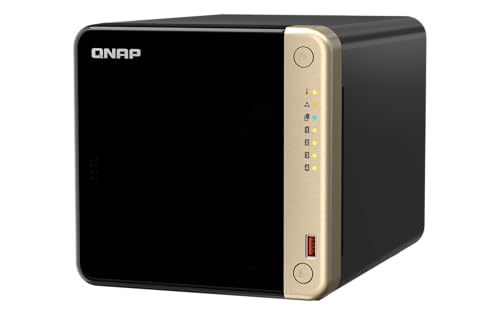
- 8GB RAM and quad-core Intel processor
- Dual 2.5GbE plus two M.2 slots
- Hot-swappable four-bay desktop design
Best For: Home offices, families, and small teams
Best Direct Expansion Enclosure

- Four SATA bays for 3.5-inch or 2.5-inch drives
- 10Gbps USB-C and HDMI connectivity
- Cooling fans and independent bay switches
Best For: Desktop storage expansion and local media workflows
Best for Creators and Teams

- Ryzen processor with expandable RAM up to 64GB
- Dual 10GbE networking for fast transfers
- Supports apps, surveillance, and SSD expansion
Best For: Creators, tech enthusiasts, and office teams
Best RAID Expansion DAS

- Four 3.5-inch SATA bays with hardware RAID
- USB Type-C connection for computers or NAS backup
- Supports RAID 0, 1, 5, JBOD, and individual disks
Best For: QNAP expansion and direct-attached backups
Best for Easy Setup

- 2.5GbE for faster network transfers
- RAID 0/1/5/6/10 support
- Btrfs snapshots and 4K streaming
Best For: Home and small-office private cloud storage
Best Direct-Attached Storage
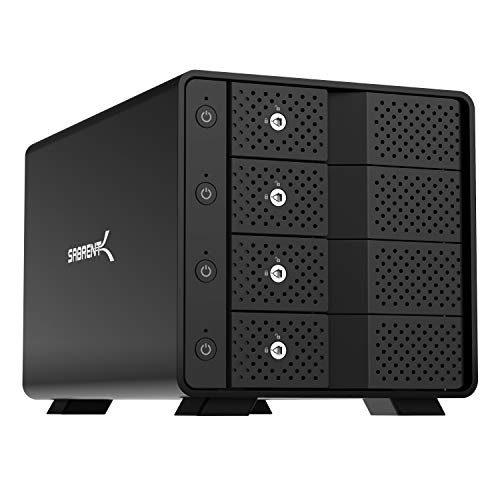
- 10Gbps USB-C connection
- Four trayless hot-swap bays
- JBOD design, not hardware RAID
Best For: High-capacity storage connected directly to a computer
Best DIY NAS Chassis
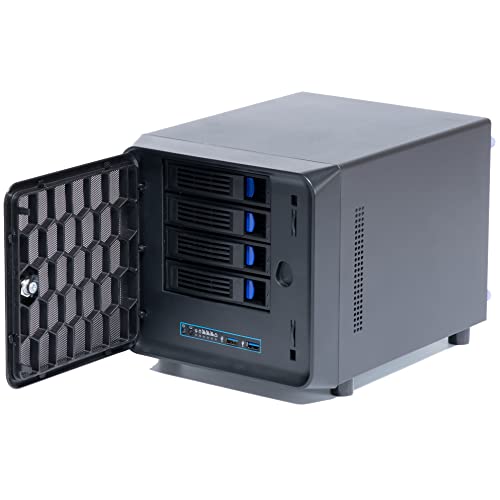
- Mini-ITX motherboard support
- Four main bays plus one internal 2.5-inch bay
- PCIe expansion and replaceable fan
Best For: Custom Mini-ITX NAS builds
Flexible RAID Storage

- Eight selectable RAID and storage modes
- Supports four SATA HDDs or SSDs
- USB 3.0 and eSATA connectivity
Best For: Desktop users who need configurable RAID storage
Simple Drive Expansion
- Tool-free installation with hot swapping
- Holds up to four SATA drives
- USB 3.0 speeds up to 5Gbps
Best For: Users wanting convenient, non-RAID external storage
USB and eSATA Expansion

- USB 3.0 and eSATA interfaces
- Supports four SATA HDDs or SSDs
- Up to 80TB total capacity
Best For: Computer-attached storage with flexible connectivity
Best Overall NAS – QNAP TS-464-8G-US
The QNAP TS-464-8G-US is a strong choice if you want a true nas enclosure with four bays for centralized storage, backups, and family media. Its 8GB of RAM, dual 2.5GbE ports, NVMe expansion, and hot-swappable design give it room to handle demanding home or small-business file workflows.
Best For: Families, home offices, and small teams needing a capable network-attached storage system.
Pros:
- Quad-core Intel processor and 8GB DDR4 RAM
- Dual 2.5GbE ports support faster network transfers
- Two M.2 PCIe Gen3x2 slots enable caching or SSD pools
- Hot-swappable drive design and multiple USB 3.2 Gen 2 ports
Cons:
- Drives are not specified as included in the supplied notes
- Its desktop NAS feature set may be more than basic storage users need
Choose this model when you want more than a basic four-drive enclosure. The faster networking and SSD options make it a flexible foundation for shared files, photos, videos, and business data.
Best Direct Expansion Enclosure – WAVLINK 4-Bay USB-C
The WAVLINK four-bay enclosure suits shoppers who need a nas enclosure with four bays but prefer direct USB-C storage rather than a standalone NAS operating system. It supports 3.5-inch and 2.5-inch SATA drives, delivers USB 3.2 speeds, and adds HDMI connectivity for a flexible desktop setup.
Best For: Users expanding a computer’s storage with a versatile, directly attached enclosure.
Pros:
- Four SATA 6Gbps bays support up to four drives
- USB-C 3.2 offers data rates up to 10Gbps
- Independent bay power switches support hot-swappable use
- Aluminum housing and temperature-controlled cooling fans
Cons:
- 2.5-inch drives require separate mounting brackets
- It is a direct-attached enclosure, not a full network NAS
- HDMI video output requires a compatible host USB-C port and cable
This is a practical pick for local storage expansion, media projects, or large game libraries. Its broad drive compatibility and display output are useful, but buyers specifically seeking remote access or NAS applications should consider a networked model instead.
Best for Creators and Teams – UGREEN NAS DXP4800 GT
The UGREEN DXP4800 GT is a performance-focused nas enclosure with four bays for creators, technical users, and office teams. Its Ryzen processor, expandable memory, dual 10GbE networking, app support, and storage expansion options make it suited to demanding backups, media work, containers, and multi-user access.
Best For: Creators and small teams managing large media libraries, backups, applications, or surveillance footage.
Pros:
- AMD Ryzen Embedded processor with 4 cores and 8 threads
- 8GB RAM expandable to 64GB
- Dual 10GbE ports support high-speed networking
- Supports Docker, virtual machines, surveillance, SD backup, and local media workflows
Cons:
- Drives are not included
- Its advanced capabilities may be excessive for simple file storage
- Maximum capacity depends on compatible SATA, U.2, and M.2 drives
For buyers who want a four-bay system that can grow into a broader home lab or production hub, the DXP4800 GT is especially compelling. Dual 10GbE and expandable memory are valuable for large files and concurrent users, while UGOS Pro provides a platform for additional services.
Best RAID Expansion DAS – QNAP TR-004
QNAP TR-004 4 Bay USB Type-C Direct Attached Storage (DAS) with hardware RAID (Diskless)
Check Price On AmazonThe QNAP TR-004 is a straightforward nas enclosure with four bays for users who need direct-attached storage or extra capacity for an existing QNAP NAS. It connects over USB Type-C, supports four 3.5-inch SATA drives, and includes hardware RAID modes for flexible local storage management.
Best For: QNAP owners and computer users seeking affordable USB storage expansion or a backup target.
Pros:
- Four 3.5-inch SATA bays in a diskless enclosure
- Hardware RAID supports RAID 0, 1, 5, JBOD, and individual disks
- Works with Windows, macOS, and Linux through USB Type-C
- Lockable drive bays and included USB Type-C to Type-A cable
Cons:
- It is direct-attached storage rather than a standalone network NAS
- NAS applications cannot be installed on the enclosure
- Compatibility and volume limitations apply when connecting it to certain QNAP NAS models
The TR-004 makes sense when the priority is simple, locally connected storage with hardware RAID. It is less suitable for shoppers wanting independent NAS services, but it can provide useful backup or expansion capacity alongside a compatible QNAP system.
Best for Easy Setup – Asustor Drivestor 4 Gen 2
The Asustor Drivestor 4 Gen 2 is a strong choice if you want a complete NAS enclosure with four bays for private cloud storage, backups, and media streaming. Its four drive bays, 2.5GbE networking, RAID support, and diskless design make it suitable for expanding storage at home or in a small office.
Best For: Home users and small offices that want a networked four-bay NAS for backups, remote access, and 4K media streaming.
Pros:
- 2.5GbE connectivity can improve file transfers over standard Gigabit networking.
- Supports RAID 0/1/5/6/10 for flexible capacity and redundancy.
- Btrfs snapshots and WORM technology add protection against accidental deletion and ransomware.
- Supports personal cloud features, remote access, and 4K media playback.
Cons:
- Ships diskless, so drives must be purchased separately.
- Its 1GB of DDR4 RAM may limit heavier multitasking compared with more generously equipped NAS systems.
Choose this model when you want a purpose-built NAS rather than a simple direct-attached enclosure. The combination of RAID options, snapshots, and 2.5GbE gives it a practical balance of protection, speed, and home-server features.
Best Direct-Attached Storage – Sabrent 4-Bay USB-C Enclosure
The Sabrent DS-SC4B is a practical NAS enclosure with four bays for users who prefer direct-attached storage instead of a network operating system. It connects to a computer over 10Gbps USB-C and accepts four 3.5-inch SATA HDDs or SSDs in a trayless, hot-swappable design.
Best For: Windows, macOS, and Linux users who need high-capacity JBOD storage connected directly to a computer.
Pros:
- 10Gbps USB-C connectivity supports fast direct-attached transfers.
- Holds up to four 3.5-inch SATA drives, with a stated capacity of up to 80TB.
- Trayless hot-swap bays provide tool-free drive installation.
- Per-bay power switches, activity LEDs, a lock, and active cooling improve usability.
Cons:
- This is JBOD direct-attached storage, not a hardware RAID enclosure.
- It does not provide the remote-access and private-cloud functions of a true NAS.
- Drives are not included.
This enclosure makes sense when your computer should manage the drives individually. It offers convenient four-drive expansion and fast USB-C access, but buyers needing RAID protection or standalone network services should look at a dedicated NAS instead.
Best DIY NAS Chassis – KCMconmey 4+1 Bay NAS Case
The KCMconmey 4+1 Bay case is a flexible starting point for a custom NAS enclosure with four bays. It supports a Mini-ITX motherboard, Flex or compatible 1U power supply, four 2.5- or 3.5-inch drive trays, and an additional internal 2.5-inch bay, allowing builders to choose their own NAS hardware and software.
Best For: DIY builders creating a compact Mini-ITX NAS with room for a PCIe expansion card.
Pros:
- Supports four 2.5- or 3.5-inch drive bays plus one internal 2.5-inch bay.
- Compatible with Mini-ITX motherboards and Flex or specified 1U power supplies.
- Includes a single-slot full-height PCIe expansion option for a video or network card.
- Provides two front USB 3.0 ports and a replaceable 80mm fan.
Cons:
- It is a chassis rather than a complete NAS, so the motherboard, processor, memory, storage, and software are separate.
- Power-supply and motherboard compatibility must be checked against the listed size limits.
- DIY setup requires more planning and assembly than a ready-to-use NAS.
This case is best for experienced users who want control over components and NAS software. Its expansion support and extra internal bay add flexibility, but the final storage experience depends on the hardware selected for the build.
Flexible RAID Storage – 4-Bay RAID Enclosure
This CENMATE model is a four-bay NAS enclosure alternative for users who want external DAS storage with selectable RAID modes. It supports 2.5- and 3.5-inch SATA HDDs or SSDs, USB 3.0 and eSATA connectivity, and up to 80TB total capacity.
Best For: Users who need RAID, cloning, or multiple storage modes in a desktop enclosure rather than a network-attached NAS.
Pros:
- Supports RAID 0/1/3/5/10, CLONE, LARGE, and NORMAL modes.
- Accepts four 2.5- or 3.5-inch SATA drives, up to 80TB total.
- Includes USB-A/USB-C 3.0 and eSATA cables, plus a 12V power adapter.
- Aluminum construction and a built-in cooling fan help manage drive heat.
Cons:
- Hot-swapping is not supported.
- RAID changes require a manual power-off and reset procedure and may result in data loss.
- The fan operates at roughly 40–50 decibels, and eSATA multi-bay access requires a compatible RAID-capable computer port.
This is the most feature-rich option in the group for users who specifically want hardware RAID choices. It is still a DAS enclosure, not a true NAS, so it does not provide network storage on its own.
Simple Drive Expansion – Tool-Free 4-Bay Enclosure
This four-bay NAS enclosure alternative focuses on straightforward USB storage expansion rather than RAID or networking. Its tool-free design accepts 2.5- and 3.5-inch SATA drives, supports hot swapping, and connects to a computer through USB 3.0.
Best For: Users who want convenient, individually managed drives and easy access to a large external storage pool.
Pros:
- Tool-free, hot-swappable design simplifies drive installation and replacement.
- Supports four 2.5- or 3.5-inch SATA HDDs or SSDs, up to 80TB total.
- USB 3.0 supports transfer speeds up to 5Gbps with UASP control.
- Includes USB-A/USB-C cable and a 12V power adapter.
Cons:
- Does not support RAID or NAS functionality.
- The cooling fan produces approximately 40–50 decibels of noise.
- Storage management depends on the connected Windows, Mac, or Linux computer.
Choose this model when ease of use matters more than RAID protection. Hot swapping and tool-free access make it practical for rotating or separately managed drives, but it cannot create a redundant array or act as a standalone network server.
USB and eSATA Expansion – 4-Bay DAS Enclosure
This four-bay NAS enclosure alternative adds both USB 3.0 and eSATA connection options for desktop or laptop storage expansion. It supports four 2.5- or 3.5-inch SATA drives and up to 80TB total, but it does not include RAID or NAS functionality.
Best For: Users with a compatible eSATA or USB-equipped computer who want a flexible, high-capacity external drive enclosure.
Pros:
- Supports four 2.5- or 3.5-inch SATA HDDs or SSDs.
- Provides USB-A/USB-C 3.0 and eSATA connectivity.
- Offers up to 80TB total capacity, based on four 20TB drives.
- Aluminum housing and a built-in fan help with cooling.
Cons:
- Does not support RAID or NAS operation.
- Hot-swapping is not supported.
- eSATA multi-bay access requires a RAID-capable computer port; otherwise, only one bay may be accessible.
This model makes sense when you specifically need eSATA alongside USB connectivity. Because it is a non-RAID DAS enclosure, it is better suited to flexible computer-attached storage than redundancy or shared network access.
How We Picked the Best Nas Enclosure with Four Bays
We focused on four-bay storage products that support common 2.5-inch and 3.5-inch SATA HDDs or SSDs, while covering distinct use cases. The list includes complete NAS systems with operating systems and network services, USB-C and eSATA DAS enclosures for simpler local storage, and a DIY case for builders who want control over components.
We considered drive flexibility, RAID or redundancy support, interface speed, cooling, hot-swap or tool-free access, maximum stated capacity, and the practical differences between a network appliance and a directly connected enclosure. Diskless products are also evaluated as platforms, since the drives and storage configuration will significantly affect the final result.
Quick Comparison
- Best for a complete home or small-office NAS: QNAP TS-464-8G-US or UGREEN NAS DXP4800 GT.
- Best for USB-based RAID storage: QNAP TR-004.
- Best for straightforward local expansion: WAVLINK or SABRENT four-bay USB-C enclosures.
- Best for a personal cloud on a budget: Asustor Drivestor 4 Gen 2.
- Best for a custom build: The 4 + 1 bay DIY NAS case.
- Best for flexible SATA drive access: The CENMATE aluminum enclosures.
Key Buying Factors for a Nas Enclosure with Four Bays
NAS or DAS Architecture
A true NAS connects through Ethernet and can serve files to multiple computers, phones, media players, or backup clients. It typically includes an operating system, user accounts, remote access, apps, and network services. A DAS connects directly to one host over USB or eSATA and is usually simpler to configure, but it does not independently provide network storage.
Drive Support and RAID
Confirm support for your preferred 2.5-inch or 3.5-inch SATA drives, including SSDs if you want quieter or faster storage. RAID 5 is often attractive in a four-bay setup because it provides redundancy while preserving more usable capacity than RAID 10, but RAID is not a substitute for an independent backup. Check whether RAID is managed by the NAS software, enclosure hardware, or the host computer.
Connectivity and Real-World Speed
USB 3.2 Gen 2 and 10Gbps USB-C can improve transfers with compatible computers and SSDs, though hard drives may become the limiting factor. A NAS should also be judged by its Ethernet connection, processor, memory, and ability to handle multiple users. Make sure included cables match your computer or network equipment.
Cooling, Access, and Capacity
Multiple spinning drives produce heat and vibration, so look for an active fan, temperature management, and unobstructed airflow. Hot-swap trays make replacement easier, while tool-free bays reduce installation time. Capacity claims are generally maximum platform limits; usable space will be lower after formatting and redundancy.
Who Should Buy Which Nas Enclosure with Four Bays?
Choose a QNAP or UGREEN appliance if you want centralized file sharing, automated backups, media services, and a broad software ecosystem. Asustor is a sensible alternative for personal cloud and home backup duties when you want a dedicated NAS without building one yourself.
Choose the QNAP TR-004, WAVLINK, SABRENT, or CENMATE models if you mainly need additional local storage, drive pooling, or hardware RAID without running a full network operating system. These are especially suitable for a desktop, workstation, or backup drive workflow.
The DIY case is best for experienced builders who already have compatible Mini-ITX hardware, a suitable power supply, and the confidence to configure storage software and cooling. Whichever Nas Enclosure with Four Bays you choose, plan a separate backup for important files and verify drive, interface, and operating-system compatibility before purchase.