Reliable signal conversion is essential when cameras, switchers, monitors, recorders, and streaming systems use different video connections. The right SDI converter can simplify a live rig while preserving resolution, audio, and signal stability.
This roundup compares 10 SDI converters for live video production, including bidirectional models, SDI-to-HDMI adapters, HDMI-to-SDI converters, distribution hardware, and 12G-SDI options.
Best 10 Sdi Converters for Live Video Production Picks for 2026
Flexible Signal Bridge
Blackmagic Micro BiDirectional SDI/HDMI

- Bidirectional SDI and HDMI conversion
- Supports SD, HD, and 3G-SDI
- Universal 5V supply included
Best For: Portable mixed SDI/HDMI live-video setups
Simple Display Adapter
SHUITING SDI to HDMI Converter

- SDI-to-HDMI conversion up to 1080p
- SDI loop output included
- Plug-and-play metal housing
Best For: SDI camera feeds to HDMI monitors or projectors
Multi-Output Distributor
Blackmagic Mini SDI Distribution

- Eight re-clocked SDI outputs
- Auto-switches SD, HD, and 3G-SDI
- Supports embedded audio and ancillary data
Best For: Splitting one SDI feed across multiple destinations
Long-Run Converter
Bidirectional 3G SDI/HDMI Adapter

- Bidirectional 3G-SDI and HDMI conversion
- Supports uncompressed 1080p video
- Long SDI transmission distances
Best For: Flexible 1080p broadcast and live-streaming connections
12G HDMI-to-SDI Pick
Micro Converter HDMI to SDI 12G

- Two SDI outputs from one HDMI input
- Supports SD through 4K SDI rates
- Automatic format detection and reclocking
Best For: HDMI-to-SDI conversion in multi-output live video setups
Long-Run SDI Monitoring Pick
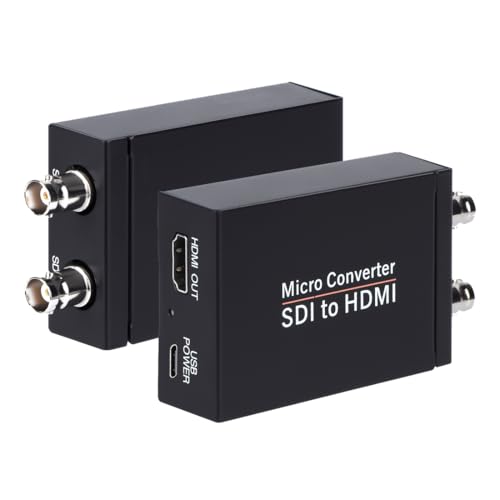
- Converts 3G-, HD-, and SD-SDI to HDMI
- Includes SDI loopout for pass-through
- Supports audio de-embedding and auto detection
Best For: SDI monitoring with HDMI display output and loop-through
Flexible Two-Way Pick
Bidirectional SDI/HDMI 12G Micro Converter

- Supports conversion in both SDI and HDMI directions
- Compact design for portable production kits
- Includes a listed two-year warranty
Best For: Portable rigs that switch between SDI and HDMI workflows
Simple HD Bridge
3G/HD/SD-SDI to HDMI Converter

- Supports SDI formats up to 1080p
- HDMI output with SDI loop-out
- Plug-and-play metal design
Best For: SDI cameras feeding HDMI displays in HD workflows
Broadcast-Grade Monitoring
Blackmagic Micro Converter SDI to HDMI 12G
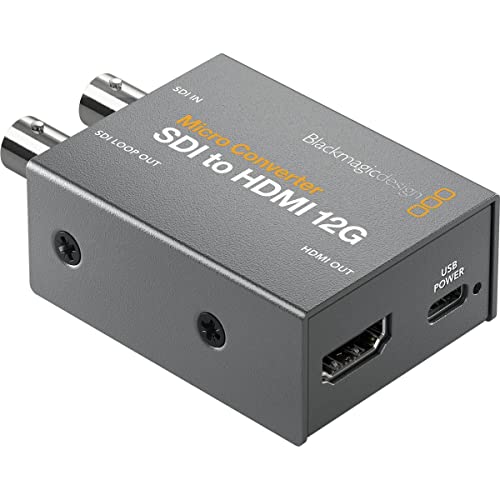
- 33-point 3D LUT for calibration
- LUT output available from SDI loop output
- Compact, robust metal body
Best For: Portable SDI monitoring with color-calibrated displays
Dual-Display Distribution
HDMI to 2-Way 3G-SDI Converter

- Converts HDMI to two SDI outputs
- Supports up to 1080p at 60 Hz
- Long-distance SDI transmission specifications
Best For: Sending one HDMI source to two SDI destinations
Flexible Signal Bridge – Blackmagic Micro BiDirectional SDI/HDMI
For creators comparing sdi converters for live video production, this compact Blackmagic Design unit is a versatile choice when both SDI and HDMI connections may be needed. It supports SD, HD, and 3G-SDI, includes HDMI input and output, and comes with a universal 5V power supply with international socket adapters.
Best For: Portable live-video setups that need bidirectional SDI and HDMI connectivity.
Pros:
- Supports SD, HD, and 3G-SDI formats.
- Provides both SDI and HDMI inputs and outputs.
- Includes a universal power supply with international adapters.
- Portable metal construction weighs 6.08 ounces.
Cons:
- The supplied details do not specify 4K support.
- Requires a 5V DC power supply.
Its bidirectional design makes it more adaptable than a one-way converter, especially for productions that move between professional SDI gear and HDMI displays or sources. Verify your required video format and power arrangements before buying.
Simple Display Adapter – SHUITING SDI to HDMI Converter
This SHUITING converter is a straightforward option among sdi converters for live video production when an SDI camera or other SDI source must feed an HDMI monitor, television, or projector. It supports SD-SDI, HD-SDI, and 3G-SDI signals up to 1080p, with synchronous audio and video transmission.
Best For: Connecting an SDI camera or source to a 1080p HDMI display or projector.
Pros:
- Supports SD-SDI, HD-SDI, and 3G-SDI input.
- Outputs up to 1920×1080 Full HD.
- Includes an SDI loop output for signal pass-through.
- Metal housing is designed for heat dissipation and plug-and-play use.
Cons:
- Converts SDI to HDMI only; HDMI-to-SDI conversion is not supported.
- Does not support 4K.
- Requires a BNC male coaxial cable and does not support RF, CVBS, AHD, TVI, or CVI signals.
Its clear one-way workflow and SDI loop out suit basic camera-to-monitor and distribution tasks. It is less appropriate for productions that need bidirectional conversion or 4K video.
Multi-Output Distributor – Blackmagic Mini SDI Distribution
For live productions that need to send one feed to several destinations, this Blackmagic Design Mini Converter is a strong distribution-focused option among sdi converters for live video production. It accepts SD, HD, or 3G-SDI and provides eight re-clocked SDI outputs, while supporting embedded audio, ancillary data, and ASI.
Best For: Splitting one SDI source across multiple monitors, recorders, or other SDI devices.
Pros:
- Provides eight re-clocked SDI outputs from one input.
- Automatically switches between SD, HD, and 3G-SDI.
- Supports embedded audio, ancillary data, and ASI.
- Includes a redundant SDI input for mission-critical applications.
Cons:
- It is a distribution amplifier, not an SDI-to-HDMI converter.
- Requires a 12V power supply.
- Its portable design may still require careful placement in a larger production rack or setup.
This model is best understood as a signal-splitting hub rather than a display adapter. The eight reclocked outputs and redundant input make it particularly useful when reliability and multiple SDI destinations matter.
Long-Run Converter – Bidirectional 3G SDI/HDMI Adapter
This bidirectional 3G model is a practical pick for sdi converters for live video production when a setup needs to move signals in either direction between SDI and HDMI. It supports adaptive 1080p conversion, uncompressed low-latency video, clock recovery, and long cable runs in a metal housing.
Best For: Broadcast, live-streaming, photography, and other 1080p workflows requiring SDI/HDMI flexibility.
Pros:
- Converts SDI to HDMI and HDMI to SDI.
- Supports up to 1080p at 60fps with uncompressed video.
- Supports SDI transmission distances up to 80m for 3G-SDI, 100m for HD-SDI, and 120m for SD-SDI.
- Uses a metal aluminum housing with built-in ESD protection and heat dissipation.
Cons:
- Its supported resolution is limited to 1080p rather than 4K.
- The supplied details do not specify particular HDMI or SDI connector counts.
- A power supply is required, though one is included.
With bidirectional operation and stated long-distance SDI ranges, this converter offers useful flexibility for compact production systems. Confirm the exact 1080p format and cabling requirements for your cameras, displays, and other equipment.
12G HDMI-to-SDI Pick – Micro Converter HDMI to SDI 12G
For live video production setups that need to feed SDI infrastructure from an HDMI source, the Blackmagic Design Micro Converter HDMI to SDI 12G offers a compact, high-bandwidth option. It supports automatic HDMI input matching, two SDI video outputs, and formats ranging from SD through 4K.
Best For: Converting HDMI cameras or devices into SDI feeds for professional video workflows.
Pros:
- Provides two SDI video outputs.
- Supports 270Mb, 1.5G, 3G, 6G, and 12G SDI rates.
- Automatically detects SD, HD, 2K, Ultra HD, and 4K formats.
- Includes SDI reclocking for signal handling.
Cons:
- Converts HDMI to SDI rather than operating as a bidirectional unit.
- Its compact design has only one HDMI input.
This is a strong choice when a live production system needs multiple SDI outputs from a single HDMI source and broad format compatibility, particularly for 4K-capable workflows.
Long-Run SDI Monitoring Pick – SDI to HDMI Audio De-embedder
For live video production systems that need to monitor an SDI feed on an HDMI display, the Anber-Tech SDI to HDMI Converter combines format detection, HDMI output, and SDI loopout. It supports 3G-SDI, HD-SDI, and SD-SDI signals, with listed cable-run distances of up to 300 feet for 3G-SDI, 500 feet for HD-SDI, and 1,000 feet for SD-SDI.
Best For: Converting SDI camera or production feeds to HDMI displays while preserving an SDI loop-through connection.
Pros:
- Automatically detects 3G-SDI, HD-SDI, and SD-SDI formats.
- Provides one HDMI output and one SDI loop output.
- Supports stereo audio de-embedding and up to eight channels of 48 kHz digital audio.
- Supports listed long SDI cable runs across supported formats.
Cons:
- It is not bidirectional and cannot convert HDMI to SDI.
- Its supported formats top out at 3G-SDI rather than 6G- or 12G-SDI.
This converter fits monitoring and distribution points where an SDI signal must reach an HDMI monitor or projector while continuing to another SDI device through the loop output.
Flexible Two-Way Pick – Bidirectional SDI/HDMI 12G Micro Converter
When a live video production rig may need to convert in either direction, the Blackmagic Design Bidirectional SDI/HDMI 12G Micro Converter is designed for two-way SDI and HDMI conversion. Its compact form supports SD and HD workflows, making it useful when equipment changes between production setups.
Best For: Compact production kits that need bidirectional SDI and HDMI conversion for cameras and other video devices.
Pros:
- Supports bidirectional SDI and HDMI conversion.
- Designed as a small micro converter for portable rigs.
- Intended for SD and HD SDI devices.
- Includes a listed two-year warranty.
Cons:
- The supplied notes do not specify supported video rates or resolutions.
- The notes list one channel, so it may be less suitable where multiple conversion paths are required.
This model is the most adaptable option of the three for crews that regularly switch between HDMI and SDI directions, though buyers needing confirmed 4K or detailed format support should verify those specifications before purchase.
Simple HD Bridge – 3G/HD/SD-SDI to HDMI Converter
For buyers comparing SDI converters for live video production, this GUETAD model is a straightforward choice when the workflow needs SDI input and HDMI display output. It supports 3G-, HD-, and SD-SDI signals up to 1080p, with synchronized audio and video transmission.
Best For: Connecting an SDI camera or other SDI source to an HDTV, monitor, or projector in standard HD production, broadcast, conference, and control-room setups.
Pros:
- Supports 3G/HD/SD-SDI input and up to 1920×1080 resolution.
- Provides HDMI output plus an SDI loop-out connection.
- Metal housing is designed for heat dissipation, and operation is plug-and-play.
- Includes stated 18-month warranty support.
Cons:
- Does not support 4K video.
- Converts SDI to HDMI only; it cannot convert HDMI to SDI.
- Requires a compatible coaxial cable with a BNC male connector and does not support RF, CVBS, AHD, TVI, or CVI signals.
This converter fits buyers who want a practical HD-only SDI-to-HDMI link without unnecessary setup. Confirm the source is SDI and the destination accepts HDMI before purchasing.
Broadcast-Grade Monitoring – Blackmagic Micro Converter SDI to HDMI 12G
For SDI converters for live video production where compact size and monitor calibration matter, the Blackmagic Design Micro Converter SDI to HDMI 12G offers a portable metal-bodied design with 33-point 3D LUT support. It is positioned as a compact converter using broadcast-quality technology.
Best For: Portable SDI-to-HDMI monitoring setups that need 3D LUT-based color calibration for a monitor, projector, or television.
Pros:
- Includes a 33-point 3D LUT for monitor, projector, or television color calibration.
- Can output the 3D LUT from the SDI loop output.
- Uses a compact, robust metal body suited to portable production work.
- Designed around broadcast-quality technology.
Cons:
- The supplied notes do not specify supported video resolutions or connector details beyond the SDI interface.
- The listed maximum and minimum supply voltage is 5 volts, so an appropriate 5V power source is required.
This is the more specialized option of the three for crews prioritizing calibrated monitoring and a compact form factor. Check the full technical specifications to confirm compatibility with your exact SDI format and power arrangement.
Dual-Display Distribution – HDMI to 2-Way 3G-SDI Converter
Among SDI converters for live video production, this adapter is aimed at the reverse workflow: it takes an HDMI source and sends it to two SDI displays or destinations. It supports HDMI inputs through 1080p at up to 60 Hz and offers stated transmission distances of up to 100 meters for 3G-SDI.
Best For: Distributing one HDMI camera, computer, or home-theater source to two SDI displays or devices over longer coaxial runs.
Pros:
- Converts one HDMI input to two SDI outputs.
- Supports HDMI formats from 480i through 1080p at 24/25/30/50/60 Hz.
- Lists transmission distances up to 100m for 3G-SDI, 200m for HD-SDI, and 300m for SD-SDI.
- Metal shell, heat dissipation, and plug-and-play operation support practical installation.
Cons:
- It converts HDMI to SDI only and does not support SDI-to-HDMI conversion.
- The supplied notes do not describe 4K support.
- Compatibility depends on having an HDMI-output device and SDI-compatible receiving equipment.
This model is a good fit when the production path starts with HDMI and needs two SDI feeds. It is not the right choice for monitoring an SDI camera on an HDMI display, so verify the signal direction first.
How We Picked These Sdi Converters for Live Video Production
We focused on the connection types and workflow requirements that matter most in live production: SDI and HDMI directionality, supported signal speeds, loop-through capability, audio handling, power options, and suitability for cameras, monitors, switchers, and streaming systems. The selection includes established Blackmagic Design converters alongside lower-cost alternatives for buyers balancing features and budget.
Compatibility is especially important. A converter should match your source and destination connectors, resolution, frame rate, and SDI standard. Products described as 3G-SDI commonly target HD workflows up to 1080p, while 12G-SDI models are better suited to higher-bandwidth UHD and 4K environments when the rest of the system supports them.
Quick Comparison
| Best for | Look for | Useful features |
|---|---|---|
| Camera monitoring | SDI to HDMI | Loop output, automatic format detection |
| Connecting consumer HDMI gear | HDMI to SDI | Embedded audio and dual SDI outputs |
| Flexible production rigs | Bidirectional conversion | Selectable signal direction and compact design |
| Sending one feed to multiple devices | SDI distribution | Multiple reclocked outputs |
| UHD or 4K workflows | 12G-SDI | 12G support and suitable cabling |
Key Buying Factors
Signal Format and Bandwidth
Confirm whether your equipment uses SD-SDI, HD-SDI, 3G-SDI, or 12G-SDI. Also check the exact resolution and frame-rate combinations supported by the converter. A 3G model may be ideal for 1080p production but unsuitable for a 4K signal.
Conversion Direction and Connectivity
Choose a single-direction converter when your workflow is fixed and simple. A bidirectional unit adds flexibility for changing setups, but make sure its switching method and status indicators are clear. SDI loop out is valuable when the original camera or signal must continue to another device.
Audio and Signal Distribution
Check whether audio is embedded, de-embedded, or passed through unchanged. For multi-device monitoring, use a dedicated distribution converter with enough outputs rather than chaining multiple adapters, which can make troubleshooting more difficult.
Power, Cabling, and Reliability
Compact converters are convenient for field production, but they still need dependable power and properly rated BNC and HDMI cables. For long SDI runs or critical events, prioritize reclocking, robust construction, secure connections, and a proven power arrangement.
Who Should Buy Which Sdi Converters for Live Video Production?
Choose an SDI-to-HDMI converter if you need to view a professional SDI camera feed on an HDMI monitor, recorder, or capture device. Choose HDMI-to-SDI when adding a laptop, consumer camera, or HDMI switcher to an SDI-based system. Bidirectional models are a practical choice for freelancers and mobile crews that regularly change setups.
For studios, houses of worship, venues, and event teams distributing one source to several destinations, an SDI distribution converter is usually the better fit. If your production is moving to UHD or 4K, select a 12G-SDI model only after confirming that your cameras, switchers, cables, and displays support the same standard.