The best USB4 external GPU enclosures let compatible laptops and mini PCs use a desktop graphics card without replacing the entire computer. The right dock can add substantial graphics performance for gaming, 3D work, video editing, and AI workloads.
This roundup compares 10 options ranging from compact GPU docks to high-wattage Thunderbolt 5 and USB4 enclosures. Pay close attention to host-port compatibility, PCIe bandwidth, power delivery, card clearance, and whether you need features such as OCuLink, NVMe storage, or extra expansion slots.
Best 10 Usb4 External GPU Enclosures Picks for 2026
Best Fully Powered Option
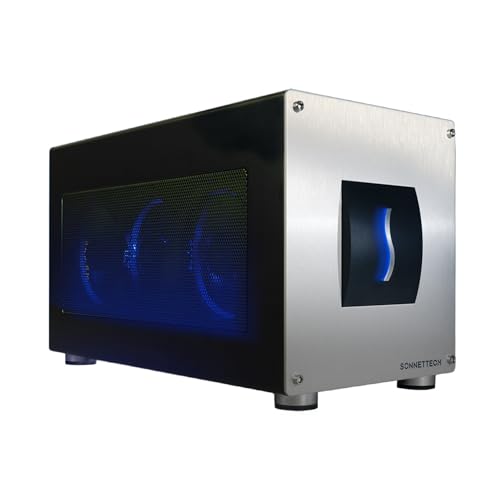
- 80Gbps Thunderbolt 5 bandwidth
- Integrated 850W power supply
- Triple-wide GPU and built-in 5GbE support
Best For: Demanding Windows 11 GPU workloads
Best DIY Value
GOLDSOUN 3-Slot USB4 eGPU Dock

- Supports three-slot NVIDIA and AMD GPUs
- PCIe 4.0 with certified JHL7440 controller
- Requires a separate ATX power supply and GPU
Best For: DIY users building a modular eGPU setup
Best Compact Dock
TREBLEET Mini USB4 eGPU Enclosure

- Compact 280-gram enclosure
- USB4 and Thunderbolt 3/4 support
- Includes cable, USB-A, and downstream Thunderbolt
Best For: Space-conscious DIY eGPU setups
Best Complete eGPU Kit
Compact USB4 External GPU Enclosure

- Includes 240W PSU, cables, and carrying case
- Supports Thunderbolt 3/4 and USB4
- Adds 85W PD, 15W PD, and DisplayPort
Best For: Portable laptop, NUC, and handheld graphics upgrades
Best Premium eGPU Enclosure
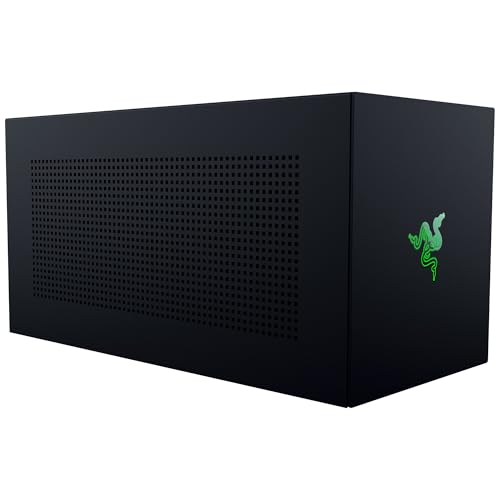
- Fits NVIDIA and AMD GPUs up to four slots wide
- Supports PCIe Gen 4 and Thunderbolt 5
- Includes 140W USB-C power delivery
Best For: Windows users wanting a spacious, upgradeable desktop-GPU enclosure
High-Power OCuLink Pick
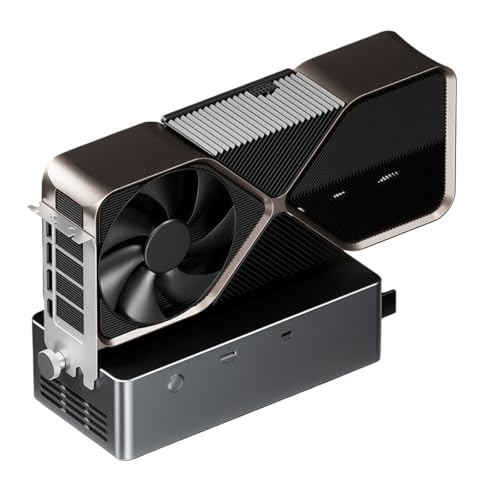
- 800W built-in PSU supports GPUs up to 600W
- OCuLink, USB4.0, and TGX connectivity
- Open aluminum chassis with hot-swapping TGX
Best For: Windows users needing a high-power, flexible eGPU dock
Silent Expansion Choice
VIKINYEE Dual PCIe USB4 Chassis

- Adds two PCIe 3.0 x16 expansion slots
- 40Gbps Thunderbolt 3/4 and USB4 connection
- Fanless cooling with a built-in 60W PSU
Best For: Quiet professional expansion with capture, network, or storage cards
Feature-Rich GPU Hub
ORARA 750W USB4 eGPU Enclosure

- 750W PSU with 85W Power Delivery
- 10Gbps USB-A, TB4, and daisy-chain ports
- Supports single- and dual-slot GPUs up to 350mm
Best For: USB4 or Thunderbolt users wanting eGPU and hub features together
Most Versatile – MINISFORUM DEG2 USB4 V2 eGPU Dock
The MINISFORUM DEG2 is one of the most advanced USB4 external gpu enclosures in this roundup, combining USB4 V2/TB5 compatibility with OCuLink connectivity. Its dual-mode design, NVMe slot, and flexible power-supply support make it suitable for both high-performance GPU work and a broader desktop setup.
Best For: Users who want flexible USB4 V2 or OCuLink connectivity, onboard NVMe storage, and support for ATX or SFX power supplies.
Pros:
- Supports USB4 V2/TB5 speeds up to 80Gbps and OCuLink up to 64Gbps.
- Built-in M.2 2280 slot adds convenient storage for project files or AI models.
- Supports standard ATX and SFX power supplies and a range of desktop graphics cards.
- Signal re-drive circuitry is designed to improve stability during demanding workloads.
Cons:
- Requires a compatible power supply and separate graphics card.
- Its advanced feature set may be more than needed for basic eGPU use.
The DEG2 stands out for expandability and interface flexibility. Choose it if you expect to switch between docking convenience and dedicated GPU performance or want storage integrated into the enclosure.
Best Fully Powered Option – Sonnet Breakaway Box 850 T5
The Sonnet Breakaway Box 850 T5 is a powerful choice among USB4 external gpu enclosures for Windows 11 systems. Its Thunderbolt 5 connection, 850W integrated power supply, triple-wide GPU support, and built-in networking and USB ports make it a complete desktop-style expansion box.
Best For: Windows 11 users running demanding GPUs for gaming, rendering, editing, animation, visual effects, or AI applications.
Pros:
- Delivers up to 80Gbps of bidirectional Thunderbolt 5 bandwidth.
- 850W built-in power supply supports power-hungry current and future GPUs.
- Accommodates triple-wide NVIDIA and AMD graphics cards.
- Includes 5GbE, three 10Gbps USB-A ports, and an additional Thunderbolt 5 port.
Cons:
- Designed for Windows 11, limiting its stated platform scope.
- The 14.1-pound enclosure is relatively large and heavy.
With power, cooling, and connectivity built in, the Breakaway Box 850 T5 minimizes the extra hardware needed for a high-performance setup. It is especially compelling when you plan to install a large, power-hungry graphics card.
Best DIY Value – GOLDSOUN 3-Slot USB4 eGPU Dock
The GOLDSOUN eGPU dock offers a practical route into USB4 external gpu enclosures for Windows, Linux, and compatible Thunderbolt systems. It supports three-slot NVIDIA and AMD cards, PCIe 4.0, 80W USB-C power delivery, and basic hub functionality, but you must provide the power supply and graphics card separately.
Best For: DIY builders who already have a compatible ATX power supply and graphics card and want a capable USB4 or Thunderbolt expansion dock.
Pros:
- Works with USB4, Thunderbolt 3, and Thunderbolt 4 laptops and devices.
- Supports three-slot NVIDIA and AMD graphics cards, including listed newer series.
- Uses a certified JHL7440 controller and supports PCIe 4.0.
- Provides a 40Gbps port, USB-A connectivity, daisy chaining, and 80W USB-C power delivery.
Cons:
- ATX power supply and graphics card are not included.
- Correct power-cable installation is important; the notes warn against using a CPU cable in the PCIe-8PIN port.
- Its warranty is listed as 30 days.
This dock can deliver strong flexibility for the money if you are comfortable assembling and troubleshooting an eGPU setup. Confirm your host has USB4 or Thunderbolt 3/4 before buying and follow the power instructions carefully.
Best Compact Dock – TREBLEET Mini USB4 eGPU Enclosure
The compact TREBLEET Mini is a straightforward option among USB4 external gpu enclosures for compatible laptops and NUCs. It includes a cable, supports Thunderbolt 3/4 and USB4, and can use SFX, ATX, FLEX, or suitable DC power supplies, though setup requires some hardware and driver knowledge.
Best For: Users who want a small eGPU dock with hub and daisy-chain functions and already understand the power and compatibility requirements.
Pros:
- Compact 9.45-inch-long design weighing about 280 grams.
- Supports USB4, Thunderbolt 3, and Thunderbolt 4 hosts with NVIDIA or AMD PCIe graphics.
- Includes a TB3/USB4 cable, USB-A port, and second Thunderbolt port for downstream devices.
- Supports SFX, ATX, FLEX, and compatible 19.5–20V DC power supplies.
Cons:
- Graphics card, laptop, and power supply are not included.
- Requires DIY knowledge and careful driver and hardware compatibility checks.
- Not recommended for handheld game consoles.
The TREBLEET Mini is appealing when desk space matters and you want a lightweight enclosure with basic expansion features. Its broad power-input options are useful, but beginners should verify host compatibility and GPU power requirements before purchase.
Best Budget eGPU Dock – 22Gbps USB4 External GPU Enclosure
This open-air dock is a practical starting point for shoppers comparing USB4 external gpu enclosures. Its PCIe 3.0 x16 slot works with compatible NVIDIA and AMD desktop graphics cards, while the included Thunderbolt 4 cable supports Thunderbolt 3, Thunderbolt 4, and USB4 devices.
Best For: Windows 10/11 or Linux laptop, desktop, and handheld users who want flexible power-input options for gaming, video editing, graphics work, or AI art.
Pros:
- Supports compatible NVIDIA and AMD GPUs with official drivers.
- Works with Thunderbolt 3, Thunderbolt 4, and USB4 systems.
- Offers CPU, Molex, PD 3.0, and DC5521 power-input options.
- Includes a Thunderbolt 4 cable and 24-pin power jumper cable.
Cons:
- It is an open eGPU dock rather than a protective enclosed chassis.
- Graphics card and main power supply are not listed as included.
- Some USB4 consoles may require a BIOS update.
Choose this model when connection flexibility and compatibility matter more than a polished enclosure. The JHL6340 controller and stated approximately 22Gbps transfer speed make it a versatile option, but buyers should plan their GPU and power arrangement separately.
Best Complete eGPU Kit – Compact USB4 External GPU Enclosure
For shoppers wanting a more complete USB4 external gpu enclosures package, this compact dock includes the enclosure, 240W power supply, Thunderbolt 4 cable, 8-pin PCIe cable, and carrying case. It supports compatible NVIDIA and AMD cards up to 205mm long, with PCIe 3.0 x16 data transfer.
Best For: Laptop, NUC, and handheld-console owners who need a portable, ready-to-connect graphics enclosure for gaming, editing, or rendering.
Pros:
- Includes a 240W external power supply, cables, and carrying case.
- Supports Thunderbolt 3, Thunderbolt 4, and USB4 host devices.
- Provides 85W and 15W PD charging connections plus DisplayPort.
- Compact aluminum chassis is designed for portability.
Cons:
- Graphics card is not included.
- GPU clearance is limited to 205mm in length and specified height and width limits.
- Listed warranty coverage is only 30 days.
This is a convenient choice if you want the core accessories supplied in one package. Check your graphics card dimensions carefully before buying, and confirm that your device’s USB-C port supports Thunderbolt 3/4 or USB4.
Best Premium eGPU Enclosure – Razer Core X V2 for USB4
The Razer Core X V2 is a spacious USB4 external gpu enclosure for users who want room for modern desktop graphics cards. It supports NVIDIA and AMD cards up to four slots wide, PCIe Gen 4, Thunderbolt 4 and 5, and USB4 devices, with 140W USB-C power delivery.
Best For: Windows 11 laptop and handheld users seeking a robust, upgradeable enclosure for demanding gaming or creative applications.
Pros:
- Accommodates desktop GPUs up to four slots wide.
- Supports PCIe Gen 4 and Thunderbolt 5 bandwidth up to 80Gbps.
- Provides 140W USB-C power delivery.
- Includes active cooling with a 120mm fan and tool-free installation features.
Cons:
- Graphics card and power supply are sold separately.
- It is a large, heavy enclosure at approximately 5.06kg.
- Mac devices with M1 or later chipsets do not support eGPUs.
This enclosure makes the most sense for buyers prioritizing GPU size, cooling, and future upgrade flexibility. Its separate PSU requirement adds to the setup cost, but the steel chassis, PCIe Gen 4 support, and broad Thunderbolt/USB4 compatibility offer a stronger long-term platform.
High-Power OCuLink Pick – Tangxi 800W eGPU Dock
For shoppers comparing usb4 external gpu enclosures, the Tangxi eGPU dock stands out for its built-in 800W power supply and flexible OCuLink, USB4.0, and TGX connectivity. Its open chassis supports a wide range of graphics cards, although compatibility and power limits should be checked carefully.
Best For: Windows laptop users who want a high-power eGPU dock with OCuLink or USB4 connectivity.
Pros:
- Built-in 800W power supply supports graphics cards rated up to 600W.
- Offers OCuLink, USB4.0, and TGX interfaces, with TGX hot-swapping support.
- Open aluminum-alloy chassis is relatively compact and supports graphics cards of various lengths.
Cons:
- Not suitable for graphics cards with maximum power consumption above 600W, including the listed 5090 and 5090D models.
- System support is limited to Windows, with Windows 11 version 22H2 or newer recommended.
- Graphics card and other required components are not indicated as included.
The Tangxi is a power-focused choice for compatible Windows setups, especially where OCuLink bandwidth or TGX hot swapping is useful. Confirm your laptop interface, Windows version, and GPU power requirements before buying.
Silent Expansion Choice – VIKINYEE Dual PCIe USB4 Chassis
This VIKINYEE chassis is a different kind of option among usb4 external gpu enclosures: it adds two external PCIe 3.0 x16 slots rather than serving as a conventional single-GPU enclosure. Its 40Gbps connection and fanless aluminum design suit specialized expansion tasks on Windows, macOS, and Linux.
Best For: Professionals using capture cards, 10GbE adapters, or NVMe SSDs with a laptop or mini PC.
Pros:
- Provides two external PCIe 3.0 x16 slots through one Thunderbolt 3, Thunderbolt 4, or USB4 connection.
- Supports up to 40Gbps transfer speeds for demanding expansion cards.
- Fanless aluminum construction provides silent passive cooling.
- Built-in 60W PSU powers installed PCIe cards.
Cons:
- Does not provide Power Delivery or charging to the host laptop.
- Supports cards up to 205 x 145 x 25mm, so dimensions must be checked.
- PCIe card drivers may still be required even though the chassis itself is plug and play.
Choose this model when you need multiple PCIe expansion slots and quiet operation rather than a straightforward gaming-GPU enclosure. Its dual-slot design can be valuable for workstation peripherals, but verify card size and host-port support first.
Feature-Rich GPU Hub – ORARA 750W USB4 eGPU Enclosure
The ORARA combines a dedicated graphics-card enclosure with hub features, making it a practical contender among usb4 external gpu enclosures. It includes a 750W PSU, 85W PD, a 10Gbps USB-A port, and daisy-chain support, but strict port, operating-system, GPU-size, and Mac compatibility limits matter.
Best For: Thunderbolt 3/4 or USB4 laptop users who want an eGPU enclosure with hub and daisy-chain functions.
Pros:
- Built-in 750W power supply supports compatible NVIDIA and AMD PCIe graphics cards.
- Offers 85W PD, a 10Gbps USB-A port, a TB4 port, and daisy-chain support.
- Supports single-slot and dual-slot graphics cards up to 350 x 157 x 59mm.
- Uses a JHL7440 controller and supports PCIe 3.0 x4 data transfer.
Cons:
- Requires a Thunderbolt 3, Thunderbolt 4, or USB4 port; ordinary USB-C and older Thunderbolt 1/2 ports are not supported.
- Does not support three-slot graphics cards and does not include a graphics card.
- Not compatible with MacBook models using M1, M2, M3, or M4 chips; NVIDIA cards should not be used with macOS.
The ORARA is appealing when connectivity and charging features are as important as external graphics. Before ordering, confirm the host port, Windows 11 version, graphics-card dimensions, and platform restrictions.
How We Picked These Usb4 External GPU Enclosures
We focused on enclosures and docks that support USB4, Thunderbolt 3, Thunderbolt 4, or Thunderbolt 5 systems, while considering the practical differences between those connection standards. The selection covers full-size desktop GPU enclosures, compact docks, OCuLink models, and expansion chassis for different laptop and mini-PC setups.
Our comparison criteria included advertised PCIe bandwidth, power-supply capacity, graphics-card size support, cooling design, operating-system compatibility, upgrade flexibility, and useful extras such as NVMe slots or additional PCIe connectivity. Because performance depends heavily on the host computer and GPU, specifications should be verified against your exact system before purchase.
Quick Comparison
- Highest power capacity: Look at models with 750W to 850W supplies for demanding, full-size GPUs.
- Fastest connection potential: Thunderbolt 5 and newer USB4 implementations can offer more bandwidth than standard 40Gbps USB4.
- Best compact approach: Mini docks reduce desk space but may require a separate power supply or impose card-size limits.
- Best expansion flexibility: Dual-slot chassis and models with NVMe or OCuLink support are useful for mini PCs and workstation setups.
Key Buying Factors for Usb4 External GPU Enclosures
Host-Port Compatibility
A USB-C connector alone does not guarantee eGPU support. Confirm that your laptop or mini PC supports USB4 or Thunderbolt with PCIe tunneling, and check whether the enclosure requires Windows, Linux, or a particular driver configuration. Thunderbolt 3 and 4 compatibility can vary by system, while Thunderbolt 5 models may need a newer host for their full capabilities.
Bandwidth and Real-World Performance
USB4 and Thunderbolt links share bandwidth with other traffic, so an external GPU may perform below the same card installed internally. A direct OCuLink connection can be advantageous on compatible mini PCs because it is designed around PCIe connectivity, but it is less universal than USB4 or Thunderbolt.
Power and Card Clearance
Match the enclosure’s power supply to the graphics card’s total board power, connector requirements, and transient demands. Also check maximum card length, height, thickness, and ventilation clearance. Three-slot and four-slot GPUs will not fit every enclosure.
Expansion and Convenience
An internal NVMe bay, hot-swapping, extra PCIe slots, or USB ports can add value, but each feature may affect airflow, size, or shared bandwidth. Decide whether you need a complete enclosure with a built-in PSU or a simpler dock that uses an external power supply.
Who Should Buy Which Usb4 External GPU Enclosures?
Choose a high-wattage enclosure if you are pairing a powerful desktop GPU with a gaming laptop, workstation, or mini PC. Choose a compact USB4 dock for portability, occasional gaming, or a smaller graphics card. Choose OCuLink support when your mini PC has a compatible port and maximum PCIe performance matters more than universal connectivity. Choose a Thunderbolt 5 model if you already own a compatible newer computer and want more headroom for future GPUs and high-speed peripherals. Finally, choose a dual-slot expansion chassis when your priority is adding more than graphics capability to a compact computer.