The right mixer can make a karaoke system easier to connect, simpler to control, and more enjoyable to use. The best options balance microphone inputs, music playback, vocal effects, and compatibility with your TV or streaming gear.
We compared these 10 audio mixers for karaoke setups by looking at connection options, microphone control, sound features, ease of use, and the needs of casual home singers, hosts, and creators.
Best 10 Audio Mixer for Karaoke Setup Picks for 2026
Best All-in-One Pick
R4-PROS Wireless Karaoke Mixer

- Two UHF wireless microphones included
- Independent dual-mic volume controls
- Bluetooth, USB, and 24 DSP effects
Best For: Home karaoke, duets, streaming, and podcasts
Best Compact Analog Option

- Compact five-channel design
- RCA playback and recording connections
- Two-band EQ and phantom power
Best For: Simple karaoke setups with existing equipment
Best TV and Soundbar System
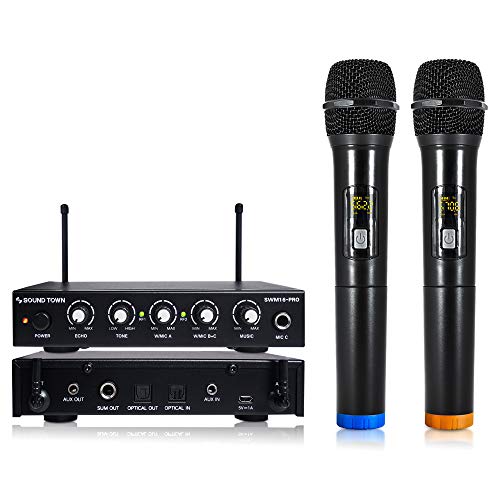
- Optical connections for TVs and soundbars
- Two handheld UHF microphones included
- 16 selectable frequencies and vocal controls
Best For: Smart TV, soundbar, and home theater karaoke
Best for Recording and Effects

- Plug-and-play Type-C PC recording
- 99 DSP effects and three-band EQ
- Bluetooth, USB, and 48V phantom power
Best For: Karaoke, recording, podcasts, and live broadcasts
Creator-Friendly Pick

- Two-channel mixer with condenser microphone
- Follow Singing mode and vocal effects
- Works with PC, phone, and tablet
Best For: Beginners building a karaoke and streaming setup
Expandable Performance Choice

- Eight channels for multiple microphones and sources
- Bluetooth and USB playback or recording
- Per-channel EQ, effects, gain, and monitoring
Best For: Karaoke hosts and small live performances
Home TV Karaoke Pick
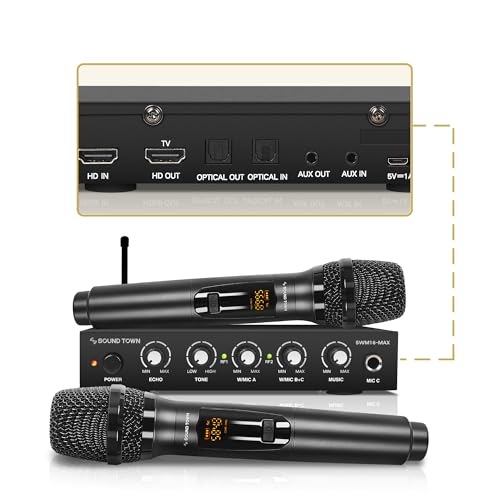
- Two wireless metal handheld microphones included
- HDMI ARC and optical TV audio support
- Independent mic volume with shared echo and tone
Best For: Home karaoke with a smart TV, soundbar, or receiver
Compact Connectivity Pick

- Four channels with XLR and 6.35mm inputs
- USB recording and MP3 playback
- Compact design with +48V phantom power
Best For: Portable home karaoke, streaming, and small-party setups
Effects-Focused Choice

- Six channels with four XLR inputs
- 16 DSP effects and three-band EQ
- Bluetooth and USB playback support
Best For: Expanded karaoke rigs needing multiple inputs and vocal effects
Best All-in-One Pick – R4-PROS Wireless Karaoke Mixer
If you want an audio mixer for karaoke setup that includes microphones and flexible audio connections, the R4-PROS combines a four-channel mixer with two UHF wireless microphones, Bluetooth playback, USB recording, and vocal effects. Independent microphone volume controls make it especially practical for duets.
Best For: Home karaoke parties, duets, live streaming, podcasts, and small performances.
Pros:
- Includes two UHF wireless microphones with anti-interference performance.
- Independent volume controls help balance two singers.
- Offers Bluetooth, USB, XLR, 1/4-inch, RCA, and 3.5mm connectivity.
- Includes 24 DSP effects, tone controls, and 48V phantom power.
Cons:
- Its many controls and connection options may require more setup than a basic mixer.
- The supplied notes do not specify wireless microphone range or battery life.
The R4-PROS is a strong choice when you want a ready-to-use karaoke mixer rather than a standalone board. Its included microphones and dual-channel control simplify karaoke hosting, while USB and Bluetooth expand its usefulness for recording and streaming.
Best Compact Analog Option – Mackie Mix5
The Mackie Mix5 is a straightforward option for an audio mixer for karaoke setup when you already have microphones and playback equipment. Its compact five-channel design provides a mic/line input, stereo line inputs, RCA playback connections, basic EQ, and main outputs without adding wireless microphone hardware.
Best For: Simple home karaoke systems, playback mixing, and users who prefer a compact corded mixer.
Pros:
- Compact five-channel format is easy to place in a small setup.
- Provides a mic/line input and two stereo 1/4-inch line inputs.
- Dedicated stereo RCA inputs and outputs support playback or recording.
- Includes two-band EQ and phantom power for condenser microphones.
Cons:
- Only one mic/line input is listed, so it is less suited to multiple singers.
- Does not include microphones, Bluetooth, USB recording, or built-in vocal effects.
The Mix5 makes sense for a minimal karaoke rig built around existing equipment. It is less feature-rich than dedicated karaoke systems, but its compact design and conventional inputs can work well when simplicity and basic mixing are the priorities.
Best TV and Soundbar System – Sound Town SWM16-PRO
For an audio mixer for karaoke setup centered on a smart TV, soundbar, or home theater, the Sound Town SWM16-PRO emphasizes digital connectivity and wireless microphones. Optical Toslink, 3.5mm, and 1/4-inch connections help it integrate with a range of home audio equipment.
Best For: Smart TV karaoke, home theater systems, soundbars, conferences, and small to medium venues.
Pros:
- Includes two handheld UHF wireless microphones.
- Optical input and output support compatible TVs, soundbars, and receivers.
- Offers 16 selectable frequencies designed to reduce interference.
- Dedicated controls adjust microphone volume, echo, and tone.
Cons:
- It is primarily a wireless microphone receiver and karaoke mixer, not a general-purpose multichannel console.
- Optimal sound requires following the recommended external and mixer volume adjustments.
The SWM16-PRO is a practical match for living-room karaoke where optical audio compatibility matters. Its dual microphones and vocal controls simplify setup, while the selectable UHF frequencies provide flexibility for events and shared spaces.
Best for Recording and Effects – Aveek F4 4-Channel Mixer
The Aveek F4 is a versatile audio mixer for karaoke setup if you also want USB recording, Bluetooth playback, and extensive effects. It supports microphones or instruments through combination inputs, provides headphone monitoring, and can record through a Type-C-connected computer or USB flash drive.
Best For: Karaoke, parties, podcasts, live broadcasts, and users who want recording features.
Pros:
- Supports Bluetooth playback and USB flash-drive MP3 playback or recording.
- Built-in PC recording chip enables plug-and-play computer recording through Type-C.
- Provides 99 DSP effects, three-band EQ, and gain controls.
- Includes 48V phantom power for compatible condenser microphones.
Cons:
- Bluetooth is for playback and is not intended for connecting an output device.
- The mixer has four channels, which may be limiting for larger setups.
- Its broad feature set may take time to configure for first-time users.
The F4 stands out when karaoke is only part of the plan. Its recording options, effects, monitoring output, and varied inputs make it a flexible hub for home entertainment and content creation, provided you do not need more than four channels.
Creator-Friendly Pick – TENLAMP G10 Mixer Bundle
If you want an audio mixer for karaoke setup that can also support streaming and recording, the TENLAMP G10 bundle offers a compact starting point. It combines a two-channel mixer with a condenser microphone, Bluetooth, USB, voice effects, and real-time controls for bass, treble, reverb, and pitch.
Best For: Beginners who want a bundled karaoke, singing, streaming, or voice-recording setup.
Pros:
- Includes the mixer, condenser microphone, and essential accessories.
- Follow Singing mode lets the performer monitor the original track while the audience hears the voice and music mix.
- Supports PC, phone, and tablet use across Windows, Mac, iOS, and Android without drivers.
- Offers voice changing, sound effects, auto-tune, and adjustable bass, treble, reverb, and pitch.
Cons:
- Only two channels, so it is less suited to larger multi-microphone karaoke setups.
- Battery-powered operation may require attention to charging during extended sessions.
- The supplied notes do not specify the exact included accessory list beyond the microphone and essential accessories.
The G10 is a practical all-in-one option when simplicity and creator features matter more than expanding to many separate inputs. Its two-channel design fits personal karaoke and small singing sessions, while the mobile compatibility broadens its use for live content.
Expandable Performance Choice – 8-Channel Karaoke Mixer
For a more expandable audio mixer for karaoke setup, this eight-channel console provides room for multiple microphones and source devices. It combines XLR and 1/4-inch inputs, Bluetooth, USB playback and recording, 48V phantom power, headphone monitoring, and per-channel tone controls.
Best For: Karaoke hosts, small performances, and users mixing several microphones or audio sources.
Pros:
- Eight channels support multiple devices, with mic inputs accepting XLR and unbalanced 1/4-inch plugs.
- Bluetooth and USB connectivity allow music playback from phones, computers, flash drives, or other USB devices.
- Per-channel gain, fader, three-band EQ, FX, and monitoring controls provide hands-on adjustment.
- Built-in reverb and delay effects, 48V phantom power, and headphone monitoring add flexibility.
Cons:
- Its larger control layout may be more than a casual karaoke user needs.
- It is corded electric rather than battery powered, so placement depends on access to power.
- The supplied notes do not identify included microphones or speakers.
This console is the stronger fit when your karaoke setup may grow beyond one or two performers. The eight-channel layout and independent controls offer useful flexibility for live shows, while Bluetooth and USB features simplify music playback and recording.
Home TV Karaoke Pick – Sound Town SWM16-MAX
The Sound Town SWM16-MAX is a convenient audio mixer for karaoke setup when your music comes from a smart TV, soundbar, receiver, or media box. It combines a receiver/mixer with two metal wireless microphones and HDMI ARC, optical, AUX, Bluetooth, and USB connectivity.
Best For: Home karaoke users who want wireless microphones and direct TV or soundbar integration.
Pros:
- Includes two metal handheld wireless microphones and a dedicated receiver/mixer.
- HDMI ARC and optical inputs can extract TV audio for mixing with vocals.
- Separate volume controls adjust Mic A and Mic B independently, with shared echo and tone controls.
- UHF operation from 550–590 MHz provides 16 selectable frequencies to help reduce interference.
Cons:
- HDMI cable is not included.
- Echo and tone controls affect both connected microphones together rather than independently.
- Additional microphones require separately purchased compatible units.
The SWM16-MAX is especially appealing for living-room karaoke because it focuses on wireless microphones and straightforward TV audio extraction. It is less of a general-purpose production console, but its dedicated connections and two-mic controls make home singing sessions easy to organize.
Compact Connectivity Pick – 4-Channel Bluetooth Mixer
This compact 4-channel unit is a practical audio mixer for karaoke setup when you need microphone, instrument, Bluetooth, and USB connectivity without a large console. It includes +48V phantom power, USB recording, MP3 playback, and monitoring support in a portable design.
Best For: Home karaoke, small parties, podcasting, live streaming, and portable audio setups.
Pros:
- Supports XLR and 6.35mm inputs for microphones, guitars, bass, and keyboards.
- Bluetooth enables wireless background-music playback from compatible devices.
- USB interface supports PC recording, streaming, and USB flash-drive MP3 playback.
- Compact size and built-in +48V phantom power add flexibility for mobile setups.
Cons:
- Bluetooth supports input only, not wireless audio output.
- With four channels, it offers less expansion than larger mixers.
- Some MP3 and Bluetooth functions require pressing the MP3 ROUTE control.
Choose this model if portability and straightforward connectivity matter most. It is well suited to casual karaoke and content creation, though larger performances may benefit from more channels.
Ready-to-Sing Bundle – 5-Channel Mixer with Wireless Mics
This 5-channel audio mixer for karaoke setup stands out as an all-in-one option because it includes two UHF wireless handheld microphones. Independent channel controls, echo, three-band EQ, Bluetooth, and USB connectivity make it easy to build a family karaoke or small-event system.
Best For: Family karaoke, parties, small performances, DJ events, and users who need microphones included.
Pros:
- Includes two UHF wireless microphones with a stated range of up to 180 feet.
- Provides independent volume, gain, echo, and EQ adjustments across its channels.
- Bluetooth and USB support music playback, recording, and computer or smartphone connection.
- Microphones include batteries rated for approximately four to six hours of use.
Cons:
- The two wireless microphones share channel 2.
- Bluetooth playback has a stated maximum transmission distance of 35 feet.
- The included microphone system adds weight compared with a mixer-only setup.
This is the most convenient choice for karaoke hosts who want to start singing quickly without purchasing microphones separately. Its bundled wireless system is useful for gatherings, while the mixer still provides controls for external sources.
Effects-Focused Choice – 6-Channel DSP Karaoke Mixer
For a karaoke setup requiring more inputs and vocal effects, this 6-channel mixer combines four XLR inputs, +48V phantom power, Bluetooth, USB playback, three-band EQ, and 16 built-in DSP effects. Its controls are aimed at users who want more hands-on sound shaping.
Best For: Karaoke systems with several microphones or instruments, studio-style practice, live gigs, and streaming.
Pros:
- Six channels accommodate multiple microphones, instruments, and stereo sources.
- Four XLR inputs support condenser microphones with switchable +48V phantom power.
- Includes 16 DSP effects plus three-band EQ for shaping vocals and music.
- Bluetooth and USB support wireless playback and USB-stick or MP3 use.
Cons:
- It is larger and heavier than the compact 4-channel model.
- The traditional analog design may require more careful setup and operation.
- The supplied warranty description is limited to 90 days.
This model makes sense when channel count and built-in effects are higher priorities than portability. It offers useful karaoke-focused control, but beginners should allow time to learn the analog routing and controls.
How We Picked the Best Audio Mixer for Karaoke Setup
We focused on the features that matter most when building or upgrading a karaoke system: microphone capacity, independent volume control, music-input flexibility, vocal effects, and ease of setup. Models with Bluetooth or USB support can simplify playback from phones, computers, and media devices, while optical or HDMI-compatible options are useful for connecting modern TVs.
We also considered whether each mixer suits a particular role. Compact five-channel boards may be ideal for simple home use, while larger consoles offer more inputs for multiple singers, instruments, monitors, or recording equipment. Wireless microphone bundles were evaluated for convenience, but buyers should still check operating range, battery requirements, and included accessories.
Quick Comparison
- Best for simple karaoke: Choose a compact mixer with Bluetooth, USB, and straightforward microphone controls.
- Best for TV-based systems: Look for optical, AUX, HDMI audio return, or other outputs that match your television and media player.
- Best for multiple singers: Select a four-channel or larger mixer with separate microphone volume controls.
- Best for streaming and recording: Prioritize a USB audio interface, monitoring controls, and a suitable microphone input.
- Best for advanced setups: An eight-channel or larger console provides room for instruments, additional microphones, and external effects.
Key Buying Factors for an Audio Mixer for Karaoke Setup
Inputs and Microphone Control
Count how many microphones you expect to use at once, then leave room for expansion. Independent mic volume controls are especially helpful when two singers have different vocal levels. If you use wired microphones, confirm the connector type; wireless bundles may be more convenient but can limit future microphone choices.
Music and TV Connections
Bluetooth is convenient for phone playback, while USB can support computer audio or recording. AUX inputs work with many media devices, and optical or HDMI audio-return connections can make TV karaoke systems cleaner and easier to manage. Check both input and output compatibility before buying.
Effects, Monitoring, and Power
Echo or reverb can add a familiar karaoke feel, but basic controls are often easier for casual users. Headphone monitoring is valuable for streaming and recording. If you plan to connect a condenser microphone or other powered equipment, verify that the mixer provides suitable 48V phantom power.
Size and Setup Complexity
A small mixer is easier to place beside a television and faster to learn. Larger consoles offer more flexibility but require additional cables and more careful gain adjustment. Make sure the mixer has the outputs needed for your speakers, soundbar, amplifier, or powered monitors.
Who Should Buy Which Audio Mixer for Karaoke Setup?
Casual home karaoke users should favor a compact Bluetooth mixer or a bundle with wireless microphones. These setups reduce cable clutter and are usually the quickest to operate.
Families and karaoke hosts may benefit from four or more microphone channels, separate level controls, and TV-friendly digital inputs. A larger wireless system can be worthwhile when several people sing regularly.
Streamers and recording users should prioritize USB connectivity, headphone monitoring, microphone gain control, and reliable computer compatibility. A creator-focused bundle may be convenient if it includes a suitable microphone.
Musicians and advanced users should choose a larger mixer with additional line inputs, phantom power, stronger routing options, and enough output flexibility for instruments, monitors, or live events.
Before ordering, confirm the included microphones, cables, power supply, and software requirements. Matching the mixer’s inputs and outputs to your existing equipment is the best way to avoid adapters, compatibility issues, and unnecessary setup work.