A reliable business webcam for meetings can make remote calls look and sound more professional without requiring a complicated studio setup. The right model balances video quality, microphone performance, framing, privacy, and ease of use.
We compared 10 popular webcams across resolutions, viewing angles, autofocus systems, low-light features, and compatibility to help you choose a camera that fits your workspace and meeting habits.
Best 10 Business Webcam for Meetings Picks for 2026
Reliable Meeting Classic

- 1080p video at 30 fps
- Autofocus and light adjustment
- Dual microphones and XSplit VCam
Best For: Everyday Full HD business calls
Sharper Home Office Choice

- Detailed 2K video
- AI noise cancellation
- Adjustable 65°–95° framing
Best For: Home offices needing flexible, clear calls
Workplace-Ready Standard

- 1080p autofocus video
- Zoom-certified with Teams support
- Attachable privacy screen
Best For: Hybrid teams using common meeting platforms
Ultra-Clear Meeting Upgrade

- True 4K at 30 fps
- PDAF autofocus and light correction
- Privacy cover with flexible mounting
Best For: High-detail calls and presentations
Reliable Full-HD Value

- 1080p video at 30 fps with a 110° viewing angle
- Noise-canceling mic and physical privacy cover
- Plug-and-play USB compatibility across several operating systems
Best For: Remote workers and small offices seeking an affordable, easy-to-use meeting webcam
Simple Logitech Upgrade

- 1080p video with automatic RightLight brightness adjustment
- Built-in microphone and sliding privacy cover
- Works with Teams, Zoom, Google Meet, and Logi Options+
Best For: Home-office users who prioritize simple setup and dependable everyday calls
Wide-View Meeting Pick

- 1080p video with a 90° wide-angle lens
- Dual omnidirectional microphones for voice pickup
- USB-A and A-to-C connectivity with privacy cover
Best For: Small group meetings and shared workspaces needing wider framing
Best Value Meeting Webcam

- 1080p video with wide-angle lens
- Noise-reducing microphone
- Privacy cover and plug-and-play USB setup
Best For: Remote workers seeking an affordable, straightforward meeting camera
Best Simple Office Setup

- 1080p video with CMOS sensor
- Dual noise-reduction microphones
- 360° rotation and Type-C adapter included
Best For: Remote work, teaching, and everyday video meetings
Best Advanced Framing
EMEET C60E Dual-Camera 4K Webcam
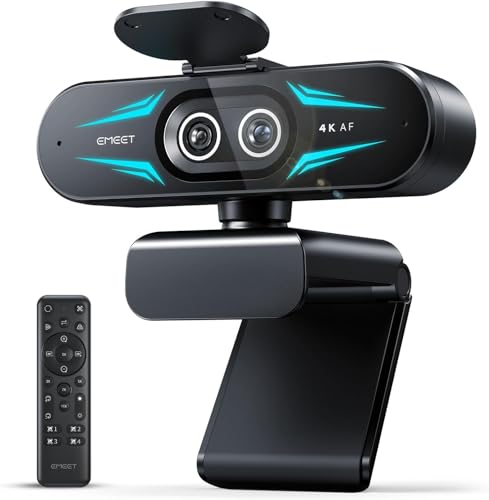
- Dual wide-angle and telephoto cameras
- 4K capture with up to 11X hybrid zoom
- Remote control and two omnidirectional microphones
Best For: Presentations, teaching, demonstrations, and advanced streaming setups
Reliable Meeting Classic – Logitech C920x HD Pro
The Logitech C920x is a dependable business webcam for meetings, offering Full HD 1080p video at 30 fps, autofocus, and automatic lighting adjustment. Its 78-degree view suits individual calls, while dual microphones and broad computer compatibility make it a practical everyday choice.
Best For: Professionals who want proven Full HD video and straightforward setup for calls, recordings, and streaming.
Pros:
- Full HD 1080p video at 30 fps
- Autofocus and automatic lighting adjustment help maintain a clear image
- Dual microphones capture natural-sounding audio
- Includes a three-month XSplit VCam license for background effects
Cons:
- No physical privacy shutter
- Video is limited to 30 fps at 1080p
The C920x remains a sensible pick when consistent Full HD quality matters more than higher resolution. Its lack of a privacy shutter is the main compromise for meeting-focused users.
Sharper Home Office Choice – Anker PowerConf C200 2K
The Anker PowerConf C200 is a business webcam for meetings that steps up to 2K resolution while adding low-light correction and AI noise cancellation. Its adjustable viewing angles let you choose between a tighter or wider frame, and the integrated lens cover adds convenient privacy between calls.
Best For: Remote workers who want sharper-than-1080p video, clearer voice capture, and flexible framing.
Pros:
- 2K resolution delivers detailed meeting video
- AI noise cancellation supports clearer voice capture
- 65-, 78-, and 95-degree viewing angles are selectable through software
- Integrated privacy cover and low-light correction
Cons:
- Requires software to change viewing angles
- Compatibility notes focus on Windows 7 or later and macOS 10.11 or later
The C200 is a strong middle ground for home-office meetings, especially if your room lighting varies. Its 2K image and adaptable framing offer more flexibility than a basic 1080p webcam.
Workplace-Ready Standard – Logitech C920e HD Webcam
The Logitech C920e is a business webcam for meetings designed around workplace compatibility. It combines 1080p video, automatic light correction, dual omnidirectional microphones, and certification for Zoom, with support for Microsoft Teams and other popular calling applications.
Best For: Office teams and hybrid workers who prioritize meeting-platform compatibility, a privacy cover, and easy mounting.
Pros:
- 1080p video with HD autofocus
- Dual microphones capture audio from up to one meter away
- Attachable privacy screen provides a visible lens cover
- Certified for Zoom and works with Microsoft Teams and other popular apps
Cons:
- Fixed 78-degree field of view offers less framing flexibility
- Video resolution is limited to 1080p
The C920e is a practical business-oriented option for users who need dependable video calls across common workplace platforms. Its privacy screen and tripod thread are useful extras for hybrid setups.
Ultra-Clear Meeting Upgrade – EMEET C960 4K Webcam
The EMEET C960 is a business webcam for meetings aimed at users who want true 4K detail. Its PDAF autofocus, automatic light correction, 73-degree field of view, dual microphones, and privacy cover support polished calls without relying on Wi-Fi, Bluetooth, or cloud storage.
Best For: Professionals who need high-resolution video, focused framing, and flexible mounting across multiple operating systems.
Pros:
- True 4K resolution at 30 fps, with 1080p as the default setting
- PDAF autofocus and automatic light correction
- 73-degree field of view keeps attention on the speaker
- Privacy cover, 360-degree horizontal adjustment, and tripod thread
Cons:
- 4K must be enabled through camera software or supported apps
- Uses a USB-A interface
The C960 is the most detail-focused option in this group, but it requires a settings change to use 4K. It is a good fit for users who value sharp video and mounting flexibility across varied setups.
Reliable Full-HD Value – NexiGo N60
The NexiGo N60 is a practical business webcam for meetings, offering 1080p video, a wide 110-degree viewing angle, and plug-and-play USB connectivity. Its fixed-focus lens is optimized for typical indoor distances, while the privacy cover adds a useful layer of security for home or office use.
Best For: Remote workers and small offices that want sharp Full HD video, broad compatibility, and a built-in privacy cover.
Pros:
- Captures 1920 x 1080 video at 30 fps.
- Wide 110-degree viewing angle can include more of a workspace.
- Built-in noise-canceling microphone and physical privacy cover.
- Works with USB 2.0 and 3.0 without additional drivers on multiple operating systems.
Cons:
- Fixed focus is less flexible for changing camera distances.
- Not compatible with Xbox, PS4, or PS5.
- The manufacturer notes that firmware support may be needed if audio delays occur.
The N60 combines the meeting essentials—Full HD video, integrated audio, wide framing, and privacy protection—in a compact, easy-to-install design. It is a sensible choice when compatibility and straightforward setup matter more than advanced camera controls.
Simple Logitech Upgrade – Brio 101 Full HD Webcam
The Logitech Brio 101 is a streamlined business webcam for meetings, with 1080p Full HD video, automatic light balancing, and a built-in microphone. It connects through USB-A and works with common platforms such as Microsoft Teams, Zoom, and Google Meet without complicated installation.
Best For: Home-office users who want dependable Full HD video, easy platform compatibility, and a discreet sliding privacy cover.
Pros:
- Provides 1080p Full HD video for calls and streaming.
- RightLight technology boosts brightness and reduces shadows in dimmer conditions.
- Integrated sliding privacy cover offers convenient lens protection.
- Logi Options+ allows adjustments to zoom, framing, and camera settings.
Cons:
- The 60-degree viewing angle is narrower than some wide-angle alternatives.
- Uses a built-in USB-A cable rather than a detachable cable.
- The supplied compatibility information lists Windows, macOS, and Chrome OS, not Linux or Android.
The Brio 101 focuses on hassle-free daily calls rather than extensive hardware features. Its automatic light adjustment, familiar Logitech software, and privacy cover make it an appealing fit for a tidy, straightforward meeting setup.
Wide-View Meeting Pick – EMEET C960 1080p Webcam
The EMEET C960 is a business webcam for meetings that need broader framing and clear voice pickup. It combines 1080p video, a 90-degree wide-angle lens, dual omnidirectional microphones, automatic light adjustment, and both USB-A and A-to-C connection options.
Best For: Small group calls, shared desks, and users who need wide framing plus dual-microphone audio.
Pros:
- Records smooth 1920 x 1080 video with a five-layer anti-glare lens.
- 90-degree field of view captures more participants with fewer camera adjustments.
- Two built-in omnidirectional microphones support voice pickup for communication.
- Includes USB Type-A and A-to-C adapter connectivity, plus a removable privacy cover.
Cons:
- Best image performance requires normal or well-lit conditions.
- Does not include built-in speakers.
- Not supported on Windows Hello, TVs, tablets, or game consoles.
The C960 is especially practical when one person is not the only subject in the frame. Its wide-angle lens and dual microphones support collaborative calls, while automatic exposure and color adjustments help simplify everyday setup.
Best Value Meeting Webcam – TRAUSI 1080P FHD Webcam
The TRAUSI TW05 is a practical business webcam for meetings, offering 1080p video, a wide-angle lens, automatic light correction, and a noise-reducing microphone. Its plug-and-play USB setup makes it easy to use with laptops, desktops, Macs, Zoom, Teams, and other common platforms.
Best For: Remote workers and students who want clear Full HD video, simple setup, and built-in privacy protection.
Pros:
- 1080p video with a wide-angle lens and 30 fps capture.
- Noise-reducing microphone helps keep speech clear in busy environments.
- Automatic light correction adjusts brightness and color in changing conditions.
- Sliding privacy cover and driver-free USB setup add convenience.
Cons:
- Fixed focus and fixed zoom offer less framing flexibility.
- No specific field-of-view measurement is provided in the supplied details.
Choose the TRAUSI if you want an uncomplicated, well-equipped business webcam for meetings without needing advanced controls or high-resolution 4K video.
Best Simple Office Setup – Acer A610 1080p Webcam
The Acer A610 is a business webcam for meetings designed for straightforward video calls and everyday remote work. It combines 1080p video, dual noise-reduction microphones, automatic exposure and low-light correction, plus a Type-A to Type-C adapter for broader device compatibility.
Best For: Office users, educators, and remote workers who need flexible positioning and an easy plug-and-play setup.
Pros:
- 1080p video uses a CMOS sensor for improved clarity and color performance.
- Dual noise-reduction microphones help improve voice clarity.
- 360-degree rotation and an 83-degree field of view support flexible framing.
- Built-in privacy cover, automatic exposure adjustment, and included Type-C adapter.
Cons:
- The camera has no built-in speakers.
- Best image performance still requires a well-lit environment.
- The supplied details do not specify manual focus or advanced image controls.
The A610 is a sensible choice for meeting-heavy setups where positioning flexibility, microphone performance, and compatibility matter more than premium resolution.
Best Advanced Framing – EMEET C60E Dual-Camera 4K Webcam
The EMEET C60E is a business webcam for meetings suited to presentations, demonstrations, and professional streaming. Its dual-camera design combines a wide-angle view with a telephoto camera, while 4K capture, up to 11X hybrid zoom, PDAF autofocus, remote control, and EMEET STUDIO adjustments provide more framing control than a conventional webcam.
Best For: Presenters, instructors, and creators who need to switch between a full scene and detailed close-up views.
Pros:
- Dual-camera system supports wide-angle and telephoto perspectives.
- 4K sensor, PDAF autofocus, and up to 11X hybrid zoom enable detailed framing.
- Remote and EMEET STUDIO controls allow adjustments to zoom, brightness, focus, color, and RGB lighting.
- Two omnidirectional microphones capture audio within a stated 9.8-foot radius.
Cons:
- Zoom is not supported in 4K, 60 fps, or YUY2 modes.
- Its advanced features may be more than needed for basic meetings.
- USB 2.0 connectivity may be less convenient for some modern setups.
The C60E stands out when meetings involve product demonstrations, teaching, or visual presentations that benefit from quick transitions between room-wide and close-up views.
How We Picked the Best Business Webcam for Meetings
We focused on webcams that support common meeting platforms such as Zoom, Microsoft Teams, Google Meet, and Skype. Each option was assessed by its stated resolution, frame rate, autofocus or fixed-focus design, field of view, built-in microphones, privacy features, and connection method.
Because meeting environments vary, the list includes practical 1080p cameras as well as higher-resolution 2K and 4K models. We also considered whether a webcam offers useful software controls, automatic light correction, noise reduction, or flexible framing.
Quick Comparison
| Feature | What to look for | Best suited to |
|---|---|---|
| Resolution | 1080p for most calls; 2K or 4K for extra detail and cropping | Everyday meetings, presentations, or content creation |
| Autofocus | Helpful when you move or show documents | Dynamic workspaces and demonstrations |
| Field of view | Narrower views focus on one person; wider views include more of a room | Solo desks, shared offices, and small rooms |
| Microphones | Dual microphones and noise reduction can improve voice pickup | Users without a dedicated headset or microphone |
| Privacy | A physical shutter or cover blocks the lens | Home offices and shared workspaces |
Key Buying Factors for a Business Webcam for Meetings
Video Resolution and Lighting
Full HD 1080p is usually sufficient for professional calls and uses less bandwidth than 4K. Choose 2K or 4K if you frequently crop footage, stream, record training videos, or want more detail. Resolution cannot fully compensate for poor lighting, so automatic light correction or a front-facing lamp may matter just as much.
Framing and Focus
Check the field of view before buying. A wider lens works well for group calls or showing a workspace, while a standard view keeps attention on your face. Autofocus is useful for moving presenters, but fixed-focus cameras can be dependable for a stationary desk setup.
Audio and Compatibility
Built-in microphones are convenient, especially for laptops and uncomplicated meeting stations. Look for dual-mic or noise-canceling designs if your environment is not perfectly quiet. USB plug-and-play compatibility is generally the easiest choice, but confirm that your computer has the required USB port and that your preferred meeting software recognizes the camera.
Privacy and Mounting
A physical privacy cover provides simple protection between calls. Also check whether the webcam includes a monitor clip, tripod thread, or adjustable mount so you can position it at eye level rather than looking noticeably down or up.
Who Should Buy Which Business Webcam for Meetings?
For most office users: Choose a dependable 1080p webcam with a built-in microphone, plug-and-play setup, and a moderate field of view.
For low-light rooms: Prioritize automatic light correction and place the camera near a soft light source whenever possible.
For presenters and creators: A 2K or 4K model with autofocus, software controls, and flexible framing offers more room for recording and cropping.
For shared spaces: Look for a wider viewing angle, dual microphones, and a physical privacy cover.
For simple, budget-conscious setups: A basic 1080p webcam remains the best value when you mainly attend calls from a fixed position and already use a headset for audio.