The best camera external recorders for DSLR cameras can improve video quality, extend recording options, and make monitoring easier than relying on a camera’s built-in screen or storage.
We selected 10 options for different workflows, including on-camera HDMI recorders, field monitors, computer capture cards, and professional ProRes or ProRes RAW solutions.
Best 10 Camera External Recorders for Dslr Cameras Picks for 2026
Premium HDMI Recorder
Atomos Ninja 5.2-inch 4K Monitor

- Records up to 4Kp60 in multiple codecs
- Includes a 240GB SSD
- Combines monitoring with HDMI recording
Best For: DSLR and mirrorless filmmakers needing a versatile on-camera recorder
Computer Capture Solution
Blackmagic UltraStudio Mini Recorder 12G

- Accepts 12G-SDI and HDMI inputs
- Supports UHD 4K60 workflows
- Works with OBS, vMix, Wirecast, and Resolve
Best For: Computer-based camera capture and streaming setups
Budget Touchscreen Recorder

- Records 1080p30 to a FAT32 USB drive
- Offers a 6-inch Full HD touchscreen
- Includes extensive exposure and focus tools
Best For: DSLR users wanting affordable HD recording and field monitoring
Compact Computer Recorder
Blackmagic UltraStudio Express Recorder 3G

- Supports HDMI and 3G-SDI inputs
- Handles 10-bit digital video
- Works with Resolve and streaming software
Best For: Portable computer-based capture and live-streaming workflows
Best Plug-and-Play Capture Card

- 4K60 RGB24 HDMI capture
- No drivers or external power required
- Low-latency audio and video capture
Best For: DSLR streaming, calls, podcasts, and webinars
Best On-Camera Monitor Recorder

- 5.2-inch 1500-nit touchscreen
- 4K60 HDMI and 12G-SDI I/O
- Records ProRes, DNx, and H.265/H.264
Best For: Professional monitoring, recording, and camera-to-cloud workflows
Best Budget USB Capture Option
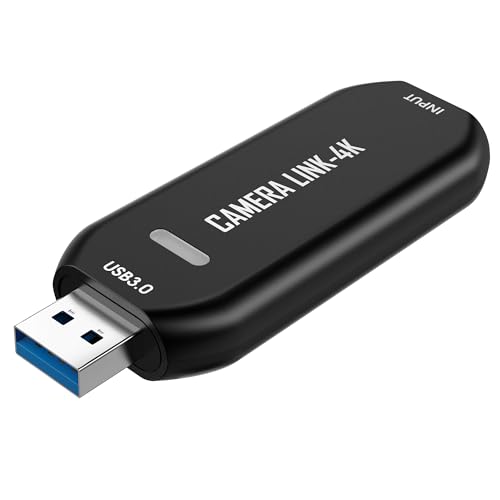
- Up to 4K60 or 1080p120 capture
- Plug-and-play USB 3.0 connection
- Works with cameras, consoles, and microscopes
Best For: Simple DSLR streaming and computer-based recording
Premium RAW Workflow

- 1500-nit 5-inch HDR touchscreen
- ProRes and ProRes RAW recording
- Camera control and advanced monitoring
Best For: Filmmakers needing RAW capture and professional monitoring
Compact Budget Capture
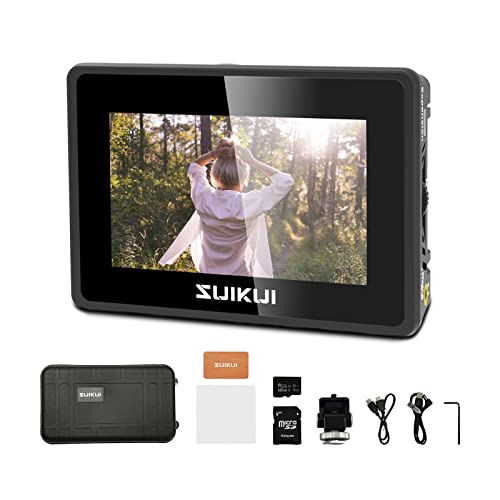
- 1080p30 H.264 recording
- 3.5-inch monitor with 600-nit brightness
- Waveform, zebra, and focus-assist tools
Best For: Basic portable 1080p camera recording
Connected Production Hub

- Up to 6K RAW recording
- ProRes, DNx, H.265, and H.264 codecs
- Wi-Fi 6E and NDI streaming support
Best For: Connected high-resolution production workflows
Premium HDMI Recorder – Atomos Ninja 5.2-inch 4K Monitor
For shoppers comparing camera external recorders for DSLR cameras, the Atomos Ninja combines on-camera monitoring with high-resolution recording. It accepts HDMI from DSLR, cinema, and mirrorless cameras, records up to 4Kp60 in several formats, and includes a 240GB SSD.
Best For: DSLR and mirrorless users who want a portable monitor-recorder with broad codec support and included storage.
Pros:
- Records up to 4Kp60 in Apple ProRes, Avid DNxHD, and H.265.
- Supports up to 6Kp30 Apple ProRes RAW with compatible cameras.
- Includes a 240GB SSD and offers a clean, modern AtomOS 11 interface.
- Supports HDMI cameras and Atomos RemoteView sharing features.
Cons:
- Its recording features depend on an HDMI-output camera and compatible signal.
- The included warranty is limited to one year.
The Ninja is a strong all-in-one choice when you need both a camera monitor and a capable external recorder. Its codec range and included SSD make it particularly practical for production workflows that need flexible recording options.
Computer Capture Solution – Blackmagic UltraStudio Mini Recorder 12G
The Blackmagic UltraStudio Mini Recorder 12G is aimed at camera-to-computer workflows rather than standalone on-camera recording. For camera external recorders for DSLR cameras, its HDMI and 12G-SDI inputs, Thunderbolt 4 output, and support for common software make it a compact capture option.
Best For: Creators routing compatible HDMI or SDI camera signals into a computer for recording, streaming, or production software.
Pros:
- Provides both 12G-SDI and HDMI inputs.
- Supports common codecs up to UHD 4K60.
- Works with DaVinci Resolve, Wirecast, vMix, OBS, and other popular software.
- Outputs to a computer through Thunderbolt 4.
Cons:
- Requires a computer-based workflow and does not list built-in recording media.
- Its compatibility depends on a computer with the required Thunderbolt connection.
This model makes sense when your DSLR or other camera feeds a computer-based setup. It is less suitable for handheld, standalone recording, but its input flexibility and software support are useful for studio, streaming, and capture applications.
Budget Touchscreen Recorder – FEELWORLD CUT6 6-inch Monitor
The FEELWORLD CUT6 adds monitoring tools and basic recording to a compact field display. Among camera external recorders for DSLR cameras, it stands out for its 6-inch Full HD touchscreen, USB flash-drive recording, HDMI loop-out, and exposure and focus aids.
Best For: DSLR shooters who want an affordable field monitor that can record compatible HDMI footage to a FAT32 USB flash drive.
Pros:
- Records compatible camera video up to 1080p30 in MP4 format.
- Provides a 6-inch 1920×1080 touchscreen with 8-bit color depth.
- Includes waveform, vectorscope, focus peaking, zebra, false color, and other tools.
- Supports HDMI 2.0 input up to 4K60 and HDMI output up to 1080p60.
Cons:
- Recording is limited to 1080p30 and requires a FAT32 USB flash drive.
- It does not provide the higher-resolution recording formats offered by dedicated professional recorders.
The CUT6 is a practical choice if monitoring and exposure assistance matter as much as recording. Its USB recording feature is convenient for straightforward HD capture, while the extensive display tools help with focus and image evaluation.
Compact Computer Recorder – Blackmagic UltraStudio Express Recorder 3G
The Blackmagic UltraStudio Express Recorder 3G is a small computer-connected capture device with HDMI and 3G-SDI support. For camera external recorders for DSLR cameras, it is best understood as a compact interface for digital video, live streaming software, and DaVinci Resolve rather than a standalone camera recorder.
Best For: Lightweight computer, live-streaming, and post-production setups using HDMI or 3G-SDI camera sources.
Pros:
- Supports HDMI and 3G-SDI video inputs.
- Handles 10-bit video and HDMI or 3G-SDI audio input.
- Compatible with DaVinci Resolve and live-streaming software.
- Compact pocket-format design weighs about 100 grams.
Cons:
- Requires a connected computer and does not list built-in storage.
- Its 3G-SDI specification is positioned below the 12G-SDI capability of some newer capture devices.
This recorder is a sensible fit for users who value portability and computer integration. Its HDMI and 3G-SDI connectivity covers common camera sources, while 10-bit video support adds flexibility for compatible production workflows.
Best Plug-and-Play Capture Card – CamStream 4K BU113G2
The AVerMedia CamStream 4K BU113G2 is a practical choice among camera external recorders for DSLR cameras when you want to send HDMI video to a computer, tablet, or supported streaming app. It captures up to 4K60 RGB24 video, combines audio and video, and works without drivers or external power.
Best For: DSLR livestreaming, video calls, podcasts, webinars, and low-latency monitoring.
Pros:
- Captures up to 4K60 RGB24 video.
- Plug-and-play support for OBS Studio, Streamlabs, Zoom, Twitch, and other compatible apps.
- Supports Windows, macOS, iPadOS, and compatible computers, tablets, and smartphones.
- Includes a 1/4-inch cold/hot shoe mount adapter.
Cons:
- Requires an HDMI-equipped camera and a compatible host device.
- Application and operating-system support may vary by platform.
With its compact 26 g design, synchronized audio and video, and ultra-low-latency capture, this model is well suited to mobile and desktop production. Its three-year manufacturer warranty is an added advantage for regular use.
Best On-Camera Monitor Recorder – Ninja TX 5.2
The Atomos Ninja TX is a more advanced option for shoppers comparing camera external recorders for DSLR cameras. It combines a bright 5.2-inch touchscreen monitor with 4K60 HDMI 2.0 and 12G-SDI connectivity, onboard recording, wireless features, and support for professional recording codecs.
Best For: Camera operators who need an integrated monitor, recorder, and camera-to-cloud workflow.
Pros:
- Records Apple ProRes, Avid DNx, and H.265/H.264 formats.
- Supports 4K60 input/output and 8K30 ProRes RAW recording.
- Bright 1500-nit touchscreen improves viewing in demanding conditions.
- Offers CFexpress Type B recording, Wi-Fi 6, timecode sync, and uploading features.
Cons:
- Its 0.67 kg weight is substantially higher than compact USB capture cards.
- Professional features and CFexpress recording may be more than basic streaming setups require.
- Battery, storage media, and camera compatibility should be checked before purchase.
This is the strongest fit when recording flexibility and on-camera monitoring matter more than minimal size. Its HDMI, SDI, USB-C, and wireless connections give it broader production potential than a basic computer capture device.
Best Budget USB Capture Option – VIXLW Cam Link 4K
The VIXLW Cam Link 4K is a straightforward choice among camera external recorders for DSLR cameras when your main goal is connecting an HDMI camera to a Windows or Mac computer. Its USB 3.0 connection supports up to 4K capture, plug-and-play operation, and use with OBS, Zoom, and other streaming or recording software.
Best For: Streamers, video callers, educators, gamers, and creators who want an uncomplicated DSLR-to-computer connection.
Pros:
- Supports up to 4K60 capture and 1080p120 recording.
- Works with DSLRs, camcorders, action cameras, microscopes, and game consoles.
- Plug-and-play design needs no drivers or external power.
- Designed for ultra-low-latency video and audio transmission.
Cons:
- Operating-system support is limited to Windows and macOS.
- Capture formats and frame rates vary by mode, including lower rates for some 4K formats.
- It is a USB capture device rather than a standalone recorder with built-in storage.
At 0.14 kg, this compact unit is easy to add to a computer-based workflow. It makes the most sense for users who want flexible HDMI input and simple live capture rather than an independent field recorder.
Premium RAW Workflow – Atomos Ninja RAW
The Atomos Ninja RAW is a high-end choice for camera external recorders for DSLR cameras and compatible mirrorless systems. Its 5.2-inch, 1500-nit HDR display combines ProRes and ProRes RAW recording with camera controls and detailed monitoring tools.
Best For: Filmmakers who need RAW capture, bright on-camera monitoring, and professional exposure and focus tools.
Pros:
- Records ProRes and ProRes RAW directly from the camera to CFexpress Type B or external USB-C storage.
- Bright 1500-nit HDR touchscreen with waveform, focus peaking, EL Zone false color, and other monitoring tools.
- Supports camera control for start/stop, ISO, shutter, aperture, and white balance on compatible cameras.
- Runs from NP-F batteries, USB-C power banks, or a DC adapter.
Cons:
- CFexpress media, storage, and some accessories are additional purchases.
- Its professional feature set may be more than casual DSLR users need.
Choose the Ninja RAW when recording quality and monitoring flexibility matter more than keeping the setup simple. It is especially suited to productions using compatible HDMI cameras and professional post-production workflows.
Compact Budget Capture – RH35 HDMI Monitor-Recorder
The RH35 is a compact option among camera external recorders for DSLR cameras, offering HDMI monitoring and unlimited 1080p recording in a small package. It records H.264 video at 1080p30 to a microSD card or USB flash drive.
Best For: Users who want an affordable, lightweight recorder for basic camera capture, previews, and streaming-style applications.
Pros:
- Accepts 1080p60 HDMI input and output while recording H.264 at 1080p30.
- Supports recording to a microSD card or USB flash drive.
- Includes peaking, zebra, waveform, focus assist, exposure assist, and false color.
- Compact 3.5-inch design with 600-nit brightness and a listed 120g weight.
Cons:
- The 800×480 display is less detailed than Full HD monitor screens.
- Recording is limited to H.264 1080p30 rather than higher-resolution or RAW formats.
- The supplied details do not specify camera-control functions.
The RH35 makes sense for straightforward 1080p recording when portability and basic monitoring are priorities. It is less suitable for users planning high-resolution capture or demanding RAW workflows.
Connected Production Hub – Atomos Ninja TX GO
Atomos Ninja TX GO 5-inch Camera Monitor-Recorder, HDMI CFexpress Wi-Fi HDR Touchscreen ProRes RAW
Check Price On AmazonThe Atomos Ninja TX GO is a versatile choice for camera external recorders for DSLR cameras and other HDMI-compatible cameras. It combines a bright 5-inch touchscreen with ProRes RAW, Avid DNx, H.265/H.264 recording, Wi-Fi 6E, NDI support, and up to 6K RAW capture.
Best For: Hybrid creators and production teams that need high-resolution recording plus wireless, streaming, and cloud-connected features.
Pros:
- Captures up to 6K RAW to CFexpress Type B or compatible USB-C storage.
- Supports ProRes, ProRes RAW, Avid DNx, H.265, and H.264 codecs.
- Offers HDMI input/output, Wi-Fi 6E, NDI streaming, and direct upload options.
- Includes touch-to-focus, camera control, and professional monitoring tools.
Cons:
- Storage and selected cloud or network accessories may require separate purchases.
- The broad feature set and 0.7 kg listed weight may be more than simple recording setups require.
- Compatible drives should be checked before purchase.
The Ninja TX GO is the strongest fit when an external recorder also needs to support connected production workflows. Consider it for projects that may move between local recording, wireless delivery, NDI, and cloud-oriented collaboration.
How We Picked the Best Camera External Recorders for Dslr Cameras
We compared these recorders by connection type, supported resolutions and frame rates, recording formats, monitoring features, storage requirements, portability, and intended workflow. The lineup includes devices that record directly to SSD or removable media, as well as capture hardware designed to send an HDMI feed to a computer.
Compatibility matters most. Before buying, verify that your DSLR provides clean HDMI output at the resolution and frame rate you plan to use. Also check whether the recorder needs a micro-HDMI or mini-HDMI cable, whether your camera can output audio through HDMI, and whether the device supports your preferred codec.
Quick Comparison
| Recorder type | Best for | Main advantage | Watch for |
|---|---|---|---|
| Monitor-recorder | Field production | Large display and external recording | Battery life, media, and rig weight |
| Capture card | Streaming or computer recording | Simple HDMI-to-USB workflow | Computer and software compatibility |
| Studio interface | Professional desktop setups | Stable broadcast-oriented connections | Less portable and often more specialized |
| Basic field monitor | Framing and monitoring | Affordable on-camera display | May have limited recording formats |
Key Buying Factors
Recording Format and Quality
External recording can provide higher-bitrate formats than many DSLRs record internally. ProRes is widely supported in editing software, while ProRes RAW can preserve more flexibility for compatible workflows. Confirm that your camera and editing system support the chosen format before paying for advanced features.
Resolution, Frame Rate, and HDMI Signal
Look beyond the headline 4K label. Check whether 4K is supported at your desired frame rate, whether the device accepts 10-bit or HDR signals, and whether recording is limited by the camera’s HDMI output. A recorder cannot create detail or frame rates that the camera does not send.
Storage, Power, and Portability
SSD-based recorders are convenient for longer sessions and faster file transfers, but they require compatible media and mounting hardware. Capture cards typically rely on USB and computer power. For handheld or mobile shoots, consider screen size, battery options, cable strain, and total rig weight.
Monitoring and Connectivity
A bright touchscreen, focus tools, exposure aids, audio meters, and camera control can be more valuable than recording alone. For streaming, confirm USB bandwidth, operating-system support, passthrough options, and whether the unit handles your camera’s signal without extra conversion.
Who Should Buy Which Camera External Recorders for Dslr Cameras?
For Professional Field Recording
Choose a dedicated Atomos-style monitor-recorder if you need a large screen, editing-friendly codecs, camera control, or RAW support while shooting on location.
For Streaming and Video Calls
An HDMI capture card is usually the simplest choice. It sends the DSLR feed to a computer and works well for streaming, webinars, teaching, and software-based recording.
For Desktop Production
Blackmagic UltraStudio models are better suited to users who want a more permanent computer or studio connection and already understand their interface, software, and signal requirements.
For Affordable Monitoring
A compact field monitor can improve framing and exposure without adding the cost or complexity of a full recording setup. Pick this route when your DSLR’s internal recording is sufficient.