Choosing among camera external recorders for focus pulling is about more than finding the largest screen or the highest recording resolution. A useful setup must make critical focus easy to judge while fitting your camera’s outputs, mounting system, power plan, and production workflow.
This roundup covers compact HDMI monitor-recorders, SDI-capable field monitors, and newer camera-to-cloud options. Use the guide below to match recording formats, display tools, connectivity, and portability to the way you shoot.
Best 10 Camera External Recorders for Focus Pulling Picks for 2026
Professional RAW Control

- 1500-nit HDR touchscreen
- Focus peaking and EL Zone tools
- ProRes RAW and camera control
Best For: Advanced monitoring and RAW recording on location
Scope-Focused Monitoring

- 5-inch 1080p LCD
- Focus assist and professional scopes
- HDR and 3D LUT support
Best For: Portable focus and exposure monitoring
High-Resolution RAW Recording

- ProRes RAW up to 8K 30p
- ProRes, DNxHD, and H.265
- Lightweight 360 g monitor-recorder
Best For: High-resolution HDMI recording workflows
Large-Screen Budget Monitoring

- 6-inch 1080p touchscreen
- Scopes for focus and exposure
- USB MP4 recording up to 1080p30
Best For: Affordable HDMI/SDI field monitoring
ProRes Monitoring Pick
- Records 4Kp60 in several professional codecs
- Supports up to 6Kp30 ProRes RAW
- Lightweight monitor with focus and exposure tools
Best For: Compact professional monitoring and recording
Budget Focus Assist

- 6-inch 1080p touchscreen for clear viewing
- Includes focus peaking, waveform, and false color
- Records 1080p30 MP4 to USB flash drives
Best For: Large-screen DSLR and mirrorless monitoring
Advanced RAW Workflow

- 1500-nit touchscreen with touch-to-focus control
- Captures up to 6K RAW to CFexpress or USB-C
- Supports ProRes RAW, DNx, H.265, and H.264
Best For: Bright-location monitoring and advanced RAW capture
Best All-Around HDMI Monitor Recorder

- 4Kp60 recording in ProRes, DNxHD, and H.265
- Up to 6Kp30 ProRes RAW recording
- 4K HDR display with AtomOS 11
Best For: HDMI-camera operators needing flexible monitoring and recording
Best for Bright On-Set Monitoring

- 1500-nit 5-inch touchscreen
- Locking 12G-SDI and HDMI 2.0 I/O
- Records to CFexpress Type B or USB-C
Best For: Production crews needing bright monitoring and SDI connectivity
Best Complete TX Kit

- 8K30 ProRes RAW recording
- 1500-nit HDR display with HDMI and 12G-SDI
- Includes batteries, charger, mounts, and carry case
Best For: Filmmakers wanting a ready-to-rig Ninja TX package
Professional RAW Control – Ninja RAW
For camera external recorders for focus pulling, the Atomos Ninja RAW combines a bright 5.2-inch HDR screen with focus peaking, EL Zone false color, waveform tools, and direct ProRes recording. Its camera-control features and flexible power options make it well suited to mobile production setups.
Best For: Filmmakers who want advanced focus and exposure tools alongside ProRes RAW recording and camera control.
Pros:
- 1500-nit HDR touchscreen is designed for clear field monitoring.
- Includes focus peaking, EL Zone false color, waveform, and Onion Skin tools.
- Records ProRes, ProRes RAW, and other ProRes formats to CFexpress Type B or USB-C storage.
- Controls compatible camera functions such as start/stop, ISO, shutter, aperture, and white balance.
Cons:
- Compatible cameras, cables, media, and some accessories may be required separately.
- The 5.2-inch display provides less viewing area than larger field monitors.
The Ninja RAW is a feature-rich choice when precise focus pulling is as important as recording quality. Its professional scopes and high-brightness display add practical value for demanding shoots.
Scope-Focused Monitoring – Video Assist 5'' 3G
Blackmagic Design Video Assist 5'' 3G Portable Monitor, Recorder, Scope, and Viewfinder
Check Price On AmazonThe Blackmagic Design Video Assist 5” 3G is a practical option among camera external recorders for focus pulling, pairing a 5-inch 1080p touchscreen with focus assist, professional scopes, HDR support, and 3D LUT capability. It is designed as a portable monitor, recorder, scope, and viewfinder.
Best For: Camera operators who prioritize focus assistance, scopes, and a portable 5-inch monitoring interface.
Pros:
- Built-in focus assist supports more accurate manual focusing.
- Professional scopes help evaluate exposure and image signals.
- Supports HDR and 3D LUT monitoring features.
- Includes HDMI connectivity and a 1920×1080 display.
Cons:
- The supplied notes provide limited detail about recording codecs and media compatibility.
- At 771 g, it is heavier than several compact monitor-recorders.
This Video Assist is a sensible pick for users who want monitoring tools centered on focus and image evaluation. Consider it when scopes and focus assist matter more than advanced codec details.
High-Resolution RAW Recording – Ninja Ultra
The Atomos Ninja Ultra is a strong contender among camera external recorders for focus pulling, with a lightweight 5.2-inch monitor-recorder built for high-resolution workflows. It supports ProRes RAW recording up to 8K 30p, along with ProRes, DNxHD, and H.265 options.
Best For: Shooters who need a compact HDMI recorder with high-resolution RAW support and flexible codec choices.
Pros:
- Records ProRes RAW up to 8K 30p, 6K 60p, and 4K 120p.
- Offers ProRes, DNxHD, and H.265 recording choices.
- Supports simultaneous 4Kp60 ProRes RAW and H.265 capture for Camera to Cloud workflows.
- Lightweight 360 g design is practical for mobile rigs.
Cons:
- The supplied notes do not list specific focus-peaking or waveform features.
- Recording media and camera compatibility should be checked before purchase.
The Ninja Ultra stands out when recording resolution and codec flexibility are central to the workflow. For focus pulling specifically, verify that its monitoring tools meet your preferred on-set needs.
Large-Screen Budget Monitoring – FEELWORLD CUT6S
The FEELWORLD CUT6S offers a larger 6-inch 1080p touchscreen and useful scopes for camera external recorders for focus pulling. Its waveform, RGB parade, vectorscope, and histogram tools support focus and exposure decisions, while USB recording captures compatible video up to 1080p30.
Best For: Budget-conscious crews that want a larger monitoring screen, scopes, and basic USB recording with HDMI and SDI support.
Pros:
- 6-inch 1920×1080 touchscreen provides a relatively spacious monitoring view.
- Waveform, RGB parade, vectorscope, and histogram tools aid image evaluation.
- Supports 3G-SDI input/output, HDMI input, and SDI-to-HDMI signal routing.
- Records compatible video up to 1080p30 to a FAT32 USB flash drive.
Cons:
- USB recording is limited to MP4 and up to 1080p30.
- The package does not include an NP-F battery.
- The display is rated at 450 nits, less bright than some competing monitors.
The CUT6S is a versatile, straightforward option for focus pulling when a larger screen and signal-routing flexibility are more important than RAW recording. Its included scopes make it useful for basic field monitoring and exposure checks.
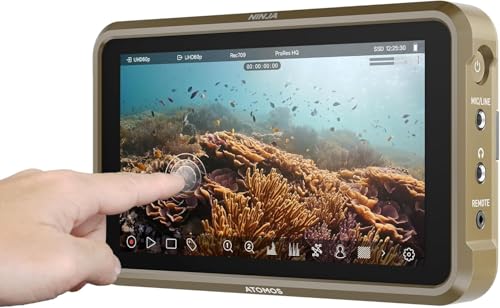
ProRes Monitoring Pick – Atomos Ninja 5.2-inch
The Atomos Ninja is a lightweight monitor-recorder for camera external recorders for focus pulling, combining a 5.2-inch matte display with focus and exposure tools such as ARRI False Color and SegmentPro. It records HDMI feeds up to 4Kp60 in ProRes, DNxHD, or H.265, while compatible cameras can provide up to 6Kp30 ProRes RAW.
Best For: Shooters who want a compact, reliable monitor-recorder with broad codec support and a bright 1000-nit display.
Pros:
- Records up to 4Kp60 and supports up to 6Kp30 ProRes RAW with compatible cameras.
- Supports Apple ProRes, Avid DNxHD, and H.265 recording.
- Lightweight 210-gram design with a matte 5.2-inch screen.
- Includes ARRI False Color and SegmentPro picture-quality tools.
Cons:
- Its native display resolution is 1920×1080, despite supporting higher-resolution recording.
- Connectivity is centered on HDMI, with 12G-SDI and NDI listed among its technologies.
The Ninja is a strong all-around choice when recording flexibility matters as much as on-camera monitoring. Its compact build and professional image-assist features make it practical for focus-pulling workflows, while the codec selection supports a range of post-production setups.
Budget Focus Assist – FEELWORLD CUT6 6-inch
The FEELWORLD CUT6 is a practical option among camera external recorders for focus pulling, pairing a 6-inch 1080p touchscreen with focus peaking, zoom, waveform, vectorscope, false color, and zebra tools. It can record compatible HDMI video up to 1080p30 to a FAT32 USB flash drive in MP4 format.
Best For: DSLR and mirrorless users who prioritize a larger viewing screen, focus aids, and straightforward USB recording.
Pros:
- 6-inch 1920×1080 touchscreen provides a larger monitoring surface.
- Includes focus peaking, zoom, waveform, RGB parade, vectorscope, and false color.
- Records up to 1080p30 directly to a FAT32 USB flash drive.
- HDMI input supports 4K 60Hz signals, with HDMI output up to 1080p60.
Cons:
- USB recording is limited to 1080p30 and MP4.
- Recording requires a compatible FAT32 USB flash drive.
- At 1.23 pounds, it is heavier than the compact Atomos Ninja listed here.
The CUT6 emphasizes visibility and on-set image evaluation rather than high-end recording formats. Its extensive monitoring tools can help with critical focus and exposure decisions, while the built-in USB recording function adds a convenient basic capture option.
Advanced RAW Workflow – Atomos Ninja TX GO
Atomos Ninja TX GO 5-inch Camera Monitor-Recorder, HDMI CFexpress Wi-Fi HDR Touchscreen ProRes RAW
Check Price On AmazonThe Atomos Ninja TX GO is a high-end choice for camera external recorders for focus pulling, with a super-bright 1500-nit touchscreen, touch-to-focus camera control, and professional monitoring tools. It captures up to 6K RAW to CFexpress Type B or compatible USB-C storage and supports ProRes, ProRes RAW, Avid DNx, H.265, and H.264.
Best For: Production teams needing bright daylight monitoring, touch-to-focus control, and flexible RAW or compressed recording.
Pros:
- 1500-nit 5-inch touchscreen is suited to bright shooting environments.
- Captures up to 6K RAW to CFexpress Type B or USB-C storage.
- Supports ProRes, ProRes RAW, Avid DNx, H.265, and H.264.
- Offers HDMI, Wi-Fi 6E, NDI, camera control, and touch-to-focus features.
Cons:
- At 0.7 kg, it is heavier than the original Ninja model listed here.
- CFexpress media, compatible drives, and some accessories may need to be purchased separately.
- Its advanced feature set may be more than needed for basic 1080p recording.
The Ninja TX GO is the most capable option in this group for demanding productions. Its high-brightness screen and touch-to-focus control directly support focus-pulling work, while 6K RAW capture and broad editing compatibility leave room for more advanced post-production workflows.
Best All-Around HDMI Monitor Recorder – Atomos Ninja 5.2
For filmmakers comparing camera external recorders for focus pulling, the Atomos Ninja 5.2 pairs a 5.2-inch 4K display with HDMI recording and HDR monitoring. It supports up to 4Kp60 recording in ProRes, DNxHD, and H.265, while ProRes RAW recording extends to 6Kp30 with compatible cameras.
Best For: HDMI-camera users who want a versatile monitor-recorder for precise framing, exposure checks, and high-quality external recording.
Pros:
- Records up to 4Kp60 in several professional codecs.
- Supports up to 6Kp30 Apple ProRes RAW.
- 4K DCI display with HDR monitoring and AtomOS 11 improvements.
- Works with a broad range of HDMI-output cameras.
Cons:
- Has one HDMI port, which may limit more complex routing setups.
- The listed item weight is 2.06 kg, making rig weight worth considering.
- RemoteView and other advanced features may depend on compatible Atomos devices and network access.
The Ninja 5.2 is a practical choice when clear 4K monitoring and flexible HDMI recording matter more than built-in SDI connectivity. Its codec support also gives productions room to adapt as camera workflows change.
Best for Bright On-Set Monitoring – Atomos Ninja TX
The Atomos Ninja TX is a compact option among camera external recorders for focus pulling, combining a 5-inch 1500-nit touchscreen with HDMI 2.0 and locking 12G-SDI connections. It records to CFexpress Type B or USB-C media and adds wireless connectivity, timecode synchronization, and camera-to-cloud uploading.
Best For: Shooters who need a bright touchscreen, SDI and HDMI connectivity, and an integrated recording and cloud workflow.
Pros:
- 1500 cd/m² touchscreen is suited to bright production environments.
- Provides locking 12G-SDI and HDMI 2.0 input/output.
- Records ProRes, DNx, H.265, and H.264 formats.
- Supports CFexpress Type B recording, USB-C media, Wi-Fi 6, and timecode sync.
Cons:
- The display resolution is 1920 x 1080 rather than 4K.
- Advanced camera-to-cloud features add workflow and connectivity requirements.
- Recording media and batteries are not described as included in the supplied package details.
Choose the Ninja TX when sunlight visibility and professional signal connectivity are priorities. Its Full HD panel is less detailed than a 4K monitor, but the bright screen, SDI support, and broad codec selection make it a strong production-focused recorder.
Best Complete TX Kit – Atomos Ninja TX Bundle
This Ninja TX bundle is aimed at filmmakers who want camera external recorders for focus pulling with a broader rig package included. The recorder combines HDMI and 12G-SDI connectivity, a 1500 cd/m² HDR display, and 8K30 ProRes RAW recording with batteries, charging equipment, mounting hardware, and a carry case.
Best For: High-end filmmakers who want an Atomos Ninja TX plus power, mounting, and transport accessories in one package.
Pros:
- Supports 8K30 RAW recording to CFexpress Type B or USB-C media.
- Includes HDMI and 12G-SDI connectivity with two HDMI ports listed.
- Bright 1500 cd/m² HDR display aids on-camera monitoring.
- Includes two rechargeable batteries, fast charger, D-Tap cable, case, and hot-shoe mounts.
Cons:
- The native display resolution is listed as 1080p despite the recorder’s 8K30 recording capability.
- The bundled accessories increase the overall kit size and carrying load.
- 8K RAW recording requires a compatible camera and suitable recording media.
This bundle makes the most sense when you are building or expanding a complete field setup rather than buying only the recorder. The included power and mounting accessories reduce the need for separate purchases, while the TX platform provides substantial recording and connectivity headroom.
How We Picked These Camera External Recorders for Focus Pulling
We selected models based on the features that matter when a monitor-recorder is used for focus work: screen size and visibility, resolution, focus-assist tools, input compatibility, recording options, camera control, power flexibility, and portability. We also considered whether each unit suits a compact mirrorless rig, a cinema camera, a multi-camera set, or a workflow that needs fast media handoff.
Not every recorder is equally suitable for every camera. Confirm the camera’s HDMI or SDI output, supported signal resolution and frame rates, recording codec compatibility, cable requirements, and whether camera control is available before buying.
Quick Comparison
| Priority | What to look for | Best fit |
|---|---|---|
| Critical focus in bright conditions | High-resolution display, focus peaking, zoom, and a strong hood or shade | Outdoor and daylight productions |
| Maximum image quality | ProRes or ProRes RAW support and a compatible camera output | Professional post-production workflows |
| Simple HDMI rig | Compact monitor-recorder with straightforward HDMI recording | Mirrorless and small cinema cameras |
| SDI infrastructure | 3G-SDI input, output, or loop-through | Long cable runs and production sets |
| Remote delivery | Wi-Fi or camera-to-cloud features | Fast review, proxy sharing, and distributed teams |
Key Buying Factors for Camera External Recorders for Focus Pulling
Display and Focus Tools
A sharp screen helps, but focus peaking, 1:1 or 2:1 magnification, false color, zebras, waveform, and vectorscope can be more valuable in practice. A 5-inch monitor is easier to mount on a compact rig, while a 6-inch display can make fine focus judgments more comfortable. Consider brightness and viewing angle if you regularly work outdoors.
Signal and Recording Compatibility
HDMI is common on mirrorless cameras, whereas SDI is preferred for secure connections and longer runs. Check whether the recorder accepts your camera’s bit depth, resolution, frame rate, and HDR signal. ProRes RAW can preserve more grading flexibility, but it requires a compatible camera, recorder, media, and editing pipeline.
Media, Power, and Rigging
Verify supported SSDs, CFexpress cards, or other recording media, along with sustained write requirements. Battery plates, USB power, DC input, runtime, weight, and mounting points affect whether the recorder works for handheld, gimbal, tripod, or studio use. Include cable strain relief and a sun hood in your rig plan.
Who Should Buy Which Camera External Recorders for Focus Pulling?
Choose a compact HDMI Atomos Ninja model if you want a practical monitor-recorder for a mirrorless or small cinema camera. Step up to a Ninja Ultra or RAW-capable model when your camera and post workflow support higher-end formats and you need more recording flexibility. Blackmagic Video Assist is a strong choice for users who want broad monitoring tools and a recorder suited to professional video setups.
Choose the FEELWORLD CUT6 or CUT6S when a larger, budget-conscious field display is more important than advanced RAW or cloud features; select the SDI version when your camera and set rely on SDI. Consider Ninja TX or TX GO models for productions that benefit from wireless connectivity, camera-to-cloud delivery, or a more modern remote-review workflow. Bundles make sense when the included accessories replace items you would otherwise buy separately, but compare the actual media, power, and mounting contents before paying extra.