The best computer monitor for home office work should make text easy to read, fit your desk, and support comfortable all-day productivity. The right size, panel type, stand, and connectivity matter more than headline specifications alone.
We selected 10 practical options ranging from compact 24-inch Full HD displays to spacious 32-inch curved models, with refresh rates up to 144Hz or higher and features such as adjustable stands, built-in speakers, eye-care modes, and adaptive sync.
Best 10 Computer Monitor for Home Office Picks for 2026
Best Balanced Pick
- 27-inch Full HD IPS display
- 144Hz refresh rate with 1ms MPRT
- TÜV 3-star eye-comfort certification
Best For: All-purpose home-office work, streaming, and light gaming
Best Large-Screen Value

- Spacious 32-inch Full HD screen
- Three-sided borderless design
- Flicker Free and Eye Saver modes
Best For: Large-screen office work, multimedia, and multi-monitor setups
Best Ergonomic Upgrade

- Fully adjustable ergonomic stand
- 144Hz refresh rate and 1ms MPRT
- Built-in dual 3W speakers
Best For: Adjustable home-office workstations with integrated audio
Best Slim Everyday Monitor

- 27-inch Full HD IPS panel
- Smooth 100Hz refresh rate
- Slim design with eye-care features
Best For: Everyday office work, creative tasks, and compact desks
Best Value Office Monitor
Philips 24-Inch FHD 100Hz Monitor

- Full HD VA display with 3000:1 contrast
- 100Hz refresh rate for smoother motion
- EasyRead, flicker-free, and blue-light features
Best For: Budget-conscious home office setups and document work
Best Ergonomic Pick
Dell 24 Plus FHD 144Hz Monitor

- 144Hz display with AMD FreeSync
- Height, pivot, swivel, and tilt adjustment
- Built-in dual 3W speakers and two HDMI ports
Best For: Flexible workspaces that double as entertainment setups
Best Large-Screen Option
LG 27-Inch FHD IPS 120Hz Monitor

- 27-inch IPS display with 178-degree viewing angles
- 120Hz refresh rate for smoother motion
- HDR10, Reader Mode, and up to 99% sRGB
Best For: Productivity, media, and multitasking on a larger screen
Immersive Everyday Pick
Samsung 27-inch S3 Curved FHD Monitor

- 27-inch curved Full HD display
- 100Hz refresh rate for smoother motion
- Blue-light filter and flicker-free viewing
Best For: Home offices that also support streaming and casual gaming
Fast IPS Workday Pick
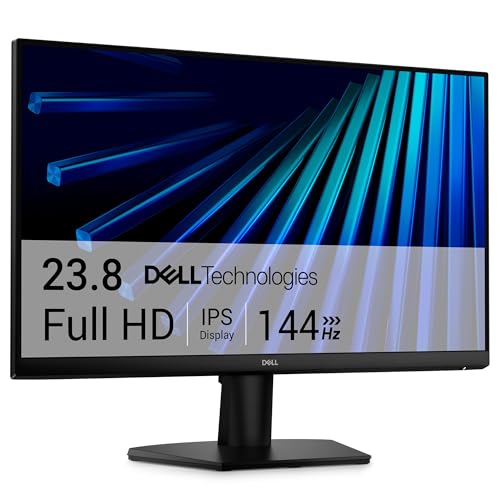
- 23.8-inch IPS Full HD display
- 144Hz refresh rate with 1ms MPRT
- Two HDMI ports and wide viewing angles
Best For: Compact home offices and mixed work-and-gaming use
Large-Screen Comfort Pick
LG 32-inch MR50C Curved Monitor
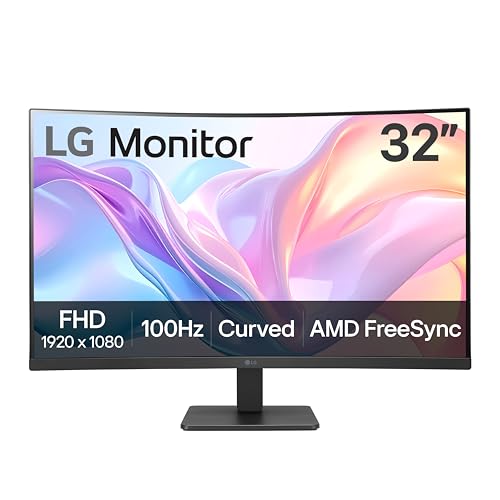
- Large 32-inch curved Full HD screen
- 100Hz refresh rate with FreeSync
- Reader Mode and tilt adjustment
Best For: Spacious desks and users who prefer an expansive curved display
Best Balanced Pick – Dell 27 Monitor SE2726H
If you want a versatile computer monitor for home office work, the Dell SE2726H combines a 27-inch Full HD IPS screen with a fast 144Hz refresh rate. Its wide viewing angles, matte finish, tilt adjustment, and eye-comfort certification make it practical for work, streaming, and occasional gaming.
Best For: Home-office users who want smooth motion, consistent colors, and a flexible all-purpose display.
Pros:
- IPS panel provides consistent color and 178-degree viewing angles.
- 144Hz refresh rate and 1ms MPRT support fluid motion.
- TÜV Rheinland 3-star eye-comfort certification and anti-glare screen.
- Includes two HDMI ports and tilt adjustment.
Cons:
- Full HD resolution is less detailed than a higher-resolution monitor at this size.
- Stand adjustment is limited to tilt.
The SE2726H is a strong everyday choice when smooth performance and comfortable viewing matter more than advanced stand ergonomics or higher resolution.
Best Large-Screen Value – Samsung 32-inch Flat Monitor
The Samsung S32B304N is a practical computer monitor for home office setups that benefit from a large 32-inch screen. Its three-sided borderless design, Full HD resolution, 75Hz refresh rate, and eye-care modes suit documents, presentations, video, and general desktop use.
Best For: Users who prioritize a roomy screen and clean styling for business and multimedia tasks.
Pros:
- Large 32-inch display offers plenty of workspace.
- Three-sided borderless design works well in multi-monitor arrangements.
- Flicker Free technology and Eye Saver Mode support extended use.
- Includes DisplayPort and HDMI connectivity, plus wall-mount support.
Cons:
- 75Hz refresh rate is slower than the 100Hz and 144Hz alternatives here.
- Full HD resolution may look less sharp across the large panel.
- Stand functionality is listed as wall mount rather than height-adjustable.
Choose this Samsung when screen size and a spacious, uncluttered view are your priorities, especially for office applications and media consumption.
Best Ergonomic Upgrade – Dell 27 Plus Monitor S2725HSM
The Dell S2725HSM is a feature-rich computer monitor for home office users who want easier positioning and built-in audio. Along with a 27-inch Full HD screen and 144Hz refresh rate, it offers height, pivot, swivel, and tilt adjustments, plus integrated dual 3W speakers.
Best For: Home offices that need an adjustable stand, built-in speakers, and smooth everyday performance.
Pros:
- Height, pivot, swivel, and tilt adjustments support ergonomic positioning.
- 144Hz refresh rate and 1ms MPRT provide smooth motion.
- Integrated dual 3W speakers add convenient desktop audio.
- 4-star TÜV-certified eye-comfort features and a matte screen support long sessions.
Cons:
- Resolution is limited to Full HD at 27 inches.
- Connectivity is HDMI-based, with no DisplayPort listed.
- The ash-white finish may not match every workspace.
This is the most adaptable option of the group, making it particularly appealing if you frequently change posture, rotate the display, or want to avoid separate desktop speakers.
Best Slim Everyday Monitor – Samsung S30GD 27-inch Monitor
The Samsung S30GD is a streamlined computer monitor for home office work, offering a 27-inch Full HD IPS panel, 100Hz refresh rate, and eye-care features in a slim design. Its wide viewing angles and modern thin bezels fit neatly into compact or style-conscious desks.
Best For: Everyday office work, creative tasks, and users who want a lightweight monitor with smooth motion.
Pros:
- IPS panel delivers consistent colors across a 178-degree viewing angle.
- 100Hz refresh rate helps reduce lag and motion blur.
- Blue Light Filter and Flicker-Free features support comfortable viewing.
- Super-slim design and thin bezels create a clean workspace appearance.
Cons:
- Only one HDMI port is listed.
- Stand adjustment is limited to tilt.
- Full HD resolution provides less desktop detail than higher-resolution models.
The S30GD is a sensible middle ground for office and creative use, especially when you want better-than-basic refresh performance without a bulky design.
Best Value Office Monitor – Philips 24-Inch FHD 100Hz Monitor
If you need a practical computer monitor for home office tasks, the Philips 241V8LB combines a sharp Full HD resolution with a VA panel designed for strong contrast. Its 23.8-inch screen, wide viewing angles, and eye-comfort features suit documents, browsing, video, and everyday desktop work.
Best For: Home office users who want a straightforward, high-contrast display with comfortable reading features and VESA compatibility.
Pros:
- Full HD 1920×1080 resolution with a 100Hz refresh rate
- VA panel provides a 3000:1 contrast ratio and deeper blacks
- 178-degree viewing angles help maintain consistent colors off-center
- Flicker-free design, blue-light filtering, and EasyRead mode support extended work sessions
Cons:
- Connectivity is limited to HDMI and VGA
- The stand does not list height, swivel, or pivot adjustment
This Philips monitor is a sensible value pick for routine office work, particularly if contrast and reading comfort matter more than advanced ergonomics or higher-resolution imagery.
Best Ergonomic Pick – Dell 24 Plus FHD 144Hz Monitor
The Dell S2425HSM is a versatile computer monitor for home office use, combining Full HD clarity with a fast 144Hz refresh rate and a fully adjustable stand. Built-in speakers and multiple HDMI ports also make it useful for switching between work, entertainment, and compatible gaming devices.
Best For: Users who want an adjustable office monitor that can also handle smooth entertainment and casual gaming.
Pros:
- 144Hz refresh rate and 1ms MPRT support smooth motion
- Height, tilt, pivot, and swivel adjustments make positioning easier
- Integrated dual 3W speakers provide built-in audio
- Two HDMI ports and AMD FreeSync add connection and gaming flexibility
Cons:
- Resolution is limited to Full HD at 1920×1080
- Response time is listed as 8ms, while the 1ms figure refers to MPRT
With its ergonomic stand, speakers, eye-comfort certification, and high refresh rate, the Dell is a strong all-around choice for a workspace that also serves as an entertainment station.
Best Large-Screen Option – LG 27-Inch FHD IPS 120Hz Monitor
For shoppers seeking a larger computer monitor for home office work, the LG 27U411A-B offers a 27-inch IPS display with Full HD resolution and broad 178-degree viewing angles. Its 120Hz refresh rate, Reader Mode, HDR10 support, and slim three-sided bezels make it suitable for productivity, streaming, and occasional gaming.
Best For: Home office users who prefer a spacious screen with wide viewing angles, smooth motion, and a clean modern design.
Pros:
- 27-inch IPS panel delivers Full HD visuals from virtually any angle
- 120Hz refresh rate supports smoother scrolling and motion
- HDR10 and up to 99% sRGB coverage provide more vivid color
- Reader Mode, Flicker Safe, and tilt adjustment support comfortable use
Cons:
- Stand adjustment is limited to tilt
- Only one HDMI port is listed
- Full HD resolution is less dense on a 27-inch screen than on a smaller display
The LG stands out when screen size, color, and smooth everyday operation are priorities. Its limited stand adjustment and single HDMI port are worth considering for more demanding desk setups.
Immersive Everyday Pick – Samsung 27-inch S3 Curved FHD Monitor
The Samsung S36GD is a practical computer monitor for home office use if you prefer an immersive curved screen with room for everyday work, streaming, and casual gaming. Its 27-inch Full HD display, 100Hz refresh rate, and eye-comfort features create a comfortable, responsive setup.
Best For: Home office users who want a curved display that also handles multimedia and casual gaming.
Pros:
- 27-inch curved Full HD screen with a 3,000:1 contrast ratio
- 100Hz refresh rate helps reduce motion blur
- Blue-light filtering and flicker-free technology support extended viewing
- HDMI and D-Sub connectivity, plus G-Sync compatibility
Cons:
- Full HD resolution provides less desktop detail than higher-resolution monitors
- Only one HDMI port is listed
- Curved design may not suit users who prefer a flat screen
Choose this Samsung if comfortable viewing and an engaging screen shape matter as much as basic office productivity. It is especially versatile for users who switch between documents, video, and gaming.
Fast IPS Workday Pick – Dell 24 SE2426H FHD Monitor
The Dell SE2426H is a compact computer monitor for home office setups that prioritizes clear IPS color, smooth motion, and straightforward connectivity. Its 23.8-inch Full HD matte display fits smaller desks while offering a 144Hz refresh rate for fluid work, streaming, and gaming.
Best For: Smaller home offices needing a compact, fast IPS monitor with wide viewing angles.
Pros:
- IPS panel provides consistent color across a 178-degree viewing angle
- 144Hz refresh rate and 1ms MPRT support fluid motion
- Two HDMI ports make it easier to connect multiple devices
- TÜV Rheinland 3-star eye-comfort certification and matte finish
Cons:
- 23.8-inch screen offers less workspace than larger models
- Stand adjustment is limited to tilt
- Full HD resolution is less detailed than higher-resolution options
This Dell is a strong fit when desk space, viewing consistency, and responsiveness are priorities. Its thin bezels and dual HDMI inputs also make it convenient for a tidy, flexible workstation.
Large-Screen Comfort Pick – LG 32-inch MR50C Curved Monitor
The LG 32MR50C-B gives a home office computer monitor setup a larger, more immersive workspace without moving beyond Full HD resolution. Its 32-inch curved VA panel offers strong contrast, while 100Hz performance, Reader Mode, and OnScreen Control support everyday productivity and entertainment.
Best For: Users who want a large curved screen for documents, streaming, and casual gaming.
Pros:
- Large 32-inch curved Full HD display with a 3,000:1 contrast ratio
- 100Hz refresh rate helps reduce stuttering and motion blur
- Reader Mode and flicker-free features support comfortable viewing
- OnScreen Control, FreeSync, and tilt adjustment add flexibility
Cons:
- Full HD resolution is relatively modest for a 32-inch screen
- Only one HDMI port is listed
- Large footprint may not suit smaller desks
This LG makes sense if screen size and contrast are more important than pixel density. It can serve as an expansive work display while remaining capable of smooth streaming and casual gaming.
How We Picked the Best Computer Monitor for Home Office Use
We focused on monitors that balance everyday productivity, comfort, price, and dependable performance. Each model was assessed by screen size and resolution, panel technology, refresh rate, stand adjustability, connectivity, eye-care features, and suitability for common home-office tasks such as documents, spreadsheets, video calls, browsing, and light entertainment.
Most selections use Full HD resolution, which remains practical for 24- and 27-inch screens and helps keep costs reasonable. We also included larger and curved options for shoppers who prioritize workspace or immersive viewing.
Quick Comparison
- Best overall flexibility: Look for a 27-inch IPS monitor with a height-adjustable stand and multiple ergonomic adjustments.
- Best for compact desks: A 23.8- or 24-inch Full HD display provides clear everyday viewing while using less space.
- Best for multitasking: A 32-inch screen gives documents and windows more room, though Full HD can look less sharp at that size.
- Best for smooth motion: Models rated at 100Hz, 120Hz, 144Hz, or 180Hz make scrolling and cursor movement feel more fluid.
- Best for immersive viewing: A curved 27- or 32-inch display can make wide content feel more enveloping.
Key Buying Factors for a Computer Monitor for Home Office
Size and Resolution
A 24-inch monitor is a strong choice for small desks and standard office work. A 27-inch model offers more comfortable working space, while 32 inches suits multitasking but may benefit from a higher resolution than Full HD for especially crisp text. Measure your desk depth before choosing a large screen.
Panel Type and Viewing Comfort
IPS panels typically offer consistent colors and wide viewing angles, making them useful for shared workspaces and general productivity. VA panels can provide stronger contrast, especially for darker content. Flicker-free operation, low-blue-light modes, and reader settings may help reduce fatigue, but placement and regular breaks remain important.
Stand and Connectivity
Height adjustment, tilt, swivel, and pivot support make it easier to position the top of the display near eye level. If the stand is basic, confirm that the monitor supports VESA mounting. Check the available HDMI or other inputs and make sure they match your computer, dock, or work laptop.
Refresh Rate and Extras
Higher refresh rates are not essential for spreadsheets, but they improve perceived smoothness and add flexibility for gaming or media. Built-in speakers can simplify video calls and casual listening, while AMD FreeSync can reduce tearing with compatible systems.
Who Should Buy Which Computer Monitor for Home Office?
Choose a 24-inch IPS model if you want an affordable, space-efficient display for email, documents, and remote work. Choose a 27-inch model if you want a better balance of viewing area and desk footprint. Buyers who frequently compare documents or keep several windows visible should consider a 32-inch screen, provided their desk allows enough viewing distance.
If ergonomic positioning is a priority, select a monitor with height, swivel, pivot, and tilt adjustments rather than relying on books or a fixed stand. For mixed work and gaming, prioritize a 120Hz-or-faster display with adaptive sync. Finally, match the monitor to your computer’s available ports and graphics capability before ordering.