The best computer monitor for programmers makes long coding sessions easier with readable text, comfortable viewing, and enough workspace for code, documentation, terminals, and testing tools.
We compared 10 monitors across 4K, Full HD, ultrawide, curved, and USB-C-equipped designs to help you choose the right fit for your desk, workflow, and budget.
Best 10 Computer Monitor for Programmers Picks for 2026
Best for Code-Focused Productivity
BenQ RD280U 3:2 Programming Monitor

- 3840x2560 resolution with a spacious 3:2 layout
- Coding modes and Nano Matte anti-glare panel
- 90W USB-C, KVM, and extensive eye-care features
Best For: Developers needing vertical workspace for code
Best 4K All-Purpose Pick
LG 27US500-W UltraFine 4K Monitor
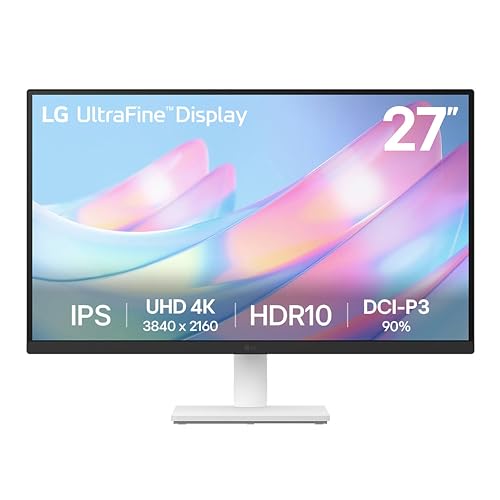
- 27-inch 4K UHD IPS display for sharp text
- Reader Mode and Flicker Safe operation
- OnScreen Control supports split-screen workspace management
Best For: Developers wanting versatile 4K clarity
Best Large Budget Workspace
Samsung S32B304NWN 32-Inch Monitor

- Large 32-inch Full HD screen
- 75Hz refresh rate with FreeSync
- Borderless design and eye-comfort modes
Best For: Developers prioritizing screen size and value
Best Smooth-Scrolling Compact Pick
Dell SE2426H 24-Inch IPS Monitor
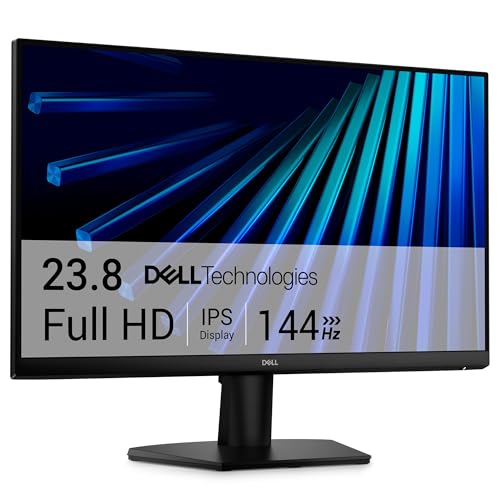
- 144Hz refresh rate with 1ms MPRT
- IPS panel with wide 178-degree viewing angles
- TÜV Rheinland eye-comfort certification
Best For: Developers needing a compact, fluid display
Immersive Workstation Pick

- 27-inch curved Full HD display
- 100Hz refresh rate for smoother motion
- Blue-light filter and flicker-free viewing
Best For: Programmers who prefer a curved screen for coding and multimedia
Productivity and Multitasking Pick

- 27-inch IPS Full HD display
- 120Hz refresh rate with HDR10 support
- Switch app supports layouts of up to six sections
Best For: Programmers who prioritize multitasking and wide viewing angles
Clean Desk Value Pick

- 27-inch IPS Full HD panel
- 100Hz refresh rate for smoother movement
- Two USB ports plus HDMI and D-Sub
Best For: Programmers wanting a slim, practical monitor for coding and office work
Best UltraWide Workspace

- 34-inch 3440 x 1440 UltraWide display
- USB-C with up to 65W power delivery
- Picture-by-Picture and workspace-splitting tools
Best For: Programmers building a spacious, laptop-friendly multitasking setup
Best Compact Budget Pick

- Compact 23.8-inch Full HD display
- 100Hz refresh rate with VA contrast
- EasyRead, flicker-free, and blue-light features
Best For: Everyday coding on a smaller desk or a multi-monitor setup
Best Eye-Care UltraWide

- 34-inch 3440 x 1440 UltraWide workspace
- Ambient light sensor and Eye Saver mode
- PIP/PBP supports multiple input sources
Best For: Long coding sessions and dual-source productivity workflows
Best for Code-Focused Productivity – BenQ RD280U 3:2 Programming Monitor
The BenQ RD280U is purpose-built for developers who want a computer monitor for programmers with extra vertical workspace. Its 28.2-inch 3:2 display delivers 3840×2560 resolution, while the matte Nano Matte Panel, coding modes, USB-C connectivity, and eye-care features support long coding sessions.
Best For: Programmers who prioritize vertical screen space, code readability, and a comfortable desktop setup.
Pros:
- High-resolution 3840×2560 display with a productivity-friendly 3:2 aspect ratio.
- Nano Matte Panel, coding modes, flicker-free operation, and blue-light filtering support extended work.
- 90W USB-C, KVM functionality, height adjustment, and FreeSync add useful workstation flexibility.
- MoonHalo backlight provides soft illumination for focused work.
Cons:
- The 60Hz refresh rate is geared toward productivity rather than high-refresh gaming.
- Its larger, heavier design may require more desk space than a conventional 16:9 monitor.
For coding-heavy workflows, the RD280U stands out for combining abundant vertical resolution with dedicated programming and eye-comfort features. It is a strong premium choice when screen organization and long-session comfort matter more than gaming speed.
Best 4K All-Purpose Pick – LG 27US500-W UltraFine 4K Monitor
The LG 27US500-W is a practical computer monitor for programmers who want sharp 4K text in a straightforward 27-inch IPS display. Its 3840×2160 resolution, Reader Mode, flicker-safe design, and OnScreen Control software make it suitable for coding, multitasking, and general desktop work.
Best For: Developers seeking a sharp, versatile 4K monitor for coding and multimedia use.
Pros:
- 4K UHD resolution provides crisp text and detailed workspace content.
- IPS technology offers wide viewing angles and consistent image quality.
- Reader Mode and Flicker Safe features support more comfortable extended use.
- OnScreen Control can split the workspace and adjust monitor settings from the desktop.
Cons:
- The 60Hz refresh rate is conventional and not intended for high-refresh gaming.
- The listed connectivity is limited to HDMI and DisplayPort, without USB-C.
The LG delivers the core benefits most programmers need: a sharp 4K canvas, IPS viewing angles, and useful software and comfort features. It is a balanced option for developers who want high resolution without specialized programming hardware.
Best Large Budget Workspace – Samsung S32B304NWN 32-Inch Monitor
The Samsung S32B304NWN offers a large 32-inch screen at an accessible Full HD resolution, making it a computer monitor for programmers who value physical screen size and straightforward multitasking. Its borderless design, 75Hz refresh rate, FreeSync, and eye-comfort modes round out the everyday work setup.
Best For: Programmers who want a spacious 32-inch display for coding, documents, and general productivity.
Pros:
- Large 32-inch screen provides ample room for code and supporting windows.
- Three-sided borderless design works well in multi-monitor arrangements.
- Eye Saver Mode and Flicker Free technology help reduce visual strain.
- 75Hz refresh rate and FreeSync provide smoother motion than a standard 60Hz display.
Cons:
- 1920×1080 resolution is less sharp than the 4K alternatives in this roundup.
- The 250 cd/m² brightness is modest for brightly lit rooms.
- Connectivity consists of one HDMI and DisplayPort.
The Samsung makes the most sense when a bigger panel is more important than pixel density. Its Full HD resolution is adequate for general coding, while the large screen and eye-care features create a comfortable basic workstation.
Best Smooth-Scrolling Compact Pick – Dell SE2426H 24-Inch IPS Monitor
The Dell SE2426H is a compact computer monitor for programmers with a 23.8-inch IPS panel, Full HD resolution, and an unusually high 144Hz refresh rate. It fits smaller desks while offering wide viewing angles, matte anti-glare treatment, FreeSync, and TÜV Rheinland 3-star eye-comfort certification.
Best For: Developers with limited desk space who also want fluid scrolling and motion.
Pros:
- 144Hz refresh rate and 1ms MPRT provide smooth motion and scrolling.
- IPS technology and 178-degree viewing angles support consistent image quality.
- Matte anti-glare screen and TÜV Rheinland 3-star eye-comfort certification benefit extended use.
- Two HDMI ports make it convenient to connect multiple devices.
Cons:
- Full HD resolution offers less workspace and text sharpness than a 4K monitor.
- The 24-inch size may feel restrictive for side-by-side code and documentation.
- The stand provides tilt adjustment rather than listed height adjustment.
The Dell is a sensible small-desk option for programmers who appreciate smooth scrolling and responsive motion. It trades resolution and workspace for a compact footprint, IPS viewing quality, and a notably fast refresh rate.
Immersive Workstation Pick – Samsung S36GD Curved Monitor
If you want a computer monitor for programmers that adds a more immersive feel to everyday work, the Samsung S36GD combines a 27-inch Full HD display with a curved 1800R screen. Its 100Hz refresh rate and eye-comfort features also suit coding, browsing, and multimedia use.
Best For: Programmers who prefer a curved display for extended desktop work, casual gaming, and general multimedia.
Pros:
- Curved 1800R screen can create a more immersive viewing experience.
- 100Hz refresh rate helps reduce motion blur during scrolling and video playback.
- Blue-light filtering and flicker-free technology support more comfortable long sessions.
- Includes HDMI and D-Sub connectivity, plus G-Sync compatibility.
Cons:
- Full HD resolution provides less workspace than a higher-resolution monitor.
- Only one HDMI port is listed.
- Curved styling may not suit programmers who prefer a flat display for multi-monitor alignment.
The S36GD is a practical choice when comfort and immersion matter more than high resolution. Its 27-inch 1080p panel gives you a familiar workspace, while the curved design and 100Hz refresh rate add appeal for mixed work and entertainment.
Productivity and Multitasking Pick – LG 27U411A-B IPS Monitor
The LG 27U411A-B is a versatile computer monitor for programmers who want clear viewing angles, smooth motion, and an easy-to-organize workspace. Its 27-inch IPS panel, Full HD resolution, 120Hz refresh rate, and virtually borderless design work well for coding and everyday productivity.
Best For: Programmers who want an IPS display with smooth scrolling, comfortable reading features, and flexible multitasking support.
Pros:
- IPS panel maintains clear, consistent color across a 178-degree viewing angle.
- 120Hz refresh rate supports smoother scrolling and motion.
- Reader Mode and Flicker Safe features are useful for extended work sessions.
- Switch app can divide the screen into up to six sections for multitasking.
Cons:
- Full HD resolution may feel limited for programmers who want extra code or window space.
- Connectivity is centered on a single listed HDMI port.
- The stand offers tilt adjustment but no listed height adjustment.
With its IPS viewing angles, 120Hz refresh rate, and productivity-oriented Switch app, this LG is a strong all-around option for coding and multitasking. It is especially appealing if comfortable reading and a clean dual-monitor-friendly design are priorities.
Clean Desk Value Pick – Samsung S30GD IPS Monitor
For a straightforward computer monitor for programmers, the Samsung S30GD offers a 27-inch Full HD IPS panel with consistent color and a slim, modern design. Its 100Hz refresh rate, eye-care features, and USB ports make it suitable for coding, office work, and general desktop use.
Best For: Programmers seeking an affordable-feeling, slim IPS monitor for coding, office work, and everyday desktop tasks.
Pros:
- IPS panel delivers consistent color across wide viewing angles.
- 100Hz refresh rate helps make scrolling and moving content smoother.
- Blue-light filtering, flicker reduction, and eye-care features support long sessions.
- Includes two USB ports along with HDMI and D-Sub connectivity.
Cons:
- Full HD resolution offers less coding workspace than higher-resolution alternatives.
- Glossy screen finish may be less suitable for brightly lit workspaces.
- Only one HDMI port is listed.
The S30GD keeps the feature set practical: a wide-viewing-angle IPS panel, smooth 100Hz performance, and a slim bezel design. It is a sensible fit for programmers who want a simple 27-inch display without prioritizing curved-screen immersion or higher resolution.
Best UltraWide Workspace – LG 34WR55QK-B
If you want a computer monitor for programmers that can replace a dual-screen setup, the LG 34WR55QK-B offers a spacious 34-inch curved UltraWide display with 3440 x 1440 resolution. Its 21:9 layout is well suited to keeping code, documentation, and other windows visible at once.
Best For: Programmers who want expansive multitasking space, USB-C connectivity, and flexible ergonomic adjustment.
Pros:
- 34-inch 3440 x 1440 UltraWide workspace supports multiple open windows.
- USB Type-C supports up to 65W power delivery for compatible laptops.
- OnScreen Control includes workspace splitting and Picture-by-Picture support.
- Height-adjustable and tilt-adjustable stand, plus Reader Mode for longer reading sessions.
Cons:
- Its large curved footprint may not suit compact desks.
- VA technology and a 5ms response time prioritize general productivity over specialized high-speed use.
The LG is a strong productivity-focused choice when screen real estate and convenient laptop connectivity matter most. HDR10, a 100Hz refresh rate, and FreeSync add versatility for media and casual gaming, while the wide format remains the main advantage for programming workflows.
Best Compact Budget Pick – Philips 241V8LB
For a straightforward computer monitor for programmers, the Philips 241V8LB provides a compact 23.8-inch Full HD screen with a 100Hz refresh rate. Its virtually bezel-free design can also work well in a side-by-side monitor arrangement for code and reference material.
Best For: Programmers who need an affordable, space-conscious display for everyday coding and office work.
Pros:
- 23.8-inch 1920 x 1080 display fits smaller desks.
- VA panel offers a 3000:1 contrast ratio with deeper blacks and brighter whites.
- 178-degree viewing angles and virtually bezel-free edges support flexible viewing and multi-monitor setups.
- EasyRead mode, flicker-free operation, and a blue-light filter support extended reading.
Cons:
- Full HD provides less workspace than the UltraWide models in this roundup.
- Connectivity is limited to HDMI and VGA, with no DisplayPort or USB-C listed.
The Philips is a practical choice when desk space and basic productivity value are more important than maximum resolution. It handles everyday programming comfortably, and its eye-care features are useful for long documentation or code-reading sessions.
Best Eye-Care UltraWide – Samsung ViewFinity S50GC
The Samsung ViewFinity S50GC is a computer monitor for programmers who want a broad 34-inch workspace without giving up eye-focused features. Its 3440 x 1440 Ultra-WQHD resolution and 21:9 aspect ratio make it easier to arrange coding tools and reference windows on one screen.
Best For: Programmers who value UltraWide multitasking, automatic brightness adjustment, and dual-source viewing.
Pros:
- 34-inch 3440 x 1440 display provides substantial horizontal workspace.
- Ambient light sensor automatically adjusts brightness, while Eye Saver and Flicker Free support extended use.
- Picture-by-Picture supports two simultaneous sources at native resolution, with Picture-in-Picture for secondary content.
- 100Hz refresh rate, HDR10, and AMD FreeSync add versatility beyond coding.
Cons:
- No USB-C connection or laptop power delivery is listed.
- The 34-inch screen requires more desk space than a standard 24-inch monitor.
The ViewFinity S50GC is particularly appealing for long workdays and workflows involving two computers or input sources. It offers the same useful UltraWide resolution as the LG, but its standout advantages are automatic brightness control, eye-care features, and flexible PIP/PBP functionality.
How We Picked the Best Computer Monitor for Programmers
We focused on the features that matter most during development work: text clarity, usable screen space, viewing comfort, connectivity, adjustability, and overall practicality. The lineup includes high-resolution 4K monitors for crisp code, ultrawide displays for side-by-side windows, affordable Full HD options, and high-refresh models that are also suitable for gaming or general desktop use.
We also considered eye-care features such as flicker reduction, reader modes, matte coatings, and brightness control. USB-C, KVM functionality, VESA compatibility, and picture-by-picture support received extra consideration because they can simplify multi-device setups.
Quick Comparison
| Monitor Type | Best For | Key Advantage |
|---|---|---|
| 4K 27–28 inch | Sharp text and detailed work | High pixel density |
| 34-inch ultrawide | Multiple windows | Broad horizontal workspace |
| 27–32 inch Full HD | Budget-conscious setups | Large screen at a lower cost |
| 24-inch Full HD | Compact desks | Space-efficient value |
| High-refresh models | Programming plus gaming | Smoother motion |
Key Buying Factors for a Computer Monitor for Programmers
Resolution and Text Clarity
Resolution affects how much code fits on screen and how sharp small text appears. A 4K display is excellent for dense layouts and crisp fonts, while 1440p ultrawide monitors offer a useful balance between workspace and performance. Full HD remains practical for basic coding, especially on 24-inch screens.
Screen Size and Layout
A 27-inch monitor is a versatile choice for most desks. Choose 32 inches or larger if you prefer bigger text or work farther from the screen. Ultrawide models are especially useful for keeping an editor, browser, terminal, and documentation visible without constantly switching windows.
Comfort and Ergonomics
Look for flicker-free operation, a reader or low-blue-light mode, a matte finish, and a stand with height, tilt, or swivel adjustment. VESA support is valuable if you plan to use a monitor arm. Curved screens can make large or ultrawide displays easier to view, although they are not essential for coding.
Connectivity and Multitasking
Check whether the monitor has the inputs your computer supports, including HDMI, DisplayPort, or USB-C. USB-C with power delivery can reduce cable clutter for laptops. A KVM switch, picture-in-picture, or picture-by-picture mode is useful when sharing one keyboard, mouse, or display between multiple systems.
Who Should Buy Which Computer Monitor for Programmers?
Choose the BenQ RD280U or an equivalent 4K model if sharp text, coding-focused features, USB-C, and premium ergonomics are priorities. Pick a 34-inch ultrawide such as the LG 34WR55QK-B or Samsung ViewFinity S50GC when you regularly compare files, run virtual machines, or keep several applications open side by side.
For affordable everyday development, the LG 27US500-W provides a strong 4K option, while the 27-inch Samsung and LG Full HD models suit simpler setups. A 24-inch Philips or Dell display is a sensible choice for smaller desks or secondary-monitor duty. If you also play games, prioritize the Dell SE2426H or another high-refresh model for smoother motion without giving up a practical coding workspace.