A computer monitor with adjustable stand makes it easier to position the screen at a comfortable height, angle, and viewing distance. That flexibility can reduce neck strain while improving your setup for work, study, gaming, or home entertainment.
We selected 10 Full HD monitors with practical ergonomic features, including height adjustment, tilt, swivel, pivot, or VESA compatibility. The lineup includes compact 24-inch models, spacious 27-inch displays, and higher-refresh-rate options for smoother motion.
Best 10 Computer Monitor with Adjustable Stand Picks for 2026
Balanced Entertainment Pick

- 27-inch Full HD display with 144Hz refresh rate
- Height, tilt, pivot, and swivel adjustments
- Built-in speakers and eye-comfort features
Best For: Work, streaming, and casual gaming
Everyday Office Value
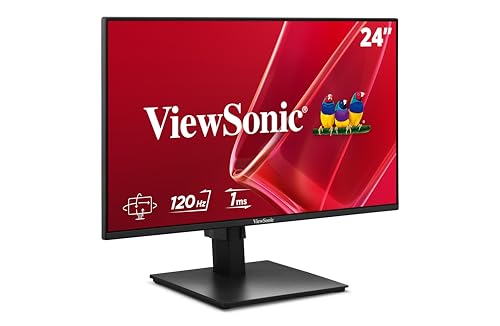
- 24-inch IPS Full HD display with 120Hz refresh
- Height-adjustable ergonomic stand
- HDMI and VGA connectivity
Best For: Home office, school, and everyday productivity
Flexible Gaming Stand Pick

- Up to 144Hz refresh with AMD FreeSync
- Height, tilt, and 360-degree swivel adjustments
- Quick-release VESA mounting support
Best For: Casual gaming and flexible desktop setups
Connectivity-Focused Office Choice

- Height, tilt, swivel, and pivot adjustments
- HDMI, DisplayPort, VGA, and USB connectivity
- IPS Full HD panel with built-in speakers
Best For: Business and multi-device office setups
Best Gaming Pick
Acer SH273 P1si 27-inch 144Hz Monitor

- 144Hz refresh rate with 1ms VRB response time
- Height, tilt, and swivel-adjustable stand
- IPS Full HD display with FreeSync
Best For: Gamers needing smooth motion and flexible positioning
Best Everyday Value
Amazon Basics 27-inch IPS Monitor

- 27-inch Full HD IPS display
- Tilt-adjustable stand with VESA support
- Built-in speakers and HDMI, DisplayPort, VGA, and USB
Best For: Home-office work, meetings, and entertainment
Best Dell Display
Dell SE2726H 27-inch 144Hz Monitor
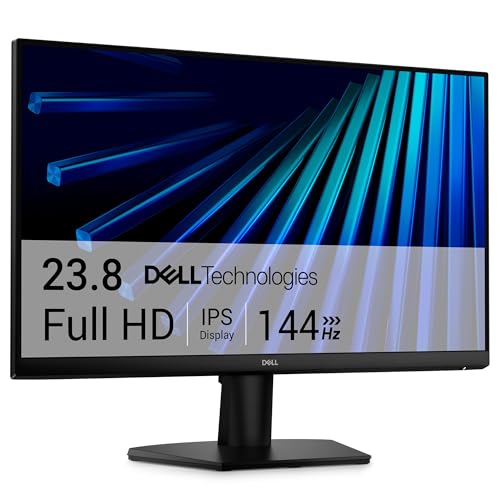
- 144Hz refresh rate with 1ms MPRT
- IPS panel with 178-degree viewing angles
- TÜV 3-star eye-comfort certification
Best For: Desktop work and casual gaming with smoother motion
Best All-Around Pick

- 27-inch Full HD IPS display with wide viewing angles
- 120Hz refresh rate with HDR10 and up to 99% sRGB
- Tilt-adjustable stand with Reader Mode and Flicker Safe
Best For: Mixed work, entertainment, and casual gaming
Best for Smooth Motion
Dell 24-inch 144Hz IPS Monitor
- 144Hz refresh rate with 1ms MPRT
- Two HDMI ports and AMD FreeSync
- Tilt-adjustable stand and TÜV 3-star eye comfort certification
Best For: Fluid office, streaming, and gaming use
Best Connectivity Value
Amazon Basics 24-inch IPS Monitor

- Full HD IPS display with 75Hz refresh rate
- HDMI, DisplayPort, VGA, and built-in speakers
- Tilt adjustment plus 100 x 100mm VESA compatibility
Best For: Home offices and mixed-device setups
Balanced Entertainment Pick – Dell 27 Plus S2725HSM
The Dell 27 Plus S2725HSM is a versatile computer monitor with adjustable stand, combining a roomy 27-inch Full HD screen with smooth 144Hz performance. Its built-in speakers, eye-comfort features, and broad ergonomic adjustments make it practical for work, streaming, and casual gaming.
Best For: Users who want one adjustable monitor for desktop work, entertainment, and gaming.
Pros:
- Height, tilt, pivot, and swivel adjustments support flexible positioning.
- 144Hz refresh rate, 1ms MPRT, and AMD FreeSync help deliver smooth motion.
- Integrated dual 3W speakers reduce the need for separate desktop speakers.
- 4-star TÜV-certified eye-care design includes reduced blue light and flicker-free viewing.
Cons:
- Full HD resolution is less detailed than a QHD display at this screen size.
- Connectivity is limited to two HDMI ports.
Choose this Dell when ergonomic flexibility and built-in audio matter as much as refresh rate. It is a well-rounded option, though users seeking higher resolution or more varied inputs may want to look elsewhere.
Everyday Office Value – ViewSonic VA2448-MHJ
The ViewSonic VA2448-MHJ is a compact computer monitor with adjustable stand for home offices, study spaces, and everyday desktop use. Its 24-inch IPS Full HD panel, 120Hz refresh rate, and HDMI/VGA connectivity cover common productivity and multimedia needs.
Best For: Office, school, and home users who want ergonomic height adjustment in a compact display.
Pros:
- Height-adjustable stand helps improve viewing comfort during longer sessions.
- IPS panel provides 178-degree viewing angles and Full HD resolution.
- 120Hz refresh rate and 1ms MPRT support smoother scrolling and motion.
- HDMI and VGA inputs work with compatible laptops, desktops, and Macs.
Cons:
- Only one HDMI input is provided.
- The stand’s listed adjustments focus on height, pivot, and tilt rather than swivel.
This ViewSonic is a sensible choice for practical productivity setups, especially where height adjustment and broad device compatibility are priorities. Its 24-inch size also suits smaller desks.
Flexible Gaming Stand Pick – Acer SH243Y P1si
The Acer SH243Y P1si is a gaming-oriented computer monitor with adjustable stand, pairing a 23.8-inch IPS Full HD panel with up to 144Hz refresh and AMD FreeSync. Its generous stand adjustments and quick-release VESA design make it especially flexible for gaming desks and shared workspaces.
Best For: Gamers and desktop users who want smooth motion with extensive stand positioning.
Pros:
- Up to 144Hz refresh rate, 1ms VRB, and AMD FreeSync target smooth gaming motion.
- Stand offers height, tilt, and 360-degree swivel adjustment.
- Quick-release design supports VESA wall mounting.
- Zero-frame IPS display provides Full HD images with 178-degree viewing angles.
Cons:
- No built-in speakers are listed.
- Connectivity is limited to one HDMI port plus VGA.
- The 23.8-inch screen may feel small for users wanting a larger gaming display.
The Acer stands out when adjustability and gaming responsiveness are more important than extra features. It offers a strong ergonomic range for its size, while the port selection remains fairly basic.
Connectivity-Focused Office Choice – ASUS VA24DQSB
The ASUS VA24DQSB is a feature-rich computer monitor with adjustable stand for office and multi-device setups. Its 24-inch IPS Full HD screen includes HDMI, DisplayPort, VGA, and a USB hub, while the stand supports height, tilt, swivel, and pivot positioning.
Best For: Business users who need broad connectivity and a highly adjustable ergonomic monitor.
Pros:
- Height, tilt, swivel, and 90-degree pivot adjustments support ergonomic positioning.
- HDMI, DisplayPort, VGA, and two USB ports offer flexible connectivity.
- IPS panel provides 178-degree viewing angles at Full HD resolution.
- Flicker-free, low-blue-light features and built-in speakers add everyday convenience.
Cons:
- 75Hz refresh rate is lower than the other listed monitors.
- Listed response time is 5ms, making it less gaming-focused.
- The USB hub uses USB 2.0 ports.
This ASUS is the strongest fit for productivity users managing several connection types or rotating the display for certain tasks. Its ergonomic range and office-focused features are more compelling than its modest refresh rate.
Best Gaming Pick – Acer SH273 P1si 27-inch 144Hz Monitor
If you want a computer monitor with adjustable stand for gaming and everyday desktop use, the Acer SH273 P1si combines a 27-inch Full HD IPS screen with a fast 144Hz refresh rate. Its stand offers tilt, height adjustment, and swivel, making it easier to position the display comfortably.
Best For: Gamers and home-office users who want fluid motion and broad stand adjustability.
Pros:
- 144Hz refresh rate, 1ms VRB response time, and AMD FreeSync support help deliver smooth gaming visuals.
- IPS panel provides Full HD resolution and 178-degree viewing angles.
- Stand adjusts for tilt, height, and swivel, with quick-release VESA mounting support.
- Includes HDMI and VGA connectivity.
Cons:
- Resolution is limited to 1920 x 1080 on the 27-inch screen.
- Connectivity is relatively basic compared with monitors that include USB hubs.
The Acer is the strongest choice here for performance-focused buyers who also need a genuinely adjustable stand. It is especially appealing if smooth gaming motion matters as much as ergonomic positioning.
Best Everyday Value – Amazon Basics 27-inch IPS Monitor
For general work, meetings, streaming, and light gaming, this Amazon Basics model is a practical computer monitor with adjustable stand. Its 27-inch IPS panel offers Full HD resolution, while the stand tilts from -5 to 20 degrees for a more comfortable viewing angle.
Best For: Home offices, webinars, digital work, and everyday entertainment.
Pros:
- 27-inch Full HD IPS display supports consistent color viewing from wide angles.
- Adjustable stand provides a -5-to-20-degree tilt range.
- Built-in speakers and multiple connections add convenience.
- VESA compatibility allows wall mounting, and the monitor is Energy Star certified.
Cons:
- 75Hz refresh rate is less suited to high-refresh gaming than the other options.
- The stand offers tilt adjustment but no listed height or swivel adjustment.
This is a sensible all-purpose pick when you want a large IPS screen, basic stand adjustment, speakers, and broad connectivity without prioritizing competitive gaming specifications.
Best Dell Display – Dell SE2726H 27-inch 144Hz Monitor
The Dell SE2726H is a computer monitor with adjustable stand designed for clear everyday viewing and fluid motion. It pairs a 27-inch Full HD IPS panel with a 144Hz refresh rate, 1ms MPRT, AMD FreeSync, and a tilt-adjustable stand.
Best For: Desktop users and casual gamers who want a fast IPS display with eye-comfort features.
Pros:
- 144Hz refresh rate and 1ms MPRT support smoother motion.
- IPS technology provides consistent color across a 178-degree viewing angle.
- TÜV Rheinland 3-star eye-comfort certification helps reduce harmful blue light.
- Thin bezels, matte finish, and two HDMI ports suit a clean desktop setup.
Cons:
- The stand is listed with tilt adjustment only, without height or swivel adjustment.
- The supplied specifications list an 8ms response time alongside the 1ms MPRT rating, so buyers should distinguish between the two measures.
Dell’s SE2726H is a well-rounded option for users who value fast refresh, wide viewing angles, and eye-comfort credentials. Its main limitation for an adjustable-monitor roundup is the stand’s tilt-only design.
Best All-Around Pick – LG 27-inch 120Hz IPS Monitor
The LG 27U411A-B is a strong choice if you want a computer monitor with adjustable stand features for everyday work, entertainment, and gaming. Its 27-inch Full HD IPS display offers wide viewing angles, while the 120Hz refresh rate, HDR10 support, and Reader Mode add versatility. The stand adjusts by tilt from -5° to 20°.
Best For: Mixed work, web browsing, streaming, and casual gaming in a modern desktop setup.
Pros:
- 27-inch Full HD IPS screen with 178-degree viewing angles
- 120Hz refresh rate and 1ms Motion Blur Reduction for smoother motion
- HDR10 and up to 99% sRGB coverage for vivid color
- Reader Mode, Flicker Safe, and tilt adjustment support comfortable use
Cons:
- The stand provides tilt adjustment but not height, swivel, or pivot adjustment
- It has one HDMI port listed in the supplied specifications
The LG balances a larger screen with gaming-friendly motion performance and useful comfort features. Choose it if tilt adjustment is sufficient and you value the extra screen space over a fully ergonomic stand.
Best for Smooth Motion – Dell 24-inch 144Hz IPS Monitor
The Dell SE2426H is a practical computer monitor with adjustable stand functionality for work, streaming, and gaming. Its 23.8-inch Full HD IPS panel combines a 144Hz refresh rate with 1ms MPRT, while the stand tilts for basic positioning. Two HDMI ports and AMD FreeSync add useful desktop flexibility.
Best For: Users who prioritize fluid motion, multiple HDMI connections, and a compact office or gaming display.
Pros:
- 144Hz refresh rate and 1ms MPRT for fluid motion
- IPS panel with 178-degree viewing angles
- Two HDMI ports and AMD FreeSync support
- TÜV Rheinland 3-star eye comfort certification
Cons:
- The stand offers tilt adjustment only
- The 23.8-inch screen is smaller than the LG option in this roundup
- The supplied specifications list an 8ms response time despite the 1ms MPRT rating
The Dell is the motion-focused pick, offering the highest refresh rate among these three monitors. Its tilt-only stand is less flexible than a full ergonomic stand, but the dual HDMI setup and FreeSync support make it well suited to straightforward work-and-play setups.
Best Connectivity Value – Amazon Basics 24-inch IPS Monitor
The Amazon Basics 24E2QA is a versatile computer monitor with adjustable stand support for home offices, meetings, and general entertainment. Its 24-inch Full HD IPS panel includes HDMI, DisplayPort, and VGA inputs, while the stand tilts from -5° to 23°. Built-in speakers and VESA compatibility add convenience.
Best For: Home and office users who need broad connectivity, built-in audio, and flexible mounting options.
Pros:
- Full HD IPS display with 178-degree viewing angles
- HDMI, DisplayPort, and VGA connectivity
- Tilt-adjustable stand and 100 x 100mm VESA compatibility
- Built-in speakers and included HDMI cable
Cons:
- Its 75Hz refresh rate is lower than the LG and Dell models
- The stand is tilt-adjustable rather than height-adjustable
- The supplied notes contain mixed port details, so verify the configuration before purchase
This model emphasizes compatibility and convenience rather than high-refresh gaming. It is a sensible option for mixed older and newer devices, especially if built-in speakers or VESA mounting are important to your setup.
How We Picked the Best Computer Monitor with Adjustable Stand
We focused on monitors that combine useful ergonomic adjustment with dependable everyday performance. Each selected model offers a Full HD resolution and includes at least one practical stand or mounting feature, such as height adjustment, tilt, swivel, pivot, or VESA compatibility. We also considered screen size, panel type, refresh rate, response claims, connectivity, built-in speakers, and suitability for office work or casual gaming.
Because specifications vary by model and retailer, check the current listing for exact adjustment ranges, included cables, port versions, and warranty details before buying.
Quick Comparison
| Best For | Recommended Size | Features to Prioritize |
|---|---|---|
| Everyday office work | 24 to 27 inches | IPS panel, ergonomic stand, HDMI and DisplayPort |
| Casual gaming | 24 to 27 inches | 120Hz or 144Hz refresh rate, low response time, FreeSync |
| Small desks | 23.8 to 24 inches | Compact footprint, height adjustment, VESA support |
| Multitasking | 27 inches | Larger viewing area, Full HD IPS panel, flexible positioning |
Key Buying Factors for a Computer Monitor with Adjustable Stand
Stand Adjustment
Confirm which movements are actually supported. Height adjustment is the most useful for aligning the top of the screen with your eye level, while tilt helps reduce glare. Swivel and pivot are valuable for shared workspaces or portrait-oriented documents. If the included stand is limited, VESA support gives you the option to add an arm later.
Screen Size and Resolution
At 24 inches, 1920×1080 remains a practical choice for sharp text and a compact desk footprint. A 27-inch Full HD screen provides more physical workspace, but images and text may appear slightly less dense than on a smaller display. Choose based on viewing distance and available desk space.
Refresh Rate and Response Time
A 75Hz monitor is adequate for office work and streaming, while 120Hz or 144Hz can make scrolling, animations, and gaming feel smoother. Published response times may use different testing methods, so treat them as a guide rather than a guarantee of identical real-world performance.
Ports and Compatibility
HDMI is broadly compatible with laptops, desktops, and consoles. DisplayPort is useful for many PC graphics outputs, while USB docking features can simplify peripheral connections on compatible models. Also verify that your computer supports the desired resolution and refresh rate through the selected port.
Who Should Buy Which Computer Monitor with Adjustable Stand?
Choose a 24-inch IPS model if you want an affordable, space-conscious monitor for productivity, schoolwork, or a dual-screen setup. A 27-inch model is better when you prefer larger text, more comfortable viewing from a distance, or a more immersive gaming screen. For smoother motion, prioritize the 120Hz and 144Hz options with adaptive-sync support. If ergonomics are your main concern, select the model with the broadest built-in adjustment range or pair a VESA-compatible monitor with an adjustable arm.