The best desktop computers in 2026 range from compact business PCs and space-saving all-in-ones to powerful towers built for demanding games and creative work.
These ten picks cover a broad range of budgets and priorities, making it easier to choose the right combination of performance, storage, display convenience, and upgrade potential.
Best 10 Desktop Computers Picks for 2026
Best Business Desktop Computer

- 32GB DDR5 RAM and 1TB Gen4 NVMe SSD
- Ryzen 7 with integrated AI NPU
- Windows 11 Pro and dual-display support
Best For: Business, home office, multitasking, and moderate editing
Best All-in-One Desktop Computer
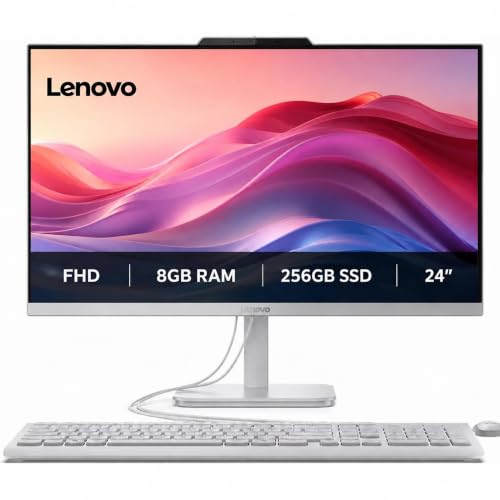
- 24-inch Full HD all-in-one display
- 16GB RAM with a 256GB SSD
- 5MP webcam with privacy and noise-reduction features
Best For: Home offices, video calls, and everyday productivity
Best Gaming Desktop Computer

- Ryzen 7 9800X3D and RTX 5090 graphics
- 32GB DDR5-6000 RAM and 2TB NVMe SSD
- 360mm liquid cooling with Wi-Fi 7
Best For: High-end gaming, 4K play, and demanding graphics work
Best Budget All-in-One Desktop Computer

- 21.5-inch Full HD anti-glare display
- Intel N100 with 8GB RAM and 384GB listed storage
- Keyboard, mouse, docking hub, and multiple ports included
Best For: Students, basic office work, and everyday browsing
Compact Business Performer

- Six-core Intel Core i5 with 16GB RAM
- 512GB NVMe SSD for quick access
- Tiny chassis with dual DisplayPort
Best For: Space-conscious office and business workstations
All-in-One Home Hub

- 27-inch Full HD IPS display
- Ryzen AI 7 with 16GB DDR5
- Integrated camera, audio, and speakers
Best For: Home offices, calls, entertainment, and simple setups
High-Performance Tower
Dell QCT1250 Core i7 Desktop Tower

- Core i7-12700K with 12 cores and 20 threads
- 32GB DDR5 RAM and 1TB PCIe SSD
- Dual 4K monitor support with accessories
Best For: Demanding business multitasking and multi-monitor workstations
Best Space-Saving Desktop Computer
Lenovo IdeaCentre V100 All-in-One

- 23.8-inch Full HD IPS display in a compact all-in-one design
- 512GB PCIe SSD for quick boots and app launches
- Wi-Fi 6, USB-C, HDMI-out, camera, speakers, and keyboard included
Best For: Students, home offices, and everyday computing in compact spaces
Best Performance-Oriented Office Desktop

- Eight-core Core i7-9700 processor up to 4.7GHz
- 32GB RAM and 1TB NVMe SSD for multitasking and storage
- Two DisplayPort outputs plus nine USB ports
Best For: Business productivity, home offices, and dual-monitor workstations
Best Value Refurbished Desktop Computer

- Six-core Core i7-8700 processor up to 4.6GHz
- 512GB NVMe SSD and listed 32GB DDR4 memory
- Dual DisplayPort, Wi-Fi, Bluetooth, optical drive, and wireless peripherals
Best For: Home and office productivity on a refurbished budget
Best Business Desktop Computer – HP OmniDesk Ryzen 7
For buyers seeking capable desktop computers for demanding office work, content creation, coding, or multitasking, the HP OmniDesk combines an AMD Ryzen 7 processor, 32GB DDR5 memory, and a 1TB Gen4 NVMe SSD in a traditional tower design.
Best For: Business users, home offices, multitasking, moderate gaming, editing, trading, and AI-enabled workloads.
Pros:
- Ryzen 7 processor with 8 cores, 16 threads, and a 16 TOPS NPU
- 32GB DDR5 RAM and fast 1TB PCIe Gen4 NVMe storage
- Integrated Radeon 780M graphics with HDMI 2.1 and DisplayPort 1.4a
- Windows 11 Pro, Wi-Fi 6, Bluetooth 5.4, and multiple front USB ports
Cons:
- Integrated graphics are less suited to demanding modern gaming than a dedicated GPU
- Tower design requires a separate monitor and peripherals
This HP is a well-rounded choice among desktop computers when productivity, connectivity, and responsive multitasking matter more than high-end dedicated graphics.
Best All-in-One Desktop Computer – Lenovo IdeaCentre 24
The Lenovo IdeaCentre is a practical all-in-one option for shoppers who want desktop computers with a built-in 24-inch Full HD display. Its 16GB RAM, 256GB SSD, integrated webcam, and included wired keyboard make it ready for everyday office and home use.
Best For: Home offices, business tasks, video calls, web-based productivity, and everyday entertainment.
Pros:
- Space-saving all-in-one design with a 24-inch 1920×1080 display
- 16GB DDR5 memory and SSD storage for routine productivity
- 5MP webcam, optional IR capability, privacy shutter, and noise suppression features
- Harman audio-enhanced speakers and HDMI input
Cons:
- Intel N100 processor is aimed at everyday tasks rather than demanding workloads
- 256GB storage provides less room than many larger desktop configurations
Choose this Lenovo when a clean, compact workstation and convenient video-calling features are more important than upgradeability or high-performance computing.
Best Gaming Desktop Computer – Skytech Blaze 5 RTX 5090
For shoppers comparing desktop computers built for serious gaming and creative workloads, the Skytech Blaze 5 pairs a Ryzen 7 9800X3D processor with an RTX 5090 32GB graphics card, 32GB DDR5-6000 memory, and a 2TB Gen4 NVMe SSD.
Best For: High-end gaming, 4K gaming, multimedia work, and users who want dedicated graphics performance.
Pros:
- Ryzen 7 9800X3D processor with boost speeds up to 5.2GHz
- NVIDIA GeForce RTX 5090 with 32GB GDDR7 dedicated graphics memory
- 360mm AIO liquid cooling and 32GB DDR5-6000 RGB memory
- 2TB Gen4 NVMe SSD, Wi-Fi 7, Windows 11 Home, and included keyboard and mouse
Cons:
- Large tower requires substantial desk or floor space
- Windows 11 Home lacks the business-oriented features of Windows 11 Pro
- Graphics card brand may vary
This is the performance-focused pick in the group, offering the dedicated GPU, cooling system, and fast components suited to demanding games and graphics-intensive applications.
Best Budget All-in-One Desktop Computer – HP 21.5-inch FHD All-in-One
This HP all-in-one offers a straightforward approach to desktop computers for office work, school, and everyday browsing. It combines a 21.5-inch Full HD anti-glare display with an Intel N100 processor, 8GB RAM, 384GB listed storage, and included keyboard and mouse.
Best For: Students, basic office work, browsing, video calls, and space-conscious work areas.
Pros:
- Compact all-in-one design with a 21.5-inch 1920×1080 display
- Includes keyboard, mouse, Windows 11 Home, and an adjustable stand
- Wi-Fi 6, Bluetooth, HDMI, Ethernet, USB-C, and multiple USB-A ports
- 720p camera and DTS-tuned speakers for everyday communication
Cons:
- Intel N100 and integrated Intel UHD graphics are intended for basic workloads
- 8GB RAM configuration is more limited for heavy multitasking
- Additional storage includes an SD card used through the docking hub
This HP makes sense for buyers who want an uncomplicated, space-saving desktop computer for routine productivity rather than demanding editing or gaming.
Compact Business Performer – HP ProDesk Mini PC
For buyers seeking space-efficient desktop computers, this HP ProDesk Mini PC combines an Intel Core i5 processor, 16GB of RAM, and a 512GB PCIe NVMe SSD in a remarkably small chassis. Its business-focused Windows 11 Pro setup and multi-monitor connectivity suit everyday professional workflows.
Best For: Office workstations, reception desks, point-of-sale counters, and space-constrained business setups.
Pros:
- Six-core Intel Core i5 processor supports multitasking and business applications.
- 16GB DDR4 RAM and 512GB NVMe SSD provide responsive everyday performance.
- Compact design, dual DisplayPort outputs, USB-C, Wi-Fi, Bluetooth, and Ethernet offer flexible placement and connectivity.
- Windows 11 Pro includes business-oriented features such as BitLocker and remote desktop access.
Cons:
- Integrated graphics are intended for everyday visuals rather than demanding graphics workloads.
- The compact form factor may offer less upgrade flexibility than a conventional tower.
This is a practical choice when desk space and business connectivity matter more than gaming or expansion potential. It delivers a balanced office configuration in a discreet mini-PC format.
All-in-One Home Hub – HP OmniStudio 27 All-in-One
This HP OmniStudio is an all-in-one option for shoppers comparing desktop computers that minimize cable clutter. It pairs a 27-inch Full HD IPS display with an AMD Ryzen AI 7 processor, 16GB of DDR5 memory, and a 512GB SSD for home productivity, entertainment, and everyday creative use.
Best For: Home offices, family spaces, video calls, entertainment, and users who want a complete display-and-PC setup.
Pros:
- 27-inch IPS display provides a spacious Full HD workspace.
- AMD Ryzen AI 7 445 processor and 16GB DDR5 RAM support multitasking.
- Integrated FHD IR camera, HDR auto-switch, Windows Hello support, and AI noise reduction enhance video calls.
- Built-in speakers, DTS Sound Unbound, Wi-Fi connectivity, and adjustable stand create a streamlined setup.
Cons:
- Windows 11 Home is less business-focused than Windows 11 Pro.
- Full HD resolution may provide less workspace detail than a higher-resolution display of the same size.
- As an all-in-one, display and computer upgrades are more limited than with a tower.
The OmniStudio makes sense for buyers who value simplicity and a large built-in screen. Its camera, audio, and eye-comfort features also make it well suited to long workdays and frequent calls.
High-Performance Tower – Dell QCT1250 Core i7 Desktop Tower
Among desktop computers for demanding productivity, this Dell tower stands out with an Intel Core i7-12700K, 32GB of DDR5 RAM, and a 1TB PCIe SSD. Windows 11 Pro, dual 4K monitor support, extensive ports, and included wired accessories make it a ready-to-use business workstation.
Best For: Advanced multitasking, business applications, data processing, content creation, and multi-monitor office setups.
Pros:
- 12-core, 20-thread Intel Core i7 processor reaches speeds up to 5.0GHz.
- 32GB DDR5 RAM and a 1TB PCIe SSD provide strong multitasking capacity and storage.
- Supports up to two 4K displays through HDMI and DisplayPort connections.
- Includes Windows 11 Pro, Wi-Fi, Bluetooth, a wired keyboard, and a wired mouse.
Cons:
- Integrated Intel UHD Graphics 770 are not intended for graphics-intensive gaming or professional GPU workloads.
- The tower requires more desk space than a mini PC or all-in-one.
- Supplied memory is listed with a 32GB maximum, limiting future RAM expansion.
This Dell is the strongest fit for users who prioritize processing power, memory, and connectivity over compactness. Its included peripherals and Windows 11 Pro reduce the effort required to build a productive workstation.
Best Space-Saving Desktop Computer – Lenovo IdeaCentre V100 All-in-One
If you want a clean, compact setup, this Lenovo all-in-one desktop computer combines the PC and a 23.8-inch Full HD IPS display in one slim design. Its Intel N100 processor, 8GB of RAM, and 512GB PCIe SSD are suited to everyday productivity, browsing, schoolwork, and home-office tasks.
Best For: Students, home offices, reception desks, and everyday computing where desk space is limited.
Pros:
- Space-saving all-in-one design with a 23.8-inch anti-glare IPS display.
- 512GB PCIe SSD supports quick boot times and app launches.
- Wi-Fi 6, Bluetooth 5.2, Gigabit Ethernet, USB-C, multiple USB-A ports, and HDMI-out provide flexible connectivity.
- Integrated camera, microphone, speakers, and included wired keyboard support video calls and productivity.
Cons:
- Intel N100 and integrated graphics are intended for everyday use rather than demanding creative or gaming workloads.
- 8GB of included RAM may be limiting for heavier multitasking, although the system supports up to 32GB.
- The display is built in, so replacing or upgrading the screen is less flexible than with a separate monitor.
The IdeaCentre V100 is a practical choice among desktop computers for users who value a tidy workspace and an integrated setup. It offers useful modern connectivity and upgradeable memory, while its capabilities are best matched to routine office, education, and home tasks.
Best Performance-Oriented Office Desktop – Dell OptiPlex 7070 SFF
This renewed Dell OptiPlex 7070 is a capable business desktop computer for multitasking, office applications, and large file collections. Its eight-core Intel Core i7-9700 processor, 32GB of DDR4 RAM, and 1TB NVMe SSD provide a strong productivity-focused configuration in a small-form-factor tower.
Best For: Business users, home offices, and multitaskers who need generous memory, fast storage, and multiple display connections.
Pros:
- Eight-core Intel Core i7-9700 processor reaches up to 4.7GHz for demanding office multitasking.
- 32GB of RAM and a 1TB NVMe SSD provide substantial capacity for applications and files.
- Two DisplayPort outputs support a dual-monitor setup.
- Nine total USB ports, built-in Wi-Fi 6E, and included wireless keyboard and mouse add convenience.
Cons:
- Renewed condition comes with a stated 90-day warranty.
- Integrated Intel UHD Graphics 630 is aimed at productivity rather than graphics-intensive workloads.
- The small-form-factor tower may offer less expansion flexibility than a larger desktop case.
With its high memory capacity, fast NVMe storage, and strong older-generation Core i7 processor, this OptiPlex is a sensible productivity workstation. It is particularly appealing if your desktop computers shortlist prioritizes office performance and dual-display support over new-generation hardware.
Best Value Refurbished Desktop Computer – Dell OptiPlex 7060 SFF
The renewed Dell OptiPlex 7060 delivers a practical balance of processing power and office-ready features. Its six-core Intel Core i7-8700 processor, 32GB DDR4 memory, and 512GB NVMe SSD make this desktop computer well suited to multitasking, business applications, and everyday personal use.
Best For: Home and office users seeking a refurbished productivity tower with fast storage, wireless connectivity, and dual-monitor capability.
Pros:
- Six-core Core i7-8700 processor reaches up to 4.6GHz for responsive multitasking.
- 32GB of DDR4 RAM supports running multiple applications and browser tabs.
- 512GB NVMe SSD helps accelerate boot times and application loading.
- Built-in Wi-Fi and Bluetooth, dual DisplayPort outputs, an optical drive, and wireless keyboard and mouse add versatility.
Cons:
- As a renewed product, it includes a stated 90-day limited warranty.
- Integrated Intel UHD Graphics 630 is not designed for demanding graphics workloads.
- The supplied specifications list conflicting RAM details, so buyers should verify the exact configuration before ordering.
This OptiPlex 7060 is a strong option for buyers comparing desktop computers on practical productivity value. It offers a capable six-core processor, ample listed memory, fast NVMe storage, and business-friendly connectivity, though the renewed status and configuration inconsistency merit attention.
How We Picked the Best Desktop Computers
We compared these Desktop Computers by looking at processor performance, memory, storage, graphics capability, size, included accessories, connectivity, and overall suitability for the intended use. We also considered whether each system offers meaningful value for its category, from entry-level home computing to high-end gaming.
Because specifications vary considerably, the strongest choice depends on your workload rather than a single overall ranking. A compact office PC may be a better fit than a gaming tower for a small workspace, while demanding games and video production require substantially more graphics and processing power.
Quick Comparison
- Best for high-end gaming: Choose the Skytech system with the Ryzen 7 9800X3D and RTX 5090.
- Best for general productivity: Consider an HP OmniDesk, Dell tower, or Lenovo all-in-one based on your space and display needs.
- Best for compact offices: HP ProDesk Mini and Dell OptiPlex SFF models save desk space.
- Best for simple home use: Lenovo and HP all-in-one systems provide a monitor and computer in one enclosure.
Key Buying Factors for Desktop Computers
Processor and Memory
The CPU affects application responsiveness, multitasking, and demanding workloads. For everyday browsing and office work, a modern entry-level processor can be sufficient, while content creation, software development, and gaming benefit from higher-core-count chips. Aim for at least 16GB of RAM for a comfortable modern setup; 32GB is preferable for heavier multitasking and creative applications.
Storage and Graphics
SSDs make startup and application loading much faster than traditional hard drives. A 512GB SSD is a practical starting point, while 1TB or more is better for games, media libraries, and large projects. Integrated graphics are suitable for office work and streaming, but serious gaming and GPU-accelerated creative tasks require a dedicated graphics card.
Form Factor, Display, and Expansion
All-in-one PCs reduce cable clutter and are convenient when you need a built-in screen. Mini and small-form-factor systems fit tight workspaces but may offer fewer upgrade options. Tower desktops generally provide better cooling, graphics choices, and future expansion. Also check monitor outputs, wireless connectivity, USB ports, and whether a keyboard and mouse are included.
Who Should Buy Which Desktop Computers?
Choose an all-in-one if you want a clean, simple setup for family computing, schoolwork, or a home office. Select a mini or small-form-factor business desktop when reliability, compactness, and efficient productivity matter most. A conventional tower is the better choice for users who want stronger performance, multiple monitors, or room to upgrade. For demanding gaming, 3D work, or enthusiast workloads, prioritize the system with the most capable dedicated GPU and adequate power and cooling.