Adding a desktop graphics card to a laptop or compact PC can deliver a major performance boost without replacing the entire system. The right enclosure also simplifies power delivery, cooling, and connectivity.
This roundup compares 10 external GPU enclosures with power supplies, including Thunderbolt, USB4, OCuLink, and newer high-bandwidth designs, so you can match the dock to your computer, graphics card, and upgrade plans.
Best 10 External GPU Enclosures with Power Supplies Picks for 2026
Best High-Power Thunderbolt 3 Option

- Integrated 750W power supply
- Supports GPUs up to 312mm
- Four USB-A ports plus Gigabit Ethernet
Best For: Creative workstation users with compatible Thunderbolt 3 systems
Best PCIe 5.0 Performance

- PCIe 5.0 x4 bandwidth up to 128Gbps
- Supports RTX 50 Series and AMD RX 90xx
- Requires a 500W-or-higher ATX supply
Best For: DIY users with compatible NVMe M.2 systems
Best Compact DIY Dock
TREBLEET Mini Thunderbolt eGPU Enclosure

- Supports Thunderbolt 3/4 and USB4
- Accepts SFX, ATX, FLEX, or select DC power
- Provides 85W PD charging and daisy chaining
Best For: Compact DIY setups using compatible laptops or NUCs
High-Power OCuLink Pick
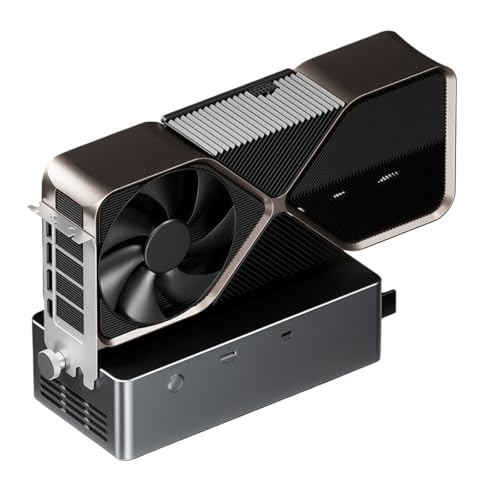
- Built-in 800W PSU supports GPUs up to 600W
- OCuLink, USB4.0, and TGX connectivity
- Open aluminum-alloy chassis with PCIe 4.0 x4
Best For: High-wattage eGPU setups using OCuLink or USB4
Premium Thunderbolt 5 Option
Razer Core X V2 eGPU Enclosure
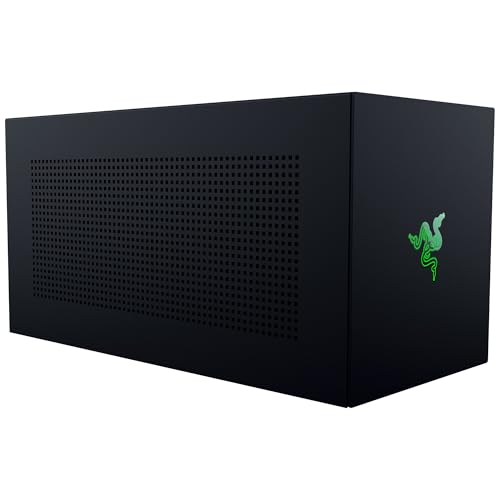
- Supports four-slot NVIDIA and AMD desktop GPUs
- Up to 80Gbps Thunderbolt 5 bandwidth
- 140W USB-C PD and modular ATX PSU support
Best For: Windows users building a customizable Thunderbolt eGPU setup
Portable Complete Kit

- Includes 240W PSU, cables, and carrying case
- Supports Thunderbolt 3/4 and USB4 hosts
- Fits GPUs up to 205mm long
Best For: Portable eGPU setups for laptops, NUCs, and handhelds
Best for OCuLink Builds
ATX-Compatible PCIe 4.0 eGPU Dock

- 64Gbps PCIe 4.0 x4 OCuLink connection
- Accepts standard ATX power supplies
- Detachable design supports large GPUs
Best For: Custom laptop or mini PC OCuLink setups
Best All-in-One Option
TREBLEET 80Gbps eGPU Enclosure

- Integrated 600W SFX PSU
- Up to 140W laptop charging
- Fits GPUs up to 340 x 154 x 57mm
Best For: Windows users needing power and docking features
Best for Thunderbolt 4 Hubs

- Built-in 750W power supply
- Thunderbolt 3/4 and USB4 support
- Adds USB-A and daisy-chain connectivity
Best For: Compatible Windows laptops and NUCs
Best Overall Versatility – MINISFORUM DEG2 USB4 V2 eGPU Dock
For shoppers comparing external gpu enclosures with power supplies, the MINISFORUM DEG2 stands out for its dual USB4 V2 and OCuLink connectivity. It accepts standard ATX or SFX power supplies, supports desktop graphics cards, and adds an M.2 NVMe slot for local storage.
Best For: Users who want flexible interface options, upgradeable power support, and a single-cable desktop workflow.
Pros:
- Supports USB4 V2/TBT5-compatible speeds up to 80Gbps and OCuLink up to 64Gbps.
- Accepts standard ATX and SFX power supplies for modular upgrades.
- Includes an M.2 2280 NVMe slot and a signal booster for high-bandwidth tasks.
- Single-cable connectivity can handle data, display, and laptop charging.
Cons:
- Power supply and graphics card choices must be provided separately.
- Its advanced feature set may be more than basic eGPU users need.
The DEG2 is a strong fit when expandability matters. Its switchable docking and GPU-performance modes, broad power-supply support, and storage slot give it more flexibility than a basic enclosure.
Best High-Power Thunderbolt 3 Option – Sonnet Breakaway Box 750ex
The Sonnet Breakaway Box 750ex is a practical choice among external gpu enclosures with power supplies for Mac and Windows systems using Thunderbolt 3. Its integrated 750W supply supports compatible high-performance graphics cards, while built-in USB-A ports and Gigabit Ethernet add useful desktop connectivity.
Best For: Creative professionals who need GPU acceleration for editing, rendering, color grading, animation, or effects work.
Pros:
- Integrated 750W power supply supports demanding compatible graphics cards.
- Works with Mac and Windows systems that support the enclosure.
- Supports GPUs up to 312mm and provides 375W continuous GPU power.
- Adds four USB-A ports and Gigabit Ethernet for peripherals and networking.
Cons:
- M1 Macs are not compatible with GPUs.
- Uses Thunderbolt 3 rather than newer USB4 or Thunderbolt 5 connectivity.
- The graphics card is not included.
With its substantial built-in power supply and useful expansion ports, the 750ex is more than a graphics dock. It is best suited to users who already have a compatible card and want a workstation-oriented Thunderbolt 3 setup.
Best PCIe 5.0 Performance – OwlTree PCIe 5.0 eGPU Dock
The OwlTree PCIe 5.0 dock takes a more modular approach to external gpu enclosures with power supplies. It connects through an NVMe M.2 slot and PCIe x16 riser cable, supports standard ATX power supplies rated at 500W or higher, and is designed for newer graphics cards including NVIDIA RTX 50 Series models.
Best For: DIY builders using an NVMe-equipped mini PC, NUC, laptop, or compatible ITX/STX system.
Pros:
- Supports PCIe 5.0 x4 transfer speeds up to 128Gbps.
- Designed for NVIDIA RTX 50 Series, AMD RX 90xx, and backward-compatible cards.
- Uses a flexible, shielded 50cm M.2-to-PCIe cable.
- Detachable dock design and status LEDs improve portability and monitoring.
Cons:
- GPU and power supply are not included.
- Requires an NVMe-protocol M.2 interface; M.2 SATA, Wi-Fi, WWAN, and USB interfaces are unsupported.
- Accepts standard ATX power supplies only, rated at 500W or higher.
This dock is a good match for technically confident users who want PCIe 5.0 bandwidth and broad graphics-card support. Its M.2 connection and external ATX power requirement make compatibility checks essential before buying.
Best Compact DIY Dock – TREBLEET Mini Thunderbolt eGPU Enclosure
The TREBLEET Mini eGPU enclosure is a compact option for shoppers seeking external gpu enclosures with power supplies while keeping the setup modular. It works with Thunderbolt 3, Thunderbolt 4, and USB4 systems, supports several external power-supply formats, and includes an extra USB-A port and downstream Thunderbolt connection.
Best For: DIY users with compatible NUCs or laptops who need a small, adaptable GPU dock.
Pros:
- Compatible with Thunderbolt 3, Thunderbolt 4, and USB4 interfaces.
- Supports SFX, ATX, FLEX, and select 19.5–20V DC power supplies.
- Includes PD 85W charging support, USB-A connectivity, and daisy chaining.
- Compact 280g design is easy to integrate into a portable setup.
Cons:
- Graphics card, power supply, and host computer are not included.
- Requires careful hardware and driver compatibility checks.
- DC power is suitable only for PCIe cards that do not require external power.
The Mini enclosure offers useful flexibility in a small footprint, but it is not a plug-and-play choice for every system. Confirm USB4 or Thunderbolt support and select the power supply according to the graphics card.
High-Power OCuLink Pick – Tangxi 800W External GPU Dock
For shoppers comparing external gpu enclosures with power supplies, the Tangxi dock stands out for its built-in 800W unit and broad connection options. Its open chassis supports GPUs up to 600W and provides OCuLink, USB4.0, and TGX connectivity, though the TGX hot-swapping feature is specifically suited to compatible ThinkBook models.
Best For: Users who want a high-wattage eGPU dock with OCuLink or USB4 connectivity and an open, flexible chassis.
Pros:
- Built-in 800W power supply supports graphics cards drawing up to 600W.
- Offers OCuLink, USB4.0, and TGX interfaces.
- OCuLink provides up to 64Gbps effective bandwidth through PCIe 4.0 x4.
- Compact aluminum-alloy frame supports graphics cards of various lengths.
Cons:
- Not suitable for 5090 or 5090D graphics cards according to the listing.
- Windows support is specified for Windows 11 version 22H2 or newer.
- Open-frame construction provides less enclosure coverage than a closed case.
The Tangxi is a strong option when integrated power and high-speed connectivity matter more than a fully enclosed design. Check your GPU’s power requirements, laptop interface, and operating-system version before buying.
Premium Thunderbolt 5 Option – Razer Core X V2 eGPU Enclosure
The Razer Core X V2 is a modular choice among external gpu enclosures with power supplies, but its power supply is not included. It is designed for desktop NVIDIA and AMD cards up to four slots wide, with Thunderbolt 5 bandwidth up to 80Gbps, USB4 compatibility, and 140W USB-C power delivery.
Best For: Windows users who already have, or want to choose, a compatible desktop GPU and ATX power supply for a premium Thunderbolt setup.
Pros:
- Supports four-slot-wide NVIDIA and AMD desktop graphics cards.
- Thunderbolt 5 connectivity offers bandwidth up to 80Gbps.
- Compatible with Thunderbolt 4, Thunderbolt 5, and USB4 devices.
- Tool-free installation supports modular GPU and ATX PSU replacement.
Cons:
- Graphics card and power supply are sold separately.
- Mac devices with M1 or later processors do not support eGPUs.
- Its 5.06 kg chassis is less portable than compact eGPU docks.
The Core X V2 makes sense for buyers who value upgrade flexibility and a substantial chassis over an all-in-one package. Budget separately for the GPU and ATX power supply, and verify that the host device runs Windows 11 with a supported connection.
Portable Complete Kit – GOLDSOUN 240W eGPU Enclosure
The GOLDSOUN enclosure is a practical pick among external gpu enclosures with power supplies because it includes a 240W PSU, Thunderbolt 4 cable, PCIe power cable, and carrying case. It supports select NVIDIA and AMD cards up to 205mm long, while its Thunderbolt and USB4 compatibility extends to laptops, NUCs, and handheld gaming devices.
Best For: Portable gaming, editing, or rendering setups using a compact graphics card and a Thunderbolt 3, Thunderbolt 4, or USB4 host.
Pros:
- Includes a 240W power supply and required connection cables.
- Comes with a custom carrying case for easier transport.
- Provides Thunderbolt connectivity, DisplayPort, and up to 85W PD charging.
- Supports Windows 10/11 and Linux systems.
Cons:
- Graphics card is not included.
- GPU compatibility is limited to cards no longer than 205mm and no wider than 55mm.
- The Type-C connection requires Thunderbolt 3/4 or USB4 support.
This GOLDSOUN model is appealing when portability and included accessories are priorities. Its compact dimensions and carrying case are useful for mobile setups, but carefully measure the graphics card and confirm the host port protocol before ordering.
Best for OCuLink Builds – ATX-Compatible PCIe 4.0 eGPU Dock
This OCuLink dock is a practical choice among external gpu enclosures with power supplies if you already have a compatible ATX power supply and want a flexible PCIe 4.0 x4 connection for a laptop or mini PC. It supports large graphics cards, but the GPU and PSU must be supplied separately.
Best For: Laptop or mini PC users building a portable OCuLink eGPU setup with their own ATX power supply.
Pros:
- PCIe 4.0 x4 bandwidth rated up to 64Gbps.
- Supports standard ATX power supplies with top-and-bottom screw mounting.
- Detachable design, flexible shielded cable, and status LEDs improve portability and monitoring.
- Accommodates graphics cards such as the RTX 4090 and RX 7900 XTX without stated length restrictions.
Cons:
- The GPU and power supply are not included.
- Requires an OCuLink connection and a compatible host device.
- OCuLink is not hot-pluggable; the computer must be turned off before disconnecting.
This is a component-focused dock rather than a complete plug-and-play enclosure. Its ATX compatibility and open GPU support make it appealing for custom builds, while the lack of an included PSU means you should budget for the remaining hardware.
Best All-in-One Option – TREBLEET 80Gbps eGPU Enclosure
The TREBLEET is a strong all-in-one option among external gpu enclosures with power supplies, pairing an integrated 600W SFX PSU with high-speed Thunderbolt 5 and USB4 v2 compatibility. It also supplies up to 140W of laptop charging, reducing cable and power-brick clutter.
Best For: Windows users who want a compact enclosure for a high-end GPU, laptop charging, and added connectivity.
Pros:
- Built-in 600W SFX PSU provides up to 450W for the GPU.
- Supports up to 140W USB Power Delivery for compatible laptops.
- 80Gbps bandwidth and a JH9480 controller target demanding gaming, rendering, and editing workloads.
- 5.5L aluminum chassis fits GPUs up to 340 x 154 x 57mm and supports daisy chaining.
Cons:
- Requires a host device with a supported external PCIe expansion port.
- macOS support is limited to Intel-based Macs with compatible AMD GPUs.
- Does not support NVIDIA GPUs or Boot Camp on macOS.
With its integrated PSU, substantial GPU capacity, and laptop charging, this model is the most convenient choice of the three for a modern Windows setup. Check your host port, GPU dimensions, and operating system before buying.
Best for Thunderbolt 4 Hubs – ORARA 750W eGPU Enclosure
The ORARA combines a built-in 750W power supply with Thunderbolt 3, Thunderbolt 4, and USB4 connectivity, making it a capable choice among external gpu enclosures with power supplies. Its hub features and daisy-chain support add flexibility, although compatibility requirements are relatively strict.
Best For: Windows laptop or NUC users with Thunderbolt 3/4 or USB4 who want GPU expansion plus basic hub functionality.
Pros:
- Built-in 750W PSU supports an external NVIDIA or AMD PCIe graphics card.
- Provides 32Gbps PCIe 3.0 x4 data transfer according to the supplied notes.
- Includes a 10Gbps USB-A port, Thunderbolt port, and daisy-chain port.
- Supports single- and dual-slot GPUs up to 350 x 157 x 59mm.
Cons:
- Does not support Thunderbolt 1/2, standard USB-C, or ordinary USB ports.
- Does not support three-slot graphics cards.
- Not compatible with Apple silicon MacBook models or NVIDIA cards in macOS.
The ORARA offers useful built-in power and connectivity for the right Thunderbolt-equipped Windows system. Its size limits and platform restrictions are important, so verify the host interface, Windows version, GPU thickness, and operating system before purchase.
How We Picked the Best External GPU Enclosures with Power Supplies
We focused on enclosure and dock designs that include, support, or are clearly intended to work with a dedicated power supply. Our comparison considers interface bandwidth, graphics-card clearance, power capacity, charging support, expansion features, and compatibility with current Windows, Mac, USB4, Thunderbolt, and OCuLink systems.
Because eGPU performance depends on the host connection as well as the graphics card, we also separated convenient plug-and-play options from more enthusiast-oriented docks that use exposed PCIe slots, riser cables, or standard ATX power supplies.
Quick Comparison
- Best for newer high-bandwidth systems: Look at Thunderbolt 5, USB4 v2, or 80Gbps-class models.
- Best for broad laptop compatibility: Thunderbolt 3/4 and USB4 enclosures are generally easier to integrate.
- Best for maximum flexibility: OCuLink and open eGPU docks can offer a more direct PCIe connection and replaceable power supplies.
- Best for demanding graphics cards: Prioritize 600W or higher output, adequate cooling, and enough physical clearance.
Key Buying Factors for External GPU Enclosures with Power Supplies
Connection and Bandwidth
Check the exact port on your computer before buying. Thunderbolt and USB4 are convenient because they use familiar cables and may support charging or peripherals, but their shared bandwidth can limit top-end GPU performance. OCuLink usually requires a compatible port or adapter, yet its direct PCIe connection may reduce overhead.
Power Capacity and Connectors
Match the enclosure’s rated wattage and GPU power connectors to your graphics card. A higher wattage rating provides more headroom, but it does not guarantee compatibility if the enclosure lacks the required 8-pin, 12V-2×6, or other connector. Confirm whether the listed power refers to total PSU output or power available to the GPU.
Size, Cooling, and Card Clearance
Verify maximum card length, height, thickness, and radiator or fan clearance. Four-slot cards may not fit compact enclosures. Active fans, ventilation, and a replaceable or standard-form-factor PSU can matter more for sustained rendering or gaming than a small difference in peak bandwidth.
Extras and Operating-System Support
Some models add M.2 storage, USB ports, power delivery, hot swapping, or multiple interface options. Treat these features as conveniences, and confirm driver, monitor-output, sleep-mode, and macOS support for your specific computer before purchase.
Who Should Buy Which External GPU Enclosures with Power Supplies?
Choose a compact Thunderbolt or USB4 enclosure if you want a tidy, portable setup for a modern laptop. Pick a Thunderbolt 5 or 80Gbps-class model when your computer supports the newer standard and you plan to use a powerful current-generation GPU. OCuLink or PCIe riser docks suit enthusiasts who prioritize bandwidth, modularity, and standard ATX power supplies over a polished enclosure.
For demanding cards and long workloads, favor models with generous wattage, strong airflow, and documented clearance. If you are unsure about compatibility, confirm the laptop port specification, GPU dimensions, PSU connectors, and required operating system support before ordering.