The best external GPU enclosures can turn a compatible laptop or compact computer into a more capable gaming, creative, or AI workstation without replacing the entire system.
This roundup compares 10 options across Thunderbolt, USB4, and OCuLink connectivity, with attention to GPU compatibility, power delivery, expansion, portability, and setup requirements.
Best 10 External GPU Enclosures Picks for 2026
Premium Thunderbolt 5 Pick
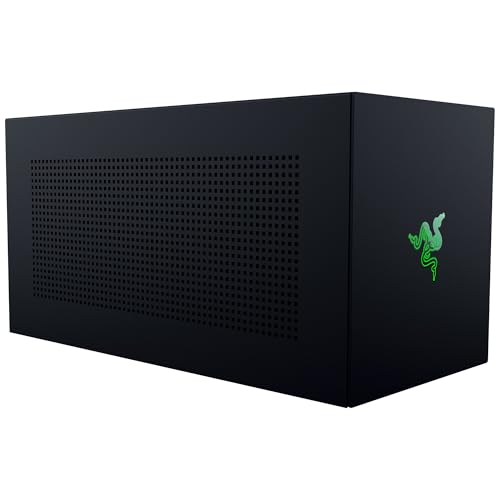
- Supports up to four-slot desktop GPUs
- Thunderbolt 5 up to 80 Gbps
- 140W USB-C PD; GPU and PSU sold separately
Best For: Windows 11 users planning a high-performance, upgradeable eGPU setup
High-Wattage Professional Pick
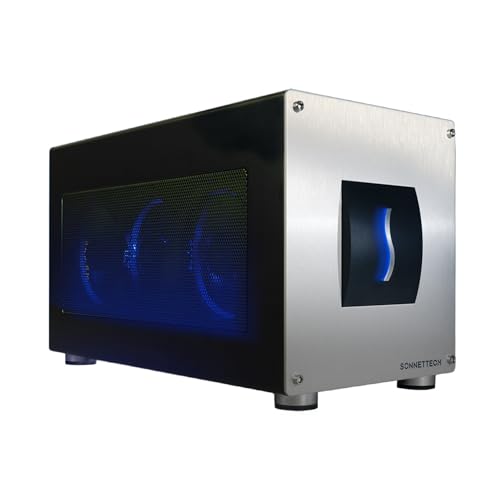
- Built-in 850W power supply
- Triple-wide GPU support
- 5GbE, USB-A, and Thunderbolt 5 connectivity
Best For: Windows 11 creative professionals and AI users needing high GPU power
Flexible Budget Dock

- 40 Gbps USB 4 connectivity
- Supports ATX and SFX power supplies
- Includes 60W PD, Ethernet, and M.2 NVMe support
Best For: Users wanting a versatile dock for laptops, NUCs, or gaming consoles
Mac and Windows Thunderbolt 3 Pick

- 750W built-in power supply
- Supports GPUs up to 312 mm
- Four USB-A ports and Gigabit Ethernet
Best For: Compatible Thunderbolt 3 Mac and Windows users needing GPU acceleration
Best Compact DIY Option
TREBLEET Thunderbolt 3/4 eGPU Enclosure

- Works with compatible Thunderbolt 3/4 and USB4 systems
- Adds USB-A, second Thunderbolt port, and 85W charging
- Supports multiple external power-supply formats
Best For: Compact laptop and NUC GPU expansion
Best Built-In Power Pick
Tangxi 800W OCuLink/USB4 eGPU Dock
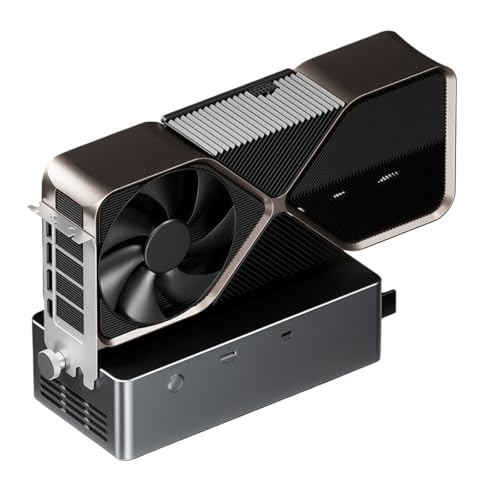
- Built-in 800W supply supports GPUs up to 600W
- OCuLink, USB4, and TGX connectivity options
- Open aluminum chassis with hot-swapping TGX support
Best For: High-power Windows 11 laptop GPU expansion
Best High-Speed Option
80Gbps Thunderbolt 5 eGPU Enclosure

- Up to 80Gbps with Thunderbolt 5 and USB4 v2 support
- Integrated 600W PSU and up to 140W laptop charging
- Fits large GPUs and supports daisy chaining
Best For: Demanding Windows or Intel Mac AMD-GPU setups
Best OCuLink Value

- PCIe 4.0 x4 interface rated up to 64Gbps
- Supports large cards including RTX 4090 and RX 7900 XTX
- Detachable design with flexible, shielded cable
Best For: Laptop and mini PC users with an ATX power supply
Best Thunderbolt Hub
750W Thunderbolt eGPU Enclosure

- Built-in 750W PSU for compatible GPUs
- Supports dual-width cards up to 350 x 157 x 59mm
- Adds USB-A, Thunderbolt, and daisy-chain connectivity
Best For: Windows 11 Thunderbolt or USB4 users needing hub features
Premium Thunderbolt 5 Pick – Razer Core X V2
The Razer Core X V2 is a forward-looking choice among external gpu enclosures for Windows 11 laptops and compatible USB 4 devices. It supports desktop NVIDIA and AMD graphics cards up to four slots wide, PCIe 4.0, Thunderbolt 5 bandwidth up to 80 Gbps, and up to 140W USB-C power delivery. The GPU and power supply are sold separately.
Best For: Windows 11 users who want a spacious, upgradeable enclosure for demanding gaming or creative workloads.
Pros:
- Supports up to four-slot NVIDIA and AMD desktop GPUs.
- Thunderbolt 5 provides up to 80 Gbps bandwidth and also works with Thunderbolt 4 and USB 4 devices.
- Tool-free GPU and ATX power-supply installation, plus active cooling from a 120 mm fan.
Cons:
- Graphics card and power supply must be purchased separately.
- Not compatible with Macs using M1 or later chipsets.
Its broad card support, modular design, and Thunderbolt 5 connectivity make the Core X V2 a strong long-term platform, provided your laptop supports the required connection and you budget for the additional GPU and PSU.
High-Wattage Professional Pick – Sonnet Breakaway Box 850 T5
The Sonnet Breakaway Box 850 T5 is one of the most capable external gpu enclosures for Windows 11 systems, pairing Thunderbolt 5’s 80 Gbps bandwidth with an integrated 850W power supply. It supports triple-wide NVIDIA and AMD cards and adds USB-A ports, 5GbE networking, and a built-in Thunderbolt 5 peripheral port.
Best For: Windows 11 professionals handling GPU-accelerated editing, rendering, animation, AI, or visual-effects workloads.
Pros:
- 850W power supply supports demanding current and future GPU cards.
- Supports triple-wide NVIDIA GeForce and AMD Radeon GPUs.
- Includes three 10Gbps USB-A ports, 5GbE Ethernet, and an additional Thunderbolt 5 port.
Cons:
- Designed for Windows 11; Mac compatibility is not stated in the supplied specifications.
- Its larger, heavier chassis may be less convenient for portable setups.
With substantial built-in power and useful dock connectivity, this enclosure is particularly compelling when a high-end GPU and workstation-style expansion matter more than compact size.
Flexible Budget Dock – VBESTLIFE USB4 GPU Enclosure
This VBESTLIFE model is a flexible option among external gpu enclosures for compatible laptops, NUCs, and gaming consoles. Its USB 4 interface supports 40 Gbps data transfer and PCIe 3.0 x4 performance, while dual Thunderbolt 3 ports, Gigabit Ethernet, an M.2 NVMe slot, and 60W power delivery add practical connectivity.
Best For: Users seeking a versatile GPU dock with expansion features and support for ATX or SFX power supplies.
Pros:
- Supports PCIe x16 graphics cards with USB 4 and Thunderbolt 3 connectivity.
- Offers 40 Gbps transfer speeds and 60W power delivery.
- Includes dual Thunderbolt 3 ports, Gigabit Ethernet, and an M.2 NVMe slot.
Cons:
- Power supply and graphics card requirements may require compatibility adjustments.
- PCIe 3.0 x4 performance is more limited than newer PCIe generations.
- The supplied specifications list broad compatibility details that should be checked against your exact device.
This enclosure stands out for connectivity and power-supply flexibility, but buyers should verify host-device support and installation requirements before choosing it for a performance-critical setup.
Mac and Windows Thunderbolt 3 Pick – Sonnet Breakaway Box 750ex
The Sonnet Breakaway Box 750ex remains a practical choice among external gpu enclosures for Thunderbolt 3 desktops and laptops running compatible Mac or Windows systems. Its 750W power supply supports a range of AMD and NVIDIA cards, while four USB-A ports and Gigabit Ethernet provide useful built-in expansion.
Best For: Thunderbolt 3 Mac or Windows users who need GPU acceleration and integrated peripheral connectivity.
Pros:
- 750W power supply supports many compatible AMD and NVIDIA GPU families.
- Supports GPUs up to 312 mm with 375W continuous GPU power.
- Adds four USB-A ports and Gigabit Ethernet.
Cons:
- Macs with M1 chips are not compatible with GPUs.
- Thunderbolt 3 offers less bandwidth than newer Thunderbolt 5 enclosures.
- The GPU card is not included.
For compatible Thunderbolt 3 systems, the 750ex combines established eGPU support with helpful dock features. Confirm your computer, operating system, card dimensions, and GPU compatibility before buying.
Best High-Bandwidth Pick – MINISFORUM DEG2 USB4 V2 eGPU Dock
The MINISFORUM DEG2 is one of the most versatile external gpu enclosures for users who want both USB4 V2/TBT5-compatible and OCuLink connectivity. It supports standard ATX and SFX power supplies, desktop graphics cards, and includes an M.2 2280 slot for local project files or AI models.
Best For: High-bandwidth GPU workflows, AI inference, 8K rendering, and users who switch between docking and pure-GPU modes.
Pros:
- Supports up to 80Gbps through USB4 V2/TB5-compatible connectivity and up to 64Gbps through OCuLink.
- Built-in M.2 2280 slot adds convenient local storage for models and project files.
- Works with ATX and SFX power supplies and includes a signal re-drive booster for improved PCIe stability.
- Can provide data, display, and laptop charging through one TB5 cable.
Cons:
- Power supply and graphics card are not specified as included in the supplied notes.
- Its advanced feature set may be more than basic eGPU users need.
Choose the DEG2 if you want a flexible enclosure that can grow with your graphics card and storage needs. Its dual-interface design and modular power support make it especially appealing for demanding desktop-style setups.
Best Compact DIY Option – TREBLEET Thunderbolt 3/4 eGPU Enclosure
The TREBLEET mini eGPU dock is a compact choice among external gpu enclosures for compatible laptops and NUCs. Its JHL7440 controller, 85W charging support, extra USB-A port, and second Thunderbolt port make it useful as both a GPU dock and a small expansion hub.
Best For: USB4 or Thunderbolt 3/4 laptop users who want a compact, hub-friendly enclosure and are comfortable handling compatibility and power-supply setup.
Pros:
- Compatible with Thunderbolt 3, Thunderbolt 4, and USB4 systems when the host hardware supports them.
- Includes USB-A and a second Thunderbolt port for downstream devices and daisy chaining.
- Supports SFX, ATX, FLEX, and compatible DC power supplies, with up to 85W PD charging support.
- Small, lightweight design measures 9.45 by 2.91 by 1.1 inches and weighs 280 grams.
Cons:
- Requires separate graphics card and power supply.
- Compatibility must be verified before purchase, and setup may require DIY knowledge.
- Not recommended for handheld game consoles according to the supplied notes.
The TREBLEET is a practical space-saving option, but it rewards careful preparation. Confirm USB4 or Thunderbolt support on the host and match the power supply to the selected PCIe card before buying.
Best Built-In Power Pick – Tangxi 800W OCuLink/USB4 eGPU Dock
The Tangxi dock stands out among external gpu enclosures by including an 800W power supply in an open metal chassis. It supports PCIe 4.0 x4 graphics expansion through OCuLink, USB4, or its TGX interface, with up to 600W graphics card power according to the supplied specifications.
Best For: Windows 11 laptop users who want a high-power open-frame dock with built-in power and OCuLink or TGX connectivity.
Pros:
- Built-in 800W power supply supports graphics cards rated up to 600W.
- Offers OCuLink, USB4, and TGX interfaces, with TGX hot-swapping support.
- Open aluminum-alloy chassis supports graphics cards of various lengths.
- Provides three 8-pin graphics card power connectors.
Cons:
- Not suitable for RTX 5090 or 5090D models according to the supplied notes.
- Supports Windows 11 22H2 or newer rather than a broad range of operating systems.
- Its open chassis provides less enclosure coverage than a closed design.
The Tangxi is a strong fit when built-in power matters more than a traditional enclosed form factor. Check your laptop interface, Windows version, and GPU power requirements carefully before choosing it.
Best High-Speed Option – 80Gbps Thunderbolt 5 eGPU Enclosure
For buyers seeking future-ready external gpu enclosures, the TREBLEET stands out with Thunderbolt 5 and USB4 v2 compatibility, an integrated power supply, and support for large graphics cards. It is especially appealing for demanding gaming, 3D rendering, and video-editing setups.
Best For: Windows users and Intel Mac owners with compatible AMD graphics cards who want high bandwidth, laptop charging, and a compact desktop-style dock.
Pros:
- Supports up to 80Gbps bandwidth through its JH9480 controller.
- Built-in 600W SFX PSU provides up to 450W for the GPU.
- Offers up to 140W laptop Power Delivery through one cable.
- Fits graphics cards up to 340 x 154 x 57mm and supports daisy chaining.
Cons:
- Does not support NVIDIA GPUs or Boot Camp on macOS.
- Mac support is limited to Intel-based Macs with compatible AMD GPUs.
The TREBLEET is a strong premium choice when bandwidth, integrated power, and charging convenience matter. Confirm your host port and graphics-card dimensions before buying, particularly for Mac systems.
Best OCuLink Value – PCIe 4.0 OCuLink eGPU Dock
This OwlTree dock takes a different approach to external gpu enclosures by using an OCuLink connection and a separate standard ATX power supply. Its detachable design and PCIe 4.0 x4 interface make it a practical option for laptop and mini PC users who already have the required power hardware.
Best For: Laptop and mini PC owners who want broad graphics-card size support and already have a compatible ATX power supply.
Pros:
- Supports PCIe 4.0 x4 transfer speeds up to 64Gbps.
- Designed to accommodate graphics cards such as the RTX 4090 and RX 7900 XTX.
- Detachable construction improves portability and storage.
- Shielded, flexible OCuLink cable helps reduce interference and cable strain.
Cons:
- GPU and power supply are not included.
- Requires a standard ATX power supply.
- OCuLink does not support hot plugging; the computer must be shut down before disconnecting.
This is a flexible, component-based solution rather than an all-in-one enclosure. It can be a good fit for performance-focused users, but budget for an ATX PSU and plan to power down before making OCuLink connections.
Best Thunderbolt Hub – 750W Thunderbolt eGPU Enclosure
The ORARA is one of the more versatile external gpu enclosures for Thunderbolt and USB4 laptops, combining a 750W power supply with hub features and daisy-chain support. Its dual-width graphics-card capacity makes it suitable for compact workstations, provided your computer meets its strict port and operating-system requirements.
Best For: Windows 11 users with Thunderbolt 3, Thunderbolt 4, or USB4 systems who want an eGPU enclosure that also connects peripherals.
Pros:
- Includes a built-in 750W power supply.
- Supports NVIDIA and AMD PCIe graphics cards up to 350 x 157 x 59mm.
- Provides a 10Gbps USB-A port, Thunderbolt port, and daisy-chain port.
- Uses the JHL7440 controller and supports PCIe 3.0 x4 data transfer.
Cons:
- Does not support three-slot graphics cards.
- Requires Thunderbolt 3, Thunderbolt 4, or USB4; ordinary USB-C is not sufficient.
- Not compatible with MacBook models using M1, M2, M3, or M4 chips.
The ORARA offers useful connectivity beyond graphics expansion, but compatibility checks are essential. Verify the host port, Windows 11 requirement, GPU width, and Mac restrictions before choosing it.
How We Picked the Best External GPU Enclosures
We focused on enclosure design, host connectivity, power capacity, graphics-card support, expansion features, and practical compatibility. The selection includes Thunderbolt 3, Thunderbolt 4, Thunderbolt 5, USB4, and OCuLink models because bandwidth and compatibility vary significantly between systems.
We also considered whether each enclosure includes a built-in power supply, supports standard desktop GPUs, provides laptop charging, and offers useful extras such as USB ports, Ethernet, NVMe storage, or daisy chaining. Since most enclosures do not include a graphics card, the cost and physical requirements of your chosen GPU remain important parts of the buying decision.
Quick Comparison
| Connection type | Typical strength | Best suited to |
|---|---|---|
| Thunderbolt 3/4 and USB4 at 40Gbps | Broad compatibility and simple single-cable setups | Laptops, Macs, and everyday upgrades |
| Thunderbolt 5 and USB4 v2 | Higher available bandwidth on supported systems | Newer laptops and demanding external-GPU workloads |
| OCuLink | Direct PCIe connectivity and low overhead | Mini PCs and systems with a dedicated OCuLink port |
| Built-in 600W–850W PSU | More headroom for power-hungry graphics cards | High-performance desktop GPUs |
Key Buying Factors for External GPU Enclosures
Host and GPU Compatibility
Check your computer’s exact port standard rather than relying on connector shape. USB-C does not automatically support Thunderbolt or USB4, and an enclosure cannot add eGPU support if the host system lacks the required PCIe tunneling or OCuLink connection. Confirm operating-system support, GPU dimensions, slot width, and any manufacturer limitations before buying.
Bandwidth and Real-World Performance
Thunderbolt 3, Thunderbolt 4, and standard 40Gbps USB4 can provide a convenient upgrade, but they do not match a desktop PCIe connection in every workload. Thunderbolt 5 and USB4 v2 offer more bandwidth when both the computer and enclosure support them. OCuLink generally provides a more direct link, but it usually sacrifices the convenience of one-cable docking and laptop charging.
Power, Cooling, and Expansion
Match the enclosure’s PSU wattage and GPU power connectors to your graphics card. Leave room for transient power demands, especially with high-end cards. Large GPUs may require a four-slot enclosure, while compact models can be easier to transport but less flexible. USB ports, Ethernet, NVMe slots, and power delivery are useful bonuses, not substitutes for the correct host interface.
Who Should Buy Which External GPU Enclosures?
Choose a Thunderbolt 3/4 or 40Gbps USB4 enclosure if you want the widest compatibility and a straightforward laptop upgrade. These are sensible choices for gaming, photo work, video editing, and general acceleration.
Choose Thunderbolt 5 or USB4 v2 if your laptop already supports the newer standard and you want more bandwidth for demanding graphics workloads. Buying a faster enclosure for an older port will not create a performance benefit.
Choose OCuLink if your mini PC or handheld has a dedicated OCuLink port and maximum link performance matters more than portability or integrated docking features.
Choose a high-wattage enclosure for larger, power-hungry GPUs. Before ordering, verify card length, thickness, auxiliary power plugs, cooling clearance, operating-system support, and whether the enclosure’s included cable matches your computer.