The right enclosure can turn a spare SATA hard drive or SSD into convenient external storage for backups, file transfers, system recovery, and media libraries. Compatibility, cooling, speed, and ease of installation all matter when choosing a case for a Windows PC.
We selected 10 practical options covering 2.5-inch and 3.5-inch drives, USB-A and USB-C connections, tool-free designs, docking stations, and multi-drive setups. Use the guide below to narrow the list based on your drive and workflow.
Best 10 Hard Drive Enclosures for Windows Picks for 2026
Best All-Around Enclosure
UGREEN 2.5/3.5-Inch SATA Enclosure
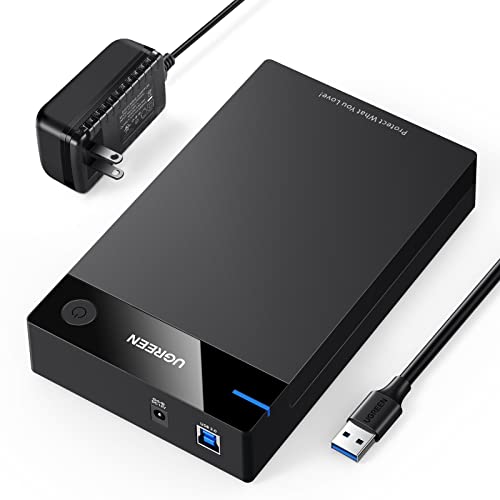
- Supports 2.5-inch and 3.5-inch SATA drives up to 20TB
- USB 3.0 with UASP and speeds up to 5Gbps
- Includes 12V power adapter and tool-free setup
Best For: Windows users needing one enclosure for multiple SATA drive sizes
Best With Cooling
SABRENT USB 3.0 Hard Drive Dock
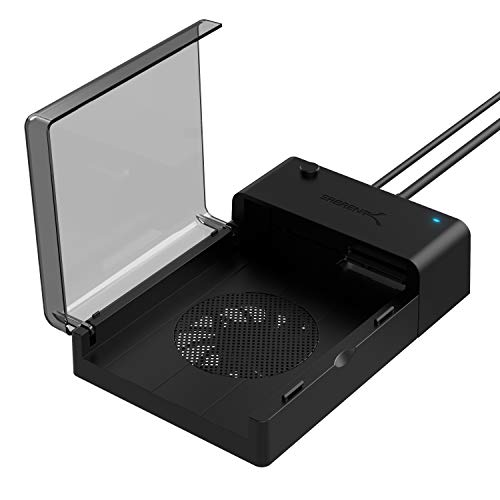
- Built-in fan for active drive cooling
- Supports 2.5-inch and 3.5-inch SATA drives up to 22TB
- Includes hot-swap support and Acronis cloning software download
Best For: Frequent Windows backups, cloning, and desktop drive access
Best Compact 2.5-Inch Pick
SABRENT Tool-Free SATA Enclosure

- Designed for 2.5-inch SATA HDDs and SSDs
- Tool-free, plug-and-play installation
- Compact design with USB 3.0 and UASP support
Best For: Repurposing a 2.5-inch laptop drive or SSD
Best High-Capacity Pick
CLAVOOP 3.5-Inch SATA Enclosure

- Supports 2.5-inch and 3.5-inch SATA drives up to 20TB
- USB 3.0 with UASP and included 12V/2A adapter
- Ventilated lay-flat design with shock protection
Best For: Powered desktop-drive storage expansion and recovery
Best Portable Option
UGREEN 2.5-Inch USB 3.0 Enclosure

- Fits 7mm and 9.5mm 2.5-inch SATA drives
- UASP-enabled USB 3.0 supports up to 5Gbps
- Lightweight shell with EVA foam protection
Best For: Portable laptop-drive upgrades and file recovery
Best Tool-Free Design
SABRENT 2.5/3.5-Inch SATA Enclosure
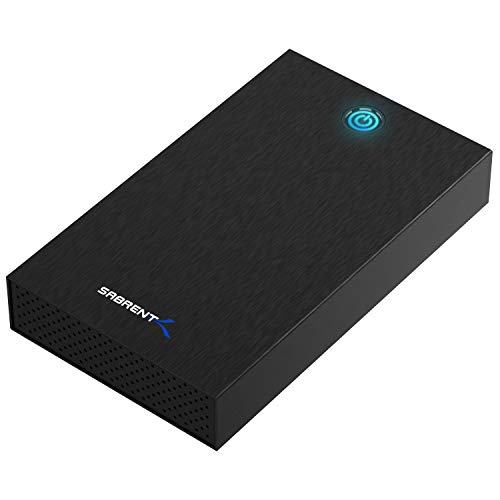
- Tool-free slide-and-click drive installation
- Supports 2.5-inch and 3.5-inch SATA drives up to 22TB
- Aluminum shell and included 12V/2A power adapter
Best For: Frequent SATA drive swaps on Windows 10 or 11
Best Tool-Free Pick
BENFEI 2.5-Inch SATA Enclosure

- Tool-free installation with no driver required
- Supports SATA drives up to 6TB
- Includes USB Type-C/Type-A cable
Best For: Windows users needing a compact single-drive enclosure
Best Aluminum 2.5-Inch Option

- USB-C interface with up to 10Gbps support
- Aluminum body aids passive heat dissipation
- Supports 2.5-inch SATA drives up to 6TB
Best For: USB-C-equipped Windows PCs and portable drive use
Best Dual-Bay Choice
CENMATE Two-Bay SATA Enclosure

- Holds two 2.5- or 3.5-inch SATA drives
- Supports up to 20TB per drive
- Includes cooling fan and hot swapping
Best For: Windows users building a larger desktop storage setup
Best All-Around Enclosure – UGREEN 2.5/3.5-Inch SATA Enclosure
For shoppers comparing hard drive enclosures for Windows, the UGREEN enclosure is a flexible choice for both 2.5-inch and 3.5-inch SATA HDDs or SSDs. It supports drives up to 20TB, connects over USB 3.0, and includes a 12V power adapter for compatible desktop drives.
Best For: Windows users who want one enclosure for both desktop and laptop-size SATA drives.
Pros:
- Supports 2.5-inch and 3.5-inch SATA I/II/III HDDs and SSDs up to 20TB.
- USB 3.0 and UASP support provide transfer speeds up to 5Gbps.
- Tool-free setup, heat-dissipation openings, and protective rubber strips.
- Compatible with Windows 11, 10, 8.1, and 7, plus other listed platforms.
Cons:
- Requires a separate power adapter connection for use with 3.5-inch drives.
- Only supports one drive at a time.
This is a practical pick when drive-size flexibility matters. Its broad Windows support and included power supply make it suitable for backups, extra storage, and accessing older SATA drives.
Best With Cooling – SABRENT USB 3.0 Hard Drive Dock
The SABRENT EC-DFFN is a dock-style option for hard drive enclosures for Windows, supporting standard 2.5-inch and 3.5-inch SATA HDDs. Its built-in cooling fan, hot-swappable design, and USB 3.0 connection make it useful for recurring backups and drive transfers.
Best For: Windows users who regularly access desktop-size drives and want active cooling.
Pros:
- Works with standard 2.5-inch and 3.5-inch SATA hard drives.
- Built-in cooling fan helps keep drives operating cool.
- Supports drives up to 22TB and USB 3.0 transfers up to 5Gbps.
- Plug-and-play, hot-swappable operation with free Acronis cloning software download.
Cons:
- Its lay-flat dock format is less enclosed than a traditional portable case.
- Supports one drive at a time.
Choose this model if cooling and convenient drive swapping are higher priorities than portability. It is especially suited to a Windows desktop workspace used for backups, cloning, or file migration.
Best High-Capacity Dock – ORICO 2.5/3.5-Inch SATA Dock
Among hard drive enclosures for Windows, the ORICO DD18 is a convenient docking station for quickly accessing 2.5-inch or 3.5-inch SATA drives. It supports capacities up to 22TB, UASP, hot-swapping, and multiple operating systems, while its tool-less design simplifies drive changes.
Best For: Windows users who need a high-capacity dock for occasional drive swapping.
Pros:
- Supports 2.5-inch and 3.5-inch SATA I/II/III drives up to 22TB.
- USB 3.0 with UASP and transfer speeds up to 5Gbps.
- Tool-less, hot-swappable design with dust protection, LED indicators, and an anti-skid pad.
- Supports Windows, macOS, Linux, and other listed platforms.
Cons:
- New or unallocated drives must be initialized and formatted in Windows Disk Management.
- Does not support IDE or SAS drives.
- Supports one drive at a time.
The ORICO is a strong fit for a workstation where drives are inserted and removed regularly. Its 22TB capacity limit and broad platform support add flexibility, but buyers should confirm that their drives use SATA rather than IDE or SAS.
Best Compact 2.5-Inch Pick – SABRENT Tool-Free SATA Enclosure
The SABRENT EC-UASP is a compact choice for hard drive enclosures for Windows when you only need to use a 2.5-inch SATA HDD or SSD. Its tool-free installation, USB 3.0 connection, and lightweight plastic housing make it convenient for notebook drives and SSDs.
Best For: Windows users converting a 2.5-inch SATA laptop drive or SSD into external storage.
Pros:
- Tool-free installation with plug-and-play and hot-swappable operation.
- Supports USB 3.0 transfer rates up to 5Gbps and UASP for compatible SSD setups.
- Compact, lightweight design measuring about 5.31 by 2.91 by 0.59 inches.
- Backwards-compatible with USB 2.0 and USB 1.1.
Cons:
- Only supports 2.5-inch SATA drives, not 3.5-inch desktop drives.
- Its listed Windows compatibility covers older versions through Windows 8 rather than explicitly listing Windows 10 or 11.
This enclosure makes sense for repurposing a spare notebook drive or SATA SSD. It is easy to carry and install, but users with newer Windows systems or 3.5-inch drives should verify compatibility and choose a larger model if needed.
Best High-Capacity Pick – CLAVOOP 3.5-Inch SATA Enclosure
For shoppers comparing hard drive enclosures for windows, the CLAVOOP is a practical choice for desktop-size SATA drives. Its lay-flat design supports both 3.5-inch and 2.5-inch SATA HDDs and SSDs, while the included power adapter supports larger-capacity drives.
Best For: Windows users who need a powered enclosure for 3.5-inch SATA drives, storage expansion, or data recovery.
Pros:
- Supports 2.5-inch and 3.5-inch SATA HDDs and SSDs up to 20TB.
- USB 3.0 with UASP supports up to 5Gbps transfer rates.
- Includes a 12V/2A power adapter and USB 3.0 cable.
- Ventilation holes, shock-proof sponges, non-slip pads, and an auto-sleep function aid everyday use.
Cons:
- Not compatible with IDE, mSATA, or M.2 drives.
- Requires an external power adapter for operation.
- Actual transfer speeds depend on the connected hardware.
The CLAVOOP stands out when capacity and 3.5-inch support matter more than portability. Confirm that your drive uses SATA before buying.
Best Portable Option – UGREEN 2.5-Inch USB 3.0 Enclosure
Among hard drive enclosures for windows, the UGREEN 2.5-inch model is a compact option for connecting a SATA laptop drive or SSD. It uses USB 3.0 and UASP for fast transfers without requiring a separate power adapter for the enclosure.
Best For: Windows users who want a lightweight enclosure for 2.5-inch SATA drives, file recovery, or portable storage.
Pros:
- Supports 7mm and 9.5mm 2.5-inch SATA HDDs and SSDs up to 6TB.
- USB 3.0 and UASP support transfer rates up to 5Gbps.
- Compact design includes EVA foam protection and a detachable 12-inch cable.
- Plug-and-play compatibility includes Windows, Linux, and macOS.
Cons:
- Does not support 3.5-inch drives.
- Drive is not included.
- Screws on the drive may need to be removed for proper fit.
This UGREEN enclosure is a sensible pick for repurposing an older laptop drive or SSD. Its 6TB limit and 2.5-inch-only design make it less suitable for desktop hard drives.
Best Tool-Free Design – SABRENT 2.5/3.5-Inch SATA Enclosure
The SABRENT EC-KSL3 offers broad SATA drive support for shoppers seeking hard drive enclosures for windows. Its slide-and-click installation makes drive swaps simple, and its aluminum shell with an internal shock-absorbing tray is designed for practical desktop use.
Best For: Windows 10 and 11 users who regularly swap compatible 2.5-inch or 3.5-inch SATA drives.
Pros:
- Supports both 2.5-inch and 3.5-inch SATA HDDs and SSDs.
- Tool-free installation requires no screws or tools.
- USB 3.0 with UASP and an aluminum shell supports performance and heat dissipation.
- Includes a 12V/2A power adapter and supports drives up to 22TB.
Cons:
- Not compatible with SAS, M.2, NVMe, or IDE/PATA drives.
- Requires a wall outlet and is not USB bus-powered.
- USB-C-only computers need a separate USB-C-to-USB-A adapter.
The SABRENT is especially convenient for testing or rotating multiple SATA drives. Check drive dimensions carefully, particularly with some 4TB-and-larger 3.5-inch models, before purchasing.
Best Tool-Free Pick – BENFEI 2.5-Inch SATA Enclosure
For shoppers comparing hard drive enclosures for Windows, the BENFEI is a straightforward choice for connecting one 2.5-inch SATA HDD or SSD to a computer. Its tool-free design, included USB Type-C/Type-A cable, and support for UASP make it practical for file transfers, backups, and drive reuse.
Best For: Windows users who want a compact, single-drive enclosure with simple installation.
Pros:
- Tool-free, plug-and-play installation with no driver required.
- Supports 2.5-inch SATA I/II/III drives up to 6TB and 7/9.5mm thickness.
- Supports UASP and data transfer rates up to 6Gbps.
- Includes both USB Type-C and Type-A connectivity through the supplied cable.
Cons:
- Designed for 2.5-inch drives only.
- Supports one drive at a time.
The BENFEI focuses on convenience and broad compatibility rather than multi-drive expansion. Its 18-month warranty adds useful purchase protection for a basic Windows storage setup.
Best Aluminum 2.5-Inch Option – UGREEN USB-C SATA Enclosure
The UGREEN enclosure is a strong option among hard drive enclosures for Windows when you want USB-C connectivity and an aluminum body. It supports 2.5-inch SATA HDDs and SSDs up to 6TB, while its UASP-compatible chipset is designed for faster transfers and passive heat dissipation.
Best For: Windows users with USB-C computers who want a portable enclosure for a 2.5-inch SATA drive.
Pros:
- USB-C interface supports up to 10Gbps, with SATA III transfers up to 6Gbps.
- UASP support is rated up to 70% faster than traditional USB 3.0.
- Aluminum alloy construction helps dissipate heat without a cooling fan.
- Tool-free, plug-and-play setup requires no extra power supply.
Cons:
- Limited to 2.5-inch SATA drives and capacities up to 6TB.
- USB-A-only devices require a USB-C-to-USB-A cable.
With support for Windows, macOS, Linux, consoles, and other compatible devices, the UGREEN is versatile. Its USB-C cable is convenient for newer PCs, though users with only USB-A ports may need an additional cable.
Best Dual-Bay Choice – CENMATE Two-Bay SATA Enclosure
For users who need more capacity than a single-drive case provides, the CENMATE is a two-bay option among hard drive enclosures for Windows. It accepts both 2.5- and 3.5-inch SATA HDDs or SSDs, includes USB-A and USB-C 3.0 cables, and supports hot swapping without RAID or NAS functionality.
Best For: Windows desktops and laptops needing a larger, two-drive external storage setup.
Pros:
- Two bays support 2.5- and 3.5-inch SATA drives, up to 20TB per drive.
- Built-in aluminum construction and a 2-inch cooling fan help manage heat.
- Tool-free installation and hot swapping simplify drive changes.
- Supports USB 3.0 speeds up to 5Gbps and daisy chaining of up to three devices.
Cons:
- Fan noise is rated around 40–50 decibels.
- It is DAS only and does not provide RAID or NAS functionality.
- The larger dual-bay design is less portable than a single-drive enclosure.
The CENMATE is aimed at capacity and drive flexibility rather than silent operation or advanced storage management. Its Windows 7-and-above compatibility and dual-bay design make it suitable for desktop-oriented expansion.
How We Picked the Best Hard Drive Enclosures for Windows
We focused on enclosures and docks that support common SATA HDDs and SSDs used with Windows desktops and laptops. The selection includes compact 2.5-inch cases, larger 3.5-inch enclosures, dual-size docks, and dual-bay hardware for users managing more than one drive.
We also considered connection type, advertised USB bandwidth, UASP support, installation method, cooling, portability, and practical compatibility. A USB 3.0 enclosure is generally sufficient for most SATA SSDs and hard drives, while USB-C can make connection easier on newer laptops when the enclosure and cable support the same standard.
Quick Comparison
| Best For | Look For | Recommended Type |
|---|---|---|
| Portable 2.5-inch drive | Tool-free installation and compact size | 2.5-inch USB 3.0 or USB-C enclosure |
| Desktop 3.5-inch HDD | External power and reliable cooling | 3.5-inch enclosure or powered dock |
| Swapping multiple drives | Open access and broad drive support | SATA docking station |
| Two drives at once | Dual-bay design and adequate power | Dual-bay enclosure |
Key Buying Factors for Hard Drive Enclosures for Windows
Drive Size and Interface
Confirm whether your drive is 2.5-inch or 3.5-inch and whether it uses SATA. Most products here are designed for SATA drives, not M.2 NVMe SSDs. A 2.5-inch laptop drive typically needs no separate power brick, while a 3.5-inch desktop HDD usually requires an enclosure with an AC adapter.
USB Connection and Speed
USB 3.0, also labeled USB 3.2 Gen 1, offers up to 5Gbps in ideal conditions. USB 3.1 or USB 3.2 Gen 2 hardware can be faster, but both the enclosure and Windows computer must support the higher standard. UASP support can improve performance and reduce overhead with compatible Windows systems.
Cooling, Power, and Installation
Hard drives generate heat during extended transfers, so ventilated enclosures or docks are useful for frequent backups and large media libraries. Tool-free cases are convenient for occasional upgrades, while docks are better for repeatedly accessing bare drives. Make sure the included power supply is suitable for your 3.5-inch drive.
Who Should Buy Which Hard Drive Enclosures for Windows?
Choose a compact 2.5-inch tool-free enclosure for a laptop SSD, retired notebook drive, or portable backup. Select a 3.5-inch powered enclosure or dock for a desktop HDD and long transfer sessions. A USB-C model makes the most sense for newer Windows laptops, but check whether it includes a compatible cable. If you regularly clone, recover, or rotate drives, a dock is more convenient than a closed case. For simultaneous storage or backup work, choose a powered dual-bay enclosure and verify how Windows recognizes each installed drive.