The best hard drive enclosures make unused SATA drives practical again, whether you need a portable backup drive, a simple upgrade, or a multi-disk storage setup.
This roundup covers compact 2.5-inch cases, versatile 3.5-inch enclosures, tool-free docks, and higher-capacity multi-bay options. Use the guide below to match drive compatibility, connection speed, cooling, and capacity to your workflow.
Best 10 Hard Drive Enclosures Picks for 2026
Best Overall
UGREEN 2.5/3.5-Inch SATA Enclosure
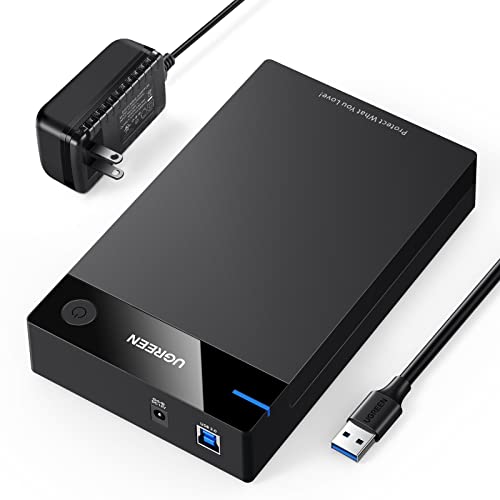
- Supports 2.5-inch and 3.5-inch SATA drives up to 20TB
- USB 3.0 with UASP supports up to 5Gbps
- Includes power adapter and protective design
Best For: Versatile SATA storage, backups, and console use
Best Docking Station

- Tool-free bay accepts 2.5-inch and 3.5-inch SATA drives
- Hot-swappable design avoids reboots
- Includes 12V adapter for 3.5-inch drives
Best For: Frequent drive swapping and temporary SATA access
Best Ventilated Design
CLAVOOP 3.5-Inch SATA Enclosure

- Ventilated lay-flat housing with non-slip feet
- Supports 2.5-inch and 3.5-inch SATA drives up to 20TB
- Includes shock protection and a 12V/2A adapter
Best For: Stable, cool operation with desktop SATA drives
Best Compact Option
SABRENT 2.5-Inch Tool-Free Enclosure

- Lightweight 2-ounce enclosure for 2.5-inch SATA drives
- Tool-free, plug-and-play installation
- USB 3.0 supports up to 5Gbps with UASP
Best For: Portable storage and 2.5-inch laptop-drive upgrades
Best Multi-Drive Value
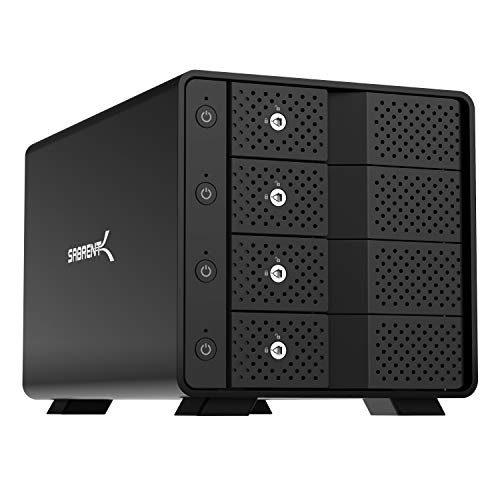
- Four independent 3.5-inch SATA bays
- 10Gbps USB-C and up to 80TB
- Trayless hot-swap with active cooling
Best For: Local multi-drive storage without RAID
Best Single-Drive Dock

- Supports one 2.5- or 3.5-inch SATA drive
- USB-A/USB-C cable included
- UASP support and automatic sleep mode
Best For: Compact single-drive desktop storage
Best Maximum Capacity

- Five 3.5-inch bays and up to 100TB
- 10Gbps USB-C with independent controllers
- PWM temperature-controlled 120mm cooling
Best For: Large local multi-drive DAS setups
Best High-Capacity Pick
CENMATE 4-Bay Hard Drive Enclosure

- Four bays support 2.5-inch and 3.5-inch SATA drives
- USB 3.0 and eSATA connectivity
- Up to 80TB stated capacity; no RAID or NAS
Best For: Multi-drive desktop storage for home or business use
Best Simple Single-Drive Option
SABRENT USB 3.0 Hard Drive Enclosure
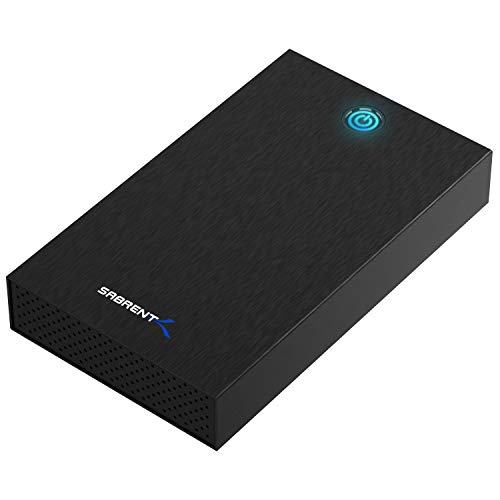
- Tool-free enclosure for one SATA HDD or SSD
- Fits 2.5-inch and 3.5-inch drives
- USB 3.0 with UASP and included 12V adapter
Best For: Quick access to a single SATA drive
Best Flexible Dual-Bay Pick
CENMATE 2-Bay Hard Drive Enclosure

- Two bays with tool-free installation and hot-swapping
- Supports 2.5-inch and 3.5-inch SATA drives
- USB 3.0 and daisy-chain expansion support
Best For: Two-drive storage with convenient drive replacement
Best Overall – UGREEN 2.5/3.5-Inch SATA Enclosure
If you need a versatile hard drive enclosure for both desktop and laptop drives, the UGREEN enclosure supports 2.5-inch and 3.5-inch SATA HDDs and SSDs. It includes a 12V power adapter for 3.5-inch drives and supports capacities up to 20TB.
Best For: Users who want one enclosure for SATA drives, backups, extra storage, or compatible gaming consoles.
Pros:
- Supports 2.5-inch and 3.5-inch SATA I/II/III drives up to 20TB
- USB 3.0 and UASP support provide transfer rates up to 5Gbps
- Includes a 12V/2A power adapter and USB cable
- Tool-free, plug-and-play setup with shock protection and ventilation
Cons:
- Requires safe removal before unplugging to help avoid data loss
- Uses a USB 3.0 Type-A to Type-B cable rather than a USB-C connection
Its broad drive compatibility, included power supply, and protective construction make this a strong all-purpose choice among hard drive enclosures.
Best Docking Station – SABRENT SATA Drive Dock
The SABRENT EC-DFLT is a lay-flat hard drive enclosure designed for quick access to bare 2.5-inch and 3.5-inch SATA drives. Its tool-free bay supports hot-swapping and includes a required 12V adapter for 3.5-inch drives.
Best For: Users who frequently swap SATA drives for transfers, testing, or temporary access.
Pros:
- Accepts 2.5-inch and 3.5-inch SATA I/II/III HDDs and SSDs
- Tool-free, plug-and-play hot-swapping without rebooting
- Includes a 12V/2A adapter for 3.5-inch drives
- LED indicates power and drive activity
Cons:
- Supports SATA drives only; it does not support IDE, M.2, NVMe, or SAS
- Uses a USB Type-A host cable and is not a USB-C dock
- S.M.A.R.T. diagnostics do not pass through the USB bridge
This dock prioritizes convenience over a fully enclosed design, making it especially practical for users who regularly rotate bare SATA drives.
Best Ventilated Design – CLAVOOP 3.5-Inch SATA Enclosure
The CLAVOOP enclosure combines a lay-flat design with large ventilation openings, non-slip feet, and shock-absorbing sponges. This hard drive enclosure supports 2.5-inch and 3.5-inch SATA drives up to 20TB and includes the power adapter needed for 3.5-inch models.
Best For: Users who want a stable, ventilated enclosure for desktop drives, data transfers, or recovery work.
Pros:
- Supports 2.5-inch and 3.5-inch SATA HDDs and SSDs up to 20TB
- Large ventilation holes and four non-slip pads promote stable operation
- Includes shock-proof sponges, LED status indicators, and auto-sleep
- USB 3.0 UASP support and included 12V/2A adapter
Cons:
- Does not support IDE, mSATA, or M.2 drives
- Actual transfer performance can vary by the connected hardware
- It has no stated warranty in the supplied specifications
With its cooling-focused housing and drive-protection features, the CLAVOOP is a sensible option when stable desktop placement matters.
Best Compact Option – SABRENT 2.5-Inch Tool-Free Enclosure
The SABRENT EC-UASP is a compact hard drive enclosure for standard 2.5-inch SATA notebook drives and SSDs. Its tool-free design, low weight, and USB 3.0 connection make it convenient for portable storage or drive upgrades.
Best For: Laptop-drive users who want a lightweight enclosure for a 2.5-inch SATA HDD or SSD.
Pros:
- Compact 2-ounce design is easy to carry
- Tool-free installation with plug-and-play operation
- Supports USB 3.0 transfer rates up to 5Gbps and UASP for SATA III
- Compatible with USB 2.0 and USB 1.1 ports
Cons:
- Supports 2.5-inch SATA drives only
- Not suitable for 3.5-inch drives or newer M.2 formats
- Older listed operating-system support may not reflect every modern system
This is a straightforward choice for repurposing a 2.5-inch SATA drive, particularly when portability and simple installation are priorities.
Best Multi-Drive Value – SABRENT 4-Bay USB-C Enclosure
For buyers comparing hard drive enclosures for several SATA drives, the SABRENT DS-SC4B offers four independent 3.5-inch bays, 10Gbps USB-C connectivity, and trayless hot-swapping. It is a direct-attached JBOD enclosure rather than a hardware RAID or NAS system, so each drive remains individually accessible.
Best For: Users who need reliable access to up to four 3.5-inch SATA HDDs or SSDs from a Windows, macOS, or Linux computer.
Pros:
- Four independent ASMedia controller connections help provide stable multi-drive access.
- Supports up to four 3.5-inch SATA drives and up to 80TB of total capacity.
- Trayless hot-swap design includes per-bay power switches, activity LEDs, and a locking key.
- Aluminum-and-metal construction and a 92mm fan support extended operation.
Cons:
- Drives are not included.
- Uses JBOD-style direct-attached storage, not hardware RAID or network storage.
- The most reliable connection requires a USB-C to USB-C connection.
This is a practical middle ground for expanding local storage without managing a larger five-bay unit. Its per-bay controls and independent connections are particularly useful when drives need to be accessed or powered separately.
Best Single-Drive Dock – RSHTECH USB-C SATA Enclosure
The RSHTECH RSH-339STC is one of the simpler hard drive enclosures for connecting a single 2.5- or 3.5-inch SATA drive. It includes a detachable USB-A/USB-C cable, supports UASP, and can sit flat or upright in its removable stand.
Best For: Users who need a compact enclosure for one SATA HDD or SSD, with flexible USB-A and USB-C host compatibility.
Pros:
- Supports 2.5-inch and 3.5-inch SATA drives up to 24TB.
- Included 2-in-1 cable works with USB-A, USB-C, and Thunderbolt host ports.
- Aluminum housing, bottom vents, and a removable vertical stand aid practical desktop use.
- Automatic sleep after 10 minutes of inactivity can reduce unnecessary drive operation.
Cons:
- Holds only one drive.
- Transfer performance is rated up to 5Gbps, with UASP support up to 6Gbps, rather than 10Gbps.
- Drives are not included.
Choose this model when you want a straightforward single-drive solution rather than a multi-bay enclosure. Its dual-connector cable and included stand make it convenient for mixed computer setups and flexible placement.
Best Maximum Capacity – SABRENT 5-Bay DAS Dock
For the highest drive count in this group of hard drive enclosures, the SABRENT DS-SC5B provides five empty 3.5-inch SATA bays and 10Gbps USB-C connectivity. It is built for direct-attached, individually managed storage, with no hardware RAID or NAS functionality.
Best For: Users who need to connect up to five 3.5-inch SATA HDDs or SSDs and want a large-capacity DAS setup with quieter temperature-controlled cooling.
Pros:
- Five independent bays support up to 100TB total capacity.
- Dedicated controller per bay is designed for stable, drop-free multi-drive access.
- Trayless hot-swap design includes per-bay switches, activity LEDs, and a locking key.
- 120mm PWM fan adjusts cooling based on drive temperature and supports quieter everyday use.
Cons:
- Drives are not included.
- It is direct-attached storage, not a hardware RAID system or NAS.
- Its larger five-bay design takes more desk space than a single-drive enclosure.
This is the strongest choice when expansion room matters more than a compact footprint. The internal power supply, daisy-chain-capable rear USB-C port, and temperature-controlled fan make it well suited to a substantial local storage setup.
Best High-Capacity Pick – CENMATE 4-Bay Hard Drive Enclosure
If you need multiple drives in one desktop storage setup, this 4-bay hard drive enclosure supports 2.5-inch and 3.5-inch SATA HDDs and SSDs, with up to 80TB of combined stated capacity. USB 3.0 and eSATA connectivity offer flexible host options, while the aluminum body and built-in fan help with cooling.
Best For: Users who need four drive bays for personal or business storage and can accommodate an externally powered desktop enclosure.
Pros:
- Supports four 2.5-inch or 3.5-inch SATA drives, up to 20TB per drive.
- Offers USB-A/C 3.0 and eSATA connectivity with transfer rates up to 5Gbps.
- Aluminum construction, built-in 2-inch fan, and included 12V power adapter.
- Compatible with Windows, Mac, and Linux systems.
Cons:
- Not a RAID or NAS enclosure.
- The fan may produce approximately 40–50dB of noise.
- Hot-swapping is not supported, and eSATA access to multiple bays requires computer-side RAID support.
This is a practical choice when bay count and capacity matter more than silent operation or RAID features. Check your computer’s eSATA capabilities carefully if you plan to use that connection.
Best Simple Single-Drive Option – SABRENT USB 3.0 Hard Drive Enclosure
For a single SATA drive, this compact hard drive enclosure offers tool-free installation and USB 3.0 with UASP. It accepts 2.5-inch and 3.5-inch SATA HDDs or SSDs, includes a 12V power adapter, and works with Windows, macOS, and Linux without additional drivers.
Best For: Users who want a straightforward, tool-free enclosure for one internal SATA HDD or SSD.
Pros:
- Supports both 2.5-inch and 3.5-inch SATA HDDs and SSDs.
- Tool-free design enables quick drive installation and swapping.
- USB 3.0 with UASP and plug-and-play support for Windows, macOS, and Linux.
- Aluminum shell, shock-absorbing ABS tray, LED indicator, and included power adapter.
Cons:
- Supports only one drive and requires a wall outlet.
- USB-A host connection may require an adapter for computers with USB-C-only ports.
- Not compatible with SAS, M.2, NVMe, or IDE/PATA drives; S.M.A.R.T. diagnostics are unavailable through the USB bridge.
This SABRENT model keeps single-drive expansion simple, especially for users who value tool-free access. Confirm that your drive is SATA and that its physical dimensions fit before ordering.
Best Flexible Dual-Bay Pick – CENMATE 2-Bay Hard Drive Enclosure
This dual-bay hard drive enclosure is designed for users who want more capacity than a single-drive case without moving to a four-bay setup. It supports 2.5-inch and 3.5-inch SATA HDDs and SSDs, includes tool-free trays and hot-swapping, and connects through USB 3.0 with USB-A/C cable support.
Best For: Users who need two accessible SATA drives, convenient drive replacement, and the option to expand through daisy chaining.
Pros:
- Two bays support 2.5-inch and 3.5-inch SATA HDDs or SSDs, up to 20TB per drive.
- Tool-free installation and hot-swapping simplify drive changes.
- USB 3.0 provides transfer rates up to 5Gbps, with USB-A/C cable support.
- USB host port enables daisy chaining up to three devices for stated expansion up to 120TB.
Cons:
- It is a DAS enclosure, not a RAID or NAS system.
- The built-in fan may produce approximately 40–50dB of noise.
- Requires external power through the included adapter.
Choose this model if hot-swapping and two-drive flexibility are more useful than a single-drive enclosure’s smaller footprint. Its expansion port adds capacity options, but the setup remains dependent on USB connectivity rather than RAID or NAS management.
How We Picked These Hard Drive Enclosures
We selected these models based on the features that matter most in everyday storage use: SATA drive compatibility, supported drive sizes, connection type, transfer-speed potential, installation process, cooling, portability, and multi-drive capacity. The list includes both single-drive enclosures and desktop-style docks so you can compare a basic external-drive conversion with a larger direct-attached storage setup.
We also considered practical details such as tool-free installation, hot-swapping, included USB cables, aluminum construction, cooling fans, and support for modern USB-C connections. Actual performance depends on the installed drive, computer port, cable, file sizes, and enclosure controller.
Quick Comparison
| Type | Best For | What to Check |
|---|---|---|
| 2.5-inch enclosure | SSDs, laptop drives, portability | SATA compatibility, bus power, UASP |
| 3.5-inch enclosure | Desktop HDDs and large-capacity storage | External power supply, cooling, drive capacity |
| Single-drive dock | Frequent drive access and cloning | Top-loading design, hot-swap support, stability |
| 4- or 5-bay enclosure | Backups, media libraries, and DAS storage | Bay independence, cooling, USB-C speed, power management |
Key Buying Factors for Hard Drive Enclosures
Drive Size and Interface
Confirm whether the enclosure accepts 2.5-inch drives, 3.5-inch drives, or both. Most products in this roundup use SATA connections, but an enclosure for SATA drives will not directly accept an NVMe M.2 drive. A 3.5-inch HDD generally also requires a dedicated power adapter, while many 2.5-inch models can run from USB power.
Connection Speed
USB 3.0 is sufficient for many hard drives and basic SSD use, while USB-C 10Gbps can reduce transfer times when paired with a fast SSD and compatible host port. USB-C describes the connector, not necessarily the speed, so check the stated data rate. UASP support can improve command handling and reduce overhead on compatible computers.
Cooling and Construction
Aluminum bodies can help dissipate heat, but ventilation and fans matter more during long transfers. For multi-bay units or continuously used desktop HDDs, prioritize active cooling, sensible spacing, and a stable power supply. A compact fanless enclosure may be preferable for occasional or portable use.
Installation and Features
Tool-free designs are convenient when swapping drives often. Docks make bare-drive access easier, while enclosed cases provide better protection for a drive that will remain installed. For several disks, verify whether the bays operate independently and whether the enclosure is a true DAS device rather than a hardware RAID system.
Who Should Buy Which Hard Drive Enclosures?
For Portable Backups
Choose a compact 2.5-inch enclosure, especially for a SATA SSD or laptop hard drive. Look for bus-powered operation, a tool-free cover, and UASP support.
For a Desktop Hard Drive
A 3.5-inch enclosure or single-drive docking station is the better fit. Prioritize an included power adapter, ventilation, and enough capacity support for your disk.
For Frequent Drive Swapping
Choose a top-loading dock or tool-free model. These are useful for migrations, diagnostics, cloning, and rotating backup drives, though bare drives receive less physical protection.
For Large Storage Libraries
Move to a 4-bay or 5-bay USB-C enclosure when you need several independent drives connected at once. Favor active cooling, 10Gbps connectivity, reliable power management, and clear compatibility with your operating system.