Choosing the right converter can determine whether your live production runs smoothly or stalls over mismatched interfaces, resolutions, or frame rates. This roundup covers practical options for connecting HDMI, SDI, USB, and NDI equipment in studio, event, and mobile workflows.
We included solutions for simple signal conversion, professional 4K routing, network video, legacy sources, and multi-camera streaming. Pay close attention to signal direction, supported formats, latency, power requirements, and loop-through connectivity before you buy.
Best 10 Hdmi Converters for Live Video Production Picks for 2026
Best Live Switching Hub

- Four HDMI camera inputs
- Built-in streaming, recording, and multiview
- Integrated audio mixing and production effects
Best For: Multicamera livestreams and compact broadcast setups
Best 4K Signal Flexibility

- HDMI and SDI cross-conversion
- Scaling and frame-rate conversion
- Built for 4K production workflows
Best For: Mixed HDMI/SDI live video systems
Best Plug-and-Play Capture
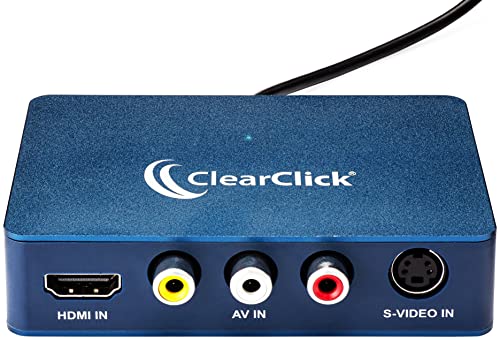
- HDMI capture up to 1080P
- Supports AV, RCA, and S-Video sources
- USB-C works with PC, Mac, and Linux
Best For: Computer-based streaming and legacy video capture
Best Compact HDMI-to-SDI Link
Micro Converter HDMI to SDI 12G

- One HDMI input and two SDI outputs
- Supports SDI rates through 12G
- Automatic format detection and reclocking
Best For: Linking HDMI sources with SDI production equipment
Best NDI-to-HDMI Decoder
Magewell Pro Convert NDI to HDMI 64100

- Converts NDI and NDI|HX streams to HDMI
- Supports up to 4K60 output
- PoE/USB power and web-based control
Best For: Low-latency NDI decoding and 4K display integration
Best Bidirectional 3G Converter
Bidirectional SDI/HDMI Converter 3G

- Converts SDI to HDMI and HDMI to SDI
- Supports uncompressed 1080p60 video
- SDI transmission up to 80 m at 3G-SDI
Best For: Full HD broadcast and streaming systems using SDI and HDMI
Best HDMI-to-NDI Encoder
Magewell Pro Convert HDMI Plus

- Encodes HDMI sources into NDI
- Includes HDMI loop-through monitoring
- Works with OBS, vMix, and Wirecast
Best For: Adding HDMI cameras and sources to NDI production workflows
Best SDI-to-HDMI Bridge
1080p SDI Converter with Loop Out

- Converts SD, HD, and 3G-SDI to HDMI
- Supports synchronized 1080p audio and video
- Provides SDI loop-out connectivity
Best For: HD SDI camera monitoring and display setups
Best USB Camera Converter

- Converts compatible MJPEG UVC cameras to HDMI
- Outputs up to 1080p60 with low latency
- Embeds UAC audio through HDMI
Best For: USB-camera streaming and HDMI production workflows
Best Budget SDI Converter

- Accepts 3G, HD, and SD-SDI signals
- Supports synchronized 1080p HDMI output
- Adds SDI loop-out for monitoring workflows
Best For: Standard HD SDI-to-HDMI production connections
Best Live Switching Hub – ATEM Mini Pro
The Blackmagic Design ATEM Mini Pro is a strong choice when your search for HDMI converters for live video production also includes switching, streaming, recording, and monitoring. It accepts four HDMI camera inputs and adds integrated production controls for multicamera events.
Best For: Multicamera livestreams, education, business presentations, and esports events.
Pros:
- Four HDMI inputs with 10-bit 4:2:2 YUV support.
- Built-in streaming, recording, multiview, and a six-input, two-channel audio mixer.
- Includes transitions, upstream and downstream keying, and Ethernet connectivity.
Cons:
- It is a production switcher rather than a simple HDMI conversion adapter.
- It has four HDMI inputs, so larger camera setups may require additional equipment.
Choose this model when you need an all-in-one HDMI production center instead of a single-purpose converter. Its integrated controls and connectivity can simplify a compact live workflow.
Best 4K Signal Flexibility – Decimator 12G-CROSS
Decimator 12G-CROSS 4K HDMI/SDI Cross Converter with Scaling and Frame Rate Conversion
Check Price On AmazonThe Decimator 12G-CROSS is designed for production environments that need HDMI and SDI cross-conversion with scaling and frame-rate conversion. It is a practical option for adapting signals between common professional video interfaces.
Best For: Live production systems that need HDMI/SDI conversion, scaling, and frame-rate conversion.
Pros:
- Supports HDMI and SDI cross-conversion.
- Includes scaling and frame-rate conversion for signal adaptation.
- Designed for 4K workflows.
Cons:
- The supplied notes do not specify supported resolutions, frame rates, or detailed input/output configurations.
- It may be more specialized than needed for basic HDMI capture or switching.
This converter makes the most sense when your production chain mixes HDMI and SDI equipment. Verify the exact format and connection requirements for your cameras, displays, and other devices before buying.
Best Plug-and-Play Capture – ClearClick Video to USB
The ClearClick Video to USB device is a versatile capture option for HDMI and older analog sources. It records or live streams through USB-C, supports computers running Windows, Mac, or Linux, and includes software for getting started.
Best For: Computer-based streaming and digitizing HDMI, composite, RCA, or S-Video sources.
Pros:
- Captures HDMI sources at up to 1080P, including sources up to 4K at 30 FPS.
- Supports AV, RCA, and S-Video sources, with automatic HD upscaling for analog video.
- USB-C plug-and-play design works with PCs, Macs, and Linux systems; a USB-A adapter is included.
Cons:
- It does not support copyrighted or content-protected HDMI sources.
- HDMI capture and output are limited to 1080P even though inputs can reach 4K at 30 FPS.
- It is a USB capture device, not a standalone live-production switcher.
For creators who need a straightforward computer capture path, this device covers both modern HDMI gear and legacy video sources. Its format support is especially useful for mixed-source streaming or archival projects.
Best Compact HDMI-to-SDI Link – Micro Converter HDMI to SDI 12G
The Blackmagic Design Micro Converter HDMI to SDI 12G provides a compact way to feed an HDMI source into SDI-based live video equipment. It automatically matches the HDMI input and offers two SDI outputs with multi-rate support through 12G.
Best For: Connecting HDMI cameras or devices to professional SDI infrastructure, including HD, Ultra HD, and 4K workflows.
Pros:
- Converts HDMI input to two SDI video outputs.
- Supports 270Mb, 1.5G, 3G, 6G, and 12G SDI rates.
- Automatically detects SD, HD, 2K, Ultra HD, and 4K formats and provides reclocking.
Cons:
- The supplied notes list one HDMI input and do not indicate HDMI pass-through.
- It is a signal converter, so it does not provide switching, streaming, or recording controls.
- Its maximum supply voltage is specified as 5.25V DC, so compatible power arrangements matter.
This is a focused solution for productions that need to extend an HDMI source into SDI equipment. Its dual SDI outputs and broad rate support make it useful in compact professional signal chains.
Best NDI-to-HDMI Decoder – Magewell Pro Convert NDI to HDMI 64100
For HDMI converters for live video production, the Magewell Pro Convert NDI to HDMI is a strong fit when your workflow needs to turn network-based NDI or NDI|HX streams into a display-ready HDMI signal. It supports output up to 4096×2160 at 60 fps and includes processing tools for adapting the signal to the connected display.
Best For: Live productions that need low-latency NDI decoding, 4K HDMI output, and flexible network control.
Pros:
- Decodes full-bandwidth NDI and NDI|HX streams to HDMI with near-zero latency.
- Supports output up to 4096×2160 at 60 fps with scaling and EDID-based optimization.
- Offers de-interlacing, frame-rate conversion, cropping, scaling, and color-space adjustments.
- Supports PoE or USB power, web configuration, HTTP API control, tally, embedded audio, and PTZ integration.
Cons:
- It is designed for NDI-to-HDMI conversion rather than bidirectional format conversion.
- Its feature set may be more advanced than needed for simple HDMI-only setups.
Choose this model when your production infrastructure is built around NDI and you need a reliable, compact decoder for 4K displays or monitoring. The metal housing and 24/7 operational design also suit continuous-use environments.
Best Bidirectional 3G Converter – Bidirectional SDI/HDMI Converter 3G
Among HDMI converters for live video production, this bidirectional SDI/HDMI unit is useful when a setup must connect professional SDI equipment with HDMI cameras, displays, or other devices. It handles SDI-to-HDMI and HDMI-to-SDI conversion at up to 1080p and is designed for plug-and-play operation.
Best For: Broadcast, streaming, photography, and installation workflows that require affordable 3G-SDI and HDMI compatibility.
Pros:
- Provides both SDI-to-HDMI and HDMI-to-SDI conversion in one device.
- Supports adaptive input up to 1080p and uncompressed 1080p at 60 fps.
- Supports SDI transmission distances up to 80 m for 3G-SDI, 100 m for HD-SDI, and 120 m for SD-SDI.
- Uses an FPGA chip with clock recovery, ESD protection, and a durable aluminum housing.
Cons:
- Its maximum supported resolution is 1080p, so it is not intended for 4K production.
- The supplied notes identify HDMI as the interface, so buyers should verify the exact connector layout before installation.
This converter makes the most sense for Full HD systems that move between HDMI and SDI. Its bidirectional design reduces the need for separate converters, while the metal enclosure and long-distance SDI support suit demanding production and installation environments.
Best HDMI-to-NDI Encoder – Magewell Pro Convert HDMI Plus
The Magewell Pro Convert HDMI Plus is a practical choice among HDMI converters for live video production when an HDMI camera or source needs to join an IP-based NDI workflow. It can encode HDMI input into NDI, provide local loop-through monitoring, and integrate with platforms such as OBS Studio, vMix, and Wirecast.
Best For: Multi-camera studios, classrooms, and field productions that need HDMI sources on an NDI network.
Pros:
- Converts HDMI input up to 4096×2160 into an NDI output stream.
- Provides HDMI loop-through for local monitoring while transmitting over NDI.
- Includes video processing for de-interlacing, scaling, cropping, aspect-ratio, and color-format conversion.
- Supports PTZ control, tally, PoE or USB power, and compatibility with major NDI-enabled production systems.
Cons:
- It is an HDMI-to-NDI encoder, not an NDI-to-HDMI decoder.
- Supported input frame rate and chroma options vary by format, with 4K60 input listed at 4:2:0.
This model is well suited to productions transitioning from HDMI sources to network-based video. Loop-through monitoring and broad software compatibility make it especially useful for live directing, remote camera placement, and multi-camera NDI systems.
Best SDI-to-HDMI Bridge – 1080p SDI Converter with Loop Out
For live video production setups built around SDI cameras, this converter provides a straightforward way to feed an HDMI television, monitor, or projector. It supports SD-SDI, HD-SDI, and 3G-SDI signals up to 1080p, making it a practical HDMI converter for live video production when 4K is not required.
Best For: Connecting an SDI camera or other SDI source to an HDMI display while retaining an SDI loop-out connection.
Pros:
- Converts SD-SDI, HD-SDI, and 3G-SDI to HDMI.
- Supports up to 1920x1080p with synchronized audio and video.
- Includes SDI loop out for compatible production and monitoring workflows.
- Metal housing, heat dissipation, and plug-and-play operation.
Cons:
- Does not support 4K output.
- Converts SDI to HDMI only; it cannot convert HDMI to SDI.
- Requires a coaxial cable with a BNC male connector and does not support RF, CVBS, AHD, TVI, or CVI signals.
This is a focused choice for HD production environments that need dependable SDI-to-HDMI conversion and loop-through capability. Verify that your source outputs SDI before ordering.
Best USB Camera Converter – UVC to HDMI 1080p60 Adapter
This UVC-to-HDMI unit is designed for productions that start with a compatible USB camera and need a direct HDMI feed. It can output up to 1080p at 60Hz with low latency, making it a useful HDMI converter for live video production involving monitors, switchers, capture cards, or encoders.
Best For: Turning a compatible MJPEG UVC USB camera into an HDMI source for streaming and multi-camera workflows.
Pros:
- Provides direct HDMI output without additional software.
- Supports up to 1920×1080 at 60Hz with low-latency output.
- Embeds UAC audio into the HDMI connection for synchronized audio and video.
- Offers 5V/1A USB power output and supports external power input up to 12V.
Cons:
- Compatibility is limited to UVC cameras with MJPEG video output.
- Does not support YUY2/YUYV, NV12/NV21, RGB, H.264, or H.265 formats.
- It is intended for USB-camera conversion rather than SDI-source workflows.
The main buying consideration is camera compatibility: confirm that your USB camera outputs MJPEG UVC video and, where needed, UAC audio. With a supported camera, this adapter offers a simple route into HDMI-based production equipment.
Best Budget SDI Converter – 3G/HD/SD-SDI to HDMI
For standard HD broadcast and production connections, this converter accepts 3G-SDI, HD-SDI, and SD-SDI and sends the signal to an HDMI display. Its BNC input and loop-out design make it a practical HDMI converter for live video production when you need 1080p support rather than 4K.
Best For: SDI camera and equipment users who need plug-and-play HDMI monitoring with SDI loop-through.
Pros:
- Supports 3G-SDI, HD-SDI, and SD-SDI sources.
- Delivers up to 1920x1080p with synchronized audio and video.
- Includes a BNC input and SDI loop-out connection.
- Uses a metal housing with heat dissipation and an intelligent chip design.
Cons:
- Does not support 4K resolution.
- Only converts SDI to HDMI, not HDMI to SDI.
- Does not support RF, CVBS, AHD, TVI, or CVI signals and requires a BNC male coaxial connection.
This model fits conventional HD production systems where SDI distribution and HDMI monitoring are both needed. Check your source type and connector before choosing it, especially if your equipment uses a non-SDI signal.
How We Picked These Hdmi Converters for Live Video Production
We selected products that address common production problems rather than focusing on one type of converter. The lineup includes HDMI-to-SDI and SDI-to-HDMI adapters, bidirectional units, HDMI and USB capture devices, NDI encoders and decoders, a 4K cross converter, and a compact live-streaming switcher.
Our evaluation criteria included supported resolution and frame rates, conversion direction, audio handling, signal reliability, loop-through options, network compatibility, power flexibility, and suitability for field or studio use. Product descriptions and stated capabilities should still be verified against the latest manufacturer specifications before purchase.
Quick Comparison
| Need | Best-fit type | What to prioritize |
|---|---|---|
| Connect HDMI cameras to SDI infrastructure | HDMI-to-SDI converter | SDI data rate, cable distance, embedded audio |
| Feed an HDMI display from an SDI source | SDI-to-HDMI converter | Loop output, resolution support, audio de-embedding |
| Convert between formats or frame rates | Cross converter | Scaling, frame-rate conversion, 4K support |
| Send video over a network | NDI encoder or decoder | NDI version, Ethernet speed, latency, PoE |
| Capture older or mixed sources | USB capture device | Inputs, UVC support, audio sync, operating-system compatibility |
| Switch multiple HDMI sources | Live-streaming switcher | Input count, multiview, streaming, recording, control |
Key Buying Factors for Hdmi Converters for Live Video Production
Signal Direction and Interface
Confirm whether you need HDMI to SDI, SDI to HDMI, both directions, or conversion to and from NDI. A one-way adapter is often smaller and less expensive, while a bidirectional model can be more useful in changing production setups.
Resolution, Frame Rate, and Scaling
Match the converter to the exact formats produced by your cameras and required by your switcher, recorder, or display. For 4K workflows, check whether the device supports your required frame rate and HDMI or SDI standard. Scaling and frame-rate conversion are valuable when sources do not match, but they can add cost and processing latency.
Audio and Latency
Check whether audio is embedded, passed through, extracted, or converted separately. For live work, low and consistent latency matters, especially when combining cameras, microphones, and projection or remote guests.
Power, Cabling, and Reliability
Consider AC, USB, battery, or PoE power options, along with the connectors and cable lengths used on location. SDI is generally better suited to long cable runs, while HDMI is common for cameras, computers, and consumer displays. Locking connectors, cooling, status indicators, and loop-through outputs can improve reliability.
Who Should Buy Which Hdmi Converters for Live Video Production?
- Small streaming teams: Choose an HDMI switcher or USB capture device if you need simple source selection, computer streaming, or integrated production controls.
- SDI-based studios and events: Select an HDMI-to-SDI, SDI-to-HDMI, or bidirectional converter based on the direction of your signal path; prioritize loop-through when downstream equipment also needs the feed.
- 4K productions: Look for a genuine 4K converter with the required frame-rate, scaling, and standard support rather than assuming every “12G” device handles every format.
- Networked video workflows: Use an NDI encoder to place HDMI on the network or an NDI decoder to return network video to an HDMI display or switcher. Gigabit Ethernet and suitable network capacity are essential.
- Mobile and budget setups: Favor compact USB-powered hardware, but verify heat management, operating-system support, and whether the device accepts your camera’s output format.