Choosing among today’s laptops means balancing performance, portability, screen quality, storage, and price. This roundup compares 10 standout options for productivity, schoolwork, business tasks, and everyday computing.
From Apple’s M5-powered MacBook Air to practical Windows laptops with large displays, Microsoft 365, touchscreens, and numeric keypads, these picks cover a wide range of needs and budgets.
Best 10 Laptops Picks for 2026
Best Premium Mac
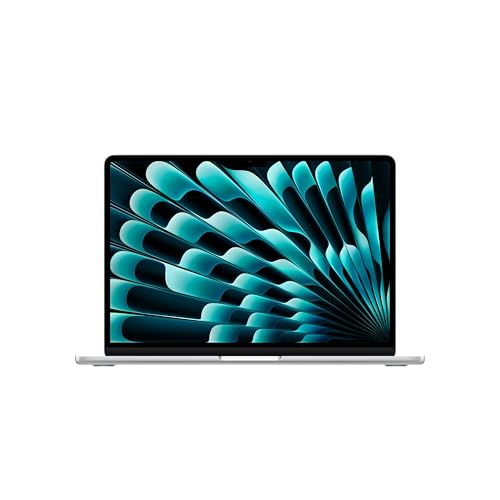
- M5 chip with 16GB unified memory
- Up to 18 hours of battery life
- 13.6-inch Liquid Retina display
Best For: Students, creatives, and Apple ecosystem users
Best Budget Windows Laptop
Lenovo Business 15.6-inch Laptop

- 15.6-inch Full HD anti-glare display
- Includes 1-year Microsoft 365 Personal
- Lightweight design with versatile ports
Best For: Students, remote workers, and everyday home use
Best Touchscreen Laptop

- Ryzen 5 7530U with 16GB RAM
- 512GB PCIe NVMe SSD
- FHD IPS touchscreen and backlit keyboard
Best For: Business users and multitaskers
Best Everyday Lenovo

- 15.6-inch anti-glare display
- Lightweight 3.42-pound design
- Includes Microsoft 365 and Copilot key
Best For: Students and home users with basic computing needs
Best Budget Everyday Laptop

- Intel N150 processor for everyday tasks
- Lightweight 14-inch design with up to 11-hour video playback
- Includes Microsoft 365 Personal and Copilot
Best For: Students, home users, and basic productivity
Best Large-Screen Business Laptop

- Ryzen 5 processor with 16GB RAM and 512GB SSD
- Large anti-glare screen and full-size numeric keypad
- Battery life listed at up to 12 hours
Best For: Business work, spreadsheets, and desk-based multitasking
Best Cloud-Ready Student Laptop

- Includes Microsoft 365 and 1TB OneDrive storage
- Lightweight design with Wi-Fi 6 and versatile ports
- Intel N150 processor for everyday computing
Best For: Students and mobile users who rely on cloud storage
Best Premium Mac – Apple MacBook Air M5
For shoppers seeking premium laptops for college, creative work, and everyday productivity, the 2026 MacBook Air combines an M5 chip with a lightweight design. Its 13.6-inch Liquid Retina display, long battery life, and macOS features make it a strong portable option.
Best For: Students, creatives, and Apple users who prioritize portability, battery life, and smooth multitasking.
Pros:
- M5 chip, 16GB unified memory, and AI-focused performance support demanding multitasking.
- Up to 18 hours of battery life in a 2.71-pound design.
- Sharp Liquid Retina display, 12MP Center Stage camera, and four-speaker Spatial Audio system.
- Includes Thunderbolt 4, MagSafe charging, Wi-Fi 7, and support for up to two external displays.
Cons:
- The 13.6-inch screen may feel compact for users who prefer larger workspaces.
- Storage is limited to a 512GB SSD configuration.
The MacBook Air is a polished choice for buyers already invested in the Apple ecosystem. It offers a compelling balance of performance, portability, connectivity, and battery endurance for school and general creative workflows.
Best Budget Windows Laptop – Lenovo Business 15.6-inch Laptop
This Lenovo is one of the more practical laptops for everyday computing on a budget. Its 15.6-inch Full HD anti-glare display, Windows 11 Home, Microsoft 365 subscription, and useful port selection suit schoolwork, office tasks, streaming, and video calls.
Best For: Students, remote workers, and home users who need basic productivity features at a budget-friendly price.
Pros:
- Intel N150 processor and 8GB LPDDR5 memory handle browsing, documents, streaming, and basic multitasking.
- Includes a 1-year Microsoft 365 Personal subscription with Office apps and 1TB OneDrive storage.
- 15.6-inch 1920×1080 anti-glare display with a 720p webcam privacy shutter.
- Lightweight 3.42-pound chassis with USB-C, HDMI, SD card, and dual USB-A ports.
Cons:
- Its 128GB UFS storage provides less room than many SSD-equipped laptops.
- The TN display may be less appealing than an IPS panel for demanding visual work.
This Lenovo focuses on practical value rather than high-end performance. It is a sensible pick for routine office, education, communication, and entertainment tasks, especially when the bundled Microsoft 365 subscription is useful.
Best Touchscreen Laptop – HP 15.6-inch Ryzen 5 Laptop
For shoppers comparing versatile laptops for work and multitasking, this HP pairs a Ryzen 5 processor with 16GB of RAM and a 512GB PCIe NVMe SSD. The touchscreen, backlit keyboard, Windows 11 Pro, and privacy-focused camera make it well suited to professional use.
Best For: Business users, developers, and multitaskers who want a touchscreen and ample memory.
Pros:
- Six-core Ryzen 5 7530U processor supports everyday productivity and multitasking.
- 16GB RAM and 512GB NVMe SSD provide useful capacity and responsive boot times.
- 15.6-inch FHD IPS touchscreen offers wide viewing angles and touch navigation.
- Backlit keyboard with numeric keypad, Windows 11 Pro, and camera privacy shutter support office work.
Cons:
- The USB-C port is listed for data only, limiting its connectivity flexibility.
- The 41Wh battery is designed for daily use but is smaller than some high-end laptop batteries.
This HP stands out among these laptops for combining strong everyday specifications with business-friendly features. Its larger memory and SSD capacity should make it more comfortable for frequent multitasking than entry-level configurations.
Best Everyday Lenovo – Lenovo IdeaPad Slim 3 15
This Lenovo IdeaPad Slim 3 is a straightforward choice among laptops for school, home, and basic office work. It combines an Intel N150 processor with 8GB LPDDR5 memory, a Full HD display, Microsoft 365, and a portable 3.42-pound design.
Best For: Students and home users who need a portable laptop for browsing, documents, online classes, and streaming.
Pros:
- 15.6-inch anti-glare display provides a roomy workspace for documents and online classes.
- Lightweight 0.70-inch design includes MIL-STD-810H testing for everyday durability.
- Useful connectivity includes USB-C with Power Delivery and DisplayPort, HDMI, USB-A, SD card, and Wi-Fi 6.
- Includes Windows 11 Home, Microsoft 365 Personal, a Copilot key, and a camera privacy shutter.
Cons:
- 128GB UFS storage and 8GB memory are best suited to essential computing rather than demanding workloads.
- Integrated graphics are intended for everyday use, not specialized graphics performance.
The IdeaPad Slim 3 is a sensible everyday laptop when portability, familiar software, and connectivity matter more than premium performance. It fits common education and home tasks while remaining easy to carry.
Best Large-Screen Touch Laptop – HP OmniBook 3 16
The HP OmniBook 3 is one of the more capable laptops here for users who want a roomy screen, touch controls, and comfortable everyday performance. Its 16-inch 2K IPS display, Ryzen 5 processor, 512GB SSD, and Windows 11 make it well suited to productivity, streaming, video calls, and light creative work.
Best For: Home users, multitaskers, students, and anyone who prefers a large touchscreen for work and entertainment.
Pros:
- 16-inch 2K IPS touchscreen offers detailed visuals and wide viewing angles.
- Ryzen 5 processor, 8GB LPDDR5 RAM, and 512GB NVMe SSD provide balanced everyday performance.
- FHD HDR camera, AI noise reduction, Wi-Fi 6, and Bluetooth 5.4 support calls and connectivity.
- Rated for up to 14 hours and 15 minutes of battery life, with fast charging to 50% in about 45 minutes.
Cons:
- At 3.6 pounds, it is less travel-friendly than smaller 14-inch laptops.
- Integrated Radeon 610M graphics are intended for entertainment and casual gaming rather than demanding graphics work.
- Only 8GB of onboard memory is listed, so memory expansion may be limited.
Choose this HP if screen size and display quality matter more than maximum portability. It offers a useful blend of touch-screen convenience, storage, battery life, and communication features for general computing.
Best Student Value Laptop – HP 14 with Intel N150
This HP 14 is a practical choice among laptops for schoolwork, web browsing, video calls, and basic home productivity. The Intel N150 processor, compact 14-inch display, dual storage setup, and included one-year Microsoft 365 Personal subscription give it a useful everyday focus.
Best For: Students, remote workers, families, and travelers who need a straightforward Windows laptop with Office apps and extra storage.
Pros:
- Intel N150 quad-core processor is designed for browsing, documents, streaming, and video calls.
- Combines 128GB UFS storage with a 500GB HDD for quick boot access and additional file capacity.
- Includes a one-year Microsoft 365 Personal subscription with Word, Excel, PowerPoint, and OneDrive.
- Provides Wi-Fi 6, Bluetooth 5.4, USB-C, USB-A, HDMI, and an SD card reader.
Cons:
- 4GB of RAM is modest for heavy multitasking.
- The 14-inch display is HD with a listed 250-nit brightness, rather than a higher-resolution panel.
- The supplied specifications list conflicting weight information, so portability should be verified before purchase.
This HP 14 makes the most sense for routine computing rather than demanding applications. Its included Microsoft 365 plan and expandable storage are particularly helpful for school assignments, office documents, and family use.
Best Basic Business Laptop – HP 14 Essential
The HP 14 Essential is a simple Windows laptop for users who prioritize familiar productivity features and a compact design. Its Intel N150 processor, 14-inch 1080p IPS display, full-size keyboard with numeric keypad, and Microsoft 365 inclusion make it a sensible option for routine business and home tasks.
Best For: Basic business work, document editing, email, online tasks, and users who want a full-size keyboard with a number pad.
Pros:
- Intel N150 processor is built for efficient multitasking and everyday productivity.
- 14-inch 1920-by-1080 IPS display provides sharper resolution than a basic HD panel.
- Offers USB-C, USB-A, HDMI, Wi-Fi, Bluetooth, and microSD compatibility.
- Full-size keyboard with numeric keypad suits spreadsheet and number-entry work.
Cons:
- 4GB of RAM limits suitability for demanding multitasking.
- 128GB SSD capacity may require external or cloud storage for larger files.
- The listing contains varying storage and processor-speed details, so confirm the final configuration before ordering.
This model is best viewed as an entry-level productivity machine. Its sharper display, useful port selection, and numeric keypad make it appealing for straightforward office tasks, but heavier workloads call for more memory and storage.
Best Budget Everyday Laptop – HP 14-inch Copilot Laptop
If you need a practical laptop for school, web browsing, streaming, video calls, and basic productivity, this compact HP model offers a lightweight design and useful modern features. Its Intel N150 processor, 4GB of RAM, 128GB UFS storage, Windows 11, and included Microsoft 365 Personal subscription suit everyday computing rather than demanding workloads.
Best For: Students, home users, travelers, and remote workers handling documents, email, online classes, and video calls.
Pros:
- Lightweight 3.24-pound design with a 14-inch anti-glare display.
- Includes a one-year Microsoft 365 Personal subscription and Copilot integration.
- Useful connectivity includes USB-C, two USB-A ports, HDMI, Wi-Fi 6, Bluetooth 5.4, and an SD card reader.
- HP lists up to 11 hours of video-playback battery life.
Cons:
- 4GB of RAM and 128GB of storage are limited for heavy multitasking or large files.
- The 1366×768 display is less detailed than a Full HD panel.
This is a sensible entry-level choice among laptops when portability and basic productivity matter more than high performance. Buyers who regularly use demanding software should consider a model with more memory and storage.
Best Large-Screen Business Laptop – HP 17.3-inch Ryzen 5 Laptop
This HP laptop is designed for buyers who want a spacious screen and stronger everyday multitasking. Its AMD Ryzen 5 7430U processor, 16GB of RAM, 512GB SSD, full-size keyboard, and numeric keypad make it a practical option for business work, spreadsheets, schoolwork, and entertainment.
Best For: Business users, students, and home users who value a large display, numeric keypad, and ample memory.
Pros:
- 17.3-inch anti-glare display provides plenty of room for multitasking.
- Ryzen 5 processor and 16GB of DDR4 RAM support responsive everyday work.
- 512GB SSD offers more local storage than the two smaller HP laptops in this roundup.
- Full-size keyboard with a 10-key numeric pad is useful for spreadsheets and data entry.
Cons:
- The large 17.3-inch chassis is less portable than compact laptops.
- Office 365 access is specified as being for the web rather than a full desktop subscription.
- The supplied display details list 1600×900 as the native resolution, below Full HD.
Among these laptops, this is the strongest fit for desk-based productivity and number-heavy work. Choose it if screen size and memory are priorities, but expect less convenience when carrying it frequently.
Best Cloud-Ready Student Laptop – HP 14-inch Slim Laptop
This slim HP laptop targets everyday users who want a portable Windows computer with cloud storage and Microsoft 365 included. The Intel N150 processor, 4GB of RAM, 128GB SSD, 1TB OneDrive storage, and 14-inch display are suited to browsing, documents, streaming, and school or remote-work tasks.
Best For: Students, travelers, and users who store and sync files through Microsoft 365 and OneDrive.
Pros:
- Compact 3.2-pound design with a slim 0.7-inch profile.
- Includes Microsoft 365 and 1TB of OneDrive cloud storage.
- Wi-Fi 6, Bluetooth 5.4, USB-C, two USB-A ports, HDMI, and an SD card reader provide flexible connectivity.
- Battery life is listed at up to 12 hours of video playback.
Cons:
- 4GB of RAM limits demanding multitasking.
- 128GB of local SSD storage is modest, so the included cloud storage may be important.
- The supplied specifications contain conflicting display-resolution listings, including 1920×1080 and 1366×768.
This is a convenient cloud-focused option among laptops for lightweight daily use. It makes the most sense for buyers comfortable keeping files in OneDrive and avoiding resource-intensive applications.
How We Picked the Best Laptops
We selected these Laptops by comparing the features that matter most in daily use: processor capability, memory, storage, display size and resolution, portability, operating system, battery expectations, and included software. We also considered how well each configuration fits its intended audience, whether that is mobile professionals, students, home users, or business buyers.
Specifications can vary by configuration and retailer, so confirm the exact processor, memory, storage, operating system, warranty, and included accessories before purchasing. Pay particular attention to listings that mention cloud storage or Microsoft 365, since these may be subscriptions rather than permanent local storage or software licenses.
Quick Comparison
| Best For | Recommended Type | What to Look For |
|---|---|---|
| Most portable premium option | MacBook Air with M5 | Strong performance, long-term usability, and a lightweight design |
| Large-screen productivity | 17-inch HP business laptop | Full HD display, 16GB RAM, 512GB SSD, and numeric keypad |
| Touchscreen multitasking | HP 15.6-inch Ryzen laptop | 16GB RAM, 512GB SSD, backlit keyboard, and touch input |
| Affordable everyday computing | Lenovo or HP entry-level models | 8GB RAM or more, an SSD, and a current operating system |
| Large display on a budget | HP OmniBook 3 16 | 2K touchscreen, 512GB SSD, and comfortable viewing space |
Key Buying Factors for Laptops
Processor and Performance
The processor affects responsiveness, application performance, and efficiency. Apple’s M5 chip is suited to demanding mobile productivity, while AMD Ryzen 5 and comparable Intel processors offer capable performance for office work, browsing, streaming, and multitasking. Intel N-series systems are better matched to basic tasks than intensive editing or gaming.
Memory and Storage
Choose at least 8GB of RAM for basic productivity; 16GB is a better target for heavier multitasking and longer useful life. An SSD generally makes Windows startup and applications feel faster than a traditional hard drive. A 128GB drive can work for cloud-focused users, but 512GB provides considerably more room for photos, documents, applications, and offline media.
Display, Size, and Portability
A 13- or 14-inch laptop is easier to carry, while 15- to 17-inch models offer more workspace and often include a number pad. Touchscreens can be useful for navigation and creative tasks, but they may affect cost and battery life. Check resolution as well as size: Full HD is a practical baseline, while 2K provides sharper text and images on larger screens.
Operating System and Included Software
macOS is a strong choice for users already invested in Apple devices, while Windows offers broad software compatibility and a wide range of hardware. Verify whether Microsoft 365 or cloud storage is a trial, subscription, or permanent inclusion before treating it as part of the laptop’s value.
Who Should Buy Which Laptops?
Choose the MacBook Air if portability, premium build quality, quiet operation, and efficient performance are priorities. Choose an HP Ryzen or OmniBook model for a flexible Windows setup with stronger multitasking, a touchscreen, or a higher-resolution display. Choose the 17-inch HP business model if you work primarily at a desk and want a large screen, generous storage, and a numeric keypad.
Choose a Lenovo or entry-level HP laptop for browsing, email, documents, video calls, and schoolwork on a tighter budget. Before buying, match the laptop’s RAM and storage to your expected workload rather than choosing solely by screen size or advertised software bundles.