The right microphone boom arm keeps your mic stable, accessible, and out of the way when you need more desk space. The wrong one can sag, transmit desk noise, or struggle with heavier microphones.
We compared 10 microphone boom arms across compatibility, reach, adjustability, mounting style, cable management, and support for popular USB and XLR microphones.
Best 10 Microphone Boom Arms Picks for 2026
Best All-in-One Kit
InnoGear MU059 Mic Boom Arm Set

- Includes shock mount, pop filter, adapter, and cable ties
- Supports microphones up to 1.5 kg
- Clamp fits desks up to 2 inches thick
Best For: First-time streamers and podcasters wanting a complete kit
Best for Quiet Studio Use
RØDE PSA1+ Professional Boom Arm
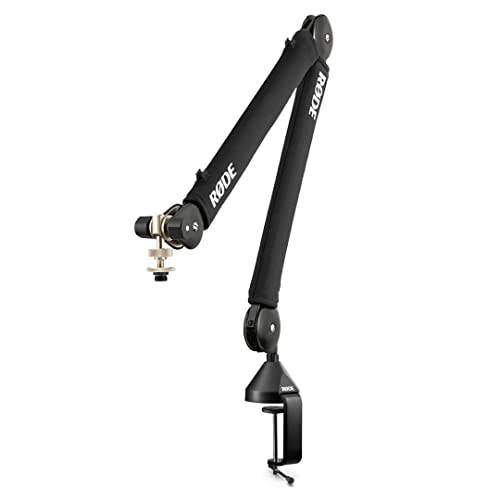
- Internal spring damping supports quiet adjustments
- 360-degree rotation with integrated cable management
- Holds microphones from 0.25 to 1.2 kg
Best For: Professional podcasting and streaming desks
Best Low-Profile Design

- Extends beneath the monitor to preserve screen visibility
- Metal construction with stable C-clamp
- Includes 1/4-inch, 3/8-inch, and 5/8-inch adapters
Best For: Gaming and streaming desks with limited monitor clearance
Best Heavy-Duty Reach

- Supports microphones up to 3.5 pounds
- Reaches 32.3 inches horizontally with included riser
- Built-in channels organize and cover cables
Best For: Heavy microphones and extended over-monitor positioning
Best Compact Pick
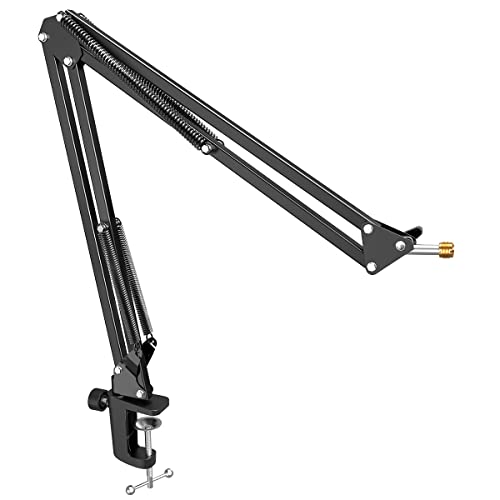
- Anti-scratch clamp fits desks up to 2 inches thick
- 180-degree vertical adjustment with stable metal construction
- Foldable design and included 3/8-to-5/8-inch adapter
Best For: Compact gaming, streaming, podcasting, and beginner recording setups
Best Long-Reach Value

- 31-inch reach with 360-degree rotation and 210-degree tilt
- Supports microphones up to 3.3 pounds
- Foldable anodized aluminum construction with adjustable joints
Best For: Flexible streaming, podcasting, gaming, and studio recording setups
Best for Comfort

- Low-profile design tucks beneath a monitor
- 360-degree rotation and 250-degree vertical adjustment
- Supports 3.3 pounds and fits desks up to 2.75 inches thick
Best For: Clean, flexible desk setups for streaming, recording, and compatible accessories
Best Value Compatibility

- Fits many popular microphones
- Dual springs and reinforced knobs
- Includes clamp and thread adapter
Best For: Compatible microphones on desks up to 1.89 inches thick
Best Starter Bundle
Amazon Basics 14-Inch Boom Arm

- Includes pop filter and windscreen
- Adjustable tension for positioning
- Clamp fits desks up to 2 inches
Best For: Standard microphones and beginner recording setups
Best Heavy-Duty Design
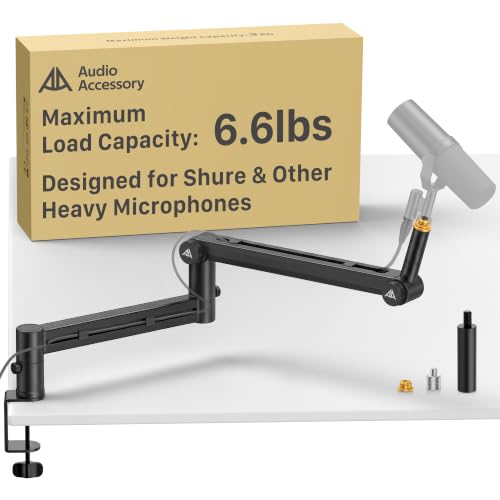
- Supports up to 6.6 pounds
- Gear-lock mechanism helps resist sagging
- 780 mm reach with cable channels
Best For: Heavy studio microphones and broadcast-style desk setups
Best All-in-One Kit – InnoGear MU059 Mic Boom Arm Set
If you want microphone boom arms with the key accessories included, the InnoGear MU059 is a practical starter set. It combines a steel clamp arm with a shock mount, dual-screen pop filter, cable ties, and thread adapters for a flexible desktop recording setup.
Best For: New streamers, podcasters, and home-recording users who want a complete microphone mounting kit.
Pros:
- Includes a shock mount, pop filter, cable ties, clamp, and 3/8-inch-to-5/8-inch adapter.
- Strong spring construction supports microphones up to 1.5 kg.
- Clamp fits desks up to 2 inches thick and the arm reaches up to 70 cm.
- Works with many standard microphones, including Blue Snowball, HyperX QuadCast, and Fifine models.
Cons:
- The included shock mount is not designed for Blue Yeti.
- The package may be more than you need if you already own a pop filter or shock mount.
The MU059 stands out among microphone boom arms for its accessory bundle and broad compatibility. It is a sensible value-oriented choice when you want to assemble a functional setup in one purchase.
Best for Quiet Studio Use – RØDE PSA1+ Professional Boom Arm
The RØDE PSA1+ is one of the more refined microphone boom arms for podcasting and streaming. Its internal spring damping is designed for quiet repositioning, while 360-degree rotation and integrated cable management keep the workspace controlled.
Best For: Podcasters, broadcasters, and streamers who prioritize quiet movement and a clean desk setup.
Pros:
- Internal spring damping helps reduce creaks and handling noise during adjustment.
- Rotates 360 degrees and offers full extension for flexible positioning.
- Integrated cable management helps hide XLR cable runs.
- Supports microphones and shock mounts from 0.25 to 1.2 kg.
Cons:
- Its 1.2 kg weight limit is lower than some heavy-duty alternatives.
- It does not include accessories such as a pop filter or shock mount.
Choose the PSA1+ when smooth, quiet repositioning matters more than an extensive accessory bundle. Its broad desk compatibility and professional-focused design make it a strong fit for regularly used recording spaces.
Best Low-Profile Design – FIFINE BM88 Gaming Boom Arm
The FIFINE BM88 is a useful option among microphone boom arms when monitor visibility and desk space are priorities. Its low-profile layout can extend beneath a screen, while the metal construction, cable management, and multiple thread adapters suit gaming and streaming setups.
Best For: Gamers and streamers who want a sturdy arm that stays below the monitor and leaves the viewing area unobstructed.
Pros:
- Low-profile design can extend beneath the bottom of a computer monitor.
- All-metal construction and a stable C-clamp help limit wobble.
- Offers up to 29 inches of extension, 220-degree vertical adjustment, and 360-degree horizontal adjustment.
- Includes 1/4-inch, 3/8-inch, and 5/8-inch thread adapters.
Cons:
- The microphone is not included.
- The section near the C-clamp cannot be adjusted vertically.
- The clamp is intended for desktops from 0.8 to 2.4 inches thick.
The BM88 is particularly appealing for compact gaming desks where a conventional arm could block the display. Its cable channels and broad adjustment range add practical flexibility without sacrificing the low-profile layout.
Best Heavy-Duty Reach – InnoGear MU-PSA28 Mic Arm
For users comparing microphone boom arms for heavier microphones, the InnoGear MU-PSA28 offers a 3.5-pound load capacity and extended reach. Its internal springs, extension riser, adjustable joints, and built-in cable channels are suited to larger podcasting and streaming microphones.
Best For: Users mounting heavier microphones such as the Blue Yeti or Shure SM7B who need extra reach over a monitor.
Pros:
- Supports up to 3.5 pounds and is designed for heavier microphones.
- Reaches up to 32.3 inches horizontally and 37.4 inches vertically with the included riser.
- Built-in cable channels keep cables covered and organized.
- Provides 135-degree back-and-forth and 180-degree up-and-down adjustment, plus a 360-degree rotating base.
Cons:
- A shock mount is not included.
- The clamp fits desks up to 2 inches thick, which may exclude thicker surfaces.
- It uses a 5/8-inch connector, so some setups may require additional compatibility checking.
The MU-PSA28 is a strong choice when reach and load capacity are more important than a small footprint. Its covered cable channels and extension riser make it especially practical for larger microphones positioned over monitors.
Best Compact Pick – FIFINE CS1 Scissor Boom Arm
The FIFINE CS1 is a practical choice among microphone boom arms for gaming, streaming, podcasting, and home recording. Its metal clamp fits desks up to 2 inches thick, while the 180-degree vertical adjustment and included thread adapter make positioning straightforward.
Best For: Beginners and creators who need a foldable, space-saving arm for a compact desk setup.
Pros:
- Metal clamp includes an anti-scratch pad and a fixed locking knob.
- Offers 180-degree up-and-down adjustment and a wide extension.
- Folds for storage or transport and includes a 3/8-inch to 5/8-inch adapter.
Cons:
- The clamp is limited to desktops 2 inches thick or less.
- The microphone is not included.
The CS1 emphasizes stable positioning and portability without adding unnecessary complexity. It is especially suitable when desk space is limited and your microphone uses a compatible 3/8-inch or 5/8-inch connection.
Best Long-Reach Value – NEEWER BASICS MS050 Boom Arm
The NEEWER BASICS MS050 is a long-reach option among microphone boom arms, extending up to 31 inches for flexible desk placement. Its 360-degree rotation, 210-degree tilt, and spring-loaded adjustment support microphones weighing up to 3.3 pounds.
Best For: Streamers, podcasters, and creators who want broad positioning range at an economical price point.
Pros:
- Extends up to 31 inches with 360-degree rotation and 210-degree tilt.
- Supports microphones up to 3.3 pounds, with joint tightness adjustable using the included hex key.
- Lightweight anodized aluminum construction is foldable, portable, and rust resistant.
Cons:
- Uses a standard 5/8-inch thread, so some microphones may require an adapter.
- The flat-base design may not suit every desk arrangement.
With its combination of reach, adjustment range, and stated load capacity, the MS050 is a versatile pick for larger or changing recording setups. Confirm your microphone’s mounting requirements before buying.
Best for Comfort – InnoGear MU-LP26 Mic Arm
The InnoGear MU-LP26 stands out among microphone boom arms with a low-profile design that can tuck beneath a monitor. It extends up to 25.6 inches, rotates 360 degrees horizontally, and supports up to 3.3 pounds for flexible streaming or recording setups.
Best For: Desk users who want a clean, unobtrusive arm with broad compatibility and multiple mounting adapters.
Pros:
- Low-profile arm helps keep the monitor area and workspace visually clear.
- Provides 360-degree horizontal rotation and 250-degree vertical adjustment.
- Alloy-steel construction supports up to 3.3 pounds, while the padded clamp fits desks up to 2.75 inches thick.
- Includes 3/8-to-5/8-inch and 3/8-to-1/4-inch adapters plus a universal mic clip.
Cons:
- Its maximum extension is 25.6 inches, shorter than some long-reach alternatives.
- The microphone and other accessories are not included.
The MU-LP26 is a strong fit when workspace clearance matters as much as microphone positioning. Its adapters also broaden use beyond microphones to compatible webcams and ring lights.
Best Value Compatibility – Compact SUNMON Mic Boom Arm
If you need microphone boom arms for a Blue Yeti, HyperX QuadCast, or another compatible mic, this SUNMON model offers a compact clamp-mounted setup with dual suspension springs and a pre-installed adapter. Its reinforced knobs are designed to help hold the microphone at your chosen angle.
Best For: Streamers and podcasters using compatible microphones on desks up to 1.89 inches thick.
Pros:
- Supports many popular microphones, including Blue Yeti, HyperX QuadCast, Shure MV7, and FIFINE models.
- Dual suspension springs and reinforced knobs help reduce shaking and unwanted movement.
- Includes a desk clamp and pre-installed 3/8-inch to 5/8-inch adapter.
- Sponge-lined clamp helps protect the desktop from scratches.
Cons:
- The clamp is limited to desktops up to 1.89 inches thick.
- Maximum recommended load is 1.4 kg, so it may not suit heavier microphone setups.
This is a practical choice when compatibility and straightforward desk mounting matter most. Check your microphone’s weight and thread size before buying, especially if you plan to add a shock mount or other accessories.
Best Starter Bundle – Amazon Basics 14-Inch Boom Arm
Among microphone boom arms for standard setups, this 14-inch Amazon Basics model is a convenient starter option because it includes a pop filter, windscreen, mic clip, and screw adapter. Adjustable tension helps position the arm, but it should be matched to your microphone’s weight and placement.
Best For: Standard microphones and beginner recording setups using desks up to 2 inches thick.
Pros:
- Includes a dual-layer pop filter and foam windscreen to help reduce plosives and unwanted noise.
- Adjustable tension allows positioning for different microphone weights.
- Desk clamp supports tables up to 2 inches thick.
- Includes both 3/8-inch and 5/8-inch thread compatibility.
Cons:
- Performance may vary with heavier microphones, shock mounts, or accessories.
- Fully extended or unevenly loaded positions may require additional tension adjustment.
- The arm is 14 inches long, which may provide less reach than extra-long alternatives.
This bundle makes sense if you want the basic accessories included rather than purchasing them separately. For heavier microphones, pay close attention to tension adjustment, arm angle, and load distribution.
Best Heavy-Duty Design – Low-Profile Gear-Lock Mic Arm
For microphone boom arms that need to support heavier studio microphones, this low-profile desk mount uses a gear-lock mechanism instead of spring-loaded arms. It is rated for up to 6.6 pounds, offers a 780 mm reach, and includes cable channels plus multiple adapters for a broad range of microphones.
Best For: Heavy microphones such as the Shure SM7B, SM7dB, MV7, RODE PodMic, and compatible studio models.
Pros:
- Supports up to 6.6 pounds, or approximately 3 kg.
- Gear-lock design is intended to resist sagging over time.
- Offers 360-degree horizontal and 120-degree vertical adjustment.
- Includes a 780 mm reach, cable channels, extension rod, and 3/8-inch-to-5/8-inch and 3/8-inch-to-1/4-inch adapters.
Cons:
- At 1.63 kg, the arm is heavier than compact alternatives.
- Its heavy-duty design may be more than needed for lightweight standard microphones.
- The supplied notes do not specify the maximum desk thickness for the clamp.
This is the strongest fit for users who prioritize load capacity and resistance to sagging. Its low-profile design, long reach, and cable routing are especially useful for studio or broadcast-style desk setups.
How We Picked These Microphone Boom Arms
We focused on practical features that affect everyday recording, streaming, gaming, and podcasting. The selection includes traditional scissor arms, low-profile designs, flexible desk mounts, and models aimed at heavier microphones. We considered published load capacity, arm reach, joint adjustability, mounting hardware, microphone-thread compatibility, cable management, and the likelihood of keeping a microphone securely positioned.
Compatibility matters just as much as construction. Several options support popular microphones from Blue, HyperX, FIFINE, RØDE, and other brands, while included adapters can make a larger range of mounts usable. Always confirm your microphone’s weight and thread size before ordering.
Quick Comparison
| Best For | What to Look For |
|---|---|
| Streaming and gaming | Low-profile positioning, smooth adjustment, and tidy cable routing |
| Podcasting and voice recording | Stable joints, quiet movement, and adequate reach |
| Heavy microphones | High load capacity, reinforced joints, and a secure desk clamp |
| Small desks | Compact mounting hardware and an arm that folds close to the desk |
| Budget setups | Basic tension adjustment, standard threading, and included adapters |
Key Buying Factors for Microphone Boom Arms
Load Capacity and Stability
Choose an arm rated above the combined weight of your microphone, shock mount, pop filter, and any accessories. Extra capacity helps reduce sagging, especially when the arm is extended. A firm clamp and broad contact surface also help prevent wobble.
Reach and Positioning
Measure your desk before buying. Longer arms offer more placement flexibility but may require stronger joints and more clearance. Low-profile models are useful when you want the microphone close to the desk or beneath a monitor.
Mounting and Compatibility
Check whether the clamp fits your desktop thickness and whether the arm uses a 3/8-inch or 5/8-inch thread. An included adapter is helpful, but a microphone may still require its own shock mount or compatible yoke.
Noise, Movement, and Cable Management
Spring damping or controlled joints can make repositioning quieter. Built-in clips or channels keep USB and XLR cables from hanging across the workspace, although a cable system should not force sharp bends near the microphone connection.
Who Should Buy Which Microphone Boom Arms?
Streamers and gamers should prioritize a low-profile arm with quick positioning and clean cable management. Podcasters and voice artists will generally benefit from smoother joints, dependable tension control, and enough reach to maintain a consistent microphone distance. Owners of heavy microphones should choose the highest-capacity option with a strong clamp rather than relying on a lightweight budget arm. Casual users and first-time buyers can save money with a straightforward adjustable arm, provided its thread and weight rating match the microphone. If your desk is shallow or crowded, measure the available mounting area first and favor a compact design that folds away when not in use.