Copying one USB drive at a time is slow, repetitive, and difficult to scale. Multi-target USB duplicators let you create several verified copies simultaneously, making them useful for deployment, media distribution, training, and data sanitization.
This roundup compares 10 standalone and PC-based models by target count, speed, workflow, management features, and intended use so you can choose equipment that fits your volume and budget.
Best 10 Multi Target USB Duplicators Picks for 2026
Best High-Capacity Standalone Choice

- 1-to-31 standalone duplication
- Smart copy and bit-by-bit modes
- Secure erase and auto-counter
Best For: Large USB duplication runs without a computer
Best for Fast Standalone Runs
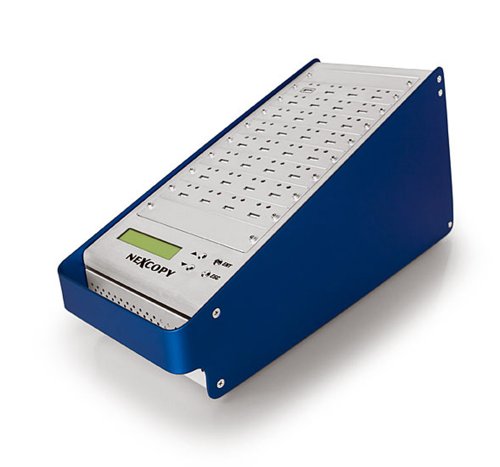
- 31 targets from one master
- No PC or software required
- LCD status and performance feedback
Best For: High-volume copying with real-time monitoring
Best PC-Based USB 3.0 Option
16-Target SuperSpeed Duplicator

- USB 3.0 PC-based operation
- 16 target ports
- Includes Drive Manager software
Best For: Computer-controlled duplication workflows
Best for Duplication and Erasing

- Duplicates and erases USB drives
- Copy, Compare, and drive diagnostics
- Compact 3.9-pound standalone design
Best For: Technicians who need copying and sanitization
Best PC-Connected Option
- Copies to 16 USB targets
- PC-connected USB 3.0 operation
- Advanced partition tools with Nexcopy media
Best For: Computer-based duplication and specialized USB media management
Best for Erasing and Verification

- Standalone operation with 15 target slots
- Copy-and-compare verification
- DoD 3-pass and 7-pass erase modes
Best For: Type-A flash duplication and secure media sanitation
Best Standalone Asynchronous Model

- No PC required
- Asynchronous independent duplication
- Smart Copy and bit-by-bit Raw Mode
Best For: Flexible standalone cloning across USB and optional flash-media formats
Best Touchscreen Pick
Acumen EZ Dupe 1-to-10 USB Duplicator

- Touchscreen operation
- Up to 10 USB targets
- Standalone copy, compare, erase, and format
Best For: Simple, computer-free batch USB duplication
Best High-Speed 7-Target Model
Vinpower Digital USBShark 7-Target Duplicator
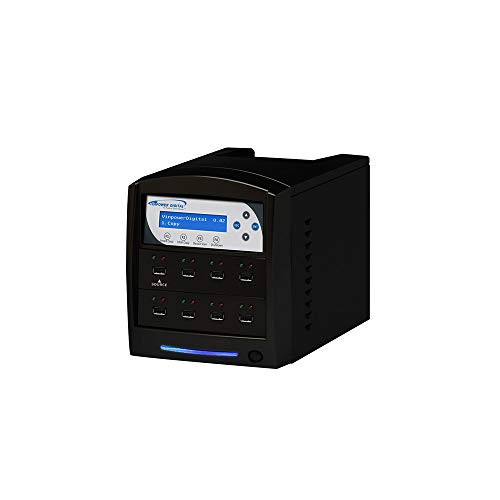
- Seven simultaneous USB targets
- USB 3.0, 2.0, and 1.0 compatibility
- Smart copy, prescan, and secure erase
Best For: Technicians handling repeat duplication and sanitization
Best for IT Workflows
StarTech 1-to-5 USB Duplicator and Eraser

- Five-target standalone duplication
- Copy-and-compare verification
- Quick and multi-pass erase modes
Best For: IT teams cloning, verifying, and sanitizing USB drives
Best High-Capacity Standalone Choice – 31-Target USB Duplicator
For teams comparing multi target usb duplicators, the Bestduplicator BD-USB-31T is built for large duplication runs without a computer. Its 1-to-31 configuration, smart copy mode, and support for bit-by-bit duplication make it a practical choice for distributing varied USB content.
Best For: Organizations that need to copy many USB drives at once using a standalone system.
Pros:
- Copies to up to 31 target USB drives without a PC.
- Supports smart copy and bit-by-bit duplication for all data formats.
- Includes secure erase, auto-counter tracking, and firmware upgrade support.
- Offers a multilingual LCD interface.
Cons:
- At 9 pounds, it is less portable than smaller duplicators.
- The included warranty is limited to 6 months.
This model stands out when throughput and broad format support matter more than compact size. Its standalone design also reduces setup complexity for repeated production or distribution tasks.
Best for Fast Standalone Runs – USB131SA 31-Target Duplicator
The USB131SA is a straightforward option among multi target usb duplicators, pairing a 1-master, 31-target layout with standalone operation. Its asynchronous duplication support and LCD feedback are useful when monitoring multiple copy jobs.
Best For: Users who want high-volume USB copying with performance information displayed in real time.
Pros:
- Operates without a PC or software.
- Provides 31 target ports from one master.
- Advertises copy speeds over 1800MBs per minute to each port.
- Supports asynchronous duplication for masters up to 256MBs.
Cons:
- Its 18-pound weight makes it less convenient to move.
- The supplied notes provide fewer details about erase or verification features.
Choose the USB131SA when maximum target count and stated copy speed are priorities. Its LCD status feedback can also make larger jobs easier to track as they run.
Best PC-Based USB 3.0 Option – 16-Target SuperSpeed Duplicator
For buyers who prefer computer-controlled multi target usb duplicators, the Nexcopy SSUSB160PC uses USB 3.0 and supports 16 target drives. The included Drive Manager software is designed to simplify the process while allowing copying at a flash drive’s maximum transfer speed.
Best For: PC-based workflows that need USB 3.0 performance and software-assisted duplication.
Pros:
- Uses USB 3.0 technology for high-speed connectivity.
- Supports 16 target USB drives.
- Includes Nexcopy Drive Manager software.
- Designed to copy at the flash drive’s maximum transfer speeds.
Cons:
- Requires a PC, unlike standalone alternatives.
- Offers fewer target ports than the 31-target models.
- The supplied notes do not specify standalone erase or verification functions.
This is a better fit for users who already manage duplication from a computer and want USB 3.0 support. It trades target capacity for a software-based workflow and modern interface speed.
Best for Duplication and Erasing – StarTech 15-Target Duplicator
The StarTech USBDUPE115 combines duplication, cloning, and drive erasing in a compact standalone unit. Among multi target usb duplicators, it is especially useful for technicians who need to create multiple USB copies, sanitize drives, and verify results from an LCD interface.
Best For: IT professionals and technicians managing USB boot drives, data distribution, and drive sanitization.
Pros:
- Copies or erases up to 15 USB drives without a computer.
- Supports system/file copy, sector-by-sector copying, and multiple erase modes.
- Includes Copy & Compare verification, error scanning, and bad-sector checks.
- Supports USB 3.0 and USB 2.0 media and has upgradeable firmware.
Cons:
- Its 15-target capacity is lower than the 31-target alternatives.
- Asynchronous copying is limited to source content under 128MB.
- The stated write speed is an estimated 1.5GB per minute.
This model is the most versatile choice when erasing and verification are as important as duplication. Its lighter 3.9-pound design and two-year warranty add practical advantages for technician-focused use.
Best PC-Connected Option – 16-Target USB 3.0 Duplicator
Nexcopy USB160PRO - 16 Target USB 3.0 Duplicator with Partition Tool Module Drive Manager Software
Check Price On AmazonFor buyers comparing multi target usb duplicators, the Nexcopy USB160PRO is a PC-connected 16-target unit built around USB 3.0. It also works with USB 2.0 and adds software-based management tools for specialized USB media workflows.
Best For: Organizations that want high-capacity, computer-connected duplication with partition and drive-management features.
Pros:
- Copies to up to 16 USB targets.
- Uses USB 3.0 technology while remaining backward compatible with USB 2.0.
- Offers a Nexcopy interface with data streaming and extraction features.
- Supports read-only, CD-ROM, and hard-coded serial-number features when used with Nexcopy USB media.
Cons:
- Requires a PC connection rather than standalone operation.
- Advanced partition and serial-number features require Nexcopy USB media.
- The listed memory capacity is 1 GB.
The USB160PRO stands out when software control and specialized media configuration matter more than standalone convenience. It is a strong fit for controlled production environments using compatible Nexcopy media.
Best for Erasing and Verification – 15-Port USB Duplicator
The Acumen Disc AD15-USB is a standalone choice among multi target usb duplicators, supporting up to 15 Type-A flash drives at claimed speeds of up to 35MB/sec. Its copy, compare, formatting, and DoD erase modes make it useful for repeatable duplication and media sanitation.
Best For: Teams needing a standalone Type-A duplicator with copy verification and multiple erase options.
Pros:
- Copies to up to 15 USB drives without a computer.
- Includes quick and full copy modes plus real-time copy-and-compare.
- Offers quick, full, DoD 3-pass, and DoD 7-pass erase modes.
- Supports FAT32 and exFAT formatting with a simple four-key interface.
Cons:
- Supports USB Standard Type-A media; USB-C drives need an optional adapter.
- Does not work properly with hardware-encrypted or protected USB devices.
- Actual transfer speed depends on the connected flash media.
Choose the AD15-USB when standalone operation and data-sanitization controls are central requirements. Its Type-A limitation should be checked against your existing drive inventory before purchase.
Best Standalone Asynchronous Model – 15-Target USB Flash Cloner
For buyers seeking multi target usb duplicators without a PC, the Vinpower USBDBL provides 15-target standalone duplication with asynchronous copying. Smart Copy handles accessible content, while Raw Mode supports bit-by-bit duplication for more exact cloning tasks.
Best For: Users who need independent multi-drive copying, raw duplication, and secure erasing in a standalone unit.
Pros:
- Operates without a computer.
- Asynchronous duplication lets target drives copy independently.
- Provides Smart Copy and bit-by-bit Raw Mode.
- Can support SD, MicroSD, CF, and other flash formats with the appropriate adapter module.
Cons:
- Alternative flash formats require a corresponding Interface Adaptor Module add-on.
- The supplied notes do not specify a transfer speed.
- Its secure-erase capability permanently removes drive content, so source selection requires care.
The USBDBL is a flexible standalone option when asynchronous workflows and multiple duplication modes are more important than a stated speed rating. Its add-on adapter approach also broadens media compatibility beyond USB drives.
Best Touchscreen Pick – Acumen EZ Dupe 1-to-10 USB Duplicator
For buyers comparing multi target usb duplicators, the Acumen Disc EZ Dupe stands out for its touchscreen controls and standalone operation. It can copy to up to 10 USB targets, with stated speeds of up to 35 MB/s, and supports copy, compare, erase, and format functions.
Best For: Users who want an easy-to-navigate duplicator for recurring USB copying without a computer.
Pros:
- Touchscreen interface with real-time information display
- Copies to up to 10 USB targets
- Standalone design requires no computer
- Supports multiple file formats, capacities, and copy or erase functions
Cons:
- Stated transfer speed is up to 35 MB/s
- USB interface details include USB 1.1 and USB 2.0 Type A connectivity
The touchscreen and Source Analysis feature make this a practical choice when straightforward controls matter more than maximum throughput. Its 10-target capacity is useful for larger batch jobs.
Best High-Speed 7-Target Model – Vinpower Digital USBShark 7-Target Duplicator
Vinpower Digital USBShark Standalone USB Flash Drive Duplicator - 7 Targets (High Speed)
Check Price On AmazonThe Vinpower Digital USBShark is a strong option among multi target usb duplicators when seven simultaneous targets are enough. Its standalone design supports bit-by-bit duplication, smart copying, secure erasure, and prescanning for physical reading errors across USB 3.0, 2.0, and 1.0 devices.
Best For: Technicians and teams needing a standalone seven-target unit with broad USB compatibility and data-erasure tools.
Pros:
- Duplicates to seven USB targets
- Supports USB 3.0, 2.0, and 1.0 devices
- Offers smart copy, bit-by-bit duplication, and secure erase
- USB prescan can check for physical reading errors
Cons:
- Provides fewer target ports than 10-target models
- The supplied notes do not specify a warranty
- At 10 pounds, it is less portable than lighter units
With smart copy, prescan, and secure erase included, the USBShark is geared toward repeatable operational workflows rather than occasional household copying. Its seven-target layout balances batch capacity with a focused feature set.
Best for IT Workflows – StarTech 1-to-5 USB Duplicator and Eraser
The StarTech USBDUP15 combines five-target USB duplication with drive-erasing functions, making it a versatile choice among multi target usb duplicators. It works without a computer, supports USB 3.0, 2.0, and 1.1 media, and includes LCD monitoring, copy-and-compare verification, and several erase modes.
Best For: IT professionals and technicians who need to clone, verify, or sanitize multiple USB drives.
Pros:
- Duplicates or erases up to five USB drives independently of a computer
- Supports file-based and sector-by-sector copying
- Includes quick erase and single- or three-pass overwrite options
- LCD, LEDs, error scanning, and copy-and-compare support monitoring
Cons:
- Five-target capacity is lower than larger duplicators
- Asynchronous copy mode requires source content under 64 MB
- External USB devices may require their own power source
This model is particularly useful when duplication and secure drive handling belong in the same workflow. Its verification and overwrite features add control for professional deployment and disposal tasks.
How We Picked the Best Multi Target USB Duplicators
We focused on the factors that have the greatest effect on real-world duplication work: the number of simultaneous targets, USB generation and rated transfer speed, standalone versus PC-based operation, verification and comparison tools, partition or drive-management functions, erasing and sanitization options, display controls, and overall workflow simplicity.
The selection includes compact five- and seven-target units, midrange 10- and 15-target machines, and higher-capacity 16- and 31-target systems. Because manufacturers may quote maximum speeds under ideal conditions, treat published throughput as a reference rather than a guarantee. Actual performance depends on the source drive, target media, file sizes, filesystem, and whether verification is enabled.
Quick Comparison
| Best For | Typical Target Count | What to Prioritize |
|---|---|---|
| Occasional small batches | 5–7 | Low cost, compact size, simple controls |
| Office and classroom deployment | 10–15 | Balanced speed, verification, and ease of use |
| Frequent production batches | 16–31 | High capacity, sustained throughput, cooling, and support |
| IT and compliance workflows | Any | Drive testing, secure erasure, logging, and repeatable processes |
| Technical operators | PC-based | Software control, reporting, and flexible drive management |
Key Buying Factors for Multi-Target USB Duplicators
Target Count and Workload
Choose capacity based on your normal batch size, not an occasional peak. A larger duplicator can reduce labor, but it also costs more and occupies more workspace. If you usually need fewer than 10 copies, a compact model may offer the better return. For recurring deployments or commercial distribution, 15 or more targets can significantly reduce cycle time.
Speed, USB Compatibility, and Media Quality
USB 3.x hardware can shorten copy times, but the slowest device in the chain often limits the result. Use matching, reliable target drives when possible, and confirm that the duplicator supports the capacities and filesystems you use. Check whether speed ratings describe copying, copying plus verification, or erasing.
Standalone or PC-Based Control
Standalone units are easier to operate on a bench and do not tie up a computer. PC-based systems may provide richer reporting, drive management, partition tools, and workflow customization. Select standalone operation for repeatable push-button batches; choose PC-based control when auditing and configuration matter more.
Verification, Erasure, and Source Protection
Verification helps identify incomplete or corrupted copies before distribution. If drives are reused, look for dependable erase or sanitization modes and confirm whether the process meets your organization’s policy. A write-protected or clearly designated master drive also helps prevent accidental data loss.
Who Should Buy Which Multi Target USB Duplicators?
Small businesses, teachers, and occasional users should favor affordable five- to 10-target machines with straightforward LCD or touchscreen controls. IT departments and support teams will generally benefit from 15- or 16-target USB 3.0 models with verification and management features. Organizations preparing large recurring batches should consider 31-target equipment to reduce operator time and the number of duplication cycles. Choose a PC-based model when software reporting, partition control, or detailed process management outweighs the convenience of a standalone unit.