When it comes to photo editing, having the right monitor can make all the difference in your workflow and output quality. In 2025, you’ll find a range of options that prioritize color accuracy, ergonomic design, and versatile connectivity. Whether you’re a seasoned pro or just starting out, choosing the right monitor is essential. Let’s explore the top contenders that could redefine your editing experience and help you achieve stunning results.
ASUS ProArt Display 27” 4K HDR Professional Monitor (PA279CRV)

The ASUS ProArt Display 27” 4K HDR Professional Monitor (PA279CRV) is an exceptional choice for photographers and graphic designers who demand unparalleled color accuracy. With a stunning 27-inch 4K HDR display and an IPS panel offering 178° wide viewing angles, you’ll enjoy vivid visuals from any position. It boasts 99% DCI-P3 and Adobe RGB color gamut coverage, ensuring your work looks true to life. Plus, it’s Calman Verified and factory pre-calibrated with a Delta E < 2. Connectivity's a breeze with DisplayPort, HDMI, and USB-C options. The ergonomic design enhances comfort, making it a perfect addition to your setup.
Best For: Photographers and graphic designers seeking exceptional color accuracy and high-resolution displays for their creative work.
Pros:
- 99% DCI-P3 and Adobe RGB color gamut coverage ensures vibrant and true-to-life colors.
- Factory pre-calibrated with Delta E < 2, guaranteeing high color accuracy straight out of the box.
- Ergonomic design enhances comfort for extended use, making it ideal for long editing sessions.
Cons:
- Price point may be higher compared to standard monitors, which could be a consideration for budget-conscious users.
- Limited built-in speakers, which might not meet the audio needs of some users.
- Size may be too large for smaller workspaces, requiring adequate desk space for optimal setup.
ASUS ProArt Display PA278QV 27” WQHD Monitor

For photographers and designers who demand exceptional color accuracy, the ASUS ProArt Display PA278QV 27” WQHD Monitor stands out as an ideal choice. With its 2560 x 1440 resolution and 100% sRGB and Rec. 709 coverage, you’ll enjoy stunning visuals and precise color representation. The IPS panel guarantees wide viewing angles, while the frameless, anti-glare design enhances focus. Ergonomics are prioritized with height, tilt, pivot, and swivel adjustments to reduce eye fatigue. Users appreciate its easy setup and versatile connectivity options, although some suggest lowering brightness for comfort. Overall, it’s a solid choice for your editing needs.
Best For: Photographers and designers seeking exceptional color accuracy and versatile ergonomic features for their editing needs.
Pros:
- 100% sRGB and Rec. 709 coverage ensures stunning visuals and precise color representation.
- Ergonomic stand with height, tilt, pivot, and swivel adjustments reduces eye fatigue during long usage.
- Versatile connectivity options including Mini DisplayPort, HDMI, and USB 3.0 ports enhance compatibility with various devices.
Cons:
- Built-in speakers are of low quality, which may not meet audio needs.
- Brightness levels may be too high for some users, leading to discomfort without adjustments.
- Color calibration issues have been reported by some users with used monitors.
BenQ SW321C 32″ 4K UHD Photo Video Editing Monitor

Designed specifically for professional photographers and video editors, the BenQ SW321C 32″ 4K UHD monitor excels in color accuracy and detail. With its IPS panel and hardware calibration, you’ll enjoy an average Delta E of ≤2, ensuring stunning color reproduction. Thanks to AQCOLOR technology, you benefit from a 100% sRGB, 95% P3, and 99% AdobeRGB color gamut. The monitor’s Paper Color Sync technology guarantees screen-to-print consistency, while USB-C connectivity simplifies image and data transfer. Plus, its ergonomic design with customizable adjustments provides comfort during long editing sessions, making the SW321C an essential tool for your creative workflow.
Best For: Professional photographers and video editors seeking exceptional color accuracy and detail in their work.
Pros:
- Hardware calibrated for color accuracy with an average Delta E of ≤2.
- Wide color gamut coverage including 100% sRGB, 95% P3, and 99% AdobeRGB.
- Ergonomic design with customizable adjustments for comfort during long editing sessions.
Cons:
- Larger screen size may not fit in smaller workspaces.
- Higher price point compared to standard monitors.
- Limited built-in speakers may not meet audio needs for video editing.
ASUS ProArt Display 32” Professional Monitor (PA329CRV)

With its impressive 4K UHD resolution and 98% DCI-P3 color gamut coverage, the ASUS ProArt Display 32” Professional Monitor (PA329CRV) is ideal for photographers and graphic designers who demand exceptional color accuracy in their work. You’ll appreciate the stunning clarity of the 31.5-inch IPS panel with HDR capabilities and a wide 178° viewing angle. Factory calibrated with a Delta E < 2, it guarantees precise colors right out of the box. Plus, it offers versatile connectivity options, including USB-C with 96W Power Delivery. Don’t forget the complimentary 3-month Adobe Creative Cloud access with your purchase—perfect for streamlining your editing process!
Best For: Photographers and graphic designers seeking exceptional color accuracy and high-resolution display for their creative work.
Pros:
- Impressive 4K UHD resolution ensures stunning clarity and detail.
- 98% DCI-P3 color gamut coverage provides exceptional color accuracy for professional work.
- Versatile connectivity options including USB-C with 96W Power Delivery enhance usability.
Cons:
- Size may be cumbersome for smaller workspaces or setups.
- Higher price point compared to standard monitors may not fit all budgets.
- Limited HDR certification (VESA DisplayHDR400) may not satisfy some users looking for premium HDR performance.
ASUS ProArt Display 27” Professional Monitor (PA278CGV)

The ASUS ProArt Display 27” Professional Monitor (PA278CGV) stands out for its exceptional color accuracy, making it an ideal choice for creative professionals in photography and graphic design. With a QHD resolution of 2560 x 1440 and 95% DCI-P3 coverage, your visuals will pop. The 144Hz refresh rate guarantees smooth rendering, perfect for both editing and casual gaming. Plus, it’s Calman Verified, so you know it’s been factory calibrated. Its USB-C PD connectivity and height adjustability add to the convenience. Users love its setup ease, although some mention mixed results with built-in speakers. Overall, it’s a solid investment for your creative work.
Best For: Creative professionals in photography, graphic design, and digital art seeking exceptional color accuracy and smooth rendering.
Pros:
- Exceptional color accuracy with 95% DCI-P3 coverage and factory calibration.
- High refresh rate of 144Hz with FreeSync Premium for smooth visuals.
- Versatile connectivity options including USB-C PD and height adjustability for ergonomic use.
Cons:
- Mixed feedback regarding the quality of built-in speakers.
- Some users reported issues with local dimming and backlight performance.
- Not specifically designed as a gaming monitor despite its casual gaming capabilities.
Samsung 27-Inch ViewFinity S7 4K UHD Monitor (LS27D702EANXGO)

For photographers and graphic designers seeking unparalleled detail and color accuracy, the Samsung 27-Inch ViewFinity S7 4K UHD Monitor (LS27D702EANXGO) stands out as an exceptional choice. Its 4K UHD resolution reveals incredible detail, while HDR10 enhances realism with true-to-life colors and deeper contrast. You’ll appreciate the near-limitless hues and wider color gamut that elevate your visual experience, especially for intricate designs. With various connectivity options, setup becomes seamless and productive. Plus, the Easy Setup Stand allows you to adjust your workspace effortlessly. The TÜV-certified eye care technology guarantees comfort, reducing flicker and excessive blue light exposure.
Best For: Photographers and graphic designers looking for exceptional detail and color accuracy in their work.
Pros:
- Incredible 4K UHD resolution provides stunning detail and clarity for intricate designs.
- HDR10 technology enhances color representation and contrast, making visuals more realistic.
- Easy Setup Stand allows for quick workspace adjustments without the need for tools.
Cons:
- Limited built-in speakers may require external audio solutions for better sound quality.
- Potentially higher price point compared to monitors with lower resolution or fewer features.
- May require calibration for optimal color accuracy depending on individual preferences.
ViewSonic VP2756-4K 27 Inch Ergonomic Monitor

Professionals seeking exceptional color accuracy will find the ViewSonic VP2756-4K 27 Inch Ergonomic Monitor an outstanding choice. With its 3840x2160p resolution and IPS panel, you’ll experience vibrant visuals and 100% sRGB coverage, ensuring your edits look precise and true to life. The USB-C connectivity simplifies your workspace by combining data, audio, and video transfer in one cable. Plus, the ergonomic stand lets you adjust height, tilt, and pivot for maximum comfort. With flicker-free technology and a blue light filter, your eyes will thank you during long editing sessions. Overall, it’s a solid investment for any serious editor.
Best For: Professionals in photography, video editing, and digital marketing who require precise color accuracy and ergonomic comfort.
Pros:
- High Color Accuracy: 100% sRGB coverage and factory calibration ensure vibrant and true-to-life visuals.
- Versatile Connectivity: USB-C offers data, audio, and video transfer along with 60W charging through a single cable.
- Ergonomic Design: Adjustable stand for height, tilt, and pivot provides comfort during long working hours.
Cons:
- Limited Audio Quality: Built-in 3W speakers may not suffice for users seeking high-end audio solutions.
- Weight: At 15.1 pounds, it may be considered heavy for a portable setup.
- Refresh Rate: The 60Hz refresh rate may not meet the demands of high-end gaming enthusiasts.
ASUS ProArt Display PA279CV 27” 4K HDR UHD Monitor

Designed with creative individuals in mind, the ASUS ProArt Display PA279CV offers exceptional color accuracy and vibrant visuals, making it an ideal choice for photo and video editing professionals. With a 27-inch IPS panel boasting a 4K UHD resolution of 3840 x 2160, it delivers stunning detail. You’ll appreciate its 100% sRGB and Rec. 709 color gamut, ensuring your edits are true to life. The monitor features versatile connectivity options, including USB-C with 65W power delivery. While users praise its color fidelity, some report slight calibration issues. Overall, it’s a solid investment to elevate your editing game.
Best For: Creative professionals seeking exceptional color accuracy and vibrant visuals for photo and video editing.
Pros:
- 100% sRGB and Rec. 709 color gamut ensures true-to-life edits.
- Versatile connectivity options including USB-C with 65W power delivery enhance compatibility with various devices.
- Excellent color fidelity and HDR performance make it ideal for detailed editing tasks.
Cons:
- Some users report slight calibration issues requiring manual adjustments.
- Calibration tools for HDR content are limited, potentially impacting performance without proper setup.
- Compared to higher-end models, the monitor may have limitations in HDR performance and local dimming zones.
INNOCN 15.6 Portable OLED Touch Monitor for Photo Editing
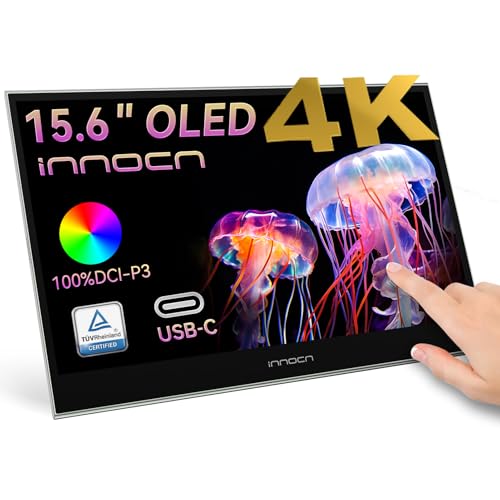
The INNOCN 15.6 Portable OLED Touch Monitor stands out as an exceptional choice for photographers and creatives seeking a high-quality display on the go. With 4K resolution and 100% DCI-P3 color coverage, you’ll enjoy stunning visuals and accurate colors. Its 10-bit color depth and 100000:1 contrast ratio enhance your editing experience. The monitor features USB-C connectivity, making it compatible with laptops, PCs, and consoles, while its plug-and-play functionality guarantees effortless setup. Plus, the 10-point touchscreen lets you tap, swipe, and zoom intuitively. This portable monitor is perfect for boosting productivity through dual-screen setups during your editing sessions.
Best For: Photographers and creatives who need a portable, high-quality display for accurate color editing on the go.
Pros:
- High 4K resolution and 100% DCI-P3 color coverage ensure stunning visuals and precise color accuracy.
- Touchscreen functionality allows intuitive interaction with editing software through tap, swipe, and pinch-to-zoom gestures.
- Portable design makes it easy to carry for on-the-go editing and enhances productivity with dual-screen setups.
Cons:
- Limited to USB-C and mini HDMI connections, which may require adapters for some devices.
- The 15.6-inch size may be too small for users who prefer larger monitors for detailed work.
- The price point may be higher compared to standard portable monitors without OLED technology.
LG 27US500-W Ultrafine Monitor 27-Inch 4K UHD

For creative professionals seeking exceptional color accuracy and detail in their work, the LG 27US500-W Ultrafine Monitor stands out with its impressive 4K UHD resolution. This 27-inch monitor boasts a contrast ratio of 1000:1 and supports up to 90% DCI-P3 color gamut, ensuring deeper blacks and vivid colors. With HDR10 compatibility, your visuals will pop even more. The ergonomic, borderless design enhances your workspace, while onscreen control allows for customizable layouts. Connectivity options include HDMI and DisplayPort, making it easy to set up. Weighing just over 12 pounds, it’s perfect for both graphic design and video consumption.
Best For: Creative professionals seeking exceptional color accuracy and detail in their work.
Pros:
- Excellent picture quality with vibrant colors.
- Easy setup and customizable workspace through onscreen control.
- Suitable for graphic design and video consumption with HDR support.
Cons:
- Limited brightness at 350 nits.
- Not ideal for competitive gaming due to a 60Hz refresh rate.
- Reports of stand stability issues.
Factors to Consider When Choosing Photo Editing Monitors for Professionals
When choosing a monitor for photo editing, you need to take into account several key factors. Color accuracy is essential, along with the right resolution and screen size for your work. Don’t forget about connectivity options, ergonomic design, and calibration tools to enhance your editing experience.
Color Accuracy Importance
Choosing a monitor with exceptional color accuracy is essential for anyone serious about photo editing, as it directly impacts your ability to produce stunning, true-to-life images. Monitors with a Delta E value of less than 2 guarantee minimal color discrepancies, allowing for precise edits. Look for wide color gamut coverage, such as 99% Adobe RGB or 100% sRGB, to access a broader range of colors, critical for vibrant images. Additionally, consider hardware calibration features, which help maintain consistent color accuracy over time. Technologies like AQCOLOR and Calman Verification further enhance color reproduction, ensuring that your edits translate realistically across different devices. Prioritizing color accuracy can elevate your work and foster trust in your editing skills.
Resolution and Screen Size
Color accuracy sets the foundation for any photo editing project, but the monitor’s resolution and screen size can dramatically enhance your editing experience. A higher resolution, like 4K (3840 x 2160), delivers exceptional detail and clarity, essential for precise tasks. Larger screens, ideally 27 inches and above, provide ample workspace, making it easier to navigate editing tools. For professional results, choose an IPS panel, which offers wide viewing angles and superior color accuracy. The right combination of resolution and screen size boosts productivity, allowing you to view high-resolution images in full detail without constant zooming or scrolling. WQHD (2560 x 1440) monitors also strike a good balance between detail and performance for most workflows.
Connectivity Options Available
While selecting a photo editing monitor, it is vital to evaluate the variety of connectivity options available. Look for monitors that offer multiple ports, such as HDMI, DisplayPort, and USB-C. USB-C is particularly beneficial, as it allows data transfer, video output, and power delivery through a single cable, simplifying your setup. Additionally, some monitors support daisy-chaining, enabling you to connect multiple displays for enhanced workflow efficiency. Confirm compatibility with a range of devices like laptops, PCs, and consoles, so you can edit in various environments. A diverse array of ports means you won’t need extra adapters, keeping your workspace organized and efficient. These connectivity features are fundamental for any professional looking to streamline their editing process.
Ergonomic Design Features
An ergonomic design is vital for any professional photo editor, as it directly impacts comfort and productivity during long editing sessions. Look for monitors that offer adjustable height, tilt, pivot, and swivel capabilities to minimize eye strain and guarantee a comfortable viewing experience. Anti-glare screens are important too, as they reduce reflections and distractions, helping you stay focused in various lighting conditions. VESA mount compatibility provides flexibility for customizing your workspace, allowing you to optimize your setup for efficiency. Additionally, consider monitors with flicker-free technology to reduce eye fatigue, especially during extended use. Blue light filters can also protect your eyes from harmful exposure, making them particularly beneficial for those long hours spent editing.
Calibration Capabilities and Tools
When selecting a photo editing monitor, calibration capabilities are vital for guaranteeing your work’s color accuracy and consistency. Look for a monitor with a Delta E value of less than 2, which signifies high-quality color representation. Many models come factory calibrated and are Calman Verified, providing reliable color accuracy right from the start. Advanced calibration tools, like 14-bit 3D lookup tables (LUT), enhance your editing by allowing precise color blending across a broader spectrum. Features such as ProArt Preset and ProArt Palette make it easy to tailor color parameters to your specific workflow. Consistent calibration across devices is important, and technologies like Paper Color Sync guarantee your digital designs match the final printed output.