The right projector screen can make conference-room presentations easier to see, more professional, and less dependent on wall color or surface texture. This roundup compares 10 screens across portable, tripod, pull-down, floor-rising, and motorized designs.
We focus on practical considerations such as screen size, aspect ratio, setup, viewing surface, portability, and installation so you can choose a screen that fits your room and presentation style.
Best 10 Projector Screens for Conference Rooms Picks for 2026
Best Portable Tripod Pick
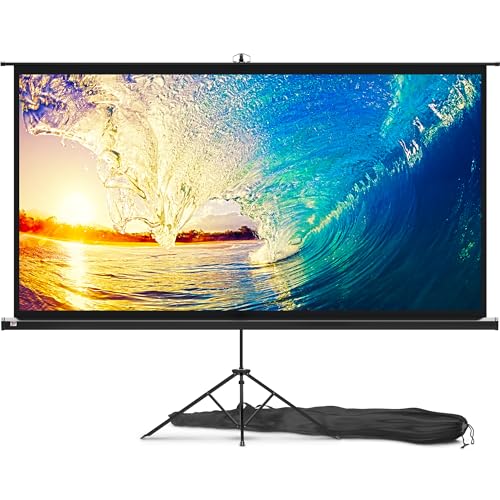
- 100-inch 16:9 matte screen
- Adjustable, stable tripod stand
- Carrying bag and three-step setup
Best For: Portable presentations and flexible indoor/outdoor use
Best Wall-Mounted Value
84-Inch Manual Roll-Down Screen

- Auto-locking height adjustment
- Wall or ceiling mounting
- Matte white retractable surface
Best For: Fixed conference rooms and classrooms
Best Motorized Option
100-Inch Electric Projection Screen

- Remote-controlled electric operation
- 100-inch 16:9 format
- Wall or ceiling mounting
Best For: Conference rooms needing convenient retractable operation
Best Floor-Rising Option
LIHONG 100-Inch Manual Projector Screen

- Large 100-inch 16:9 viewing surface
- 178-degree viewing angle for wider seating
- Portable retractable design with aluminum case
Best For: Large conference rooms using standard-throw projectors
Best for Everyday Use
Kshioe 92-Inch Remote-Controlled Screen

- Wireless remote enables in-room operation
- 92-inch 16:9 format for presentations
- Wall- or ceiling-mount installation options
Best For: Conference rooms with a dedicated installation location
Best Portable Tripod Screen
VISULAPEX 80-Inch Portable Projector Screen

- Sets up in less than three minutes
- Lightweight 8.5-pound portable design
- Includes tripod, carrying bag, and 160-degree viewing angle
Best For: Mobile presentations and smaller rooms needing flexible setup
Best Portable Conference Pick
Pyle 60-Inch Tripod Projector Screen

- 60-inch 16:9 matte screen
- Adjustable freestanding tripod
- Rolls up for storage and transport
Best For: Small conference rooms, classrooms, and portable presentations
Best Large-Space Value
ZUVMITG 120-Inch Projector Screen

- Large 120-inch 16:9 display
- Front and rear projection support
- Includes stakes, ropes, and sandbags
Best For: Large conference rooms, training spaces, and outdoor events
Best Lightweight Large Screen
TOWOND 120-Inch Portable Screen

- 120-inch 16:9 matte display
- Front and rear projection support
- About 9 pounds with carry bag
Best For: Mobile presentations, large conference rooms, and multipurpose venues
Best Portable Tripod Pick – 100-Inch Presentation Screen
For projector screens for conference rooms that may also need to travel, this 100-inch PropVue model combines a 16:9 viewing area with a height-adjustable tripod. Its portable design suits offices, classrooms, churches, and event spaces where quick setup matters.
Best For: Portable presentations, conferences, classrooms, and mixed indoor/outdoor use.
Pros:
- 100-inch 16:9 screen with a 160-degree viewing angle and 1.1 gain.
- Adjustable height and stable tripod with wide legs.
- Folds into a fitted carrying bag and assembles in three steps.
- Can be used indoors or outdoors for presentations and entertainment.
Cons:
- At 17.6 pounds, it is less lightweight than some portable alternatives.
- A tripod requires floor space in a conference room.
This is a practical choice when a conference room screen must be portable rather than permanently installed. The matte finish, broad viewing angle, and adjustable height support flexible presentation setups.
Best Wall-Mounted Value – 84-Inch Manual Roll-Down Screen
For projector screens for conference rooms with limited floor space, the Pyle 84-inch pull-down model offers a tidy wall- or ceiling-mounted setup. Its manual roll-down mechanism and auto-locking height adjustment make it easy to deploy for meetings, lessons, and presentations.
Best For: Offices, classrooms, and conference rooms needing a retractable fixed-location screen.
Pros:
- Manual screen pulls down smoothly and locks at adjustable heights.
- Matte white surface is designed for bright color and contrast.
- Wall- or ceiling-mount installation helps conserve floor space.
- Retracts neatly for less visual clutter when not in use.
Cons:
- Manual operation is less convenient than a motorized screen.
- The 84-inch size provides less image area than the 100- and 120-inch options.
This screen fits rooms where a clean, permanent-looking installation is more useful than portability. Its retractable design keeps the projection surface stored between meetings while allowing flexible height adjustment during use.
Best Motorized Option – 100-Inch Electric Projection Screen
For projector screens for conference rooms where convenient operation is a priority, this Aoxun 100-inch electric model offers plug-and-play installation with remote control. Its 16:9 format, black backing, and 160-degree viewing angle support presentations as well as movie viewing.
Best For: Conference rooms and home theaters that benefit from remote-controlled screen operation.
Pros:
- Motorized operation includes a long-distance RF remote and wall-mountable control panel.
- 100-inch 16:9 screen provides an 87-by-48.82-inch viewing area.
- Four-layer PVC matte surface has 1.2 gain and a 160-degree viewing angle.
- Arrives assembled and supports wall or ceiling mounting.
Cons:
- At 25.4 pounds, it is relatively heavy for a screen.
- Requires access to power for motorized operation.
The Aoxun is well suited to rooms where presenters want to lower or retract the screen without leaving their seat. Its quiet motor, remote control, and assembled design reduce setup effort compared with manual or tripod models.
Best Large Portable Screen – 120-Inch Tripod Model
For projector screens for conference rooms that require a larger shared image, this 120-inch excelimage model pairs a 16:9 screen with a portable tripod. It can also move outdoors, making it useful for large presentations, group viewing, and events when room dimensions allow.
Best For: Large-room presentations and portable group viewing where a 120-inch image is appropriate.
Pros:
- Large 120-inch 16:9 screen with 1.2 gain and a 160-degree viewing angle.
- Height-adjustable tripod uses aluminum tubes and spring tension for stability.
- Includes a carry bag, three ground spikes, and a wall bracket.
- Lightweight 13.07-pound design is convenient to transport.
Cons:
- The large screen needs substantial room and can be affected by wind outdoors.
- Tripod setup occupies floor space.
- Its size may be excessive for smaller conference rooms.
This model stands out when visibility for a larger audience matters more than compact storage. Check the room dimensions before buying, and use the included outdoor supports only in suitable, low-wind conditions.
Best Floor-Rising Option – LIHONG 100-Inch Manual Projector Screen
For conference rooms that need a large image without permanent installation, the LIHONG floor-rising screen offers a portable 100-inch, 16:9 viewing surface. Its retractable design and aluminum case make setup and storage practical, though it is intended for standard-throw projectors.
Best For: Conference rooms, classrooms, and offices using a standard-throw projector and needing a large, portable screen.
Pros:
- Large 100-inch diagonal image with an 87-by-48.82-inch viewing area.
- Nano white fiberglass material supports contrast and color accuracy.
- 178-degree viewing angle accommodates larger audiences.
- Double-point scissor support helps reduce tilting and curling.
Cons:
- Only suitable for standard-throw or long-throw projectors.
- At 28.7 pounds, it is heavier than smaller portable screens.
- Manual operation requires pulling the screen up and down.
The LIHONG is a strong fit when presentation visibility and portability matter more than motorized operation. Confirm that your room and projector support its size and standard-throw requirement.
Best for Everyday Use – Kshioe 92-Inch Remote-Controlled Screen
The Kshioe motorized screen is a convenient choice for conference rooms where presenters want to raise or lower the screen from anywhere in the room. Its 92-inch, 16:9 format, remote control, and wall- or ceiling-mount options suit offices, classrooms, and presentation spaces.
Best For: Fixed presentation areas that benefit from remote operation and flexible wall or ceiling installation.
Pros:
- Motorized operation with wireless remote control.
- 92-inch diagonal screen provides an 80-by-45-inch viewing area.
- 1.3 gain surface is designed to optimize picture quality.
- 160-degree viewing angle supports residential or commercial use.
Cons:
- Requires installation rather than quick, free-standing setup.
- Its glossy finish may be less forgiving of room lighting than a matte surface.
- The supplied notes do not specify installation hardware or motor noise level.
Choose this model when convenience is a priority and the room can accommodate a wall or ceiling installation. The remote-controlled design can streamline recurring presentations and training sessions.
Best Portable Tripod Screen – VISULAPEX 80-Inch Portable Projector Screen
For teams that move between meeting rooms or occasionally present outdoors, the VISULAPEX portable screen combines an 80-inch 16:9 surface with a tripod stand and carrying bag. It assembles in less than three minutes and weighs about 8.5 pounds, making it practical for mobile conference-room setups.
Best For: Mobile presenters, smaller conference rooms, training events, and indoor-outdoor use.
Pros:
- Portable tripod design sets up and packs down quickly.
- 80-inch diagonal screen offers a 70-by-39-inch viewing area.
- 1.2 gain fiberglass surface supports vibrant 4K image display.
- 160-degree viewing angle and included carrying bag improve flexibility.
Cons:
- Needs more than 70 inches of room width and 89 inches of height for indoor use.
- The 80-inch image is smaller than the other screens in this roundup.
- Manual tripod setup requires floor space.
The VISULAPEX is the most travel-friendly option here, especially when a permanent screen is impractical. Check the room dimensions carefully, including the tripod’s adjustable height range, before buying.
Best Portable Conference Pick – Pyle 60-Inch Tripod Projector Screen
For smaller meeting spaces, this 60-inch Pyle model is a practical option among projector screens for conference rooms. Its 16:9 matte surface, black masking borders, adjustable tripod, and manual roll-up design support presentations without requiring permanent installation.
Best For: Small conference rooms, classrooms, offices, and presenters who need a portable screen that can also be used outdoors.
Pros:
- Matte fabric and full black backing are designed to support bright, clear images with reduced light penetration.
- Adjustable stand extends from 50 to 83.46 inches for flexible placement.
- Roll-up screen and foldable stand make transport and storage straightforward.
- Can stand on a flat floor surface or table and includes a one-year warranty.
Cons:
- The 60-inch screen may be too small for larger conference rooms or wide seating areas.
- Manual setup and a freestanding tripod require available floor space.
- At 10.9 pounds, it is less lightweight than some compact portable screens.
This Pyle screen emphasizes simple setup and flexible placement rather than maximum size. It is a sensible choice when a conference room needs a dependable presentation screen that can be packed away between meetings.
Best Large-Space Value – ZUVMITG 120-Inch Projector Screen
This 120-inch ZUVMITG model is suited to larger meeting spaces where projector screens for conference rooms need to serve a wider audience. The floor-mounted frame supports front or rear projection, while the included stakes, ropes, and sandbags add flexibility for outdoor events.
Best For: Large conference rooms, multipurpose spaces, training sessions, and indoor or outdoor presentations that benefit from a wide image.
Pros:
- Large 120-inch 16:9 format helps presentations reach more viewers.
- Supports front and rear projection with a stated 160-degree viewing angle.
- Reinforced base, steel frame, ropes, stakes, and sandbags are designed to improve stability.
- Washable milk silk fabric folds flat and comes with a dedicated carry bag.
Cons:
- The large floor-mounted frame requires considerably more setup and storage space than a tabletop or tripod screen.
- Outdoor use depends on correctly deploying the included windproof accessories.
- The glossy finish may be less forgiving of ambient light than a matte surface.
Choose this model when screen size and placement versatility matter more than a compact footprint. Its stability accessories and dual-sided projection support make it adaptable, but the 120-inch frame is best suited to rooms or venues with sufficient open space.
Best Lightweight Large Screen – TOWOND 120-Inch Portable Screen
The TOWOND 120-inch screen combines a large presentation area with a portable tripod design, making it a flexible candidate among projector screens for conference rooms. Its 16:9 matte screen supports front and rear projection, while the wrinkle-resistant polyester construction is designed for clearer images and easier setup.
Best For: Conference rooms and event spaces that need a large screen with compact transport, as well as mobile presentations and backyard screenings.
Pros:
- 120-inch 16:9 screen provides a large viewing area for groups.
- Supports front and rear projection with a stated 160-degree viewing angle.
- Tool-free setup is designed to take only a few minutes.
- Weighs about 9 pounds, folds into a compact package, and includes a carry bag.
Cons:
- The tripod needs adequate floor space and may benefit from the included sandbag for added stability.
- The product does not include a warranty according to the supplied details.
- A large 120-inch screen may be excessive for smaller conference rooms.
This TOWOND model is a strong fit for teams that want a large image without carrying a heavier frame. Its portability is a clear advantage for shared meeting spaces, though smaller rooms may be better served by a more compact screen.
How We Picked the Best Projector Screens for Conference Rooms
We evaluated these screens based on the factors that matter most in meeting spaces: usable image size, 16:9 compatibility, setup time, installation flexibility, surface performance, portability, and control options. We also considered whether each design is better suited to a permanent boardroom, a shared office, a classroom, or presentations held in multiple locations.
Because product specifications and included accessories can vary, confirm the current dimensions, mounting hardware, remote-control features, warranty, and return policy before ordering.
Quick Comparison
| Screen type | Best for | Main advantage | Potential drawback |
|---|---|---|---|
| Tripod or portable stand | Multiuse rooms and traveling presenters | Fast setup and easy storage | Needs floor space and may require leveling |
| Pull-down wall or ceiling | Dedicated conference rooms | Clean, repeatable installation | Requires mounting and manual lowering |
| Floor-rising | Rooms where wall mounting is impractical | Self-contained placement | Needs clear floor area |
| Motorized | Professional boardrooms and training rooms | Convenient, polished operation | Higher cost and added installation needs |
Key Buying Factors for Projector Screens for Conference Rooms
Size and Viewing Distance
Choose a screen large enough for people seated at the back to read text, charts, and spreadsheets. A 100-inch screen can work well in many medium rooms, while a smaller 60- to 84-inch model may suit compact meeting spaces. Avoid choosing solely by maximum size; the screen must fit the room without forcing viewers to turn their heads or sit too close.
Aspect Ratio and Screen Surface
A 16:9 screen is a versatile choice for widescreen laptops, video calls, training content, and modern presentation software. Matte white surfaces generally help reduce distracting hotspots and provide broad viewing angles. A higher gain can increase apparent brightness, but it may narrow viewing angles and make uniform lighting more important.
Installation and Room Layout
Measure the wall, ceiling height, projector throw distance, and available floor space before buying. Tripod and floor-rising models are useful when the room is shared or cannot be modified. Wall- or ceiling-mounted screens look cleaner but need suitable anchors and enough clearance for the case and viewing area.
Operation, Wrinkles, and Portability
Motorized screens can simplify recurring presentations, especially when paired with a wall switch or remote. Manual screens are often easier to maintain and less dependent on power. For portable models, look for a stable stand, a carry bag, manageable weight, and a locking mechanism that keeps the surface evenly extended.
Who Should Buy Which Projector Screens for Conference Rooms?
Choose a Portable Stand Screen If…
You present in different rooms, need quick setup, or want one screen for indoor and occasional outdoor use. Prioritize stability, carrying convenience, and enough height for rear-row visibility.
Choose a Pull-Down or Floor-Rising Screen If…
You want a tidy installation without committing to a powered system. These options work well in dedicated rooms where the screen can remain in one location but should retract when not in use.
Choose a Motorized Screen If…
Your conference room hosts frequent presentations and you value one-touch operation and a polished appearance. Confirm power access, mounting compatibility, remote range, and whether the motorized model supports the desired viewing height.