The best short-throw projector for office use delivers a large, readable image without requiring a long conference-room setup. That makes these projectors useful in compact meeting rooms, classrooms, training areas, and shared workspaces.
This roundup includes bright lamp and laser models, ultra-short-throw designs, and higher-resolution options. Compare throw distance, brightness, resolution, connectivity, installation flexibility, and operating costs before choosing.
Best 10 Short Throw Projector for Office Picks for 2026
Best Value Office Pick

- 3,400-lumen WXGA projection
- HDMI, USB, and VGA connectivity
- SuperEco mode supports long lamp life
Best For: Small offices and classrooms seeking a flexible, budget-friendly projector
Best Ultra Short Throw

- 4,100-lumen 3LCD brightness
- Projects 60–150 inches from close range
- Laser light source rated up to 20,000 hours
Best For: Space-constrained offices and permanent wall-mounted installations
Best for Bright Meeting Rooms

- 4,000 ANSI-lumen brightness
- 0.5 throw ratio with 100-inch images from 4.5 feet
- Dual HDMI and automatic power controls
Best For: Bright conference rooms and quick-turnaround presentations
Best Full HD Compact Option

- Full HD 1080p resolution
- Laser light source rated up to 30,000 hours
- Ultra-compact short-throw design
Best For: Compact offices needing sharper presentations and low maintenance
Best Bright Office Value
ViewSonic PS502X XGA Short Throw

- 4,000 ANSI lumens for moderately lit rooms
- 0.6 throw ratio with 100-inch image at about 5 feet
- Auto-keystone, dual HDMI, and flexible mounting
Best For: Bright office presentations and classroom instruction
Best Ultra-Compact Option

- Projects from about 10 inches away
- Full HD resolution with autofocus and auto-keystone
- Portable design with battery and Google TV
Best For: Small meeting spaces and mobile presentations
Best High-Resolution Choice

- True 4K UHD with HDR10/HLG support
- 3,000 lumens for moderately lit rooms
- 100-inch image from about 6.5 feet
Best For: Detailed presentations, video demonstrations, and mixed office use
Smart Short-Throw Pick

- 5000 ANSI brightness with 65W built-in Dolby-supported audio
- VIDAA apps, channels, AirPlay, voice, and smartphone control
- 100-inch image from 8 feet with a 1:1 short-throw design
Best For: Versatile office presentations and streaming
Business Installation Pick

- Native 1080p resolution and 4,200 ANSI lumens
- 100-inch image from 3.6 feet with a 0.49 throw ratio
- Keystone, four-corner, 360-degree, and portrait projection support
Best For: Bright office, classroom, and training-room presentations
Compact Laser Performance Pick
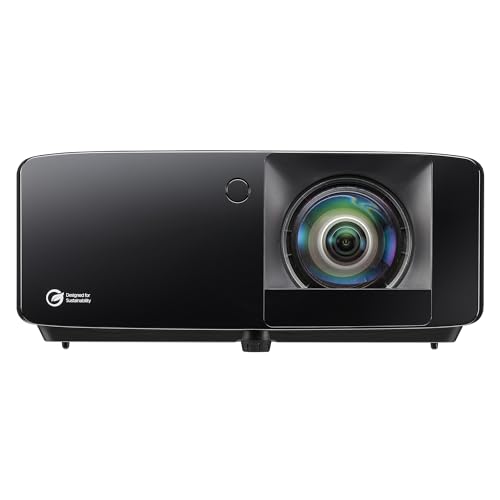
- Bright 4,200 ANSI-lumen Full HD laser projection
- Short-throw range of 2.6 to 3.7 feet
- Low input lag, HDR, and golf simulation readiness
Best For: Bright office projection with gaming or simulation use
Best Value Office Pick – ViewSonic PS501W
ViewSonic PS501W 3400 Lumens WXGA HDMI Short Throw Projector for Home and Office
Check Price On AmazonThe ViewSonic PS501W is a practical short throw projector for office presentations, training sessions, and small-business use. Its 3,400-lumen brightness, WXGA resolution, and broad input support make it a flexible choice when you need a large image without a complicated setup.
Best For: Small offices, classrooms, and budget-conscious presenters who need flexible connectivity.
Pros:
- Projects an image up to 120 inches from about 4 feet 1 inch.
- 3,400 lumens helps presentations remain visible in typical office conditions.
- Supports HDMI, USB, VGA, and other connections for PCs, Macs, and media players.
- SuperEco mode can extend lamp life to up to 15,000 hours.
Cons:
- WXGA resolution is less detailed than Full HD.
- Uses a lamp-based light source rather than a laser.
The PS501W balances useful short-throw performance, easy operation, and connectivity at a sensible level for everyday office work. Choose it when flexibility and value matter more than the sharpest resolution.
Best Ultra Short Throw – Epson PowerLite 760W
Epson PowerLite 760W Ultra Short Throw 3LCD Projector - 16:10 - Wall Mountable, Tabletop
Check Price On AmazonThe Epson PowerLite 760W is an ultra short throw projector for office environments where space is limited. It can produce a 60- to 150-inch image from a very short distance, while its 4,100-lumen 3LCD system is designed for bright, colorful widescreen presentations.
Best For: Conference rooms, classrooms, and permanent installations that need wall-mounted, space-saving projection.
Pros:
- Ultra short throw range starts at about 1.11 feet.
- 4,100-lumen brightness supports clear visuals in bright settings.
- 3LCD technology delivers WXGA widescreen performance with vivid colors.
- Laser light source offers up to 20,000 hours of operating life.
Cons:
- Heavier and less portable than the other listed office models at 13.2 pounds.
- Maximum image size is 150 inches, smaller than some alternatives.
- Wall mounting may require more installation planning.
For offices that cannot spare much room between the projector and screen, the PowerLite 760W is the most installation-friendly option here. Its laser light source and high brightness also suit frequent presentations.
Best for Bright Meeting Rooms – ViewSonic PS502W
The ViewSonic PS502W is a short throw projector for office meetings and classrooms that need strong brightness and quick setup. With 4,000 ANSI lumens, a 0.5 throw ratio, dual HDMI, and vertical auto-keystone correction, it is well suited to mobile presenters and compact meeting rooms.
Best For: Bright conference rooms, classrooms, and presenters who need fast setup and flexible placement.
Pros:
- 4,000 ANSI lumens helps images hold up against moderate ambient light.
- Projects a 100-inch image from about 4.5 feet.
- Dual HDMI inputs simplify connection of multiple presentation devices.
- Instant power on/off and vertical auto-keystone support efficient meetings.
Cons:
- WXGA resolution is not as sharp as Full HD.
- Its lamp light source is rated for up to 4,000 hours.
- It is less compact than an ultra-portable office projector.
The PS502W is a strong practical choice when office lighting, quick operation, and placement flexibility are priorities. It offers more brightness than the PS501W while retaining a short-throw design and familiar business inputs.
Best Full HD Compact Option – Optoma GT2000HDR
The Optoma GT2000HDR is an ultra-compact short throw projector for offices that value Full HD detail and a long-lasting laser light source. Its 1,920 x 1,080 resolution, 3,500-lumen brightness, and HDMI, USB, and audio connections make it suitable for presentations as well as mixed business and media use.
Best For: Compact offices and multipurpose rooms where Full HD clarity and low-maintenance operation are important.
Pros:
- Full HD 1080p resolution provides sharper text and graphics than WXGA models.
- Laser light source is rated for up to 30,000 hours.
- Ultra-compact design measures about 10.79 by 8.5 by 4.49 inches.
- Supports HDMI, USB, and 3.5mm audio connections.
Cons:
- Its 3,500-lumen brightness is lower than the brightest ViewSonic and Epson models.
- Supplied notes list a one-year projector parts-and-labor warranty.
- The listed short-throw minimum distance is about 1 meter, so it is not as close-range as the Epson.
The GT2000HDR stands out for combining compact dimensions, Full HD resolution, and a long-life laser source. It is a compelling office option when image detail and reduced maintenance matter more than maximum brightness.
Best Bright Office Value – ViewSonic PS502X XGA Short Throw
If you need a short throw projector for office presentations, the ViewSonic PS502X prioritizes brightness, straightforward setup, and dependable business-focused features. Its 4,000 ANSI lumens and 0.6 throw ratio help keep presentation text visible in moderately lit rooms, while XGA resolution suits standard slides and instructional content.
Best For: Offices, conference rooms, and classrooms that need a bright, practical projector for presentations in compact spaces.
Pros:
- 4,000 ANSI lumens help maintain visibility with moderate ambient light.
- 0.6 short throw ratio can produce a 100-inch image from about 5 feet.
- Vertical auto-keystone correction and digital zoom simplify setup.
- Includes dual HDMI, USB, 3.5mm audio, and flexible table or ceiling mounting.
Cons:
- Native XGA resolution is lower than Full HD and 4K alternatives.
- Its 9-pound desktop design is less portable than compact models.
- The lamp has a stated operating life of 4,000 hours.
The PS502X is a sensible choice when office practicality and brightness matter more than high-resolution detail. It is especially well suited to fixed presentation spaces where its short-throw positioning and mounting flexibility can reduce setup complications.
Best Ultra-Compact Option – Optoma ML1080UST Full HD
The Optoma ML1080UST is a highly compact short throw projector for office spaces where installation distance and portability are priorities. It delivers Full HD resolution from an ultra-short distance of roughly 10 inches, with autofocus, auto-keystone, built-in Google TV, and a battery for flexible use.
Best For: Small meeting areas, mobile presenters, and users who want a Full HD projector that can also handle streaming and occasional entertainment.
Pros:
- Ultra-short throw design can project from approximately 10 inches away.
- Full HD 1920 x 1080 resolution supports sharper presentation detail than XGA.
- Autofocus and auto-keystone help speed up setup.
- Portable design includes a built-in battery, Google TV, Wi-Fi, Bluetooth, and speakers.
Cons:
- 650 ANSI lumens may be less suitable for brightly lit offices.
- Maximum image size is listed as 100 inches.
- Connectivity details list HDMI and RCA, offering fewer office-oriented inputs than some larger models.
The ML1080UST stands out for teams that need a small, adaptable projector rather than maximum brightness. Its Full HD image and smart features make it versatile, but presentations in strong ambient light may call for additional room darkening.
Best High-Resolution Choice – BenQ TK700ST 4K HDR
The BenQ TK700ST is a short throw projector for office users who want presentation capability alongside detailed 4K visuals for video, demonstrations, or gaming. Its 3,000-lumen brightness is designed for moderately lit spaces, and it can create a 100-inch image from about 6.5 feet.
Best For: Offices that present detailed visuals, product demonstrations, video content, or occasional console gaming in a smaller room.
Pros:
- True 4K UHD resolution delivers highly detailed images.
- 3,000 lumens can support viewing in moderately lit spaces.
- Short throw setup produces a 100-inch image from about 6.5 feet.
- HDR10/HLG support and 16ms 4K/60Hz input lag add versatility for video and gaming.
Cons:
- Its lamp-based light source has a stated life of up to 15,000 hours in SmartEco mode.
- Supplied connectivity details list HDMI only.
- It is primarily a tabletop projector and may be less convenient for highly mobile presentations.
The TK700ST is the strongest fit when image detail is central to the buying decision. It costs some simplicity compared with office-first models, but its 4K HDR picture and short-throw flexibility are valuable for visual presentations and mixed work-and-entertainment use.
Smart Short-Throw Pick – GO2 4K Projector
If you want a short throw projector for office presentations that can also handle streaming and casual entertainment, the GO2 offers a feature-rich setup. Its 1:1 short-throw design can produce a 100-inch image from 8 feet, while the VIDAA platform, voice control, and smartphone control simplify everyday use.
Best For: Offices that want a versatile projector for presentations, streaming, and occasional after-hours entertainment.
Pros:
- 5000 ANSI brightness and a 65W Dolby-supported speaker system provide strong image and built-in audio performance.
- VIDAA includes official streaming apps, global TV channels, built-in games, and support for Apple TV+ and Apple AirPlay.
- Voice, smartphone, and parental controls offer flexible operation.
- Short-throw design delivers a 100-inch image from 8 feet.
Cons:
- The supplied notes say it is not suitable for bright rooms.
- Its extensive entertainment features may be more than a presentation-focused office needs.
The GO2 is a strong all-around option when an office projector needs to double as a smart entertainment display. For the clearest presentation results, use it in a room with controlled lighting.
Business Installation Pick – ViewSonic LS711HD
The ViewSonic LS711HD is a practical short throw projector for office use when clear Full HD presentations and flexible installation matter. Its 0.49 throw ratio produces a 100-inch image from 3.6 feet, and 4,200 ANSI lumens help maintain visibility in rooms with moderate ambient light.
Best For: Offices, classrooms, and training rooms that need a bright, permanently mountable presentation projector.
Pros:
- Native 1920×1080 resolution provides clear Full HD presentation and video quality.
- 4,200 ANSI lumens support visibility in moderate ambient lighting.
- Horizontal and vertical keystone, four-corner adjustment, and 360-degree projection simplify setup.
- Laser light source offers up to 30,000 hours of operating life, with instant power on and off.
Cons:
- It does not include the smart streaming platform and built-in channels described for the GO2.
- Its feature set is more presentation-focused than entertainment-focused.
Choose the LS711HD when dependable installation flexibility and bright Full HD output are higher priorities than built-in streaming. Support for table or ceiling mounting also makes it suitable for different office layouts.
Compact Laser Performance Pick – Optoma GT2400HDR
The Optoma GT2400HDR suits offices that want a compact short throw projector for presentations but also value gaming and simulation features. It combines Full HD 1080p output with 4,200 ANSI lumens, a laser light source, and a maximum throw distance of 3.7 feet.
Best For: Offices seeking a bright, low-maintenance projector that can also support gaming or golf simulation.
Pros:
- Full HD 1080p resolution and 4,200 ANSI lumens support sharp, bright content.
- 30,000-hour DuraCore laser light source reduces the need for frequent light-source replacement.
- Short-throw design works at distances from 2.6 to 3.7 feet.
- Low input lag, HDR capability, and golf simulation readiness add flexibility beyond presentations.
Cons:
- The supplied details list only limited image adjustment, including vertical keystone correction.
- It lacks the built-in smart apps and TV channels highlighted for the GO2.
- Its one-year projector warranty is shorter than the listed five-year or 12,000-hour light-source warranty.
The GT2400HDR is a focused choice for bright Full HD projection in a compact space. Its laser durability and gaming-oriented features make it especially appealing for offices that use the projector for both work and recreation.
How We Picked the Best Short Throw Projector for Office
We focused on models suited to presentations, training sessions, video meetings, and collaborative work rather than evaluating them only as home-theater devices. The selection considers image brightness, resolution, throw ratio, setup flexibility, connectivity, maintenance requirements, and value.
Brightness claims are not always directly comparable across manufacturers, so consider the room’s ambient light as well as the stated lumen rating. Laser and LED models generally reduce maintenance because they avoid frequent lamp replacement, while lamp-based projectors can offer strong value for budget-conscious offices.
Quick Comparison
| Priority | Best fit | What to look for |
|---|---|---|
| Small meeting room | Ultra-short-throw model | Very low placement distance, wall-mount support, high brightness |
| General presentations | WXGA or Full HD projector | Readable text, HDMI, automatic keystone, dependable brightness |
| Detailed spreadsheets and diagrams | Full HD or 4K-capable model | Higher resolution, sharp focus, suitable computer compatibility |
| Frequent daily use | Laser or LED projector | Long light-source life, low maintenance, quick startup |
| Hybrid office or streaming | Smart projector | Wireless networking, built-in apps, speakers, and flexible inputs |
Key Buying Factors for a Short-Throw Projector for Office
Throw Distance and Placement
A short-throw projector can create a large image from a relatively short distance, reducing presenter shadows and glare. Ultra-short-throw models sit closest to the wall, but they usually require more careful alignment and are often best installed permanently.
Brightness and Room Lighting
Choose a brighter model for conference rooms with windows or overhead lighting. For controlled lighting, a lower-rated projector may be sufficient. Avoid judging brightness by marketing language alone; look for credible specifications and consider whether the projector will be used with an appropriate screen.
Resolution and Aspect Ratio
WXGA can work well for basic slides, while Full HD is preferable for detailed charts, video, and shared laptop screens. 4K-oriented models provide extra detail but may cost more than an office needs. Match the projector’s aspect ratio to the computers and content used most often.
Connectivity and Installation
At minimum, look for HDMI and reliable audio output. Dual HDMI inputs help when several presenters connect at once. Wireless presentation support, USB playback, network control, vertical or horizontal keystone correction, and four-corner adjustment can simplify installation and daily use.
Running Costs and Noise
Laser and LED light sources typically offer longer service life and more consistent performance than traditional lamps. Also check fan noise, speaker quality, warranty coverage, replacement parts, and whether a ceiling or wall mount is included.
Who Should Buy Which Short Throw Projector for Office?
Choose a compact WXGA model if your office mainly displays slides, documents, and basic charts on a budget. Step up to Full HD when text clarity, video, or detailed diagrams matter. Choose an ultra-short-throw projector for a fixed small room where keeping cables and presenters away from the image is important.
A laser model is the stronger choice for frequent presentations, shared equipment, or locations where low maintenance matters. Smart features are useful when users need built-in streaming or wireless access, but they should not replace essential office inputs and network compatibility. For offices that also need gaming, simulation, or high-quality video, a short-throw 4K or Full HD model with low input lag can provide added versatility.