The right conference-room TV mount does more than hold a screen on the wall. It helps optimize viewing angles, preserve floor space, manage cable access, and keep large displays securely supported.
These 10 options cover common commercial needs, from fixed low-profile installations to full-motion mounts for rooms with flexible seating. We also included a dedicated Logitech Rally Bar wall mount for video-conferencing setups.
Best 10 TV Wall Mounts for Conference Rooms Picks for 2026
Best Overall
USX Mount Full-Motion TV Wall Mount

- Fits 42-85-inch TVs up to 110 lb
- Supports 16-, 18-, and 24-inch studs
- Tilts, swivels, extends, and levels
Best For: Medium-to-large conference rooms needing flexible positioning
Best for Ultra-Large Displays
Mount-It! The Beast Heavy-Duty Mount

- Supports 60-110-inch TVs up to 275 lb
- Extends up to 39 inches with 360° rotation
- Includes cable management and lock clips
Best For: Large commercial conference rooms with 98- to 100-inch displays
Best Low-Profile Option

- Supports 43-90-inch TVs up to 220 lb
- Sits 1.5 inches from the wall
- Tilts down up to 8 degrees
Best For: Fixed conference-room displays needing glare reduction
Best for Maximum Size Range
Mount-It! 100-Inch Full-Motion Mount

- Supports 60-120-inch TVs up to 264 lb
- Covers VESA patterns up to 900x600mm
- Swivels 120° and extends to 27.7 inches
Best For: Large conference rooms with extra-large or unusual-size displays
Best Conference Bar Mount

- Fits Rally Bar and Rally Bar Mini setups
- Above- or below-display installation
- Built-in cable management and 10° tilt
Best For: Dedicated Logitech Rally conference systems
Best Large-Display Mount
USX MOUNT Full-Motion TV Wall Mount

- Fits 37–90-inch TVs up to 120 lb
- Swivels, tilts, and extends for flexible viewing
- Retracts to a 1.45-inch low profile
Best For: Large conference-room TVs with compatible wall structure
Best Long-Reach Mount
BONTEC Extended-Arm TV Wall Mount
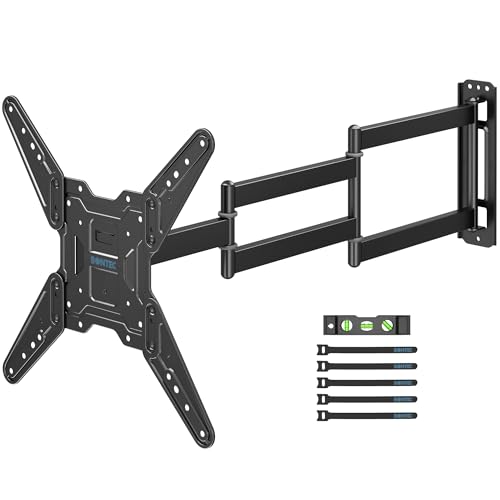
- Extends up to 37.4 inches from the wall
- Supports 26–65-inch TVs up to 77 lb
- ±90° swivel with tilt and leveling adjustment
Best For: Corner or small conference rooms needing extended reach
Best with Extra Features
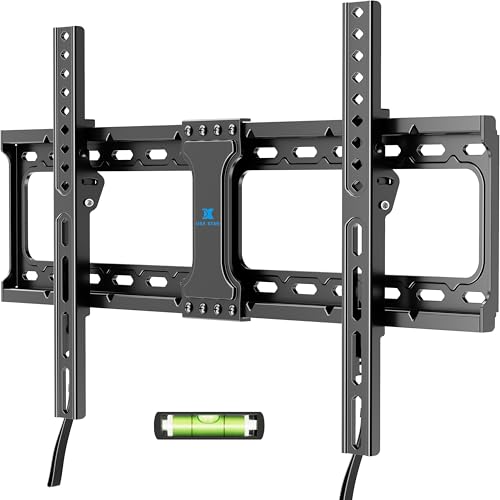
- Supports 37–86-inch TVs up to 132 pounds
- Low-profile 1.28-inch wall clearance
- Quick release with 10-year support
Best For: Flush-mounted conference room displays
Large-Screen Flexibility

- Fits 37–90-inch TVs up to 132 pounds
- Tilts, swivels, extends, and levels
- Extends up to 16.61 inches from the wall
Best For: Large rooms needing adjustable viewing angles
Compact Room Pick
USX MOUNT Swivel TV Wall Mount

- Fits 26–60-inch TVs up to 80 pounds
- Swivels up to ±90° and extends 19.37 inches
- Includes locking screws and leveling adjustment
Best For: Small conference rooms and huddle spaces
Best Overall – USX Mount Full-Motion TV Wall Mount
For conference rooms needing flexible positioning, this USX Mount is a practical choice among tv wall mounts for conference rooms. It supports 42- to 85-inch TVs, accommodates 16-, 18-, and 24-inch stud spacing, and provides broad adjustment for different seating positions.
Best For: Medium-to-large conference rooms that need a full-motion mount with wide stud compatibility.
Pros:
- Supports TVs from 42 to 85 inches and up to 110 pounds.
- Offers tilt, swivel, extension, and leveling adjustments.
- Fits VESA patterns from 200x100mm to 600x400mm and includes a template, level, and hardware.
Cons:
- Maximum supported screen size is smaller than the heavy-duty large-format options.
- Concrete anchors may need to be requested separately.
Its articulating arms make it easier to direct the display toward different areas of a meeting space, while the low retracted profile keeps the installation relatively close to the wall when extended movement is not needed.
Best for Ultra-Large Displays – Mount-It! The Beast Heavy-Duty Mount
Designed for exceptionally large screens, The Beast is one of the most substantial tv wall mounts for conference rooms. It supports 60- to 110-inch TVs weighing up to 275 pounds and provides long-extension movement for large meeting spaces.
Best For: Commercial or conference-room installations using 98- to 100-inch-class displays.
Pros:
- Supports screens from 60 to 110 inches and up to 275 pounds.
- Offers up to 39 inches of extension, tilt, swivel, and 360-degree rotation.
- Includes a sliding wall plate, cable management, lock clips, and a lifetime warranty.
Cons:
- Requires wood studs or solid concrete; it is not intended for drywall-only walls.
- Its 43.7-pound mount and large-screen compatibility may require a more involved installation.
The combination of high load capacity, long reach, and wide VESA compatibility makes this a strong fit when a conference display must be viewable from varied seating positions. Confirm the wall structure and plan for a careful installation before purchase.
Best Low-Profile Option – Mount-It! Tilting TV Mount
For a clean, close-to-wall installation, this tilting bracket is a straightforward option among tv wall mounts for conference rooms. It supports 43- to 90-inch TVs up to 220 pounds and sits just 1.5 inches from the wall.
Best For: Conference rooms where a large display can remain fixed and only needs downward tilt to reduce glare.
Pros:
- Supports 43- to 90-inch TVs weighing up to 220 pounds.
- Fits VESA patterns from 100x100mm to 800x600mm.
- Works with 16- or 24-inch studs and solid concrete, with safety bolts and an integrated level.
Cons:
- Provides tilt only, with no swivel or extension.
- Cables should be connected before the TV is mounted.
This mount prioritizes stability and a slim profile over viewing-angle flexibility. It is a sensible choice for a dedicated presentation wall, especially when the display is mounted above eye level or across from a window.
Best for Maximum Size Range – Mount-It! 100-Inch Full-Motion Mount
With support for displays up to 120 inches, this Mount-It! model is a versatile pick among tv wall mounts for conference rooms. Its slotted rails cover a broad range of VESA patterns, while dual articulating arms allow the screen to be pulled forward and angled toward different seating areas.
Best For: Conference rooms, hospitality spaces, and other installations using 60- to 120-inch displays.
Pros:
- Supports 60- to 120-inch TVs weighing up to 264 pounds.
- Provides 120-degree swivel, +5/-15-degree tilt, and 3- to 27.7-inch extension.
- Fits VESA patterns from 200x200mm to 900x600mm and includes post-install leveling.
Cons:
- Not compatible with metal studs or drywall-only walls.
- Two people are recommended for lifting and installation.
This is a strong choice when display size or unusual VESA spacing makes compatibility a priority. Its lifetime warranty and included installation accessories add practical value, but the wall must provide suitable wood studs or solid concrete support.
Best Conference Bar Mount – Logitech Rally Bar Wall Mount
For conference rooms built around Logitech Rally equipment, this purpose-designed mount is a more targeted choice than a general TV bracket. It supports Rally Bar and Rally Bar Mini setups, uses a 200 x 50 mm VESA pattern, and can position the bar above or below the display.
Best For: Logitech-equipped conference rooms, offices, classrooms, and training spaces that need a tidy camera-and-display installation.
Pros:
- Designed for Logitech Rally Bar and Rally Bar Mini setups.
- Supports above- or below-display placement and includes a 10° tilt adapter.
- Integrated cable-routing channels help organize cables upward or downward.
- Heavy-duty metal construction and included installation hardware support a stable setup.
Cons:
- Its 200 x 50 mm VESA design is specialized rather than broadly universal.
- Designed for Rally conference equipment, not general-purpose TV mounting.
This is the most purpose-built option in the group for rooms using Logitech Rally hardware. Its adjustment features and cable management are useful when camera position and a clean installation matter more than accommodating many TV sizes.
Best Large-Display Mount – USX MOUNT Full-Motion TV Wall Mount
For conference rooms using a large display, this full-motion bracket covers TVs from 37 to 90 inches and supports up to 120 pounds. Its articulating arms allow tilt, swivel, and extension for adjusting the screen toward different seating areas.
Best For: Large conference-room displays installed on compatible wood-stud, concrete, or brick walls where flexible viewing angles are useful.
Pros:
- Fits many 37–90-inch flat or curved TVs with VESA patterns up to 600 x 400 mm.
- Supports up to 120 pounds and retracts to 1.45 inches from the wall.
- Provides ±45° swivel, +10°/−10° tilt, and extension up to 11.92 inches.
- Includes a bubble level, cable ties, and standard mounting hardware.
Cons:
- Actual swivel range depends on the installed TV.
- Buyers must verify the display’s VESA pattern, weight, and stud spacing before installation.
- The supplied notes indicate that 10 x 50 mm concrete anchors require separate contact with the seller.
This mount is a strong fit when a conference-room TV needs both a low-profile resting position and repositioning flexibility. Confirm wall construction and display specifications first, since compatibility depends on those measurements.
Best Long-Reach Mount – BONTEC Extended-Arm TV Wall Mount
In conference rooms with corner layouts or seating spread across a wide area, this BONTEC mount offers an unusually long 37.4-inch extension. It fits 26–65-inch TVs, retracts to 2.9 inches, and provides broad movement for positioning the display where participants can see it.
Best For: Small or corner conference rooms that need a medium-size display pulled well away from the wall or angled toward different seating positions.
Pros:
- Extends up to 37.4 inches while retracting to 2.9 inches.
- Supports 26–65-inch TVs up to 77 pounds with VESA patterns from 200 x 200 to 400 x 400 mm.
- Offers up to ±90° swivel, +5°/−10° tilt, and ±4° leveling.
- Includes mounting screws, a bubble level, cable ties, tools, and installation guidance.
Cons:
- It supports smaller and lighter displays than the 90-inch, 120-pound alternative.
- Installation is specified for wood stud, brick, or concrete walls, not drywall.
- Its long extension may require careful planning in busy walkways.
The long reach makes this a practical choice for rooms where a fixed wall position does not provide a clear view. Verify the wall type, TV weight, and VESA dimensions, then plan the extended position to keep the display clear of traffic.
Best with Extra Features – USX STAR Fixed TV Wall Mount
For conference rooms that need a clean, space-saving installation, this fixed USX STAR mount supports many 37- to 86-inch TVs and places the screen just 1.28 inches from the wall. Check your display’s VESA pattern, weight, and stud spacing before choosing it for your tv wall mounts for conference rooms setup.
Best For: Conference rooms, lobbies, showrooms, and other spaces where a stable, flush installation is preferred.
Pros:
- Supports TVs from 37 to 86 inches and up to 132 pounds.
- Fits VESA patterns from 150×100 mm to 600×400 mm and wood studs up to 24 inches apart.
- Quick-release pull straps, mounting template, included hardware, and 10-year customer support simplify installation and maintenance.
Cons:
- Fixed design does not tilt or swivel.
- Requires careful stud-spacing and VESA verification before purchase.
This is a practical choice when the screen can face the room directly and a low-profile appearance matters more than viewing-angle adjustment.
Large-Screen Flexibility – USX STAR Full Motion TV Mount
This full-motion USX STAR bracket is designed for larger conference room displays, supporting most 37- to 90-inch TVs up to 132 pounds. Its tilt, swivel, extension, and leveling adjustments make it a flexible option among tv wall mounts for conference rooms, provided the wall and VESA pattern are compatible.
Best For: Large conference rooms, training spaces, lobbies, and installations where viewers need adjustable sightlines.
Pros:
- Supports TVs up to 90 inches and 132 pounds.
- Offers +5°/−15° tilt, up to ±45° swivel, ±4° leveling, and extension up to 16.61 inches.
- Works with compatible wood studs, solid brick, or concrete walls and includes a drilling template and labeled hardware.
Cons:
- Concrete anchors are available by request rather than included by default.
- The maximum swivel angle depends on screen size.
Choose this model when glare reduction and off-center viewing are important, especially with a large display that may need to be pulled forward for access.
Compact Room Pick – USX MOUNT Swivel TV Wall Mount
For smaller conference rooms or secondary displays, this single-arm USX MOUNT bracket accommodates most 26- to 60-inch TVs up to 80 pounds. It combines substantial extension with tilt and wide swivel movement, making it a versatile choice among tv wall mounts for conference rooms when the screen size stays within its limits.
Best For: Small conference rooms, huddle spaces, offices, and compact displays that need flexible positioning.
Pros:
- Supports 26- to 60-inch TVs up to 80 pounds.
- Provides +5°/−12° tilt, up to ±90° swivel, and extension from 2.52 to 19.37 inches.
- Includes security lock screws, post-installation leveling, a paper template, and labeled hardware.
Cons:
- Not intended for TVs larger than 60 inches or heavier than 80 pounds.
- Concrete anchors are not included and must be requested separately.
This mount offers strong positioning flexibility for smaller displays, but confirm the TV’s VESA pattern—75×75 mm through 400×400 mm—and the wall type before installation.
How We Picked the Best TV Wall Mounts for Conference Rooms
We selected mounts across the installation types and screen sizes most often used in meeting spaces. Our comparison considered stated weight limits, TV-size compatibility, VESA support, motion range, stud-spacing compatibility, profile depth, and practical installation features such as quick release or cable access. UL-listed options received particular attention for buyers who want a mount with an explicit safety certification.
Always verify the manufacturer’s specifications against your display and wall before purchasing. A mount’s advertised size range alone does not confirm compatibility with your TV’s VESA pattern or actual weight.
Quick Comparison
| Best For | Mount Type | Typical Strength | Notable Consideration |
|---|---|---|---|
| Flexible seating layouts | Full motion | Swivel, tilt, and extension | Needs adequate clearance and strong installation points |
| Clean, close-to-wall installations | Fixed or low profile | Minimal projection | Limited access and viewing adjustment |
| Large commercial displays | Heavy-duty full motion or fixed | High weight capacity | Requires careful wall and stud assessment |
| Video-conferencing bars | Dedicated accessory mount | Device-specific fit | Not a replacement for a television mount |
Key Buying Factors for TV Wall Mounts for Conference Rooms
Screen Size, Weight, and VESA Pattern
Confirm the TV’s exact diagonal size, weight without its stand, and VESA mounting-hole dimensions. Choose a mount whose capacity comfortably exceeds the display’s weight rather than relying on a borderline rating.
Viewing Angle and Room Layout
Fixed mounts work well when every seat faces the same wall. Tilt mounts can reduce glare and improve sightlines from different seating rows. Full-motion arms are more useful in multipurpose rooms, corner installations, or spaces where the display must be angled toward different groups.
Wall Construction and Stud Spacing
Concrete, brick, wood studs, and metal-stud walls require different anchors and installation methods. Several mounts in this roundup support common 16-, 18-, or 24-inch stud spacing, but that does not eliminate the need to locate studs and use the correct hardware.
Clearance, Cables, and Service Access
Measure the distance from the wall to nearby doors, furniture, and cable paths. Low-profile mounts look tidy but can make HDMI, power, and network connections harder to reach. Articulating mounts provide access but need room to retract and extend safely.
Who Should Buy Which TV Wall Mounts for Conference Rooms?
Choose a fixed or low-profile mount for a permanent presentation wall where a clean appearance matters most. Select a tilting mount when the screen is installed higher than eye level or glare is a concern. For large displays or rooms with changing seating, a heavy-duty full-motion mount offers more positioning flexibility, provided the wall can support it.
Buyers installing a Logitech Rally Bar or Rally Bar Mini should use the dedicated compatible wall mount rather than adapting a general TV bracket. For smaller displays or compact huddle rooms, a lighter single-arm mount may be easier to install and less visually intrusive. In every case, professional installation is worth considering for oversized screens, masonry walls, or heavily used commercial rooms.