The best USB-C hard drive enclosures turn spare SATA drives into practical external storage without the cost of a new portable drive. They can also make drive upgrades, backups, and data transfers more convenient.
This roundup covers compact 2.5-inch cases, larger 3.5-inch enclosures, and docking stations with extra features such as dual bays, cloning, tool-free installation, and broad USB compatibility.
Best 10 USB C Hard Drive Enclosures Picks for 2026
Best High-Speed Enclosure
ORICO Aluminum 3.5-Inch USB-C Enclosure

- USB 3.2 Gen 2 interface with UASP
- Supports SATA drives up to 20TB
- Includes USB-C/A cable and power adapter
Best For: Fast single-drive storage expansion
Best Dual-Bay Dock

- Reads and writes two SATA drives at once
- Offline drive cloning without a computer
- Tool-free bays support 2.5- and 3.5-inch drives
Best For: Drive cloning and two-drive transfers
Best Budget 3.5-Inch Enclosure
ORICO USB-C SATA III Enclosure

- Supports one 3.5-inch SATA drive up to 20TB
- Tool-free setup with UASP support
- Includes 12V adapter and USB-A-to-C cable
Best For: Simple 3.5-inch drive conversion
Best Simple Drive Dock
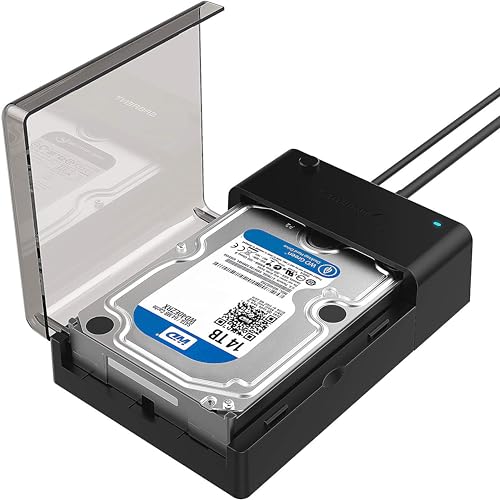
- Accepts bare 2.5- and 3.5-inch SATA drives
- Tool-free, hot-swappable design
- Includes required 12V adapter for 3.5-inch drives
Best For: Quick access to bare SATA drives
Best 10Gbps Pick
Cable Matters Aluminum 2.5-Inch USB-C Enclosure

- 10Gbps USB-C connectivity
- Aluminum housing aids heat dissipation
- Tool-free support for 2.5-inch SATA drives
Best For: Fast backups, drive diagnosis, and modern USB-C systems
Best Value Flexibility
BENFEI Tool-Free 2.5-Inch SATA Enclosure

- USB-C and USB-A connection options
- Tool-free, plug-and-play installation
- Supports drives up to 6TB
Best For: Everyday transfers across USB-C and USB-A devices
Best Heat-Dissipating Design
UGREEN Aluminum 2.5-Inch USB-C Enclosure
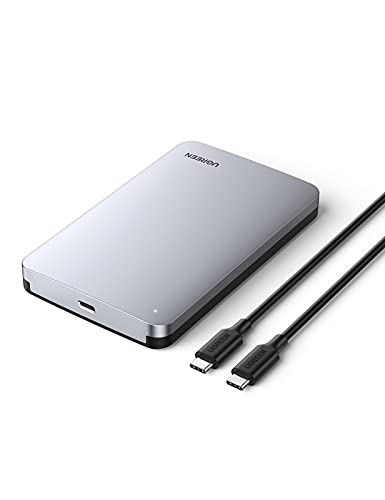
- Aluminum alloy shell with fanless heat dissipation
- Tool-free setup with no extra power supply
- Supports SATA drives up to 6TB
Best For: Portable storage, upgrades, and broad device compatibility
Best Value 2.5-Inch Enclosure
ORICO USB-C 2.5-Inch SATA Case

- Tool-free installation for 7mm and 9.5mm drives
- UASP support with included USB-C-to-USB-A cable
- Compatible with computers, consoles, routers, and TVs
Best For: Affordable portable storage expansion and drive recovery
Best High-Capacity 3.5-Inch Enclosure

- Supports 2.5-inch and 3.5-inch drives up to 24TB
- Includes detachable USB-A/USB-C 2-in-1 cable
- Aluminum housing with vents and removable stand
Best For: Large desktop SATA drives and high-capacity storage
Best High-Speed Enclosure – ORICO Aluminum 3.5-Inch USB-C Enclosure
For shoppers comparing USB C hard drive enclosures, the ORICO DD35-C3 combines a 3.5-inch aluminum enclosure with a USB 3.2 Gen 2 interface. It supports SATA HDDs and SSDs, includes both USB-C and USB-A connectivity, and accommodates drives up to 20TB.
Best For: Users who want a fast, cooled enclosure for a single 3.5-inch or 2.5-inch SATA drive.
Pros:
- USB 3.2 Gen 2 supports up to 10Gbps interface speeds and UASP.
- Aluminum housing and ventilation help with heat dissipation.
- Includes a USB-C to USB-C/A cable and 12V/2A power adapter.
- Tool-free, plug-and-play installation with protection features.
Cons:
- It supports one drive at a time.
- The 3.5-inch drive requires the included power adapter.
This is the strongest choice here for a single-drive setup where USB-C flexibility, higher interface speed, and an aluminum build matter. Actual performance will still depend on the installed SATA drive.
Best Dual-Bay Dock – SABRENT USB-C Dual-Bay Cloner
The SABRENT EC-CH2B is a practical alternative to single-drive USB C hard drive enclosures when you need to access or copy two bare SATA drives. Its two bays work simultaneously over USB, and its offline cloner can copy one SATA drive to another without a computer.
Best For: Users who regularly clone, compare, or transfer data between two bare 2.5-inch or 3.5-inch SATA drives.
Pros:
- Dual bays let both drives mount separately when connected to a computer.
- Offline 1-to-1 cloning requires no computer.
- Tool-free, hot-swappable design with an activity LED for each bay.
- USB-C cable and power adapter are included.
Cons:
- Supports SATA drives only; M.2, NVMe, IDE/PATA, and SAS drives are not supported.
- Offline cloning runs at up to 60MBps and requires a target drive at least as large as the source.
- The dock’s USB 3.0 interface is rated up to 5Gbps.
Choose this dock over a conventional enclosure if two-drive workflows or offline cloning are priorities. It is less suited to users seeking a compact, single-drive enclosure or support for newer M.2 storage.
Best Budget 3.5-Inch Enclosure – ORICO USB-C SATA III Enclosure
The ORICO 3588C3 offers a straightforward way to reuse a 3.5-inch SATA hard drive with a USB-C connection. It supports drives up to 20TB, uses UASP over a USB 3.1 interface, and includes a 12V power adapter for dependable operation.
Best For: Users converting a single 3.5-inch SATA HDD into an external drive for Windows or Linux systems.
Pros:
- Supports 3.5-inch SATA HDDs up to 20TB.
- USB-C to SATA III interface offers up to 5Gbps transfer rates.
- Tool-free installation with plug-and-play operation.
- Includes power adapter, USB-A-to-USB-C cable, and thermal pads.
Cons:
- The included cable connects to a USB-A host, so a USB-C-only computer may need an adapter.
- It supports one 3.5-inch drive and does not list macOS compatibility in the supplied specifications.
This enclosure keeps the setup simple and adds useful UASP support without requiring drivers. Check your computer’s ports before ordering, since the included host connection is USB-A.
Best Simple Drive Dock – SABRENT SATA Hard Drive Dock
The SABRENT EC-DFLT is a lay-flat docking station for bare 2.5-inch and 3.5-inch SATA drives. Although it is useful alongside USB C hard drive enclosures, its host connection is USB Type-A rather than USB-C, so USB-C-only computers require a separate adapter.
Best For: Users who need a tool-free, hot-swappable dock for occasional access to bare SATA HDDs or SSDs.
Pros:
- Accepts both 2.5-inch and 3.5-inch SATA I/II/III drives.
- Tool-free, plug-and-play, hot-swap design with power and activity indicators.
- Includes the 12V/2A adapter required for stable 3.5-inch drive operation.
- Supports UASP and backward compatibility with USB 2.0 and USB 1.1.
Cons:
- It has a USB Type-A host connection, not a USB-C port.
- It does not support IDE/PATA, M.2, NVMe, SAS, or drives already inside USB enclosures.
- S.M.A.R.T. diagnostics do not pass through the USB bridge.
This is a sensible choice for quick, repeated drive access when USB-A is available. If your computer has only USB-C ports, budget for an adapter or choose a native USB-C model instead.
Best 10Gbps Pick – Cable Matters Aluminum 2.5-Inch USB-C Enclosure
For shoppers comparing usb c hard drive enclosures, the Cable Matters model stands out with USB 3.1 connectivity rated up to 10Gbps. Its aluminum housing supports heat dissipation, while tool-free installation makes it practical for adding or diagnosing a 2.5-inch SATA SSD or HDD.
Best For: Users who want high-speed transfers, broad modern-port compatibility, and a sturdy enclosure for a 2.5-inch SATA drive.
Pros:
- Supports 2.5-inch SATA SSDs and HDDs up to 9.5mm thick.
- Offers transfer rates up to 10Gbps with compatible equipment and supports SATA III drives up to 6Gbps.
- Includes USB-C and USB cables and works with Thunderbolt 3, Thunderbolt 4, and USB4 ports.
- Supports UASP, TRIM, and S.M.A.R.T. with compatible drives, operating systems, and computers.
Cons:
- Its maximum advertised speed requires a compatible computer, drive, and cable connection.
- It supports one 2.5-inch drive rather than multiple drives.
This is a strong choice when speed and an aluminum build matter most. It also offers useful drive-diagnosis capability, making it suitable for upgrades, backups, and temporary access to internal SATA storage.
Best Value Flexibility – BENFEI Tool-Free 2.5-Inch SATA Enclosure
The BENFEI is a practical option among usb c hard drive enclosures for moving a 2.5-inch SATA drive between computers. It includes USB Type-C and Type-A connection options, supports tool-free installation, and uses UASP for transfers up to 5Gbps.
Best For: Users who need an affordable, easy-to-install enclosure with both USB-C and USB-A connection flexibility.
Pros:
- Supports 2.5-inch SATA I, II, and III SSDs and HDDs up to 6TB.
- Tool-free, plug-and-play design requires no driver and supports hot-swapping.
- USB Type-C/Type-A plug design works with compatible laptops, phones, pads, and PCs.
- Includes an 18-month unconditional warranty and customer support.
Cons:
- Transfer speeds top out at 5Gbps, below the 10Gbps rating of some competing enclosures.
- The integrated-cable design may offer less cable flexibility than models with a separate cable.
BENFEI emphasizes convenience over maximum bandwidth. Its dual-connector approach and simple installation make it a sensible everyday enclosure for file transfers, backups, or repurposing a spare 2.5-inch SATA drive.
Best Heat-Dissipating Design – UGREEN Aluminum 2.5-Inch USB-C Enclosure
UGREEN combines a USB-C interface with an aluminum alloy shell in this 2.5-inch SATA enclosure. For shoppers seeking usb c hard drive enclosures, it offers tool-free installation, UASP support, and compatibility with computers, selected game consoles, routers, and other supported devices.
Best For: Users who want an aluminum enclosure with passive heat dissipation and wide compatibility for a 2.5-inch SATA SSD or HDD.
Pros:
- Supports most 2.5-inch SATA I, II, and III drives up to 6TB.
- Aluminum alloy construction and the ASM235CM chipset support heat dissipation without a cooling fan.
- Tool-free, plug-and-play setup requires no driver or extra power supply.
- Works with Windows, macOS, Linux, PS4, PS3, Xbox One, smart TVs, and routers when the device supports the connection.
Cons:
- Drive transfer performance is limited by the SATA III interface to up to 6Gbps.
- A USB-C-to-USB-A cable is needed for devices that only have USB-A ports.
This UGREEN enclosure is a well-rounded option for portable storage and drive upgrades. Its fanless aluminum design is particularly appealing for users who want basic heat management without adding a powered cooling solution.
Best Value 2.5-Inch Enclosure – ORICO USB-C 2.5-Inch SATA Case
This ORICO model is a practical choice if you need a compact USB C hard drive enclosure for a 2.5-inch SATA SSD or HDD. Its tool-free design, UASP support, included USB-C-to-USB-A cable, and compatibility with computers, consoles, routers, and TVs make it well suited to backups, storage expansion, and accessing an older drive.
Best For: Users who want an affordable, portable enclosure for a single 7mm or 9.5mm 2.5-inch SATA drive.
Pros:
- Tool-free installation with plug-and-play operation and hot-swap support.
- Supports UASP and USB 3.1 connectivity for faster transfers with compatible hardware.
- Includes a USB-C-to-USB-A cable and EVA foam pad to help reduce drive movement.
- Works with Windows, Linux, and macOS, plus devices such as PS4, PS5, Xbox, routers, and TVs.
Cons:
- The plastic housing offers less heat dissipation than an aluminum enclosure.
- It is designed for 2.5-inch drives and supports one drive at a time.
Choose this enclosure when portability, simple installation, and broad compatibility matter more than premium materials. It is a straightforward option for repurposing or recovering a 2.5-inch SATA drive.
Best Aluminum 2.5-Inch Enclosure – ORICO USB 3.2 Gen 2 SATA Case
For shoppers comparing USB C hard drive enclosures, this ORICO DD25-C3 adds an aluminum housing, USB 3.2 Gen 2 connectivity, and a USB-C-to-USB-A/C cable. It supports one 7mm or 9.5mm 2.5-inch SATA SSD or HDD, with protection features and compatibility across computers, mobile devices, smart TVs, and consoles.
Best For: Users who want a more durable aluminum enclosure with flexible USB-A and USB-C connectivity.
Pros:
- Aluminum housing and ventilation support heat dissipation and physical protection.
- Includes a 10Gbps USB-C-to-USB-A/C 2-in-1 cable for broader host compatibility.
- Built-in protections cover over-voltage, short-circuit, overload, and over-temperature conditions.
- Supports drives up to 6TB and offers tool-free, hot-swappable installation.
Cons:
- It supports one 2.5-inch SATA drive rather than 3.5-inch desktop drives.
- Users should safely eject the enclosure before unplugging it to help avoid data loss.
This is the stronger pick for buyers who value an aluminum build, newer USB 3.2 Gen 2 connectivity, and a versatile dual-connector cable. Its automatic sleep mode also helps reduce energy use during inactivity.
Best High-Capacity 3.5-Inch Enclosure – RSHTECH USB-C SATA Drive Case
This RSHTECH enclosure is built for larger desktop drives and is a notable option among USB C hard drive enclosures because it supports both 2.5-inch and 3.5-inch SATA HDDs or SSDs up to 24TB. Its aluminum housing, vertical stand, detachable dual-connector cable, and automatic sleep function make it suited to high-capacity desktop storage.
Best For: Users who need an enclosure for a high-capacity 3.5-inch SATA drive, including backup and media storage.
Pros:
- Supports 2.5-inch and 3.5-inch SATA drives with capacities up to 24TB.
- Includes a 3.3-foot USB-A/USB-C detachable cable for USB-A, USB-C, and Thunderbolt hosts.
- Aluminum housing, bottom vents, and removable stand support cooling and upright or flat placement.
- UASP support, status LEDs, and a physical power button add convenience for desktop use.
Cons:
- The larger desktop-oriented design is less portable than a compact 2.5-inch enclosure.
- Transfer rates are listed up to 5Gbps, with UASP support up to 6Gbps.
Pick this model when drive capacity and 3.5-inch compatibility are priorities. The stand, power control, cooling-focused housing, and 24TB support make it a practical choice for keeping a large SATA drive connected at a workstation.
How We Picked the Best USB C Hard Drive Enclosures
We compared these USB-C hard drive enclosures by drive compatibility, connection speed, installation design, power requirements, and everyday usability. The selection includes options for 2.5-inch SATA SSDs and laptop hard drives, as well as powered solutions for higher-capacity 3.5-inch desktop drives.
We also considered useful differences between portable enclosures and docking stations. A compact case is better for a finished external drive, while a dock is more convenient when you regularly swap bare drives, clone disks, or access multiple storage devices.
Quick Comparison
- Best for portable 2.5-inch drives: Choose a compact aluminum enclosure with tool-free installation and a USB-C cable.
- Best for 3.5-inch desktop drives: Look for a powered enclosure or dock with adequate cooling and broad capacity support.
- Best for drive cloning: Select a dual-bay docking station with a dedicated offline clone function.
- Best for mixed computers: A model supplied with USB-C and USB-A connectivity offers more flexibility.
- Best for frequent drive swapping: An open docking station avoids repeatedly mounting drives inside a case.
Key Buying Factors for USB-C Hard Drive Enclosures
Drive Size and Interface
Confirm that the enclosure supports your drive’s physical size and SATA interface. Most 2.5-inch models accept SATA SSDs and laptop hard drives, while 3.5-inch HDDs generally require a separate power adapter. An enclosure cannot convert incompatible interfaces such as NVMe without explicitly supporting NVMe drives.
USB Speed and Real-World Performance
USB 3.2 Gen 2 can provide higher bandwidth than USB 3.0, but actual speeds depend on the drive, computer port, controller, cable, and file type. UASP support can improve performance and reduce overhead with compatible operating systems. Check both the enclosure specification and the included cable.
Power, Cooling, and Capacity
Bus-powered 2.5-inch enclosures are convenient for laptops and travel. Larger 3.5-inch drives need supplemental power, so powered enclosures and docks are the safer choice. Aluminum shells can help dissipate heat, but ventilation still matters during long transfers. Verify the listed maximum capacity if you plan to use very large drives.
Installation and Compatibility
Tool-free designs make occasional upgrades easier, while secure mounting can be preferable for a drive that travels frequently. Check operating-system compatibility, connector types, cable length, and whether the product supports both USB-C and USB-A hosts.
Who Should Buy Which USB C Hard Drive Enclosures?
Choose a slim 2.5-inch enclosure if you want to reuse a laptop HDD or SATA SSD as portable storage. Pick a powered 3.5-inch enclosure when converting a desktop drive into a larger backup device. A dual-bay dock is the better fit for IT work, cloning, or frequent drive access, while a simple single-drive case keeps the setup smaller and less expensive.