The best webcams for conference rooms make hybrid meetings easier with clearer video, better microphone coverage, and reliable compatibility with popular conferencing platforms.
Our 2026 roundup includes compact USB systems, 360-degree cameras, and feature-rich PTZ models, so you can match the camera to your room size, seating layout, and meeting style.
Best 10 Webcams for Conference Rooms Picks for 2026
Best for Hybrid Collaboration

- 360° 1080p video and room audio
- AI speaker tracking
- Plug-and-play with major platforms
Best For: Hybrid meetings requiring room-wide visibility
Best for Small Rooms
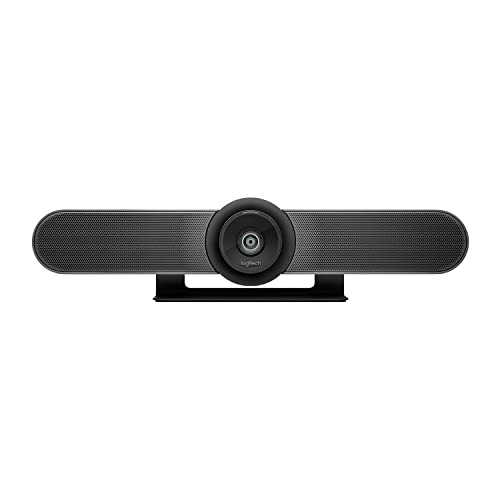
- 4K video with 120° field of view
- Motorized pan and tilt
- Integrated beamforming microphones
Best For: Huddle rooms and compact conference spaces
Best for AI Framing Value
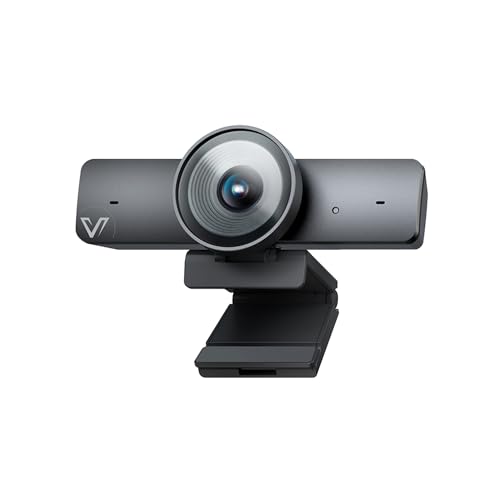
- 4K video with a 1/1.8-inch sensor
- AI framing and presenter tracking
- 120° lens with 5x digital zoom
Best For: Small rooms and presentation-focused meetings
Best Compact All-in-One
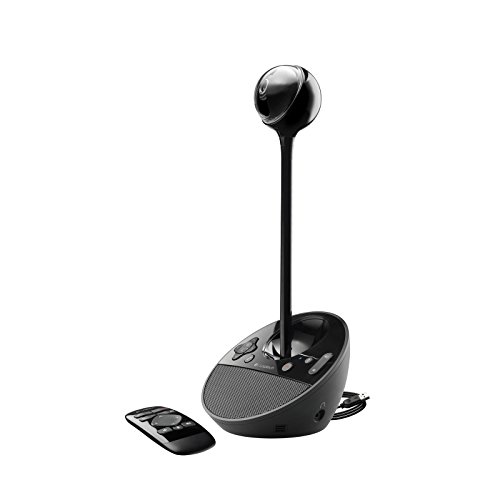
- 1080p autofocus video
- Built-in speakerphone and noise-canceling mic
- Plug-and-play PC and Mac support
Best For: Small teams wanting simple integrated conferencing
Best All-in-One PTZ System
TONGVEO AI Auto-Tracking Conference Camera

- 1080p video at up to 60fps
- 3x optical zoom with AI tracking
- Wireless speakerphone with echo cancellation
Best For: Small-to-medium rooms needing integrated video and audio
Best 360-Degree Coverage
TOUCAN SC360 Conference Camera
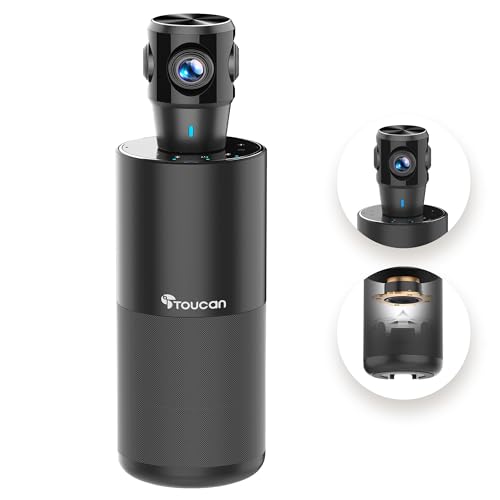
- 360-degree video capture
- Four noise-reduction microphones
- 1080p USB plug-and-play design
Best For: Flexible meeting layouts with participants around the room
Best 4K Dual-Lens Option
BizEye P30 AI Conference System

- 4K PTZ plus 1080p panoramic lens
- AI framing, tracking, and gallery modes
- 360-degree Bluetooth speakerphone
Best For: Small-to-medium rooms needing advanced automated framing
Best AI-Tracking System
TONGVEO 4K PTZ Camera and Speakerphone
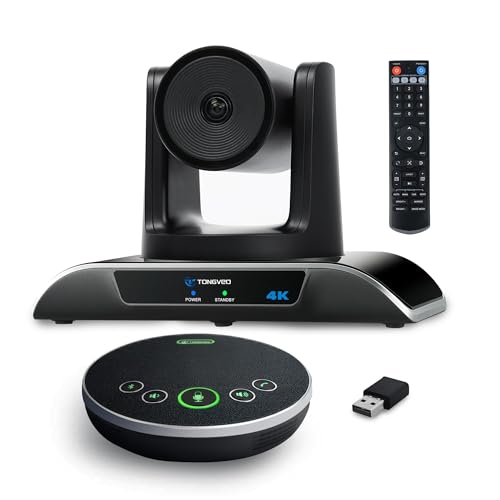
- 4K video with 120° wide-angle coverage
- AI tracking, gestures, and 5x digital zoom
- Includes speakerphone with 16.4-foot pickup range
Best For: Small and medium meeting rooms needing flexible tracking and built-in audio
Best Plug-and-Play Webcam
TONGVEO 4K All-in-One Conference Camera

- 4K video with a 116° wide-angle lens
- Built-in speaker and dual noise-reducing microphones
- USB-C plug-and-play setup
Best For: Small rooms and calls that prioritize simple all-in-one operation
Best for Large Rooms
TONGVEO 4K PTZ Camera with 20x Zoom

- 4K video with 20x optical zoom
- AI face and humanoid tracking
- HDMI, USB 3.0, LAN, and PoE support
Best For: Large rooms, events, lectures, and professional streaming
Best for Hybrid Collaboration – Meeting Owl 3
For teams comparing webcams for conference rooms, the Meeting Owl 3 stands out as an all-in-one option for collaborative spaces. It combines 360° 1080p video, 360° audio pickup up to 18 feet, and AI-driven speaker tracking to help remote attendees follow in-room conversations.
Best For: Hybrid meetings where participants need a broad room view and automatic focus on active speakers.
Pros:
- Captures 360° video in 1080p HD while showing the room context.
- AI automatically focuses on and frames in-room speakers.
- Built-in audio pickup reaches up to 18 feet.
- Plug-and-play USB setup and compatibility with Teams, Zoom, Google Meet, and Webex.
Cons:
- The 360° design may be more than needed for a small, front-facing room setup.
- Expansion for larger spaces requires additional Owl Labs devices or microphones.
The Meeting Owl 3 is a strong choice when participation and speaker visibility matter more than a traditional forward-facing camera view. Its ecosystem also gives teams room to expand as meeting spaces grow.
Best for Small Rooms – Logitech MeetUp 4K
The Logitech MeetUp is a practical choice among webcams for conference rooms, especially for huddle and small rooms. Its 4K sensor, 120° field of view, motorized pan and tilt, and integrated microphones are designed to cover compact meeting spaces with minimal setup.
Best For: Small conference rooms and huddle spaces that need wide-angle video and integrated audio.
Pros:
- 4K Ultra HD sensor with a wide 120° field of view.
- Motorized pan and tilt can extend viewing coverage up to 170°.
- Beamforming microphones capture voices from up to 4 meters.
- Supports USB BYOD use and room deployments for Teams Rooms, Zoom Rooms, and Google Meet.
Cons:
- The expansion microphone is sold separately.
- Designed primarily for huddle and small rooms rather than larger spaces.
MeetUp balances straightforward deployment with useful room coverage controls. It is particularly appealing for organizations that want a recognized room solution with mounting flexibility and remote device management through Logitech Sync.
Best for AI Framing Value – AV Access BizEye 90
The AV Access BizEye 90 offers a feature-rich approach to webcams for conference rooms, combining 4K video with a large 1/1.8-inch CMOS sensor and AI framing tools. Its 120° lens, presenter tracking, individual gallery mode, and integrated microphone suit small group meetings and presentations.
Best For: Small meeting rooms and presenters who want AI framing, tracking, and flexible USB connectivity.
Pros:
- 4K video at 30 fps with a large 1/1.8-inch CMOS sensor.
- AI auto framing, presenter tracking, and gallery modes help keep participants visible.
- 120° wide-angle lens and 5x digital zoom support group and presenter views.
- USB plug-and-play compatibility with Windows, macOS, Zoom, Teams, OBS, and Webex.
Cons:
- The built-in microphone is specified for voice pickup up to 3 meters.
- Uses fixed focus rather than autofocus.
- Some gesture-control functionality may require a firmware update.
BizEye 90 is a versatile option for teams that prioritize sharp imaging and automated framing without moving to a more complex room system. Its compact mounting options also make it adaptable to monitors, laptops, tripods, or conference-room setups.
Best Compact All-in-One – Logitech BCC950
The Logitech BCC950 is a compact all-in-one pick among webcams for conference rooms. It provides 1080p video, autofocus, a built-in full-duplex speakerphone, and a noise-canceling microphone, while its included remote helps users control meetings without additional software.
Best For: Small meeting spaces and personal conference setups needing simple plug-and-play video and audio.
Pros:
- 1080p video with autofocus and low-light support.
- Built-in full-duplex speakerphone and noise-canceling microphone.
- Included remote provides convenient meeting controls.
- Works with PC and Mac without software installation and supports most UC applications.
Cons:
- Its compact all-in-one design is better suited to small setups than larger conference rooms.
- Offers 1080p resolution rather than 4K.
- USB connectivity may be less flexible than newer room systems with broader deployment features.
The BCC950 remains a straightforward choice for users who value simplicity and integrated audio. It is most suitable when a small team needs a dedicated conference device without installing a more elaborate room solution.
Best All-in-One PTZ System – TONGVEO AI Auto-Tracking Conference Camera
For buyers comparing webcams for conference rooms, the TONGVEO system combines a 1080p 60fps PTZ camera with a Bluetooth speakerphone. Its AI face and humanoid tracking, 3x optical zoom, and USB 3.0/HDMI connectivity make it a flexible option for small-to-medium meeting spaces.
Best For: Small-to-medium conference rooms needing integrated video and wireless audio for meetings with approximately 8–12 people.
Pros:
- Combines an AI auto-tracking 1080p camera and Bluetooth conference speakerphone.
- Supports 60fps video through USB 3.0 and HDMI outputs.
- Full-duplex microphone array offers echo cancellation and voice pickup up to 16.4 feet.
- Works with Zoom, Teams, WebEx, OBS, FaceTime, and other supported platforms.
Cons:
- The PTZ camera is wired, while the speakerphone is wireless.
- The 1080p resolution is lower than some 4K conference camera systems.
This is a practical choice when you want video and audio in one kit without adding a separate conference microphone. The wired camera and included HDMI/USB options provide installation flexibility, while the wireless speakerphone helps keep the table setup tidy.
Best 360-Degree Coverage – TOUCAN SC360 Conference Camera
The TOUCAN SC360 is worth considering among webcams for conference rooms when participants may sit around different sides of a table. It offers 360-degree video capture, a built-in speaker, and four noise-reduction microphones in a compact plug-and-play design.
Best For: Flexible meeting layouts where participants need broad 360-degree video and audio coverage.
Pros:
- 360-degree viewing angle helps capture participants throughout the room.
- Includes four microphones and a Bluetooth speaker for integrated meeting audio.
- Provides 1080p video and USB plug-and-play setup.
- Compatible with PCs, laptops, MacBooks, tablets, Zoom, Microsoft Teams, and other conferencing platforms.
Cons:
- Fixed-focus and auto-focus specifications are both listed, so focusing behavior may require confirmation.
- It does not provide the PTZ optical zoom features found on some larger conference systems.
- The supplied specifications identify 1080p video rather than 4K output.
The SC360 emphasizes room coverage and simple deployment rather than advanced camera control. Its 360-degree capture and multi-microphone design can suit collaborative spaces where attendees move or sit around the camera.
Best 4K Dual-Lens Option – BizEye P30 AI Conference System
For shoppers seeking webcams for conference rooms with advanced framing, the BizEye P30 Kit combines a 4K PTZ camera, a 1080p panoramic lens, and a Bluetooth speakerphone. Its AI auto-framing, presenter tracking, and gallery modes are designed to keep speakers and groups visible with minimal manual adjustment.
Best For: Small-to-medium meeting rooms with approximately 4–8 participants that need high-resolution video and flexible framing modes.
Pros:
- Dual-lens setup combines 4K PTZ video with a 1080p panoramic view.
- AI supports auto framing, presenter tracking, and gallery view for up to four individually framed participants.
- Speakerphone provides 360-degree pickup through four microphones with echo cancellation and noise reduction.
- Offers USB and Bluetooth connectivity, remote/LAN controls, and up to nine camera presets.
Cons:
- The system is optimized for 4–8 participants rather than larger conference rooms.
- At 1.88 kg, it is less lightweight than a basic webcam.
- Advanced controls and multiple tracking modes may be more than small, simple meetings require.
The BizEye P30 Kit is the most feature-rich option in this group for teams that value framing automation and detailed video. Its included speakerphone and portable 10-hour battery make it suitable for flexible room-to-room deployments.
Best AI-Tracking System – TONGVEO 4K PTZ Camera and Speakerphone
For conference rooms that need flexible framing and built-in audio, this TONGVEO system combines a 4K PTZ camera with a wireless-capable speakerphone. Its 120-degree field of view, gesture or remote controls, and AI auto-tracking make it a versatile choice among webcams for conference rooms.
Best For: Small to medium-sized meetings where automatic tracking, broad coverage, and an included speakerphone are useful.
Pros:
- Records 4K video at 30 fps with a 120-degree wide-angle view.
- Offers AI auto-tracking, gesture control, remote control, and 5x digital zoom.
- Includes a speakerphone with dual noise-reducing microphones, a 16.4-foot pickup range, and 6–8 hours of standby.
- Supports USB 3.0 plug-and-play connectivity plus RS232 and RS485 control.
Cons:
- The 5x zoom is digital rather than optical.
- Some remote focus buttons do not apply to this camera version.
- 4K output requires compatible equipment and software.
This is a feature-rich kit for teams that want camera movement, tracking, and room audio in one package. It is especially practical when a meeting space needs flexible installation and does not require a separate speakerphone.
Best Plug-and-Play Webcam – TONGVEO 4K All-in-One Conference Camera
This compact all-in-one model is a straightforward option for webcams for conference rooms where easy setup matters. It combines 4K video, a fixed 116-degree lens, dual noise-reducing microphones, and a built-in speaker in a USB-C design.
Best For: Small meeting spaces, home offices, online classes, and calls where a fixed wide-angle view and integrated audio are sufficient.
Pros:
- Captures 4K video at up to 30 frames per second.
- The 116-degree wide-angle lens fits more people into the frame.
- Built-in dual microphones use noise reduction, and the integrated speaker eliminates the need for separate audio hardware.
- USB-C plug-and-play setup works with Windows, macOS, and major conferencing apps.
Cons:
- The fixed lens does not provide PTZ movement or optical framing control.
- Its integrated audio design may be less suitable for larger rooms than a dedicated speakerphone system.
- It requires a compatible USB-C connection or appropriate setup for the host device.
Choose this camera when simplicity and minimal equipment are priorities. Its fixed wide-angle design is easy to position, while the built-in speaker and microphones keep everyday video calls uncomplicated.
Best for Large Rooms – TONGVEO 4K PTZ Camera with 20x Zoom
Large meeting spaces and streaming setups need more reach than a basic webcam can provide. This TONGVEO system pairs a 4K PTZ camera with 20x optical zoom, AI tracking, HDMI, USB 3.0, and LAN outputs, making it a strong higher-end option among webcams for conference rooms.
Best For: Large conference rooms, lecture spaces, worship settings, events, and professional streaming workflows.
Pros:
- Delivers 4K video at 30 fps with 20x optical zoom and autofocus.
- AI supports humanoid and face recognition for subject tracking.
- Provides HDMI, USB 3.0, and IP/LAN outputs, with PoE, RTSP, RTMP, and H.264/H.265 support.
- Includes a Bluetooth speakerphone with four microphone arrays, a 16.4-foot pickup range, and 6–8 hours of operation.
Cons:
- The 63-degree viewing angle is narrower than the wide-angle models in this roundup.
- Its broad connectivity and PTZ features may be more than small rooms require.
- Professional network and streaming features can require more setup than USB-only operation.
This is the most capable option here for rooms where presenters may be far from the camera or where video must feed professional displays and networks. Its optical zoom and multiple outputs give it greater deployment flexibility than a basic conference webcam.
How We Picked the Best Webcams for Conference Rooms
We focused on the features that most affect day-to-day meetings: video resolution, field of view, microphone pickup, speaker quality, tracking performance, connection options, and ease of setup. We also considered whether each system combines the camera, microphones, and speaker in one unit, which can reduce cable clutter and simplify deployment.
Compatibility matters too. USB plug-and-play support is useful for laptops and room PCs, while HDMI, LAN, Bluetooth, and dedicated control options can make more advanced installations flexible. Manufacturer claims such as AI tracking, noise reduction, and optical zoom should be evaluated alongside the room’s actual size and lighting.
Quick Comparison
| Room requirement | Best-suited camera type | Features to prioritize |
|---|---|---|
| Small huddle room | Compact all-in-one webcam | Wide angle, echo control, USB setup |
| Medium conference room | Wide-angle or 360-degree camera | Microphone range, speaker tracking, room coverage |
| Large or flexible room | PTZ conference camera | Optical or digital zoom, presets, HDMI or LAN |
| Mixed seating layouts | AI-tracking or dual-lens system | Automatic framing, multiple viewing modes |
Key Buying Factors for Webcams for Conference Rooms
Room Coverage and Field of View
Measure the distance from the camera to the farthest participant. A wide-angle lens is convenient for small rooms, but extremely wide views can make people appear distant. Larger rooms may benefit from PTZ movement, zoom, or a 360-degree design.
Microphone and Speaker Performance
Check the stated pickup range, microphone count, and echo or noise-reduction features. Built-in audio is convenient, but a separate speakerphone or ceiling microphone may perform better in large rooms or rooms with hard, reflective surfaces.
Resolution, Tracking, and Lighting
4K sensors can provide extra detail and cropping flexibility, while 1080p is often sufficient for standard conference calls. AI framing and speaker tracking help keep participants visible, but they work best with consistent lighting and unobstructed sightlines.
Connections and Software Compatibility
Confirm that the camera works with your meeting platform and operating system. USB is the simplest option; HDMI and LAN connections are valuable for permanent installations, dedicated room systems, and longer cable runs.
Installation and Control
Consider mounting options, remote controls, presets, cable length, and whether the system needs external power. A feature-rich camera is not a good fit if employees cannot operate it quickly and consistently.
Who Should Buy Which Webcams for Conference Rooms?
Choose a compact all-in-one model for a small team that wants straightforward USB installation and integrated audio. A 360-degree camera is a strong fit for huddle rooms where participants sit around a table and may speak from different directions.
For medium rooms, prioritize wide coverage, dependable microphone pickup, and automatic framing or speaker tracking. Larger organizations and rooms with variable layouts should consider PTZ systems with zoom, presets, and multiple video outputs. If meeting quality is the priority, pair the camera with suitable room acoustics, even lighting, and a stable dedicated computer or conferencing appliance.