The right webcam can make a live stream look sharper, sound clearer, and feel more professional without requiring a complicated camera setup. This roundup compares 10 webcams for live streaming across 4K and 1080p resolutions, AI tracking, PTZ movement, autofocus, built-in lighting, and microphone features.
Whether you stream games, teach classes, host video podcasts, or broadcast from a compact desk, use the buying guide below to match image quality and features to your room, platform, and budget.
Best 10 Webcams for Live Streaming Picks for 2026
Best Proven Value

- Full HD 1080p video at 30fps
- Autofocus and automatic lighting adjustment
- Stereo microphones and XSplit VCam license
Best For: Desk-based streaming, calls, and recorded video
Best Customizable Tracking

- 4K30 and 1080p60 capture
- Custom upper-body and hand tracking
- Preset positions with gesture control
Best For: Teaching, meetings, and multi-scene broadcasts
Best Built-In Lighting

- 4K sensor with 1080p60 output
- Adjustable tri-tone ring light
- PDAF autofocus and privacy shutter
Best For: Streaming in variable lighting and video calls
Dual-Camera Versatility
EMEET C60E Dual-Camera 4K Webcam
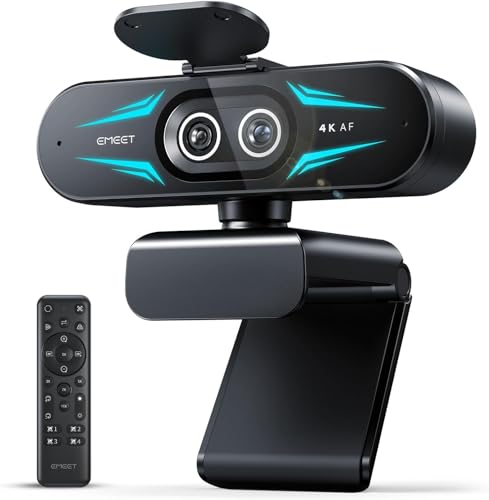
- Wide-angle and telephoto cameras for flexible framing
- Up to 11X hybrid zoom with PDAF autofocus
- Remote control, RGB lighting, and dual microphones
Best For: Presentations, product demos, teaching, and dynamic live streams
Simple 4K Setup

- 4K at 30fps or 1080p at 60fps
- PDAF autofocus and AI noise cancellation
- Plug-and-play USB-A to USB-C connectivity
Best For: Users seeking easy 4K streaming and meeting setup
Balanced Creator Performance

- Sony sensor with 4K at 30fps and 1080p at 60fps
- PDAF autofocus and automatic light balancing
- Privacy cover, noise-canceling mics, and EMEETLINK support
Best For: Streamers and creators wanting quality with customization options
Best Ring-Light Webcam
Angetube 1080p 60FPS Streaming Webcam
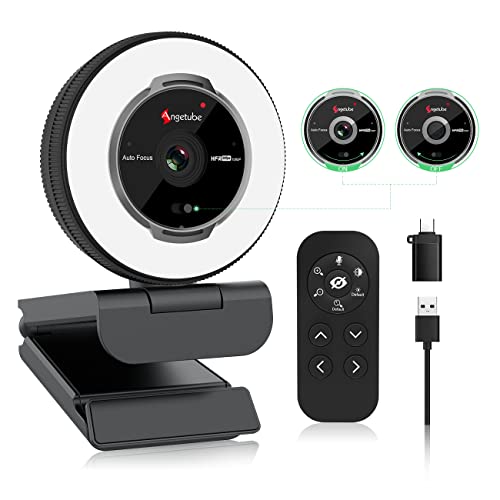
- 1080p video at up to 60 FPS
- Built-in adjustable three-color ring light
- Remote control, autofocus, and privacy shutter
Best For: Streamers wanting integrated lighting and flexible controls
Best RGB Fill-Light Webcam

- Full HD 1080p video at 60 FPS
- Built-in RGB fill light for dim settings
- Autofocus, privacy cover, and noise-canceling mic
Best For: Gaming, streaming, and calls in variable lighting
Best Wide-Angle Webcam

- 1080p video with a wide-angle lens
- Automatic light correction for changing conditions
- Noise-reducing mic and sliding privacy cover
Best For: Simple streaming, teaching, and video calls
Best AI PTZ Pick – EMEET PIXY Dual-Camera 4K Webcam
For creators comparing webcams for live streaming, the EMEET PIXY stands out with 4K video, dual-camera AI assistance, and automated PTZ tracking. Its 310° pan and 180° tilt help keep moving presenters, instructors, and performers in frame without constant manual adjustment.
Best For: Beauty streams, product demonstrations, fitness content, online teaching, podcasts, and other broadcasts where subject tracking and flexible audio modes matter.
Pros:
- 4K main camera with a 1/2.55-inch Sony sensor and PDAF autofocus.
- Three-chip AI tracking with 310° pan, 180° tilt, and gesture control.
- Three microphones and Live, Noise Canceling, and Original Sound modes.
- Works with OBS, Twitch, YouTube, Windows 10+, and macOS 10.14+.
Cons:
- Tripod is sold separately.
- FOV adjustment is limited in 4K 30fps and 1080p 60fps modes.
- The optional remote is purchased separately.
The PIXY is a feature-rich choice when hands-free framing and integrated audio are more important than a simple plug-and-play setup. Its AI and PTZ capabilities make it especially useful for dynamic live broadcasts.
Best Proven Value – Logitech C920x HD Pro Webcam
The Logitech C920x is a straightforward option for shoppers seeking dependable webcams for live streaming without moving into specialized PTZ hardware. It records Full HD 1080p video at 30fps, includes autofocus and automatic lighting adjustment, and connects through USB.
Best For: Desktop streaming, video calls, recorded content, and creators who want a familiar 1080p webcam with stereo microphones.
Pros:
- Full HD 1080p video capture at 30fps.
- Autofocus and automatic lighting adjustment help maintain a clear image.
- Dual microphones capture stereo audio for calls and recordings.
- Includes a three-month XSplit VCam license for background removal, replacement, and blur.
Cons:
- No privacy shutter.
- Limited to 30fps at 1080p.
- Does not provide the AI tracking or PTZ movement found on newer models.
The C920x remains a practical choice for conventional desk-based streams. It lacks advanced movement features, but its Full HD resolution, autofocus, and automatic exposure make it an easy fit for everyday broadcasting.
Best Customizable Tracking – OBSBOT Tiny 2 Lite 4K Webcam
The OBSBOT Tiny 2 Lite brings 4K capture and PTZ AI tracking to webcams for live streaming, while offering several ways to tailor how the camera follows you. Upper-body and hand tracking, customizable tracking areas, and preset positions make it useful for presenters who switch between scenes or camera angles.
Best For: Teaching, meetings, esports-related content, and creators who need customizable tracking or landscape, portrait, and upside-down shooting modes.
Pros:
- 4K at 30fps and 1080p at 60fps from a 1/2-inch CMOS sensor.
- Supports upper-body and hand tracking with customizable tracking and non-tracking areas.
- Preset positions can store different parameters and AI tracking modes.
- Offers gesture controls plus SDK, OSC, Stream Deck, and global hotkey support.
Cons:
- The Lite version omits whiteboard mode and voice control.
- Requires Windows 10 or later or macOS 11 or later.
- Some advanced customization features may be more than casual streamers need.
Choose the Tiny 2 Lite when tracking flexibility and repeatable presets are priorities. It is particularly well suited to structured broadcasts where the camera must adapt to different positions or orientations.
Best Built-In Lighting – NexiGo N680E Pro 4K Webcam
The NexiGo N680E Pro is a practical choice among webcams for live streaming when lighting is a concern. Its 4K Sony sensor, PDAF autofocus, and built-in tri-tone ring light help produce a polished image, while 1080p at 60fps supports smoother streaming output.
Best For: Streamers, remote presenters, gamers, and students who want adjustable front lighting, clear voice capture, and a privacy shutter in one USB webcam.
Pros:
- 4K sensor with 1080p 60fps streaming support.
- PDAF autofocus maintains focus as you move.
- Tri-tone ring light offers three color temperatures and stepless brightness control.
- Dual noise-reducing microphones and a built-in privacy shutter.
Cons:
- The ring light requires the camera to be connected through USB.
- USB-A connectivity may require an adapter for some devices.
- It does not offer PTZ or AI subject tracking.
The N680E Pro is a strong all-in-one option for setups where lighting, autofocus, and privacy are more important than camera movement. Its plug-and-play USB design also keeps installation simple across supported operating systems.
Dual-Camera Versatility – EMEET C60E Dual-Camera 4K Webcam
The EMEET C60E stands out among webcams for live streaming by combining a wide-angle camera with a telephoto camera. It is designed for creators, teachers, and presenters who need to switch between a full-scene view and detailed close-ups without repositioning the camera.
Best For: Product demonstrations, teaching, presentations, and streams that benefit from flexible framing.
Pros:
- Dual-camera design supports wide and close-up views.
- 4K capture with PDAF autofocus and up to 11X hybrid zoom.
- Remote and EMEET STUDIO controls enable framing and image adjustments.
- Includes RGB lighting, dual microphones, and tripod support.
Cons:
- Zoom is unavailable in 4K, 60FPS, and YUY2 modes.
- The advanced dual-camera setup may be more than needed for basic calls.
- Uses a USB 2.0 Type-A connection.
The C60E is a particularly flexible choice when your stream alternates between people, backgrounds, and close-up subjects. Its zoom-mode limitations are worth considering, but the dual-camera workflow can reduce the need for a second camera.
Simple 4K Setup – Acer A640 4K Webcam
The Acer A640 is a straightforward option among webcams for live streaming, pairing 4K video with instant PDAF autofocus and an AI noise-canceling microphone. Its plug-and-play USB connection and included USB-A to USB-C adapter make it convenient for both older PCs and newer laptops.
Best For: Streamers, remote workers, and meeting users who want 4K video with minimal setup.
Pros:
- Records in 4K at 30fps and supports 2K or 1080p at 60fps.
- PDAF autofocus helps maintain a crisp, stable image.
- AI noise cancellation helps reduce distracting background sounds.
- Physical privacy shutter and automatic exposure adjustments add practical convenience.
Cons:
- It does not include built-in speakers.
- Best image quality depends on having a well-lit environment.
- The supplied notes identify compatibility with personal computers rather than a broad range of devices.
The A640 is a sensible pick for users who prioritize quick installation and clear communication. It offers useful streaming features without requiring additional drivers or software, while its lighting correction can help in less-than-ideal conditions.
Balanced Creator Performance – EMEET S600 4K Webcam
The EMEET S600 combines a Sony 1/2.55-inch sensor, PDAF autofocus, and adjustable image features in a compact design. For webcams for live streaming, it offers a practical balance of sharp 4K video, smooth 1080p capture, noise-filtering microphones, and simple plug-and-play setup.
Best For: Aspiring streamers and content creators who want strong image quality with room for software customization.
Pros:
- Captures 4K at 30fps and 1080p at 60fps.
- PDAF autofocus and automatic light adjustment help maintain clear footage.
- Dual noise-canceling microphones capture voice clearly.
- Built-in privacy cover, flexible positioning, and EMEETLINK customization.
Cons:
- The field of view is fixed at 73 degrees in 4K mode.
- Advanced image and audio adjustments require EMEETLINK software.
- Video resolution can depend on the camera software or application used.
The S600 is a well-rounded streaming camera for creators who want high-resolution video without giving up setup simplicity. Its fixed 4K field of view is less flexible than its 1080p mode, but the autofocus, audio processing, and privacy cover make it easy to integrate into a regular streaming setup.
Best Ring-Light Webcam – Angetube 1080p 60FPS Streaming Webcam
For shoppers comparing webcams for live streaming, the Angetube 862Pro combines 1080p video at up to 60 FPS with an integrated adjustable ring light. Its autofocus, low-light correction, built-in microphones, and USB-A/USB-C compatibility make it a flexible choice for streaming and video calls.
Best For: Streamers who want built-in lighting, autofocus, and remote controls in one webcam.
Pros:
- 1080p video at up to 60 FPS with autofocus and low-light correction
- Three-color ring light with adjustable brightness
- Includes dual noise-canceling microphones, privacy shutter, and remote control
- Works with USB-A or USB-C using the included adapter
Cons:
- 5x digital zoom is available only at 720p and lower resolutions
- The extensive remote and lighting controls may be more than casual users need
The built-in ring light is the main differentiator, helping create a more consistent appearance without a separate lighting setup. It is a strong all-in-one option for creators who want higher frame rates and convenient control features.
Best RGB Fill-Light Webcam – NBPOWER 1080p 60FPS Webcam
The NBPOWER H782 is a practical pick among webcams for live streaming, offering Full HD 1080p video at 60 FPS, autofocus, and a built-in RGB fill light. Its noise-canceling microphone and plug-and-play USB connection also suit gaming, remote meetings, and online classes.
Best For: Gamers and streamers who want 60 FPS video with built-in fill lighting and autofocus.
Pros:
- 1080p resolution and 60 FPS capture for smooth streaming video
- Built-in RGB fill light helps reduce graininess in darker settings
- Autofocus and noise-canceling microphone support moving subjects and clearer speech
- Plug-and-play USB 2.0/3.0 setup with a braided 1.7-meter cable
Cons:
- Compatibility details are centered on Windows and macOS computers
- The supplied notes do not specify the RGB light’s adjustment range
With its combination of 60 FPS capture, face autofocus, and integrated fill light, the H782 is geared toward users who want smoother footage without adding a separate light. The privacy cover is a useful extra for everyday computer use.
Best Wide-Angle Webcam – TRAUSI 1080p FHD Webcam
The TRAUSI TW05 offers straightforward 1080p video, a wide-angle lens, and automatic light correction for users comparing webcams for live streaming. Its fixed-focus design, noise-reducing microphone, privacy cover, and plug-and-play USB setup keep the feature set simple for streaming, calls, and online teaching.
Best For: Beginners and presenters who need a simple wide-angle webcam for streaming and video calls.
Pros:
- 1920 x 1080 video at 30 FPS with a wide-angle lens
- Automatic light correction adapts brightness and color to the environment
- Built-in noise-reducing microphone and sliding privacy cover
- Supports USB 2.0, 3.0, 3.1, and OTG without additional drivers
Cons:
- Fixed focus rather than autofocus
- Captures at 30 FPS, lower than the 60 FPS models in this roundup
- No integrated fill or ring light is listed
The TW05 focuses on essential usability rather than advanced controls. Its wide-angle view can help include more of a scene, while automatic light correction and plug-and-play operation make it approachable for everyday streaming and conferencing.
How We Picked These Webcams for Live Streaming
We selected models that cover the main needs of today’s creators: dependable USB plug-and-play setup, clear video, useful autofocus, effective framing options, and features that can improve a stream without extra equipment. The lineup includes 4K webcams for detailed images, 1080p cameras for affordable everyday streaming, AI-tracking PTZ models for presenters, and options with ring lights or noise-canceling microphones.
Specifications such as resolution and frame rate are important, but they are not the only criteria. Lens coverage, low-light performance, mounting flexibility, privacy controls, software support, and microphone quality can have a greater effect on the finished broadcast.
Quick Comparison
- Best for AI framing: EMEET PIXY, OBSBOT Tiny 2 Lite, and EMEET C60E offer tracking or dual-camera flexibility.
- Best for traditional 4K video: EMEET S600 and Acer A640 suit creators who prioritize detailed image quality.
- Best 1080p value: Logitech C920x, Angetube, NBPOWER, and TRAUSI provide accessible options for basic streaming setups.
- Best feature-rich 1080p option: NexiGo N680E Pro combines autofocus, a ring light, high-frame-rate 1080p video, and privacy controls.
Key Buying Factors for Webcams for Live Streaming
Resolution and Frame Rate
4K is useful when you want a crisp image, plan to crop or reframe footage, or produce recorded content alongside live broadcasts. A 1080p webcam is often sufficient for Twitch, YouTube, meetings, and most social platforms. Look beyond headline resolution: 60fps can make movement appear smoother, while 30fps generally uses less bandwidth.
Framing, Autofocus, and Tracking
AI tracking and PTZ movement help presenters stay centered while standing, teaching, or moving around. A wide-angle lens works well for groups and demonstrations, but may make a solo subject appear farther away. PDAF or other responsive autofocus systems are helpful when you regularly hold products or notes up to the camera.
Lighting and Audio
Built-in ring lights and fill lights can improve a dim desk setup, but they cannot replace a properly positioned key light. Integrated microphones are convenient for casual streams, though a dedicated USB or XLR microphone usually provides cleaner, more controlled sound. Noise cancellation can help in busy rooms but should not be treated as a substitute for good placement.
Compatibility and Privacy
Confirm that the webcam works with your computer, operating system, streaming software, and available USB ports. A physical privacy shutter or cover is worthwhile for a camera that remains connected between broadcasts. Also check whether advanced tracking, framing, or image controls require a separate desktop application.
Who Should Buy Which Webcams for Live Streaming?
Choose a 4K PTZ or AI-tracking model if you present standing, move during demonstrations, or want automated framing. Choose a standard 4K webcam if image detail matters more than motorized movement. Choose a 1080p model if you want reliable streaming on a modest budget or have limited upload bandwidth. For a first streaming setup, prioritize autofocus, a stable mount, privacy protection, and good lighting before paying extra for features you will not use.