The best graphics cards for video editing can speed up timeline playback, GPU-accelerated effects, color work, and exports—provided the card matches your software and footage.
Our 2026 roundup covers budget-friendly options, balanced mainstream cards, and high-memory professional choices so you can find the right performance, VRAM, and connectivity for your editing workflow.
Best 10 Graphics Cards for Video Editing Picks for 2026
Creator Power Pick

- 16GB GDDR7 with up to 2730 MHz OC mode
- USB-C, HDMI 2.1b, and DisplayPort 2.1b
- Vapor-chamber cooling in a 2.5-slot design
Best For: Professional video editors and demanding creator workflows
Workstation Memory Leader

- 32GB GDDR6 for 8K editing and large workloads
- Dedicated AI accelerators and 64 compute units
- Two-slot blower design for workstation configurations
Best For: Professional workstations and memory-intensive editing
Compact Editing Choice

- 12GB GDDR7 and up to 2587 MHz OC mode
- SFF-ready 2.5-slot design
- Quiet and Performance BIOS profiles
Best For: 4K editing in compact enthusiast desktops
Budget-Friendly Starter

- 8GB GDDR6 for basic editing workloads
- Three DisplayPort outputs plus HDMI
- Intelligent fan-stop mode for quieter light use
Best For: Budget editing systems and multi-monitor setups
High-End Editing Power

- 16GB GDDR7 memory with Blackwell architecture
- Three-fan cooling and phase-change thermal pad
- Requires an 850W PSU and spacious case
Best For: Professional editors with demanding GPU workloads
Practical 12GB Value
Gigabyte RTX 3060 Windforce OC

- 12GB GDDR6 memory on a 192-bit interface
- Dual WINDFORCE fan cooling
- Older Ampere-based RTX 30 Series design
Best For: Budget-minded desktop video editors
Compact Blackwell Option

- 8GB GDDR7 with Blackwell and DLSS 4
- Compact 9-inch, 2.5-slot design
- Dual Axial-tech fans with 0dB technology
Best For: Compact editing desktops using current-generation features
Best High-Capacity Pick
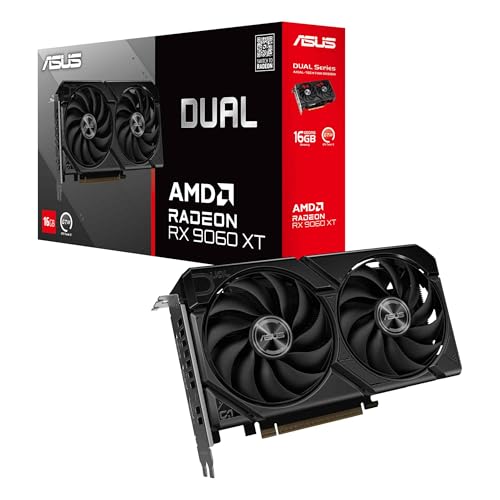
- 16GB GDDR6 memory
- Up to 3250 MHz boost clock
- Quiet and Performance BIOS profiles
Best For: Editors who prioritize VRAM and high-resolution output
Best NVIDIA Value
GIGABYTE GeForce RTX 3060 12GB
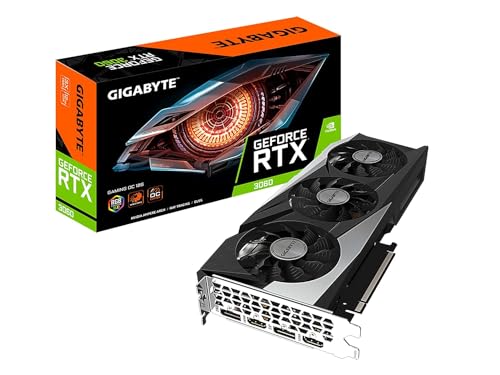
- 12GB GDDR6 memory
- 192-bit memory interface
- Three WINDFORCE fans
Best For: Editors wanting NVIDIA features and solid memory capacity
Creator Power Pick – ASUS ProArt RTX 5080
For demanding graphics cards for video editing, the ASUS ProArt GeForce RTX 5080 combines 16GB of GDDR7 memory with NVIDIA Blackwell architecture, fast boost clocks, and creator-focused connectivity. Its USB-C output and vapor-chamber cooling make it a strong fit for high-resolution editing and other intensive creative workloads.
Best For: Professional video editors and creators working with demanding projects, high-resolution displays, and GPU-accelerated applications.
Pros:
- 16GB GDDR7 memory and up to 2730 MHz OC-mode clock speed
- Integrated USB-C plus HDMI 2.1b and DisplayPort 2.1b outputs
- Vapor chamber, phase-change thermal pad, and Axial-tech fans support sustained performance
- Compact 2.5-slot design with a creator-oriented ProArt finish
Cons:
- Its 2.5-slot size and 3.1-pound weight require adequate case clearance
- High-end specifications may be more than needed for basic editing
The RTX 5080 is the premium performance choice in this group. It offers substantial compute capability and modern display connectivity, while the ProArt cooling and design are tailored to professional desktop workflows.
Workstation Memory Leader – ASRock Radeon AI PRO R9700
Among graphics cards for video editing, the ASRock Radeon AI PRO R9700 stands out for its 32GB of GDDR6 memory and professional workstation focus. Its large memory capacity is suited to 8K editing, complex 3D work, and compute-heavy applications, while the blower cooler is designed to exhaust heat from the chassis.
Best For: Workstations, multi-GPU systems, AI development, and editors handling large 8K or complex creative projects.
Pros:
- 32GB GDDR6 on a 256-bit bus for large projects and AI workloads
- 64 compute units, 3rd Gen ray tracing, and dedicated 2nd Gen AI accelerators
- Blower cooling exhausts heat directly out of the chassis
- Two-slot form factor with four DisplayPort 2.1a outputs
Cons:
- Workstation and server optimization means software compatibility should be verified
- Single-blower cooling may be less suited to quiet desktop builds
- Requires a 12V-2×6 to three 8-pin power connection included with the card
The R9700 is the specialist option for users who value memory capacity and workstation deployment. Confirm application and driver support before buying, particularly if your editing software is not commonly used in professional Radeon environments.
Compact Editing Choice – ASUS Prime RTX 5070
The ASUS Prime GeForce RTX 5070 is a practical mid-to-high-range option among graphics cards for video editing. It pairs 12GB of GDDR7 memory with NVIDIA Blackwell architecture, DLSS 4, and a 2.5-slot SFF-ready design that can fit enthusiast systems where case space matters.
Best For: Editors who want modern NVIDIA features and strong 4K display support in a more compatibility-focused desktop build.
Pros:
- 12GB GDDR7 memory with up to 2587 MHz OC-mode clock speed
- SFF-ready 2.5-slot format offers broader build compatibility
- Dual BIOS provides Quiet and Performance profiles
- HDMI and DisplayPort outputs support up to 3840×2160 resolution
Cons:
- 12GB of memory provides less headroom than the 16GB and 32GB alternatives
- 2.5-slot construction still requires careful case clearance planning
The RTX 5070 balances current-generation features, cooling controls, and system compatibility. It is a sensible choice for 4K-oriented editing setups, especially when a smaller-form-factor build is part of the plan.
Budget-Friendly Starter – AISURIX RX 5500 XT
For entry-level graphics cards for video editing, the AISURIX RX 5500 XT offers 8GB of GDDR6 memory, three DisplayPort outputs, and HDMI connectivity. Its dual-fan cooler includes an intelligent stop mode for lower-noise light workloads, making it a reasonable option for basic editing and general PC use.
Best For: Budget-conscious editors working on moderate projects who need multiple display connections and a straightforward PCI Express card.
Pros:
- 8GB of GDDR6 memory for entry-level editing workloads
- Three DisplayPort 1.4a outputs plus HDMI 2.0b
- Intelligent fans can stop under low load for quieter operation
- Composite heat pipes provide direct GPU contact for cooling
Cons:
- Older RX 5500 XT platform is less capable than the newer RTX 50-series cards
- Requires an 8-pin power connector and is rated for up to 130W power draw
- Supplied specifications list PCI Express 4.0 x8 in the title but PCI Express 3.0 x16 in the bullet details; verify platform requirements
The RX 5500 XT is best viewed as an economical starting point rather than a choice for demanding 8K or heavily GPU-accelerated work. Its 8GB memory and four display outputs suit basic editing, multi-monitor setups, and everyday creative use.
High-End Editing Power – ASUS TUF RTX 5080 OC
For demanding video editing workflows, the ASUS TUF Gaming GeForce RTX 5080 combines 16GB of GDDR7 memory with NVIDIA Blackwell architecture and DLSS 4. Its substantial cooling system and high boost clock make it a powerful option, provided your case and power supply can accommodate it.
Best For: Professional editors and creators handling demanding GPU-accelerated projects.
Pros:
- 16GB GDDR7 memory and NVIDIA GeForce RTX 5080 performance.
- Large three-fan cooler with a 3.6-slot fin array for airflow.
- Phase-change GPU thermal pad, protective PCB coating, and three-year warranty.
- Native support for three DisplayPort 2.1a outputs and two HDMI 2.1b outputs.
Cons:
- Requires a minimum 850W PSU with a 16-pin 12V-2×6 or 12VHPWR connector.
- Its 348mm length and 3.6-slot design require careful case and slot-clearance checks.
- At roughly 4.3 pounds, it may benefit from the included GPU bracket.
This is the strongest choice here for users who prioritize editing performance and long-term cooling hardware. Confirm power, clearance, and slot spacing before buying.
Practical 12GB Value – Gigabyte RTX 3060 Windforce OC
The GIGABYTE GeForce RTX 3060 WINDFORCE OC is a practical entry point for graphics cards for video editing, offering 12GB of GDDR6 memory and a dual-fan cooler. It suits desktop editors who want dedicated NVIDIA graphics without moving to a newer RTX 50 Series card.
Best For: Budget-conscious desktop editors and general creative work.
Pros:
- 12GB of GDDR6 memory with a 192-bit memory interface.
- Dual WINDFORCE fans provide active cooling.
- Supports DisplayPort and HDMI outputs.
- Uses NVIDIA Ampere architecture with second-generation RT cores and third-generation Tensor cores.
Cons:
- Older RTX 30 Series architecture than the other listed options.
- Provides less memory bandwidth and newer feature support than the RTX 50 Series cards.
- The supplied details do not specify a PSU recommendation, so system compatibility should be checked separately.
With 12GB of VRAM, this card remains a sensible option for editors seeking usable dedicated graphics at a potentially lower system cost. It is best suited to less demanding workflows and buyers who do not need the latest generation.
Compact Blackwell Option – ASUS Dual RTX 5060 OC
The ASUS Dual NVIDIA GeForce RTX 5060 OC is a compact choice for graphics cards for video editing, pairing 8GB of GDDR7 memory with NVIDIA Blackwell architecture and DLSS 4. Its 2.5-slot design and nine-inch length make it easier to fit into smaller desktop builds than the larger cards here.
Best For: Editors building compact systems or balancing newer features with moderate size.
Pros:
- NVIDIA Blackwell architecture, DLSS 4, and 623 AI TOPS.
- Compact 9-inch length and 2.5-slot design.
- Dual Axial-tech fans with 0dB technology.
- Three DisplayPort 2.1b outputs and one HDMI 2.1b output.
Cons:
- 8GB of VRAM offers less capacity than the RTX 3060 and RTX 5080 listed here.
- Its two-fan design and smaller class are less suited to the heaviest editing workloads.
- Desktop case and power compatibility should still be verified before installation.
This card offers a useful middle ground: newer Blackwell features in a relatively compact package. Choose it when system size and current-generation capabilities matter more than maximum VRAM capacity.
Best High-Capacity Pick – ASUS Radeon RX 9060 XT 16GB
For video editors seeking graphics cards for video editing with generous memory, the ASUS Dual Radeon RX 9060 XT combines 16GB of GDDR6 with modern DisplayPort 2.1a and HDMI 2.1b outputs. Its 2.5-slot design and dual-fan cooling make it a strong option for compatible desktop workstations.
Best For: Editors who want 16GB of VRAM, high-resolution display support, and flexible cooling profiles.
Pros:
- 16GB GDDR6 memory for demanding creative workloads
- Up to 3250 MHz boost clock in OC mode
- 0dB technology supports quieter light-use operation
- Dual BIOS provides Quiet and Performance profiles
Cons:
- 2.5-slot width may limit compatibility in smaller cases
- Requires a desktop with suitable PCIe x16 clearance
The RX 9060 XT is the most memory-rich option in this group. Check your case dimensions and airflow before choosing its larger 2.5-slot format.
Best NVIDIA Value – GIGABYTE GeForce RTX 3060 12GB
The GIGABYTE GeForce RTX 3060 is a practical choice among graphics cards for video editing, pairing 12GB of GDDR6 memory with NVIDIA’s Ampere architecture. Its three WINDFORCE fans and broad display support suit desktop editing systems that have room for a longer card.
Best For: Editors who prefer an NVIDIA-based card with 12GB of memory and dedicated ray-tracing and Tensor cores.
Pros:
- 12GB GDDR6 memory with a 192-bit interface
- Second-generation RT cores and third-generation Tensor cores
- Three WINDFORCE fans for active cooling
- Supports displays up to 7680 x 4320
Cons:
- 11.1-inch length requires adequate case space
- Older RTX 30 Series platform than the other NVIDIA option here
This RTX 3060 offers a balanced memory capacity and NVIDIA feature set. Confirm your case can accommodate its 11.1-inch length and three-fan cooler.
Best Compact Budget Option – ASUS GeForce RTX 3050 6GB
For entry-level systems and smaller builds, the ASUS Dual GeForce RTX 3050 offers a compact two-slot design and 6GB of GDDR6 memory. It is a straightforward option for video editing setups that need NVIDIA Ampere features while keeping compatibility and dust protection in mind.
Best For: Budget-conscious editors building compact desktop systems for general editing and 4K display output.
Pros:
- Compact 2-slot design for broader case compatibility
- NVIDIA Ampere architecture with RT and Tensor cores
- IP5X dust resistance and a stainless steel bracket
- Supports HDMI 2.1 and DisplayPort 1.4a
Cons:
- 6GB of VRAM is the lowest capacity among these options
- Listed maximum display resolution is 3840 x 2160
- Only an HDMI output is identified in the detailed interface specification
The RTX 3050 is best suited to compact or cost-conscious editing PCs. Its lower memory capacity makes it less appropriate for especially demanding, memory-heavy projects.
How We Picked the Best Graphics Cards for Video Editing
We compared these GPUs by considering video-editing performance, VRAM capacity, codec and effects support, power requirements, cooling, connectivity, and overall value. NVIDIA models can be especially attractive for software that benefits from CUDA, NVENC, or broad creator-application support, while AMD cards often offer competitive raster performance and generous memory at their price points.
Because editing workloads vary, there is no single best choice for every buyer. A card for 4K multicam editing and heavy noise reduction has different requirements from a card intended for occasional 1080p projects.
Quick Comparison
| Workload | Recommended GPU Tier | Typical VRAM Target |
|---|---|---|
| 1080p editing and basic effects | Entry-level RTX 3050 or RX 5500 XT | 6–8GB |
| 4K editing and frequent GPU effects | RTX 5060, RTX 5070, RX 9060 XT, or RTX 3060 | 8–16GB |
| Complex 4K, 6K, or 8K timelines | RTX 5080 or Radeon AI PRO R9700 | 16–32GB |
Key Buying Factors for Graphics Cards for Video Editing
VRAM Capacity
VRAM affects how comfortably a GPU handles high-resolution footage, large timelines, layered effects, and demanding grading workflows. Six to 8GB can suit basic projects, but 12GB or more provides a safer margin for 4K work. Editors working with 6K, 8K, RAW, or extensive AI effects should consider 16GB or higher.
Software and Codec Support
Check whether your editor benefits from CUDA, OpenCL, hardware encoding, or hardware decoding. NVIDIA’s NVENC and AMD’s media engines can accelerate supported export formats, but actual gains depend on applications such as Adobe Premiere Pro, DaVinci Resolve, and other tools.
Performance, Cooling, and Power
Higher-tier GPUs can improve effects and export performance but may require a stronger power supply, additional case space, and better airflow. Compare the card’s recommended PSU, power connectors, slot thickness, and length with your system before buying.
Outputs and Upgrade Value
Count the monitors you use and verify the available HDMI and DisplayPort standards. Newer cards may offer more advanced display support and media engines, while an older 12GB card can still be a sensible value choice if your software and footage do not require the latest features.
Who Should Buy Which Graphics Cards for Video Editing?
- Budget editors: Choose an RTX 3050 or RX 5500 XT for basic 1080p work, proxy workflows, and light effects.
- Value-focused 4K editors: Consider an RTX 3060, RTX 5060, or RX 9060 XT for a practical balance of performance and memory.
- Demanding enthusiasts: An RTX 5070 or RTX 5080 is better suited to complex timelines, intensive effects, and frequent exports.
- Professional creators: The Radeon AI PRO R9700 stands out when high VRAM capacity and creator-focused workloads are priorities.
- Quiet or compact-build shoppers: Check the exact cooler design, dimensions, and power draw rather than choosing solely by GPU name.
Before purchasing, confirm compatibility with your editing software, power supply, motherboard, case, and monitor setup. The best graphics card is the one that removes your current workflow bottleneck without paying for performance your projects cannot use.