Modern conference rooms often need to route multiple laptops, cameras, presentation sources, and media players to several displays without constantly swapping cables. The right HDMI matrix switch makes that setup easier to control and expand.
We selected 10 options spanning 4K and 8K support, web-based management, audio extraction, EDID control, rackmount designs, and seamless switching. Use the guide below to match features to your room’s equipment and daily workflow.
Best 10 Hdmi Matrix Switches for Conference Rooms Picks for 2026
Flexible 8-Output Hub
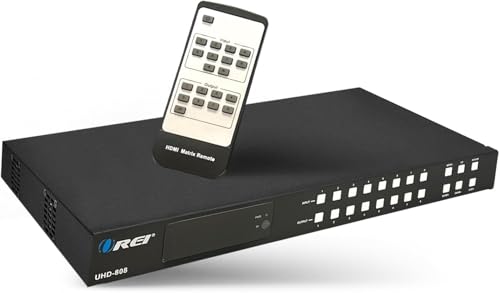
- Routes up to eight sources to eight displays
- 4K60, HDR, HDCP 2.2, and downscaling
- Audio extraction plus web, LAN, and RS-232 control
Best For: Large conference rooms with complex AV routing
Seamless Presentation Specialist

- 4K60 4:4:4 switching for four sources and displays
- Seamless switching with multiple video-wall layouts
- Web, TCP/IP, RS-232, IR, scaling, and EDID control
Best For: Presentation rooms needing video walls and smooth source changes
Next-Generation AV Backbone

- 8x8 routing with 48Gbps HDMI 2.1 bandwidth
- Supports HDR10+, Dolby Vision, VRR, QMS, and QFT
- Audio extraction, EDID, IR, and web GUI control
Best For: High-bandwidth rooms using modern HDMI 2.1 equipment
Rackmount Control-Room Workhorse

- 1U rackmount chassis with eight inputs and outputs
- Web, LAN, RS-232, IR, app, and central-control options
- 16 presets, EDID adaptation, and power-off memory
Best For: Rack-based rooms prioritizing control and repeatable setups
Best All-Around 4K Routing
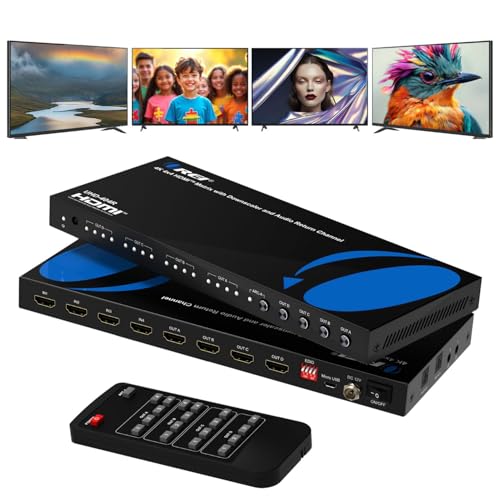
- 4K@60Hz with 18Gbps bandwidth
- Four independent inputs and outputs
- Optical, 3.5mm, and ARC audio support
Best For: Conference rooms needing 4K/60Hz routing and audio extraction
Best for Large Installations
OREI 8x8 HDMI Matrix with Web Control

- Eight inputs and eight outputs
- 4K-to-1080p downscaling for mixed displays
- Web GUI, LAN, RS-232, IR, and presets
Best For: Large AV systems with multiple sources and displays
Best for Integrated Control
MT-VIKI 4x4 HDMI Matrix with Web Access

- Web, LAN, RS-232, app, API, and IR control
- Custom EDID and mixed 4K/1080p output
- Rack-ready 4x4 routing with stereo extraction
Best For: Managed conference rooms needing networked control and EDID flexibility
Best All-Around Capacity

- Eight HDMI inputs and outputs for independent routing
- 4K60, HDR, HDCP 2.2, and 18Gbps support
- Audio extraction with LAN, RS-232, and Web GUI control
Best For: Large conference rooms with multiple sources, displays, and audio zones
Best for Premium Video Support
J-Tech Digital JTECH-88MU 8x8 Matrix

- 4K60 4:4:4 support with HDR10 and Dolby Vision
- Eight inputs and eight outputs for flexible routing
- Audio embedding, extraction, ARC, and Web GUI control
Best For: 4K conference rooms with HDR video and external audio systems
Best Rackmount Value
Yinker HD88L 1U 8x8 HDMI Matrix

- 1U rackmount design with included rack ears and screws
- Eight-by-eight routing with mixed 4K and 1080p support
- LAN, RS-232, Web GUI, app, and third-party control
Best For: Rack-based conference rooms prioritizing installation and centralized control
Flexible 8-Output Hub – 8×8 4K HDMI Matrix
For conference rooms that need several presenters routed to multiple displays, this OREI matrix provides an 8×8 switching platform with 4K60 support, downscaling, and broad control options. Its audio extraction features can also simplify connections to separate room audio equipment.
Best For: Larger conference rooms and AV systems needing flexible source-to-display routing with extracted audio.
Pros:
- Routes up to eight HDMI sources independently to eight displays.
- Supports 4K at 60Hz, 18Gbps bandwidth, HDR, HDCP 2.2, and 7.1-channel audio.
- Offers analog and coaxial audio extraction, ARC, EDID, downscaling, and LAN, web, RS-232, IR, and front-panel control.
Cons:
- Its extensive feature set may be more than a small room requires.
- The supplied notes contain inconsistent port descriptions, so verify the exact configuration before purchase.
With its high input/output count and integration-friendly controls, the UHD-808 is a strong choice for a growing conference-room system. Confirm the listed port layout with the seller if precise installation planning is important.
Seamless Presentation Specialist – 4×4 Video Wall Matrix
This 4×4 OREI is among the more versatile HDMI matrix switches for conference rooms, combining seamless source changes with video-wall modes. It supports 4K60 video, scaling, EDID management, and browser-based control for more organized presentations.
Best For: Conference rooms, classrooms, and presentation spaces that need seamless switching or multi-screen layouts.
Pros:
- Connects four HDMI sources to four displays and supports 4K60 at 4:4:4.
- Provides seamless switching plus 2×2, 4×1, and 1×4 video-wall layouts.
- Includes scaling, extensive EDID options, saved presets, TCP/IP, RS-232, IR, and web control.
Cons:
- Four inputs and four outputs may be limiting for larger installations.
- Video-wall functionality depends on supported display layouts and connected equipment.
The UHDS-404VW is a practical fit when uninterrupted source changes and flexible display arrangements matter more than maximum port capacity. Its presets and network control are useful for repeatable meeting-room setups.
Next-Generation AV Backbone – 8×8 HDMI 2.1 Matrix
For conference rooms being equipped with newer HDMI 2.1 sources and displays, this OREI 8×8 matrix is designed around 48Gbps connectivity and advanced format support. It adds audio extraction, EDID, and web GUI control for more involved AV installations.
Best For: High-bandwidth conference-room systems using HDMI 2.1 equipment, HDR formats, or gaming and presentation sources.
Pros:
- Provides eight HDMI inputs and eight outputs with 48Gbps HDMI 2.1 bandwidth.
- Supports HDR10+, Dolby Vision, VRR, QFT, QMS, and SBTM.
- Includes audio extraction, EDID management, IR, and web GUI control.
Cons:
- The 7-pound chassis is heavier than the other listed OREI models.
- Its advanced HDMI 2.1 capabilities may be unnecessary for rooms using standard 4K60 equipment.
- The supplied notes provide limited detail about specific audio outputs and control connections.
The BK-808 is the forward-looking option in this group, especially where HDMI 2.1 bandwidth and modern HDR or gaming features are priorities. Check the installation documentation for exact audio-extraction and control connectivity before deployment.
Rackmount Control-Room Workhorse – 8×8 4K30 Rackmount Matrix
This Yinker 8×8 matrix suits conference rooms that prioritize rack integration and centralized control over the latest video specifications. Its 1U chassis, web GUI, RS-232, LAN, preset scenes, and EDID handling support repeatable AV operation.
Best For: Rack-mounted conference rooms, control centers, and installations using 4K30 or 1080p sources.
Pros:
- Offers eight HDMI inputs and eight outputs in a standard 1U rackmount design.
- Supports 4Kx2K at 30Hz, 1080p 3D, HDMI 1.4B, HDCP 1.2, and Dolby TrueHD/DTS-HD audio.
- Provides six control methods, 16 preset scenes, auto cycling, EDID adaptation, and power-off memory.
Cons:
- Its 4K limit is 30Hz, below the 4K60 support of the OREI alternatives.
- HDMI 1.4 cable runs are specified up to 20 meters for inputs and 25 meters for outputs, so longer installations may need additional planning.
The Yinker is a sensible infrastructure choice when a standard rackmount form factor and extensive control options are more important than 4K60 or HDMI 2.1. Its scene memory can help staff recall common meeting configurations quickly.
Best All-Around 4K Routing – OREI 4×4 HDMI Matrix with ARC
For conference rooms that need flexible source-to-display routing without a large rack footprint, this OREI 4×4 is a practical choice among HDMI matrix switches for conference rooms. It connects four HDMI sources to four displays, supports 4K at 60Hz, and adds useful audio extraction and ARC features.
Best For: Conference rooms, classrooms, control centers, and commercial AV setups needing 4K/60Hz routing with flexible audio options.
Pros:
- Routes up to four HDMI sources independently to four displays.
- Supports 4K@60Hz, 18Gbps bandwidth, HDR, HDMI 2.0, and HDCP 2.2.
- Provides optical and 3.5mm audio extraction, plus ARC on Output A.
- Metal enclosure supports heat dissipation and durable installation.
Cons:
- Audio extraction and ARC features are tied to specified outputs.
- Offers fewer inputs and outputs than an 8×8 matrix.
This model stands out when a room needs high-refresh-rate 4K video and straightforward audio integration. Its included remote and compact 4×4 layout make it easier to deploy than a larger commercial matrix, while the 1-year warranty provides basic coverage.
Best for Large Installations – OREI 8×8 HDMI Matrix with Web Control
Large conference rooms and centralized AV systems can benefit from the high capacity of this OREI 8×8 matrix. It is designed to connect up to eight HDMI sources with eight displays, while offering downscaling, preset scenes, rack mounting, and several control methods.
Best For: Larger conference rooms, control environments, classrooms, and commercial installations with multiple sources and displays.
Pros:
- Supports independent routing between up to eight HDMI inputs and eight outputs.
- Downscales 4K sources to 1080p for mixed-resolution displays.
- Offers up to eight saved presets and EDID management.
- Supports front-panel, IR, RS-232, LAN, and Web GUI control.
Cons:
- Video support is listed up to 4K@30Hz rather than 4K@60Hz.
- Its 1U rack-mountable chassis is larger and heavier than compact 4×4 units.
The HDS-808 is the most capacity-focused option in this group. Its mixed-resolution downscaling and broad control options can simplify operation in rooms with varied displays, though buyers prioritizing 4K/60Hz should consider a higher-refresh model.
Best for Integrated Control – MT-VIKI 4×4 HDMI Matrix with Web Access
This MT-VIKI 4×4 is a flexible option for conference rooms that need multiple control paths and custom display compatibility. It routes four sources to four displays, supports simultaneous 4K and 1080p output, and can be managed through a Web GUI, LAN, RS-232, app, API, or remote.
Best For: Conference rooms and rack installations requiring networked control, custom EDID settings, and separate stereo audio.
Pros:
- Routes four HDMI sources independently or simultaneously to four displays.
- Supports 4K@30Hz, 1080p, 3D video, and simultaneous 4K/1080p output.
- Provides Web GUI, LAN, RS-232, Android app, API, IR, and front-panel control.
- Includes custom EDID writing and rack ears for standard 1U installation.
Cons:
- 4K support is limited to 30Hz.
- 3.5mm audio extraction is available through OUT4 only.
- Audio extraction requires routing the desired source to OUT4.
The MT-VIKI is compelling when system control and integration matter as much as video routing. Its custom EDID support and broad control compatibility are useful for managed conference-room systems, but the OUT4-only audio extraction should be planned around during installation.
Best All-Around Capacity – OREI UHD-808 8×8 HDMI Matrix
For conference rooms that need to route several presenters, cameras, or playback devices to multiple displays, the OREI UHD-808 is a flexible choice among HDMI matrix switches for conference rooms. Its eight inputs and eight outputs support independent routing, mirrored content, and mixed 4K and 1080p displays.
Best For: Large conference rooms and multi-display AV systems needing extensive routing and audio options.
Pros:
- Routes up to eight HDMI sources independently to eight displays.
- Supports 4K at 60Hz, HDR, HDMI 2.0, HDCP 2.2, and up to 18Gbps bandwidth.
- Offers analog and coaxial audio extraction, ARC, and multiple control methods including LAN and Web GUI.
Cons:
- Its broad feature set may be more than smaller rooms require.
- The supplied notes do not indicate automatic switching or included HDMI cables.
The OREI stands out when room growth and routing flexibility matter. Downscaling helps integrate 4K and 1080p displays, while RS-232, LAN, and Web GUI control can support more structured AV management.
Best for Premium Video Support – J-Tech Digital JTECH-88MU 8×8 Matrix
The J-Tech Digital JTECH-88MU is designed for conference rooms that need robust 4K video distribution and flexible audio integration. With eight inputs and eight outputs, it can route sources independently or mirror them across multiple display zones.
Best For: Professional presentation spaces using 4K HDR or Dolby Vision sources with external audio equipment.
Pros:
- Supports 4K at 60Hz with 4:4:4 color, HDR10, and Dolby Vision compatibility.
- Provides eight HDMI inputs and eight HDMI outputs for multi-room or multi-display routing.
- Includes audio embedding, analog and S/PDIF extraction, ARC support, and Web GUI control.
Cons:
- Its advanced audio and video features may be unnecessary for basic presentation setups.
- The supplied notes list an eight-port count without specifying the physical layout beyond the 8×8 configuration.
Choose this J-Tech model when image quality and audio flexibility are priorities. Front-panel, IR, RS-232, and Web GUI controls give installers and operators several ways to manage source selection.
Best Rackmount Value – Yinker HD88L 1U 8×8 HDMI Matrix
The Yinker HD88L is a practical option for organized AV installations, especially when a rack-mounted design is important. Among HDMI matrix switches for conference rooms, it combines eight-by-eight routing, mixed-resolution support, network control, and audio de-embedding in a 1U chassis.
Best For: Rack-installed conference room systems using 4K30 sources, 1080p displays, and centralized control.
Pros:
- 1U rackmount construction fits a standard 19-inch cabinet and includes rack hardware.
- Supports independent or shared routing across eight HDMI inputs and eight outputs.
- Offers downscaling, EDID management, RS-232, LAN, Web GUI, app, and third-party control options.
Cons:
- Maximum 4K output is 30Hz, below the 4K60 capability of the other listed models.
- Audio de-embedding is available only from HDMI output port 8.
- Uses HDMI 1.4b and HDCP 1.4 rather than newer HDMI 2.0 and HDCP 2.2 standards.
The HD88L makes the most sense for installations where rack integration and control compatibility outweigh the need for 4K60. Its resolution adaptation and EDID features can simplify systems combining newer 4K sources with existing 1080p displays.
How We Picked the Best Hdmi Matrix Switches for Conference Rooms
We focused on practical requirements for shared meeting spaces rather than headline specifications alone. The lineup includes 4×4 and 8×8 models, with options for 4K at 60Hz, 4K at 30Hz, and 8K HDMI 2.1 systems. We also considered control methods, audio support, EDID management, HDCP compatibility, rack installation, and features that help installers troubleshoot mixed displays.
Because conference rooms vary widely, no single switch is ideal for every installation. A compact 4×4 unit may suit a huddle room, while an 8×8 model offers more capacity for training rooms, divisible spaces, and multi-display systems.
Quick Comparison
- Best for standard 4K conference systems: Choose a 4K HDMI 2.0 matrix with 4K at 60Hz, HDR, and HDCP 2.2 support.
- Best for larger installations: An 8×8 matrix provides additional source and display capacity for room expansion.
- Best for centralized administration: Look for Web GUI, LAN, RS-232, or multiple control modes.
- Best for flexible audio routing: Prioritize audio extraction, ARC, audio embedding, or de-embedding as required by the room design.
- Best for future-focused systems: An HDMI 2.1 model with 8K support may be worthwhile when compatible sources and displays are already planned.
Key Buying Factors for Hdmi Matrix Switches for Conference Rooms
Resolution, Refresh Rate, and Bandwidth
For most business displays, 4K at 60Hz is a useful target because it keeps presentations and video smooth while supporting modern laptops and media players. Confirm whether the switch supports 4:4:4 chroma, HDR formats, and the exact HDMI standard your sources require. A 4K-at-30Hz unit can work for basic signage or older equipment but may feel restrictive for desktop use.
Inputs, Outputs, and Room Growth
Count every current source and display, then leave room for expansion. A 4×4 model handles four inputs and four outputs, while an 8×8 model is better for multiple displays, overflow rooms, cameras, and future upgrades. Verify how independently each output can select a source.
Control and Installation
Front-panel buttons and remote controls are convenient for small rooms. LAN or Web GUI control is more useful for IT teams managing equipment remotely, while RS-232 can integrate with control processors. Rackmount construction and a 1U form factor help keep permanent installations organized.
EDID, HDCP, and Audio
EDID management helps sources negotiate compatible video settings when displays differ. HDCP support is important for protected content, though every source and display must remain compatible. Audio extraction, ARC, and de-embedding can simplify connections to amplifiers, soundbars, DSPs, and recording systems.
Who Should Buy Which Hdmi Matrix Switches for Conference Rooms?
Choose a 4×4 matrix for a small conference or huddle room with a few sources and displays. Choose an 8×8 4K model for boardrooms, training spaces, and installations where independent routing and expansion matter. Choose Web GUI or LAN control when IT staff need centralized management or remote troubleshooting. Choose a seamless-switching model when black screens or switching delays would disrupt presentations. Choose an 8K HDMI 2.1 model only when the rest of the system—including cables, sources, displays, and control hardware—can take advantage of that added bandwidth.