The right boom arm can make a desk microphone easier to position, reduce clutter, and keep your recording or gaming setup comfortable. However, compatibility, clamp design, reach, and weight support vary widely between models.
We selected 10 microphone boom arms for desk setups across different budgets and use cases, from compact low-profile arms to sturdier options designed for heavier microphones.
Best 10 Microphone Boom Arms for Desk Picks for 2026
Best Long-Reach Option

- 38-inch articulating reach
- Supports up to 5 pounds
- C-clamp and flange mounts included
Best For: Podcasters and streamers needing extended reach
Best Quiet Premium Arm
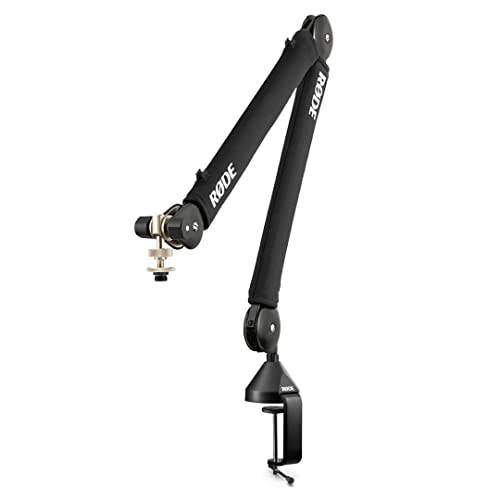
- Quiet internal spring damping
- 360-degree rotation
- Integrated cable management
Best For: Professional podcasting and streaming desks
Best Low-Profile Design

- Low-profile, stable construction
- Supports up to 2 kilograms
- 360-degree rotation and 180-degree swing
Best For: Monitor-centered gaming and streaming desks
Best Accessory Bundle
Amazon Basics 14-Inch Boom Arm

- Includes pop filter and windscreen
- Adjustable tension design
- Supports up to 1.5 kilograms
Best For: Standard microphone setups on compact desks
Low-Profile Pick

- Low-profile design
- Designed for podcast recording
- Suitable for streaming setups
Best For: Discreet podcast and streaming desks
Best Cable Management

- Built-in cable channels
- 3.5-pound load capacity
- Up to 32.3-inch horizontal reach
Best For: Neat, extended-reach streaming and podcast desks
Best Beginner-Friendly Arm

- Supports up to 2.2 pounds
- Includes 3/8-to-5/8-inch adapter
- Padded clamp fits desks up to 2.2 inches
Best For: Beginner podcasting, gaming, and streaming setups
Best Value QuadCast Arm

- Dual suspension springs with reinforced knobs
- 3/8-inch to 5/8-inch adapter included
- Clamp fits desks up to 1.89 inches thick
Best For: Blue Yeti, HyperX QuadCast, and compatible home setups
Best Space-Saving Arm
Lightweight Low-Profile Mic Stand

- Fold-away design saves desk space
- 29-inch reach with 360-degree base hinge
- Cable channels help organize the setup
Best For: Light microphones on gaming and office desks
Best Heavy-Duty Arm
Gear-Lock Low-Profile Mic Mount
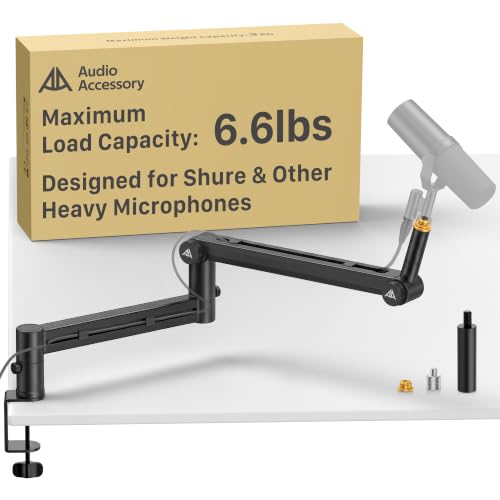
- 6.6-pound load capacity for heavy microphones
- Gear-lock mechanism helps prevent sagging
- 780 mm reach with deep cable channels
Best For: Shure SM7B, MV7, PodMic, and other heavy studio mics
Best Long-Reach Option – Samson MBA38
Samson MBA38 38" Microphone Boom Arm Studio Podcast USB Mic Stand w/Desk Clamp
Check Price On AmazonIf you need microphone boom arms for desk setups with extra reach, the Samson MBA38 provides a 38-inch articulating arm and a sturdy steel construction. Its internal springs are designed for quieter positioning, while the included C-clamp fits desks up to 2 inches thick.
Best For: Podcasters, streamers, and recording setups that need a long, durable boom arm.
Pros:
- 38-inch maximum arm reach offers flexible positioning.
- Steel construction supports microphones up to 5 pounds.
- Internal springs enable quiet, effortless adjustments.
- Includes both a C-clamp and flange mount.
Cons:
- The C-clamp is limited to desks up to 2 inches thick.
- Its 4-pound weight may be less convenient for portable setups.
The MBA38 stands out when reach and load capacity matter most. Its two mounting options add installation flexibility, though the arm’s larger, heavier design may be more than needed for compact desks.
Best Quiet Premium Arm – RØDE PSA1+
Among microphone boom arms for desk use, the RØDE PSA1+ focuses on smooth, quiet operation and a clean appearance. Its internal spring damping, 360-degree rotation, and integrated cable management suit professional podcasting and streaming desks.
Best For: Broadcast-style podcast and streaming setups using microphones or shock mounts from 0.25 to 1.2 kilograms.
Pros:
- Internal spring damping helps reduce creaks and handling noise.
- 360-degree rotation supports flexible microphone placement.
- Integrated cable management keeps XLR runs hidden.
- Includes a desk clamp and 3/8-inch and 5/8-inch thread adaptors.
Cons:
- Supports up to 1.2 kilograms, less than some heavier-duty arms.
- The desk clamp fits surfaces up to 70 millimeters thick.
The PSA1+ is a strong choice for creators who prioritize quiet repositioning and tidy cable routing. Its stated weight range covers many common microphones and shock mounts, but heavier combinations may exceed its capacity.
Best Low-Profile Design – Aokeo AK-58i
The Aokeo AK-58i is a low-profile option for microphone boom arms for desk setups where screen visibility and stability are priorities. Its lower center of gravity is designed to reduce shaking, while the arm rotates 360 degrees and swings vertically through 180 degrees.
Best For: Gaming, streaming, podcasting, and recording desks that benefit from a discreet arm below the monitor.
Pros:
- Low-profile design helps reduce visual distraction.
- Supports microphones or shock mounts up to 2 kilograms.
- 360-degree arm rotation and 180-degree vertical adjustment provide flexibility.
- Includes 1/4-inch, 3/8-inch, and 5/8-inch adapter compatibility.
Cons:
- Fits tables less than 7 centimeters thick.
- The stated maximum height is 30 centimeters, limiting vertical reach.
- Microphone is not included.
The AK-58i emphasizes a stable, unobtrusive profile rather than maximum height. It is well suited to monitor-centered workspaces, especially when its 2-kilogram capacity and broad thread compatibility match your microphone setup.
Best Accessory Bundle – Amazon Basics 14-Inch Boom Arm
For straightforward microphone boom arms for desk setups, this Amazon Basics model includes a 14-inch adjustable arm, desk clamp, pop filter, and windscreen. It is designed for standard microphones, with adjustable tension to help maintain position according to the microphone’s weight and placement.
Best For: Standard microphone setups that need basic positioning hardware plus included plosive and wind protection.
Pros:
- Includes a dual-layer pop filter and foam windscreen.
- Adjustable tension helps accommodate different microphone weights.
- Desk clamp fits surfaces up to 2 inches thick.
- Supports microphones up to 1.5 kilograms.
Cons:
- Performance may vary with heavier microphones, shock mounts, or accessories.
- Fully extended or unevenly loaded positions may require tension adjustments.
- The 14-inch arm offers less reach than longer boom arms.
This model is practical for buyers who want a compact arm and useful audio accessories in one package. Careful clamp installation and tension adjustment are important, particularly when the microphone is extended or unevenly loaded.
Low-Profile Pick – FIFINE BM88W Boom Arm
The FIFINE BM88W is a low-profile option for shoppers comparing microphone boom arms for desk setups. Its design is aimed at podcast recording and streaming where keeping the arm visually unobtrusive can be useful.
Best For: Podcast recording and streaming setups that prefer a low-profile boom arm.
Pros:
- Low-profile design.
- Made for podcast recording and streaming.
Cons:
- The supplied information does not specify weight capacity, reach, clamp thickness, or adjustment range.
- Compatibility details are not provided in the supplied notes.
The BM88W is worth considering when a discreet form factor matters most. Before buying, verify its mounting specifications and microphone compatibility for your particular desk and microphone.
Best Cable Management – InnoGear MU-PSA28 Mic Arm
The InnoGear MU-PSA28 stands out among microphone boom arms for desk setups with built-in cable channels, broad adjustment, and a high 3.5-pound load rating. Its long reach and included riser are useful for positioning a microphone around or over a monitor.
Best For: Streamers, podcasters, and creators who want concealed cable routing and substantial reach.
Pros:
- Built-in cable management channels with removable rubber covers help keep cords organized.
- Adjusts through 135° back and forth, 180° up and down, with a 360°-rotatable base.
- Reaches up to 32.3 inches horizontally and 37.4 inches vertically; includes a 6.3-inch extension riser.
- Supports microphones up to 3.5 pounds and clamps to desks up to 2 inches thick.
Cons:
- The shock mount is not included.
- At 1.6 kg, it is relatively substantial compared with lighter boom arms.
Choose the InnoGear if cable clutter, monitor clearance, and support for heavier microphones are priorities. Its 5/8-inch connector suits many popular microphones, but a separate shock mount may be needed for some setups.
Best Beginner-Friendly Arm – MAONO BA20 Boom Arm
The MAONO BA20 is a practical choice among microphone boom arms for desk users who want straightforward positioning and broad microphone compatibility. Its steel construction, padded clamp, included adapter, and 2.2-pound capacity suit many beginner podcasting, gaming, and streaming setups.
Best For: Beginners using compatible microphones weighing up to 2.2 pounds on standard desks.
Pros:
- Supports microphones up to 2.2 pounds (1 kg) with a steel arm and spring design.
- Includes a 3/8-inch to 5/8-inch screw adapter and standard microphone clip.
- Wide-mouth clamp fits desks up to 2.2 inches thick and includes a soft protective pad.
- Designed for easy, quiet angle and height adjustments; cable straps are included.
Cons:
- Not recommended for microphones weighing more than 1 kg.
- May not work with glass tables.
- Its maximum listed height is 70 cm, which may be less suitable for especially tall setups.
The BA20 offers a useful balance of included accessories and simple adjustment for everyday recording or gaming. Check your microphone’s weight and your desk material before choosing it.
Best Value QuadCast Arm – Compact Adjustable Mic Stand
If you need microphone boom arms for desk setups built around a Blue Yeti, HyperX QuadCast, or similar microphone, this SUNMON arm offers a straightforward suspension design with reinforced adjustment knobs. Its included adapter and clamp make it a practical choice for gaming, streaming, and podcasting spaces.
Best For: Blue Yeti, HyperX QuadCast, SoloCast, and other compatible microphones in home recording or streaming setups.
Pros:
- Dual suspension springs and reinforced knobs help reduce shaking, sinking, and unwanted noise.
- Includes a pre-installed 3/8-inch to 5/8-inch adapter for broad microphone compatibility.
- Desk clamp fits surfaces up to 1.89 inches thick and includes protective sponge padding.
- Supports microphones weighing up to 1.4 kg.
Cons:
- The clamp is limited to desks up to 1.89 inches thick.
- It is a suspension-arm design rather than a low-profile or fold-away stand.
This arm is a sensible pick when compatibility with popular USB and studio-style microphones matters most. Confirm your microphone weight and desk thickness before buying.
Best Space-Saving Arm – Lightweight Low-Profile Mic Stand
Among microphone boom arms for desk use, the TODI arm stands out for its compact, fold-away profile and behind-the-monitor positioning. It offers multiple adjustment points, cable management, and 3/8-inch and 5/8-inch threads, but it is specifically intended for lighter microphones.
Best For: Gaming, podcasting, recording, and streaming setups using lightweight microphones on larger office desks.
Pros:
- Low-profile design can extend behind a monitor and help preserve an unobstructed view.
- Extends up to 29 inches and folds away to save desk space.
- 360-degree base hinge supports flexible positioning and angle adjustments.
- Integrated cable management helps keep microphone cables organized.
Cons:
- Designed for light microphones and not heavy-duty or studio microphones.
- Not compatible with some models, including Blue Yeti ORB, Yeti X, Shure MV7i, and Shure Beta58A.
This is a useful choice for a clean, space-conscious workstation, provided your microphone falls within the arm’s lightweight use case and has a compatible thread.
Best Heavy-Duty Arm – Gear-Lock Low-Profile Mic Mount
For microphone boom arms for desk setups supporting heavier studio microphones, this low-profile mount uses a gear-lock mechanism instead of a spring-loaded arm. Its 6.6-pound capacity, extended reach, and multiple adapters make it suited to microphones such as the Shure SM7B, MV7, RODE PodMic, and Blue Yeti.
Best For: Heavy microphones and studio-style recording, podcasting, streaming, and broadcasting setups.
Pros:
- Supports up to 6.6 pounds, or approximately 3 kg.
- Gear-lock design is intended to resist sagging over time.
- 780 mm reach, 360-degree horizontal rotation, and 120-degree vertical adjustment provide broad positioning flexibility.
- Deep cable channels and included 3/8-inch to 5/8-inch and 3/8-inch to 1/4-inch adapters improve setup versatility.
Cons:
- At 1.63 kg, it is heavier than compact microphone arms.
- Its low-profile desk-mount design may be more substantial than needed for lightweight microphones.
This is the strongest option of the three for users concerned about arm sag and microphone weight. Its extra reach and gear-lock construction make it particularly appropriate for demanding studio or podcasting setups.
How We Picked These Microphone Boom Arms for Desk Setups
We focused on the features that matter during everyday recording, streaming, video calls, and gaming: microphone weight support, arm reach, adjustment range, desk-clamp stability, mounting-thread compatibility, cable management, and storage flexibility. We also included a mix of established brands and affordable alternatives so you can match the arm to your microphone and workspace rather than simply choosing the most expensive model.
Compatibility is especially important. Some arms are aimed at popular USB microphones such as the Blue Yeti, HyperX QuadCast, Elgato Wave, and FIFINE models, while others use standard 3/8-inch or 5/8-inch connections for broader compatibility. Check whether your microphone needs a shock mount, adapter, or additional thread converter before buying.
Quick Comparison
| Best For | Look For |
|---|---|
| Studio podcasting | Long reach, smooth movement, spring damping, and strong clamp hardware |
| Streaming and gaming | Easy repositioning, cable management, and compatibility with USB microphones |
| Small desks | Low-profile construction, compact folding, and a space-saving clamp |
| Heavy microphones | Higher load capacity, reinforced joints, and an anti-sag design |
| Budget setups | Adjustable tension, standard threads, and included adapters or accessories |
Key Buying Factors for Microphone Boom Arms for Desk
Weight Capacity and Stability
Confirm the arm can support your microphone, shock mount, pop filter, and any additional accessories together. A model that is technically compatible but operating near its limit may sag or drift. Heavy microphones benefit from reinforced joints, dependable tension control, and a wide, secure desk clamp.
Reach, Movement, and Desk Space
Measure the distance between the clamp and your preferred speaking position. Longer arms work well for deep desks and shared setups, while low-profile arms keep the microphone closer to the rear edge and leave more room in front of your keyboard. Folding or storable designs are useful when the desk serves multiple purposes.
Mounting Compatibility
Most arms use 3/8-inch or 5/8-inch threads, but included adapters vary. Verify the microphone’s mount, shock mount, or stand adapter before ordering. Product listings that name your microphone model can simplify the decision, but standard thread support generally provides more flexibility for future upgrades.
Clamp and Cable Management
A solid clamp should fit your desk thickness and grip without damaging the surface. Built-in channels, clips, or sleeves help prevent USB and XLR cables from pulling on the microphone and reduce visible clutter. Spring-damped arms can also be quieter when repositioned.
Who Should Buy Which Microphone Boom Arms for Desk?
Choose a long-reach studio arm if you record from different positions or use a large desk. Pick a low-profile arm for compact workspaces, monitor-heavy desks, or setups where the microphone needs to stay out of the way. A cable-managed arm is a practical choice for streamers who frequently adjust their microphone. If you use a heavy broadcast microphone or a large shock mount, prioritize load capacity and anti-sag stability over the lowest price. For occasional calls and light USB microphones, an affordable adjustable arm may provide all the functionality you need.