USB duplicators with erase functions can streamline two jobs that often go together: creating multiple copies of approved media and securely clearing drives for reuse or disposal.
This roundup compares 10 standalone duplicators and erasers, from compact 1:1 and 1:2 units to high-capacity systems designed for larger production runs and mixed USB or hard-drive workflows.
Best 10 USB Duplicators with Erase Functions Picks for 2026
Compact IT Workhorse
StarTech 1:2 USB Duplicator Eraser

- Standalone 1-to-2 cloning and sanitizing
- Quick, single-pass, and three-pass erase modes
- LCD diagnostics and copy verification
Best For: IT technicians needing a compact duplicator with flexible erase controls
Seven-Drive Production Station

- Duplicates up to seven drives at once
- Standalone bit-by-bit copying
- Synchronous and asynchronous modes
Best For: Batch USB duplication for business and production workflows
Touchscreen Convenience Pick
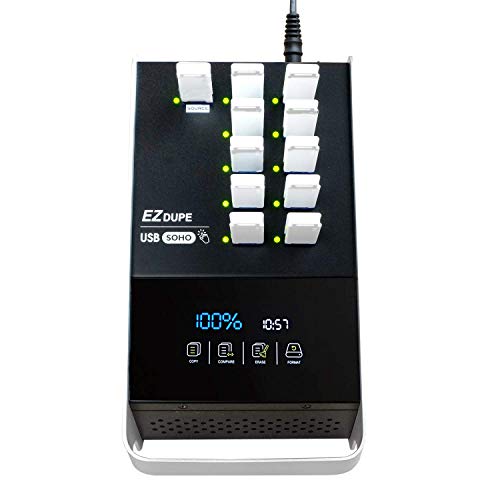
- Duplicates up to ten USB drives
- Touchscreen copy, compare, format, and erase
- Supports USB 2.0, 3.0, and 3.1 media
Best For: Accessible multi-drive duplication and basic sanitizing
High-Speed Sanitizing Tower
EZ Dupe 1:7 USB 3.0 Duplicator

- Up to 100MB/s per slot across seven drives
- Full, quick, and DoD 3-pass erase modes
- Standalone USB 3.0/3.1 operation
Best For: Fast professional duplication with defined erase procedures
Best Professional Drive Dock
StarTech 4-Bay HDD/SSD Duplicator

- 1:3 standalone SATA cloning
- Quick and NIST SP 800-88 Purge erase modes
- USB/eSATA docking with four drive bays
Best For: IT professionals handling SATA drive duplication and sanitization
Best High-Volume USB Media Value

- Duplicates to up to 15 USB targets
- Four erase modes, including DoD 3-pass and 7-pass
- Standalone operation with multiple copy modes
Best For: Batch USB flash-drive and external-HDD duplication
Best Large-Batch USB Production

- Copies asynchronously to up to 39 targets
- Smart Copy and bit-by-bit Raw Mode
- Secure erase, logging, and 600-watt power supply
Best For: High-volume USB duplication and storage sanitization
Compact USB Eraser
StarTech.com 1:2 USB Duplicator and Eraser
- Copies or erases two USB drives at once
- Standalone operation requires no computer
- Supports asynchronous duplication
Best For: Small-batch USB copying and erasure
High-Volume USB Batch Tool
EZ Dupe 1:31 Xtreme USB Duplicator

- Duplicates up to 31 USB drives
- Includes four copy and four erase modes
- Supports asynchronous batch copying
Best For: Large USB duplication and sanitization workloads
Cross-Interface Drive Sanitizer
StarTech.com SATA and USB Duplicator

- Works with SATA drives and USB flash media
- Offers five erase and four copy modes
- Includes Copy & Compare verification
Best For: Technicians handling mixed SATA and USB drives
Compact IT Workhorse – StarTech 1:2 USB Duplicator Eraser
The StarTech USBDUP12 is a practical choice among usb duplicators with erase functions when you need a compact, standalone unit for cloning, sanitizing, or sharing data across two USB drives. It supports system-and-file copying, sector-by-sector duplication, quick erase, and single- or three-pass overwriting.
Best For: IT technicians and professionals who need a small 1-to-2 duplicator with verification and multiple erase options.
Pros:
- Runs without a computer and supports USB 3.0 and USB 2.0 flash media.
- Offers quick erase, single-pass, and three-pass overwrite modes.
- LCD menu provides drive information, performance readings, and bad-sector scanning.
- Copy-and-compare helps verify cloned drives.
Cons:
- Its two-drive capacity is lower than larger desktop duplicator towers.
- Asynchronous copying is limited to source content under 64 MB.
- External USB storage devices may need their own power source.
With a 1.5 GB/min copy rate and a two-year warranty, this model balances portability with useful diagnostic and sanitizing controls. It is especially appealing when advanced erase options matter more than high-volume duplication.
Seven-Drive Production Station – Systor 1:7 USB Sanitizer
The Systor SYS-USBD-7 is built for higher-volume duplication, handling up to seven USB targets at once without a computer or software. For buyers comparing usb duplicators with erase functions, it combines bit-by-bit copying with synchronous and asynchronous operating modes.
Best For: Businesses and production environments that need to duplicate multiple USB flash drives in one batch.
Pros:
- Copies to up to seven USB drives simultaneously.
- Standalone design does not require a computer or host software.
- Supports synchronous and asynchronous copy modes.
- USB 1.1, 2.0, and 3.0 flash drives are supported.
Cons:
- The supplied notes do not specify the available erase-mode details.
- USB Type-C drives require an adapter.
- Its desktop form factor and listed 10-pound weight make it less portable.
The stated 2GB/min transfer rate remains consistent even as the number of loaded drives increases, making this a sensible option for repeatable batch work. Its warranty includes one year of parts coverage, three years of labor, and lifetime technical support.
Touchscreen Convenience Pick – EZ Dupe SOHO Touch 1:10
The EZ Dupe SOHO Touch is a user-friendly option among usb duplicators with erase functions, pairing a touchscreen interface with capacity for up to ten USB targets. Its menu includes copy, compare, format, and one-touch erase functions, while supporting USB 2.0, 3.0, and 3.1 thumb drives.
Best For: Users who want straightforward touchscreen control for recurring duplication, comparison, formatting, and erasing tasks.
Pros:
- Handles up to ten USB drives in a single unit.
- Touchscreen simplifies copy, compare, format, and erase operations.
- Supports all file formats, file sizes, and drive capacities on USB flash media.
- Designed for both daily operation and heavier use.
Cons:
- The supplied notes do not identify specific secure-overwrite standards or erase passes.
- Its stated transfer speed is 35MB per second, below the fastest model in this group.
- It carries a one-year manufacturer warranty.
This model emphasizes ease of use rather than technical complexity. The ten-port layout and touchscreen should suit teams that regularly prepare or sanitize several compatible USB drives while keeping operation accessible.
High-Speed Sanitizing Tower – EZ Dupe 1:7 USB 3.0 Duplicator
The EZ Dupe U07-SSPX100 is a high-speed choice among usb duplicators with erase functions, copying to seven USB Type-A drives at up to 100MB per second per slot. It operates independently of a computer and provides full-media, quick, and DoD 3-pass erase modes.
Best For: Professional users who need fast seven-drive duplication alongside clearly defined sanitization options.
Pros:
- Copies to up to seven drives at a stated 6GB/min rate.
- Offers system-and-files and whole-media copy modes.
- Includes full erase, quick erase, and DoD 3-pass erase.
- Standalone operation avoids software or host-computer connections.
Cons:
- Type-C drives require an optional adapter that is not included.
- It supports Type-A media directly, limiting plug-and-play compatibility with Type-C drives.
- The listed 11-pound weight makes it a substantial desktop unit.
This tower is the strongest fit here for speed-conscious workflows that also need a specified three-pass erase option. Its USB 3.0/3.1 support and seven target slots make it suited to repeatable professional batches, while lifetime U.S. technical support adds service value.
Best Professional Drive Dock – StarTech 4-Bay HDD/SSD Duplicator
For IT teams needing usb duplicators with erase functions, the StarTech SATDOCK4U3RE combines standalone 1:3 SATA cloning with quick and secure erase modes. Its four bays also let you use it as a USB 3.0 or eSATA docking station for 2.5- and 3.5-inch SATA drives.
Best For: IT professionals who need a versatile SATA duplicator, sanitizer, and drive dock.
Pros:
- Supports standalone cloning and Quick or Secure Erase, including NIST SP 800-88 Rev. 1 Purge.
- Works with 2.5- and 3.5-inch SATA drives, with included adapters for compatible IDE drives.
- Offers up to 4.2 GB/min sector-by-sector cloning and USB 3.2 Gen 1 or eSATA host connectivity.
- LCD menu, drive doors, eject buttons, and status LEDs simplify operation.
Cons:
- Target drives must be equal to or larger than the source during duplication.
- Designed around SATA and IDE drive workflows rather than USB flash-media duplication.
This is the most flexible choice for mixed SATA drive work, especially when secure sanitization and occasional docking are both part of the job. The four-bay design adds useful capacity without requiring a computer or dedicated software.
Best High-Volume USB Media Value – EZ DUPE USB Cyclone 1:15
The EZ DUPE USB Cyclone is a practical option among usb duplicators with erase functions when you need to process many flash drives or external USB hard drives at once. It works standalone, supports USB 1.0 through 3.1 media, and provides four erase choices alongside several copy modes.
Best For: Businesses and users duplicating or sanitizing batches of USB flash drives and external USB storage.
Pros:
- Handles up to 15 USB targets with independent bandwidth design.
- Includes Quick, Full, DoD 3-pass, and DoD 7-pass erase modes.
- Offers Essential Files, Full, Partitioned, and Percentage Copy modes.
- Supports USB flash drives and external HDDs beyond 2 TB without a stated capacity limit.
Cons:
- Reported transfer speed is up to 45 MB/s, depending on the connected USB media.
- At about 7 pounds, it is less convenient to move than a small desktop duplicator.
With one-touch copy, compare, erase, and format controls, the USB Cyclone keeps routine batch jobs simple. It is a strong fit when broad USB compatibility and multiple erase standards matter more than maximum throughput.
Best Large-Batch USB Production – Vinpower 1:39 USB DupeBoxES
For large production runs, the Vinpower Digital USBDupeBoxES is one of the most capable usb duplicators with erase functions in this group. It copies to as many as 39 USB targets asynchronously, supports both smart and raw duplication, and can securely erase USB flash drives and external HDDs or SSDs without a PC.
Best For: High-volume media production, deployment, and USB-storage sanitization.
Pros:
- Supports asynchronous duplication, allowing targets to copy independently.
- Handles up to 39 USB targets and includes a 600-watt power supply for connected devices.
- Provides Smart Copy and bit-by-bit Raw Mode for different duplication needs.
- Can export operation logs to a PC and supports secure erase for USB-connected storage.
Cons:
- At 26 pounds, it is a substantial desktop unit rather than a portable option.
- Additional SD, MicroSD, or CF support requires a corresponding interface adapter module.
This model is built for organizations that value throughput and scale. Its asynchronous operation and high port count can reduce waiting between jobs, while secure erase and logging add useful controls for repeatable production or decommissioning workflows.
Compact USB Eraser – StarTech.com 1:2 USB Duplicator and Eraser
For buyers who need practical usb duplicators with erase functions, the StarTech.com USBDUP12 is a compact standalone option for copying or erasing two USB drives without a computer. It can also work with HDDs, SSDs, or other flash media connected through a compatible dock, enclosure, or card reader.
Best For: Small-scale duplication and USB-drive erasure where portability and asynchronous operation matter.
Pros:
- Duplicates or erases two USB drives simultaneously.
- Copies only flash-drive content instead of the entire volume.
- Supports asynchronous duplication, so one drive can be replaced while another continues copying.
Cons:
- Limited to two target drives at a time.
- Its core USB interface is USB 2.0.
The USBDUP12 is a sensible fit for occasional or small-batch USB workflows. Its standalone design and flexible source-media support make it easier to use than a computer-based setup, while the two-drive capacity keeps it aimed at modest workloads.
High-Volume USB Batch Tool – EZ Dupe 1:31 Xtreme USB Duplicator
The EZ Dupe Xtreme is designed for users who need usb duplicators with erase functions for larger batches. Its 1-to-31 capacity, standalone operation, multiple copy modes, and DoD-compliant erase options make it suited to organized media-production or IT workflows.
Best For: High-volume USB duplication and selectable data-erasure jobs involving many target drives.
Pros:
- Copies to as many as 31 USB flash drives at 35MB per second.
- Offers four copy modes, including system-and-files, whole-drive, partitioned, and percentage copying.
- Provides full, quick, DoD 3-pass, and DoD 7-pass erase modes.
- Asynchronous copying begins as soon as the source and available targets are inserted.
Cons:
- Its 35MB-per-second rate is slower than some specialized high-speed duplication systems.
- External hard drives require their own power source.
- The large 31-target design may be excessive for occasional home use.
With broad copy and erase controls, the U31-SSPX8 is the strongest choice here for batch work. Its capacity and asynchronous mode can improve throughput, while FAT32 and exFAT formatting support adds useful flexibility for compatible media.
Cross-Interface Drive Sanitizer – StarTech.com SATA and USB Duplicator
For mixed-drive environments, the StarTech.com SU2DUPERA11 combines USB and SATA copying with several erase modes. This standalone tool supports 2.5- and 3.5-inch SATA HDDs or SSDs as well as USB flash drives, making it a versatile option among usb duplicators with erase functions.
Best For: IT teams and technicians who need to clone or sanitize both SATA drives and USB media from one standalone unit.
Pros:
- Supports USB flash drives plus 2.5- and 3.5-inch SATA HDDs and SSDs.
- Includes four copy modes and five erase modes, including cryptographic and DoD 3-pass erase.
- Offers Copy & Compare verification after cloning.
- Toolless design and LCD controls simplify drive handling and mode selection.
Cons:
- Additional interfaces such as IDE, M.2 SATA, and mSATA require separately sold adapters.
- It duplicates only one target drive at a time.
- USB copying is listed at up to 2.4GB per minute, below its SATA rate.
The SU2DUPERA11 is the most versatile pick when USB work overlaps with hard-drive maintenance. Its range of sanitization modes and verification feature add useful control, although the single-target design is better suited to technician workflows than high-volume production.
How We Picked These USB Duplicators with Erase Functions
We focused on standalone systems that combine media duplication with a dedicated erase or sanitization feature. The selection spans different port counts, copy speeds, media formats, and operating styles so buyers can match the machine to their workload rather than pay for capacity they will not use.
We also considered practical factors such as source-to-target copying, asynchronous operation, touchscreen or LCD controls, support for USB 2.0 and USB 3.x media, hard-drive compatibility, and whether the unit is better suited to occasional office use or repeated commercial production.
Quick Comparison
| Best For | Recommended Capacity | What to Prioritize |
|---|---|---|
| Occasional copying | 1:1 or 1:2 | Simple controls, compact size, dependable erase modes |
| Small-batch production | 1:7 to 1:10 | USB 3.x support, sustained speed, asynchronous copying |
| High-volume duplication | 1:15 to 1:39 | Port count, cooling, throughput, and job monitoring |
| Mixed USB and storage work | Hybrid or hard-drive models | Drive-bay support, SATA compatibility, and erase standards |
Key Buying Factors for USB Duplicators with Erase Functions
Port Count and Throughput
A 1:2 unit may be ideal for a help desk, repair bench, or small office, while a 1:7, 1:10, or larger duplicator can reduce labor during repeated media runs. Check the stated speed carefully: maximum rates depend on the source, target drives, file sizes, and the slowest connected device.
Media Compatibility
Confirm whether the duplicator supports USB 2.0, USB 3.0, USB 3.1, Type-A media, external drives, SATA disks, or SSDs. Compatibility is especially important when copying between different generations of flash media or working with larger storage devices.
Erase and Sanitization Options
Look for the erase methods your organization requires, such as quick erase, full overwrite, or a documented DoD-style pattern. An erase function is not automatically equivalent to every regulatory or forensic sanitization standard, so verify the manufacturer’s specifications and maintain any required records.
Controls, Verification, and Workflow
LCD or touchscreen menus can simplify setup, while status indicators and copy verification help catch failed or incomplete jobs. Asynchronous operation is useful when different target drives finish at different times, and standalone operation avoids tying up a computer.
Who Should Buy Which USB Duplicators with Erase Functions?
Choose a compact 1:1 or 1:2 model if you duplicate media occasionally and value low cost and straightforward operation. Small businesses, IT departments, and event suppliers will generally benefit from a 1:7 or 1:10 USB 3.x unit. For frequent commercial duplication, a 1:15 or 1:39 system can deliver better labor efficiency, provided you have enough source media and workspace.
Buy a hybrid USB and hard-drive duplicator when your workflow includes SATA HDDs or SSDs as well as flash drives. Whichever model you choose, match its erase modes to your data-handling policy, test it with the exact media you use, and prioritize verified results over headline speed alone.