Dim rooms can make video calls look grainy, soft, and unprofessional—even when your computer has a capable camera. The best webcams for low light use larger sensors, image correction, autofocus, or built-in lighting to produce a clearer picture.
We compared 10 webcams across resolution, low-light performance, microphone features, framing tools, privacy controls, and overall value to help you choose the right camera for meetings, streaming, classes, and content creation.
Best 10 Webcams for Low Light Picks for 2026
Best Balanced Low-Light Webcam
- 2K video with low-light correction
- AI noise-canceling dual microphones
- Adjustable field of view and privacy cover
Best For: Home offices, video calls, and late-night streaming
Best 4K Sensor for Dim Rooms

- Sony 1/2.55-inch sensor
- Automatic light adjustment for dim scenes
- 4K/30fps and 1080p/60fps modes
Best For: Streaming and content creation in variable lighting
Best for Meetings and Streaming

- Automatic low-light and exposure correction
- PDAF autofocus with 4K video
- AI noise-canceling microphone
Best For: Remote work, meetings, and flexible streaming setups
Reliable Low-Light Classic

- Automatic lighting adjustment and autofocus
- Full HD 1080p video at 30 fps
- Dual microphones and XSplit VCam license
Best For: Everyday calls, streaming, and desktop use
Best Built-In Lighting Upgrade

- Large 1/2-inch sensor for brighter low-light video
- Integrated ring light with four modes
- 4K video, fast PDAF autofocus, and privacy cover
Best For: Streaming and content creation in dim rooms
Simple Budget Pick

- Automatic light correction for changing conditions
- 1080p video with a wide-angle lens
- Privacy cover and plug-and-play setup
Best For: Everyday calls, classes, and budget setups
Best Compact 4K Pick

- 1/2-inch sensor helps capture more light
- 4K video with AI framing and autofocus
- Compact 40.5-gram USB-C design
Best For: Mobile workers and streamers needing portable low-light 4K video
Best Budget Lighting Bundle

- Built-in ring light has three color modes
- Adjustable brightness for dim rooms
- 4K/30fps or 1080p/60fps video
Best For: Video callers and streamers wanting integrated lighting
Best Feature-Rich Lighted Webcam

- 4K sensor with improved light transmission
- Tri-tone ring light with stepless brightness
- PDAF autofocus and 1080p/60fps support
Best For: Streamers and professionals wanting flexible lighting and mounting
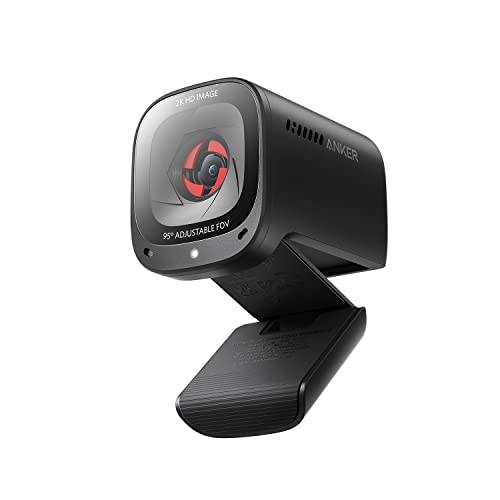
Best Balanced Low-Light Webcam – Anker PowerConf C200 2K
The Anker PowerConf C200 is a practical choice among webcams for low light, delivering 2K video with low-light correction for home offices, calls, and late-night streaming. Its adjustable field of view and built-in privacy cover add useful flexibility.
Best For: Remote workers and streamers who want sharp 2K video, clear voice capture, and adaptable framing.
Pros:
- 2K resolution provides detailed video for conferences and streaming.
- Low-light correction helps produce clearer images in dim settings.
- Dual microphones include AI noise cancellation for clearer speech.
- Software-adjustable 65°, 78°, and 95° viewing angles plus an integrated privacy cover.
Cons:
- It does not provide 4K video.
- Advanced viewing-angle adjustments require software.
The C200 is a well-rounded option when dependable low-light performance and voice clarity matter more than maximum resolution. Its broad Windows and macOS compatibility also makes it easy to add to an existing setup.
Best 4K Sensor for Dim Rooms – EMEET S600 4K
The EMEET S600 combines a Sony 1/2.55-inch sensor with automatic light adjustment, making it a strong contender among webcams for low light. It also offers 4K at 30fps or 1080p at 60fps for creators who need either detail or smoother motion.
Best For: Streamers and content creators seeking high-resolution video with fast autofocus and automatic light balancing.
Pros:
- Sony sensor supports detailed 4K video at 30fps.
- Automatic light adjustment helps balance shadows and highlights in dim environments.
- PDAF autofocus is designed for faster, more stable focusing.
- Dual noise-canceling microphones and a built-in privacy cover add practical convenience.
Cons:
- The field of view is fixed at 73° when recording in 4K.
- Some image and sound customization requires EMEETLINK software.
With its larger sensor and light-balancing features, the S600 is aimed at users who want polished video without giving up low-light adaptability. The 1080p/60fps mode is useful when smooth motion is more important than 4K detail.
Best Built-In Light – Angetube 4K Webcam with Ring Light
The Angetube 967 is one of the more direct solutions for webcams for low light because it includes a three-level adjustable ring light. Along with 4K video and PDAF autofocus, the built-in illumination helps improve face visibility when room lighting is limited.
Best For: Video callers and streamers who want adjustable on-camera lighting without buying a separate lamp.
Pros:
- Built-in ring light offers three brightness settings for dim rooms.
- Supports 4K at 30fps and 1080p at 60fps.
- PDAF autofocus helps keep subjects sharp.
- Includes dual microphones, a privacy shutter, and a USB-C adapter.
Cons:
- The integrated light requires power and may not replace larger room lighting.
- Its 4K mode is limited to 30fps.
The 967 stands out for buyers who want a simple, self-contained low-light setup. Its ring light directly addresses uneven or insufficient illumination, while plug-and-play compatibility keeps installation straightforward.
Best for Meetings and Streaming – Acer A640 4K
The Acer A640 is a versatile option among webcams for low light, pairing automatic low-light correction and exposure adjustment with a Sony 1/2.8-inch sensor. It records 4K at 30fps and supports 2K or 1080p at 60fps for smoother video.
Best For: Professionals and streamers who need fast autofocus, noise-reduced voice capture, and flexible resolution options.
Pros:
- Automatic low-light correction and exposure adjustment help in challenging lighting.
- PDAF autofocus is designed to lock onto subjects quickly.
- Supports 4K/30fps and 2K or 1080p/60fps.
- AI noise cancellation, a physical privacy shutter, and a USB-A-to-C adapter are included.
Cons:
- The manufacturer recommends a well-lit environment for optimal clarity.
- It has no built-in speakers.
The A640 offers a strong mix of meeting-focused features and creator-friendly video modes. Its automatic exposure tools can help compensate for imperfect lighting, though users seeking the best image quality should still provide reasonable front lighting.
Reliable Low-Light Classic – Logitech C920x HD Pro
The Logitech C920x is a dependable choice among webcams for low light, combining automatic lighting adjustment with autofocus to help maintain bright, sharp 1080p video in dim rooms. It is a practical fit for calls, streaming, recording, and everyday laptop or desktop use.
Best For: Video calls, streaming, and users who want proven 1080p performance with automatic image adjustments.
Pros:
- Automatic lighting adjustment and autofocus help improve clarity in low-light settings.
- Records and streams Full HD 1080p video at 30 fps.
- Dual microphones capture natural-sounding audio.
- Includes a three-month XSplit VCam license for background removal, replacement, or blur.
Cons:
- No built-in privacy shutter.
- Video is limited to 30 fps at 1080p.
The C920x is a balanced, straightforward option when you want reliable low-light correction without adding a separate light. Its established feature set makes it especially suitable for general-purpose conferencing and streaming.
Best Built-In Lighting Upgrade – EMEET S600L 4K Webcam
The EMEET S600L stands out among webcams for low light by pairing a large 1/2-inch Samsung sensor with an integrated ring light. It is designed to improve brightness, facial detail, and exposure while offering 4K video, fast autofocus, and flexible lighting controls for creators.
Best For: Streamers, creators, and professionals who need stronger low-light performance plus built-in fill lighting.
Pros:
- Large 1/2-inch sensor is designed to capture more light and detail.
- Integrated ring light offers four lighting modes with adjustable brightness and color.
- Supports 4K at 30 fps and 1080p at 60 fps.
- Includes 0.2-second PDAF autofocus, privacy cover, and flexible mounting.
Cons:
- USB 2.0 connectivity may limit transfer performance compared with newer standards.
- The advanced lighting and software controls may be more than casual callers need.
For genuinely dim workspaces, the S600L offers a more complete solution than a camera relying only on software correction. Its sensor, ring light, and adjustable positioning make it particularly capable for streaming setups and content creation.
Simple Budget Pick – Gohero Full HD Webcam
The Gohero Full HD Webcam is a simple option for webcams for low light, using automatic light correction to adjust brightness and color in dim, bright, or changing environments. Its plug-and-play setup, privacy cover, and noise-reducing microphone make it convenient for everyday calls and online meetings.
Best For: Budget-conscious users who want easy 1080p video, basic low-light correction, and built-in privacy protection.
Pros:
- Automatic light correction adapts to dim and uneven lighting.
- Full HD 1080p video at 30 fps with a wide-angle lens.
- Built-in noise-reducing microphone helps keep voices clear.
- Plug-and-play compatibility with USB 2.0, 3.0, 3.1, and OTG, plus a privacy cover.
Cons:
- Fixed focus offers less flexibility than an autofocus webcam.
- It does not include an integrated light for very dark rooms.
The Gohero is best viewed as an accessible everyday webcam rather than a specialized low-light camera. Its automatic correction can help in dim conditions, while the privacy cover and driver-free setup add practical convenience.
Best Compact 4K Pick – OBSBOT Meet 2
The OBSBOT Meet 2 is a strong choice for webcams for low light if you want a small camera that can produce brighter, clearer 4K video. Its 1/2-inch CMOS sensor is designed to capture more light, while autofocus and AI framing help keep you ready for calls, streaming, or recording.
Best For: Mobile workers, streamers, and video callers who want compact 4K quality with automatic framing.
Pros:
- 1/2-inch sensor improves light capture for clearer, brighter images.
- 4K resolution with autofocus and AI framing.
- Extremely lightweight 40.5-gram design with USB-C plug-and-play setup.
- Dual noise-canceling microphones and gesture controls add convenience.
Cons:
- Does not include a built-in fill light for especially dim rooms.
- May become hot during use, which the manufacturer says is normal.
The Meet 2 stands out for combining a relatively large sensor with a highly portable design. It is a practical low-light webcam option when you prefer better light capture over an integrated lamp.
Best Budget Lighting Bundle – 4K Webcam with Ring Light
This 4K webcam takes a direct approach to webcams for low light by combining autofocus with a built-in adjustable ring light. Its three color modes and variable brightness let you add illumination to calls, classes, and streams without setting up a separate lamp.
Best For: Users who want an all-in-one webcam and lighting solution for video calls, online classes, and streaming.
Pros:
- Built-in ring light offers white, natural, and warm color settings.
- Brightness can be adjusted through the outer ring.
- Supports 4K at 30 fps and 1080p at 60 fps.
- TOF autofocus, dual noise-canceling microphones, and a privacy cover.
Cons:
- Its 1/2.5-inch sensor is smaller than the OBSBOT Meet 2’s listed sensor.
- USB connection and included features are more practical than portable-focused.
For dim desks, the integrated light is this webcam’s main advantage. The adjustable color and brightness controls provide a simple way to improve your appearance without relying entirely on room lighting.
Best Feature-Rich Lighted Webcam – NexiGo N680E Pro
The NexiGo N680E Pro is a versatile pick among webcams for low light, pairing a Sony 1/2.5-inch 4K sensor with a built-in tri-tone ring light. PDAF autofocus, 1080p at 60 fps, and noise-reducing microphones make it suitable for streaming, conferencing, and recording.
Best For: Streamers and professionals who want adjustable lighting, fast autofocus, and flexible mounting options.
Pros:
- 4K sensor and coated lens support detailed video and improved light transmission.
- Tri-tone ring light offers touch-selectable color modes and stepless brightness control.
- PDAF autofocus helps maintain focus while you move.
- Includes a privacy shutter, 80-degree field of view, flexible clip, and tripod mount.
Cons:
- The built-in light may still be less suitable than dedicated room lighting for very large spaces.
- Uses USB-A, so some USB-C-only devices may need an adapter.
The N680E Pro offers one of the more complete low-light setups in this group. Its adjustable ring light handles immediate illumination, while the sensor, PDAF autofocus, and mounting flexibility support more demanding streaming and presentation setups.
How We Picked the Best Webcams for Low Light
We focused on webcams that offer practical advantages in dim or uneven lighting rather than judging resolution alone. Our selection includes 4K and 1080p models, cameras with larger image sensors, ring lights, automatic exposure correction, autofocus, AI framing, and noise-reducing microphones.
We also considered setup convenience. USB plug-and-play compatibility, adjustable mounts, privacy shutters or covers, field of view, and software support can matter just as much as image quality for everyday video calls.
Quick Comparison
| What to Compare | Best For | Why It Matters |
|---|---|---|
| 4K resolution | Streaming and cropping | Provides more detail when lighting is adequate |
| 1080p resolution | Meetings and value | Usually uses less bandwidth and remains sharp for calls |
| Large sensor | Dim rooms | Can capture more light and reduce a muddy image |
| Built-in ring light | Dark desks and nighttime calls | Adds direct illumination without a separate lamp |
| Autofocus and AI framing | Presenters and creators | Helps keep you sharp and centered as you move |
Key Buying Factors for Webcams for Low Light
Sensor and Image Processing
A larger sensor can improve brightness and detail in a dark room, while low-light correction helps balance exposure. Look for independent lighting control when possible, since aggressive automatic processing can make faces look washed out or noisy.
Resolution and Frame Rate
4K is useful for recording, streaming, or digitally cropping into the frame, but it does not automatically guarantee better low-light results. A well-tuned 1080p camera may look better in a dim room than an inexpensive 4K model. For smooth motion, consider 60fps options, provided your computer and connection can support them.
Lighting, Autofocus, and Audio
A built-in ring light is valuable when your workspace lacks front-facing light, although it cannot replace a quality desk lamp for full-room illumination. PDAF autofocus can help with movement, while noise-canceling microphones are useful for calls but should not be expected to match a dedicated microphone.
Field of View and Privacy
Choose a wider lens for group calls or demonstrations and a narrower view for a cleaner solo frame. A privacy shutter or cover is a worthwhile convenience if the webcam remains connected to your computer.
Who Should Buy Which Webcams for Low Light?
- For everyday meetings: Choose a dependable 1080p webcam with automatic light correction and a privacy cover.
- For streaming and recording: A 4K model with a larger sensor, autofocus, and manual controls offers more flexibility.
- For very dark workspaces: Pick a webcam with a built-in ring light, then position additional light in front of your face when possible.
- For presenters who move: Prioritize fast autofocus, AI framing, and a wider field of view.
- For budget shoppers: A basic 1080p plug-and-play webcam can deliver a major improvement over many built-in laptop cameras without adding unnecessary features.