An external GPU enclosure can turn a compatible laptop, handheld, or compact PC into a more capable gaming and workstation system without replacing the whole computer. The best choice depends on your laptop’s connection, graphics card, power needs, and tolerance for setup complexity.
We’ve selected 10 external GPU enclosures for laptops spanning Thunderbolt 3, Thunderbolt 4, Thunderbolt 5, USB4, and OCuLink designs. Use the guide below to narrow the options by performance, compatibility, portability, and value.
Best 10 External GPU Enclosures for Laptops Picks for 2026
Best Overall Thunderbolt 5 Enclosure
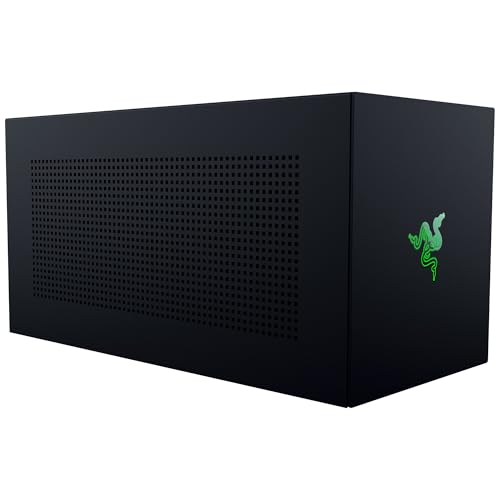
- Supports up to four-slot NVIDIA and AMD GPUs
- Thunderbolt 5 offers up to 80 Gbps bandwidth
- Includes 140W USB-C power delivery and active cooling
Best For: Windows 11 laptops and USB4 handhelds needing flexible GPU support
Best High-Power Docking Enclosure
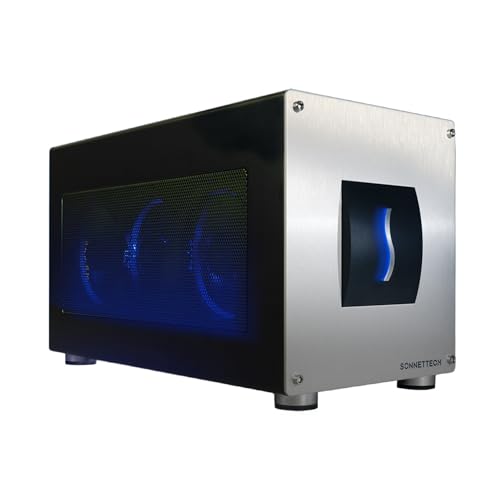
- Built-in 850W power supply
- Supports triple-wide NVIDIA and AMD GPUs
- Adds 5GbE and three 10 Gbps USB-A ports
Best For: Windows 11 power users needing GPU expansion and desktop connectivity
Best OCuLink Performance Dock
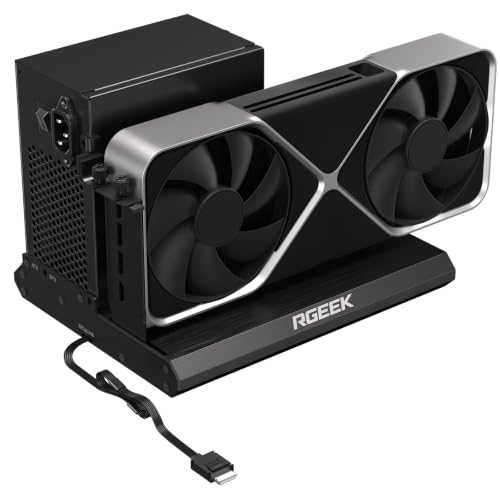
- PCIe 5.0 x4 support up to 128 Gbps
- No graphics-card size restrictions
- Works with ATX, SFX, and SFX-L power supplies
Best For: OCuLink-equipped laptops, NUCs, and mini PCs
Best Thunderbolt 3 Value Option

- 750W power supply for compatible GPUs
- Works with Mac and Windows Thunderbolt 3 systems
- Adds four USB-A ports and Gigabit Ethernet
Best For: Thunderbolt 3 laptop users needing GPU acceleration and extra ports
Best Flexible Thunderbolt Pick

- Thunderbolt 3/4 and USB4 connectivity
- 85W PD with flexible PSU support
- USB hub functionality
Best For: Portable laptop and handheld eGPU setups
Best High-Bandwidth OCuLink Dock
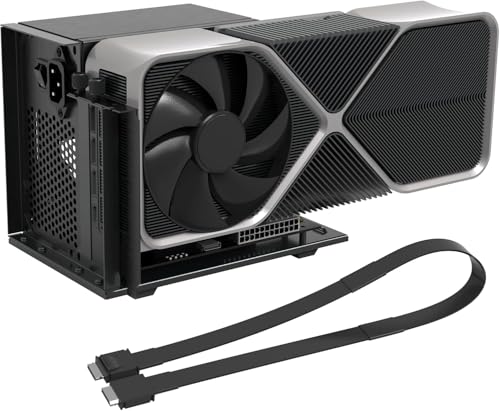
- 64Gbps PCIe 4.0 x4 OCuLink link
- Open frame supports varied GPU sizes
- Shielded 19.7-inch cable included
Best For: OCuLink-equipped laptops and mini PCs
Best Three-Slot Thunderbolt Enclosure

- Fits three-slot NVIDIA and AMD GPUs
- 40Gbps Thunderbolt 4 connectivity
- 80W USB-C PD and hub ports
Best For: Thunderbolt or USB4 laptops needing wide GPU support
Best for OCuLink Builds
Portable PCIe 4.0 x4 eGPU Dock

- PCIe 4.0 x4 speeds up to 64Gbps
- Detachable design with flexible shielded cable
- Requires separate GPU and ATX power supply
Best For: OCuLink-equipped laptops and mini PCs
Best All-in-One Thunderbolt Dock

- Built-in 750W power supply
- USB-A, Thunderbolt, and daisy-chain ports
- Supports dual-slot cards up to 350 × 157 × 59mm
Best For: Thunderbolt or USB4 Windows laptops needing a powered hub
Best Overall Thunderbolt 5 Enclosure – Razer Core X V2
The Razer Core X V2 is a flexible choice for anyone comparing external gpu enclosures for laptops. It supports up to four-slot desktop NVIDIA and AMD graphics cards, connects through Thunderbolt 5, Thunderbolt 4, or USB4, and includes 140W USB-C power delivery.
Best For: Windows 11 laptop and USB4 handheld users who want broad GPU and power-supply compatibility.
Pros:
- Supports up to four-slot PCIe 4.0 NVIDIA and AMD desktop GPUs.
- Thunderbolt 5 provides up to 80 Gbps bandwidth.
- Tool-free GPU and ATX power-supply installation with active 120 mm cooling.
- Provides up to 140W power delivery through USB-C.
Cons:
- Graphics card and power supply are sold separately.
- Mac devices with M1 or later chipsets do not support eGPUs.
With its roomy chassis, modular design, and newer connectivity options, the Core X V2 is a strong all-around enclosure for compatible Windows systems. Verify your laptop port support and plan for a separate GPU and ATX PSU.
Best High-Power Docking Enclosure – Sonnet Breakaway Box 850 T5
The Sonnet Breakaway Box 850 T5 combines an external GPU enclosure with useful desktop connectivity. Its 850W power supply, Thunderbolt 5 interface, triple-wide GPU support, and built-in dock make it suited to demanding Windows 11 creative, AI, and gaming workloads.
Best For: Windows users running power-hungry GPUs who also need USB-A and wired Ethernet ports.
Pros:
- 850W built-in power supply supports demanding current and future GPU cards.
- Supports triple-wide NVIDIA GeForce and AMD Radeon cards.
- Thunderbolt 5 delivers up to 80 Gbps bi-directional bandwidth.
- Includes three 10 Gbps USB-A ports, 5GbE, and an additional Thunderbolt 5 peripheral port.
Cons:
- Designed for Windows 11 systems; Mac compatibility is not listed in the supplied specifications.
- The built-in power supply and larger feature set may be more than basic eGPU users need.
This is a particularly capable option among external gpu enclosures for laptops when power and connectivity matter as much as graphics expansion. Its built-in 850W supply simplifies installation, while the integrated ports can reduce desktop cable clutter.
Best OCuLink Performance Dock – RGEEK OCuLink eGPU Dock
The RGEEK OCuLink eGPU Dock is a compact, open-style solution for compatible laptops, NUCs, and mini PCs. It supports PCIe 5.0 x4 bandwidth up to 128 Gbps, accepts ATX, SFX, and SFX-L power supplies, and has no graphics-card size restrictions.
Best For: Enthusiasts with OCuLink-equipped systems who want maximum GPU flexibility and a simple aluminum dock.
Pros:
- PCIe 5.0 x4 support reaches up to 128 Gbps and is backward compatible with PCIe 4.0 and 3.0.
- Compatible with mainstream NVIDIA and AMD graphics cards, including RTX 4090 and RX 7900 examples.
- Supports ATX, SFX, and SFX-L power supplies without graphics-card size limits.
- Aluminum construction helps with heat dissipation and durability.
Cons:
- Graphics card, power supply, and any adapter needed for PCIe 5.0 are not included.
- Hot-plugging is not supported.
- Full PCIe 5.0 speed requires a suitable M.2 or PCIe 5.0-to-OCuLink setup.
Compared with enclosed Thunderbolt models, this OCuLink dock favors upgrade flexibility and direct PCIe connectivity over an all-in-one chassis. Check that your laptop has a compatible OCuLink connection and budget for the separate GPU and PSU.
Best Thunderbolt 3 Value Option – Sonnet Breakaway Box 750ex
The Sonnet Breakaway Box 750ex remains a practical option for laptops with Thunderbolt 3. It supports compatible AMD and NVIDIA graphics cards, provides a 750W power supply, and adds four USB-A ports plus Gigabit Ethernet for a more useful desktop setup.
Best For: Mac and Windows users with Thunderbolt 3 computers who want GPU acceleration and built-in peripheral connectivity.
Pros:
- 750W power supply supports the requirements of many compatible high-performance GPUs.
- Supports selected AMD Radeon, NVIDIA GeForce RTX, TITAN, and Quadro cards.
- Includes four 5 Gb/s USB-A ports and Gigabit Ethernet.
- Can accelerate editing, rendering, color grading, animation, and effects workflows.
Cons:
- M1 Macs are explicitly not compatible with GPUs.
- Thunderbolt 3 offers older connectivity than the Thunderbolt 5 models in this roundup.
- GPU support is dependent on the card models and computer operating system.
For an older Thunderbolt 3 laptop, the 750ex offers a balanced combination of graphics expansion and useful I/O. Confirm operating-system and GPU compatibility before buying, particularly if you use a Mac.
Best Flexible Thunderbolt Pick – ANQ-L336 Mini eGPU Enclosure
The ANQ-L336 is a compact option among external gpu enclosures for laptops, using Thunderbolt 3, Thunderbolt 4, or USB4 for up to 32Gbps PCIe 4.0 x4 connectivity. It supports NVIDIA and AMD graphics cards, includes 85W Power Delivery, and can also serve as a small USB hub.
Best For: Laptop, mini PC, and USB4 handheld users who want flexible power-supply support and charging for devices such as the ROG Ally X.
Pros:
- Officially certified JHL7440 controller for gaming, AI, and rendering workloads.
- Supports Thunderbolt 3/4 and USB4 systems, plus NVIDIA and AMD GPUs.
- Accepts ATX, SFX, FLEX, or DC 12V power supplies and provides 85W PD.
- Adds a 10Gbps USB-A port and two Thunderbolt 4 ports.
Cons:
- Power supply and graphics card are not included.
- RTX 50-series NVIDIA support is limited according to the supplied notes.
Choose this enclosure when broad interface and power compatibility matter more than an all-in-one package. Its small footprint and 85W charging make it particularly practical for compatible handhelds and mobile setups.
Best High-Bandwidth OCuLink Dock – PCIe 4.0 x4 External GPU Dock
This OCuLink model is designed for systems with a native OCuLink port or a suitable M.2 NVMe or desktop PCIe slot and adapter. Among external gpu enclosures for laptops, it prioritizes PCIe 4.0 x4 bandwidth up to 64Gbps, but it is not compatible with USB-C, USB4, or Thunderbolt.
Best For: OCuLink-equipped laptops, mini PCs, and handhelds where maximum direct PCIe bandwidth and an open-frame GPU design are priorities.
Pros:
- PCIe 4.0 x4 OCuLink connection rated at up to 64Gbps.
- Open-frame structure accommodates GPUs of different sizes.
- Includes a detachable 19.7-inch shielded OCuLink cable and ATX power bracket.
- Provides LED indicators and auto-start or forced-start modes.
Cons:
- Works only with native OCuLink or compatible expansion-slot setups.
- GPU, ATX power supply, and OCuLink adapter are not included.
- Requires assembly, driver installation, and no hot-plugging.
This is a performance-focused choice rather than a universal laptop dock. Confirm your computer has the required OCuLink connection before buying, and plan for an ATX power supply with approximately 40% extra wattage.
Best Three-Slot Thunderbolt Enclosure – GOLDSOUN External GPU Dock
The GOLDSOUN dock is a practical option among external gpu enclosures for laptops with Thunderbolt 3, Thunderbolt 4, or USB4. It supports three-slot NVIDIA and AMD graphics cards, offers PCIe 4.0 support through a 40Gbps connection, and provides 80W USB-C Power Delivery.
Best For: Windows 10/11 or Linux laptop and device users who need room for a wide graphics card and basic hub functionality.
Pros:
- Supports three-slot NVIDIA and AMD graphics cards.
- Uses an officially certified JHL7440 controller.
- Compatible with Thunderbolt 3/4 and USB4 devices.
- Includes a USB-A port and daisy-chain port for connected accessories.
Cons:
- ATX power supply and graphics card are not included.
- Requires a compatible Thunderbolt 3/4 or USB4 port.
- The supplied warranty is limited to 30 days.
Consider this enclosure when graphics-card clearance and broad current-generation GPU support are important. Verify your laptop port first, and follow the power-connection warning carefully to avoid triggering automatic protection.
Best for OCuLink Builds – Portable PCIe 4.0 x4 eGPU Dock
This OCuLink dock is a flexible choice among external gpu enclosures for laptops when your system has an OCuLink connection and you already have a compatible graphics card and standard ATX power supply. Its detachable design and included flat cable make storage and transport easier.
Best For: Laptop or mini PC users building a high-bandwidth OCuLink eGPU setup with their own GPU and ATX power supply.
Pros:
- Supports PCIe 4.0 x4 transfer speeds up to 64Gbps.
- Detachable enclosure design improves portability and storage.
- Supports graphics cards such as the RTX 4090 and RX 7900 XTX without stated length restrictions.
- Gold-plated contacts, status LEDs, and a shielded flexible cable support dependable operation.
Cons:
- GPU and power supply are not included.
- Requires a standard ATX power supply.
- OCuLink is not hot-pluggable; the computer must be turned off before disconnecting it.
This is a performance-focused option for users who specifically need OCuLink connectivity. Confirm your laptop or mini PC has the required port and plan for a separate ATX PSU before buying.
Best All-in-One Thunderbolt Dock – ORARA 750W eGPU Enclosure
The ORARA enclosure combines an external graphics card bay with a 750W power supply, hub ports, and laptop charging support. It is one of the more complete external gpu enclosures for laptops, provided your computer has Thunderbolt 3, Thunderbolt 4, or USB4.
Best For: Windows laptop users who want a powered eGPU enclosure with USB expansion, daisy chaining, and up to 85W power delivery.
Pros:
- Includes a built-in 750W power supply.
- Supports Thunderbolt 3/4 and USB4 with a certified JHL7440 controller.
- Offers a 10Gbps USB-A port, Thunderbolt port, and daisy-chain port.
- Supports single- and dual-slot graphics cards up to 350 × 157 × 59mm.
Cons:
- Not compatible with standard USB-C or Thunderbolt 1/2 ports.
- Does not support three-slot graphics cards.
- Not compatible with Apple silicon MacBook models, and Nvidia cards should not be used with macOS.
Its integrated PSU and extra connectivity make this a convenient desktop-style solution, but compatibility requirements are strict. Verify the laptop port, operating system, and graphics card dimensions before ordering.
Best Flexible Power Option – PCIe 3.0 x16 Thunderbolt eGPU Dock
This open eGPU dock is a practical pick among external gpu enclosures for laptops when you want broad Windows, Linux, and console compatibility without a built-in enclosure or PSU. It connects over Thunderbolt 3, Thunderbolt 4, or USB4 and includes a Thunderbolt 4 cable.
Best For: Windows, Linux, and compatible console users who want to reuse an NVIDIA or AMD graphics card with flexible power-input options.
Pros:
- Supports Thunderbolt 3/4 and USB4 systems with compatible processors.
- Offers approximately 22Gbps transfer speeds through the JHL6340 controller.
- Accepts CPU 4+4-pin, Molex, USB-C PD 3.0, or DC5521 power input.
- Includes a Thunderbolt 4 cable and 24-pin power jumper cable.
Cons:
- The graphics card and power source are not stated as included.
- Some USB4 consoles may require a BIOS update.
- Intel graphics cards are not recommended, and compatibility depends on available drivers.
This dock suits builders who value compatibility and power flexibility over a fully enclosed design. Check your system’s Thunderbolt or USB4 support, available drivers, and chosen power connection before purchase.
How We Picked These External GPU Enclosures for Laptops
We focused on enclosure and dock designs that support current laptop and compact-PC workflows, then compared their connection standards, advertised bandwidth, power delivery, graphics-card fit, operating-system compatibility, and installation requirements. The selection includes premium Thunderbolt 5 models, widely compatible Thunderbolt 3/4 and USB4 enclosures, and higher-bandwidth OCuLink docks.
Because an enclosure’s real-world performance also depends on the host port, GPU, drivers, display connection, and game or application, advertised bandwidth should be treated as a ceiling rather than a guarantee.
Quick Comparison
| Connection type | Typical advantage | Best for | Main trade-off |
|---|---|---|---|
| Thunderbolt 5 | Highest mainstream flexibility and bandwidth | New laptops, demanding gaming, creative workloads | Higher cost and limited host compatibility |
| Thunderbolt 3/4 or USB4 | Broad compatibility and simple one-cable setups | Most modern Windows laptops, Macs, and handhelds | Bandwidth can limit high-end GPUs |
| OCuLink | Direct PCIe connection with strong throughput | Performance-focused handhelds and mini PCs | Usually requires a dedicated OCuLink port and separate accessories |
| Older PCIe or Thunderbolt designs | Lower entry cost | Budget builds and moderate GPU upgrades | More pronounced bandwidth limitations |
Key Buying Factors for External GPU Enclosures for Laptops
Host-Port Compatibility
Check the exact port and its capabilities, not just the connector shape. A USB-C port may not support Thunderbolt or USB4, while Thunderbolt 4 compatibility does not automatically mean Thunderbolt 5 performance. Also verify support for your operating system and laptop firmware.
Power Supply and Graphics-Card Fit
Compare the enclosure’s wattage with the graphics card’s recommended power requirement, including transient demands. Measure card length, height, thickness, and connector placement. Three-slot and four-slot designs offer more room, while compact enclosures may require careful GPU selection.
Bandwidth and Display Routing
Thunderbolt and USB4 are convenient but share bandwidth with other data traffic. OCuLink can provide a more direct PCIe connection, although it may lack charging, USB ports, or a tidy dock-style experience. Connecting a monitor directly to the external GPU often reduces unnecessary traffic through the laptop.
Setup and Expansion Features
Decide whether you need a built-in power supply, laptop charging, USB ports, Ethernet, or a compact travel-friendly design. Some docks are closer to open GPU adapters than complete enclosures and may need a separate PSU, cable, or protective housing.
Who Should Buy Which External GPU Enclosures for Laptops?
- Choose Thunderbolt 5 if you have a compatible newer laptop and want the strongest combination of bandwidth, convenience, and future readiness.
- Choose Thunderbolt 3/4 or USB4 for the safest all-around match with modern Windows systems, Macs, and gaming handhelds.
- Choose OCuLink when maximum PCIe throughput matters more than portability, integrated charging, or extra dock features.
- Choose a compact enclosure for a handheld or small laptop setup, but confirm GPU dimensions and power requirements before ordering.
- Choose a high-wattage enclosure for powerful desktop graphics cards or demanding rendering workloads, provided the host connection can use the available performance.
Before buying, confirm the laptop port standard, operating-system support, GPU dimensions, power needs, and return policy. These checks matter more than headline bandwidth alone.