The best Thunderbolt external GPU enclosures let you add desktop-class graphics to a compatible laptop, mini PC, or handheld without replacing the entire system. The right enclosure can improve gaming, video editing, 3D rendering, and AI performance while preserving your device’s portability.
These 10 options range from compact 40Gbps Thunderbolt 3 and USB4 docks to high-bandwidth Thunderbolt 5 models with powerful internal or external power supplies. Before buying, confirm your computer’s port standard, operating-system support, graphics-card clearance, and power requirements.
Best 10 Thunderbolt External GPU Enclosures Picks for 2026
Best Overall
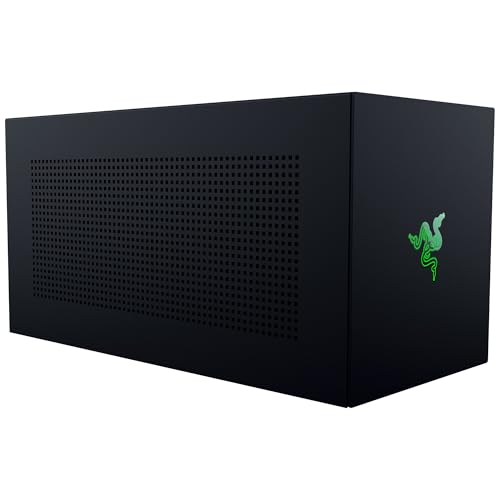
- 80 Gbps Thunderbolt 5 support
- Fits GPUs up to four slots wide
- 140W USB-C power delivery
Best For: Windows 11 users seeking a roomy, upgradeable eGPU enclosure
Best for Local AI

- 850W PSU with 600W GPU power
- Built for offline AI workflows
- Includes Ethernet, USB, and 96W charging
Best For: Windows 11 users running private local AI models
Best Built-In Dock
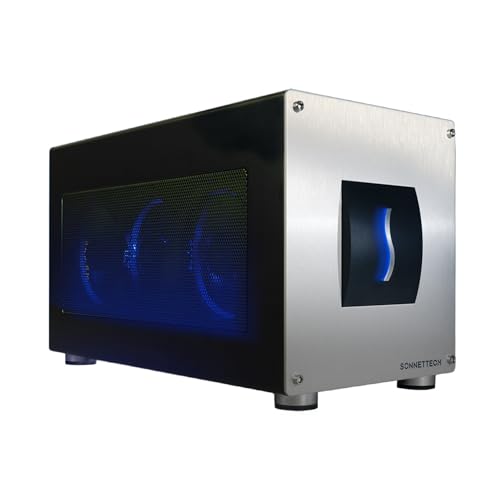
- 850W integrated power supply
- Triple-wide GPU support
- 5GbE and three USB-A ports
Best For: Creators and gamers needing GPU power plus desktop connectivity
Best Compact Option

- Works with TB3, TB4, and USB4
- 85W charging for compatible devices
- Supports flexible external PSU types
Best For: Handhelds, mini PCs, and compact laptop setups
High-Power Enclosure

- 750W power supply for compatible high-performance GPUs
- Four USB-A ports and Gigabit Ethernet built in
- Supports Windows and compatible Mac systems; not M1 Macs
Best For: Creative professionals needing high GPU power and extra ports
Flexible DIY Dock
ORARA Thunderbolt 3/4 eGPU Dock

- Supports TB3, TB4, and USB4 with a JHL7440 controller
- Accepts ATX, SFX, FLEX, or DC power supplies
- Adds 85W PD charging, USB-A, and daisy-chain support
Best For: DIY users building a customizable eGPU setup
Compact DIY Option
TREBLEET Mini Thunderbolt eGPU Dock

- Works with Thunderbolt 3/4 and USB4 systems
- Includes cable, USB-A, and a second Thunderbolt port
- Supports multiple external power-supply formats
Best For: Compact custom setups with hub functionality
Next-Gen Powerhouse
80Gbps Thunderbolt 5 eGPU Enclosure

- 80Gbps Thunderbolt 5/USB4 v2 bandwidth
- Built-in 600W PSU and up to 140W laptop charging
- Fits GPUs up to approximately 2.7 slots
Best For: High-bandwidth Windows systems and Intel Macs using compatible AMD GPUs
Flexible GPU Support
VK-Y900 Thunderbolt 3/4 eGPU Enclosure

- Supports listed NVIDIA and AMD GPU families
- Official Intel JHL7440/7450 controller
- Provides up to 85W laptop or handheld charging
Best For: Windows laptops, handhelds, and NUCs needing broad GPU support
Docking-Ready Option
ORARA 40Gbps Thunderbolt eGPU Enclosure

- Built-in 750W PSU for compatible PCIe GPUs
- JHL7440 controller with listed 32Gbps transfer
- USB-A, Thunderbolt, and daisy-chain connectivity
Best For: Windows Thunderbolt or USB4 setups needing GPU expansion and hub features
Best Overall – Razer Core X V2
The Razer Core X V2 is a flexible choice for shoppers comparing thunderbolt external gpu enclosures for high-end gaming and creative work. Its Thunderbolt 5 connection supports up to 80 Gbps, while the spacious enclosure accepts PCIe desktop graphics cards up to four slots wide.
Best For: Windows 11 users who want a roomy, upgradeable enclosure for modern NVIDIA or AMD desktop GPUs.
Pros:
- Supports NVIDIA and AMD graphics cards up to four slots wide.
- Thunderbolt 5 provides up to 80 Gbps bandwidth.
- Includes 140W USB-C power delivery and compatibility with Thunderbolt 4, Thunderbolt 5, and supported USB4 devices.
- Tool-free GPU and ATX PSU installation with active 120 mm cooling.
Cons:
- GPU and power supply are sold separately.
- Mac devices with M1 or later chipsets do not support eGPUs.
- USB connectivity is limited to one USB port.
Choose the Core X V2 if broad card support and future upgrade flexibility matter more than an integrated power supply or extensive docking features.
Best for Local AI – Plugable TBT5-AI Enclosure
The Plugable TBT5-AI stands out among thunderbolt external gpu enclosures by combining an eGPU slot with a substantial dock and an 850W ATX 3.1 power supply. It is designed for Windows 11 systems running local AI workloads without sending prompts or data to cloud services.
Best For: Windows 11 developers and professionals running offline AI models with a high-power NVIDIA or AMD GPU.
Pros:
- 80 Gbps Thunderbolt 5 bandwidth and a PCIe x16 slot with four PCIe 4.0 lanes.
- 850W 80+ Gold PSU provides up to 600W for the GPU.
- Supports local tools including Ollama, LM Studio, NVIDIA NIM, and llama.cpp.
- Adds 96W host charging, 2.5Gbps Ethernet, USB ports, and a downstream Thunderbolt 5 port.
Cons:
- GPU is not included.
- Does not support macOS, Linux, ChromeOS, or Thunderbolt 3.
- GPU clearance is limited to 346 × 170 × 77 mm and 3.5 slots.
This is the most purpose-built option here for private, local AI computing, though its Windows-only compatibility and GPU clearance should be checked before purchase.
Best Built-In Dock – Sonnet Breakaway Box 850 T5
The Sonnet Breakaway Box 850 T5 is a strong dock-focused pick among thunderbolt external gpu enclosures. Its 80 Gbps Thunderbolt 5 connection, built-in 850W power supply, and triple-wide GPU support are paired with 5GbE and three 10 Gbps USB-A ports.
Best For: Windows 11 creators, gamers, and AI users who need desktop-class GPU acceleration plus wired networking and USB expansion.
Pros:
- Supports triple-wide NVIDIA and AMD graphics cards.
- Built-in 850W power supply handles power-hungry GPUs.
- Includes 5GbE, three 10 Gbps USB-A ports, and a downstream Thunderbolt 5 port.
- Temperature-controlled variable-speed fan is designed for quieter cooling.
Cons:
- Listed for Windows 11 systems; macOS compatibility is not specified in the supplied details.
- GPU is not included.
- Its larger desktop enclosure may be less convenient for compact setups.
The Breakaway Box 850 T5 makes sense when a powerful, ready-to-use PSU and useful wired connectivity are more important than a smaller enclosure.
Best Compact Option – ANQUORA ANQ-L336
The ANQUORA ANQ-L336 is a compact, flexible alternative for shoppers seeking thunderbolt external gpu enclosures for laptops, mini PCs, and handhelds. It uses Thunderbolt 3, Thunderbolt 4, or USB4, supports NVIDIA and AMD GPUs, and provides 85W power delivery for compatible mobile devices.
Best For: Handheld gaming PCs such as the ROG Ally X, compact laptops, and users who already have a compatible power supply.
Pros:
- Supports Thunderbolt 3, Thunderbolt 4, and USB4 systems.
- Compatible with NVIDIA and AMD GPUs, including AMD 9000-series support.
- 85W power delivery can enable 30W Turbo Mode on the ROG Ally X.
- Compact 365-gram design includes two Thunderbolt 4 ports and a 10 Gbps USB-A port.
Cons:
- Power supply is not included and must be DC, ATX, SFX, or FLEX.
- Uses PCIe 4.0 x4 connectivity with 32 Gbps data transfer.
- NVIDIA RTX 50-series support is limited.
This enclosure is appealing for portable setups and handheld gaming, but buyers should budget for a compatible PSU and verify GPU support before ordering.
High-Power Enclosure – Sonnet Breakaway Box 750ex
The Sonnet Breakaway Box 750ex is a strong choice for shoppers comparing thunderbolt external gpu enclosures for demanding creative workloads. Its 750W power supply supports compatible high-performance graphics cards, while Thunderbolt 3 connects the enclosure to a Mac or Windows computer. Note that M1 Macs are not compatible with external GPUs.
Best For: Video editors, 3D artists, colorists, and Windows or compatible Mac users who need substantial GPU power plus built-in connectivity.
Pros:
- 750W power supply supports compatible current and future GPU requirements.
- Supports numerous AMD and NVIDIA GPU families, including Radeon RX, Vega, Pro, GeForce RTX, TITAN, and Quadro models.
- Includes four USB-A ports and Gigabit Ethernet for peripherals and wired networking.
- Designed to accelerate editing, rendering, color grading, animation, and effects work.
Cons:
- GPU card is not included.
- Limited to compatible computers with Thunderbolt 3 connectivity.
- M1 Macs are not compatible with GPUs.
Choose this model when power capacity and an integrated USB/Ethernet hub matter more than a compact, open-frame design. Check GPU dimensions and compatibility before buying; supported cards can measure up to 312mm.
Flexible DIY Dock – ORARA Thunderbolt 3/4 eGPU Dock
The ORARA External GPU Dock Station is an open, compact option among thunderbolt external gpu enclosures. It works with Thunderbolt 3, Thunderbolt 4, and USB4 systems and supports PCIe graphics cards, but you must supply the graphics card and an ATX, SFX, FLEX, or suitable DC power source separately.
Best For: DIY-minded laptop, NUC, and gaming-device owners who want flexible power-supply options, daisy chaining, and up to 85W device charging.
Pros:
- Uses an officially certified JHL7440 controller and supports PCIe 3.0 x4 data transfer up to 32Gbps.
- Accepts ATX, SFX, FLEX, and DC 12V power supplies.
- Supports PD charging up to 85W and includes a 10Gbps USB-A port.
- Provides a Thunderbolt 4 port and daisy-chain support for downstream devices.
Cons:
- Graphics card and power supply are not included.
- Not compatible with Thunderbolt 1, Thunderbolt 2, or ordinary USB-C interfaces.
- Windows users are advised to use the latest Windows 11 version for detection.
This dock offers useful flexibility for a custom build, but compatibility and power planning are essential. Verify that your computer has a genuine TB3, TB4, or USB4 port and select a power supply appropriate for the installed PCIe card.
Compact DIY Option – TREBLEET Mini Thunderbolt eGPU Dock
The TREBLEET Mini eGPU Enclosure is a compact choice for shoppers considering thunderbolt external gpu enclosures for USB4 or Thunderbolt 3/4 laptops and NUCs. It includes a cable and supports NVIDIA and AMD PCIe graphics cards, but it requires a separate GPU and compatible power supply, along with some setup knowledge.
Best For: Users who want a small, hub-capable eGPU dock and are comfortable checking system compatibility and handling DIY hardware configuration.
Pros:
- Compatible with Thunderbolt 3, Thunderbolt 4, and USB4 interfaces.
- Includes a TB3/USB4 cable and supports NVIDIA and AMD PCIe graphics cards.
- Provides a USB-A port and a second Thunderbolt port for downstream devices.
- Supports SFX, ATX, FLEX, and certain DC power supplies, with up to 85W PD charging support.
Cons:
- Graphics card, power supply, laptop, and other core components are not included.
- Requires driver, hardware compatibility, and power-supply configuration.
- Not recommended for handheld game consoles.
Its small footprint and included cable make it appealing for a customized setup, but it is not a plug-and-play all-in-one enclosure. Confirm that your system exposes Thunderbolt or USB4 support and choose the power method based on the PCIe card’s requirements.
Next-Gen Powerhouse – 80Gbps Thunderbolt 5 eGPU Enclosure
For shoppers seeking thunderbolt external gpu enclosures with next-generation bandwidth, the TREBLEET combines an 80Gbps JH9480 controller with a built-in 600W SFX power supply. It also provides up to 140W laptop charging and supports large graphics cards in a compact aluminum chassis.
Best For: Windows users and Intel Mac owners who want high bandwidth, strong internal power, laptop charging, and support for larger GPUs.
Pros:
- Thunderbolt 5 and USB4 v2 compatibility with up to 80Gbps bandwidth.
- Integrated 600W SFX PSU with up to 450W dedicated GPU power.
- Up to 140W USB Power Delivery and support for GPUs up to approximately 2.7 slots.
- Secondary high-speed port and USB-A ports support daisy chaining.
Cons:
- macOS support is limited to Intel-based Macs with compatible AMD GPUs.
- Does not support NVIDIA GPUs or Boot Camp on macOS.
- The host device must support external PCIe expansion.
The TREBLEET is a particularly capable choice when internal power and laptop charging matter as much as GPU expansion. Confirm your host port, operating system, and graphics-card dimensions before buying.
Flexible GPU Support – VK-Y900 Thunderbolt 3/4 eGPU Enclosure
The VK-Y900 is one of the more flexible thunderbolt external gpu enclosures for users who want to pair a laptop, handheld, or NUC with a broad range of NVIDIA or AMD graphics cards. Its official Intel JHL7440/7450 controller, dual Thunderbolt ports, and 85W power delivery support a straightforward single-cable setup.
Best For: Windows laptop, handheld, and NUC users who need broad NVIDIA/AMD GPU compatibility and up to 85W pass-through charging.
Pros:
- Supports a wide range of NVIDIA RTX and AMD Radeon graphics cards, including newer listed series.
- Official Intel JHL7440/7450 controller is designed for stable data transfer.
- Dual Thunderbolt ports include 15W and 85W power delivery options, plus DisplayPort.
- 85W pass-through can enable 30W Turbo Mode on the ROG Ally X.
Cons:
- Uses an ATX power supply, which must be provided separately.
- Apple Silicon Mac support is described for AI deep-learning development through TinyGPU, not gaming or 3D rendering.
- Its listed dimensions may be less convenient for highly compact setups.
Choose the VK-Y900 if graphics-card compatibility is your priority and you already have, or plan to add, a suitable ATX power supply. Its charging and port configuration also makes it appealing for portable gaming devices.
Docking-Ready Option – ORARA 40Gbps Thunderbolt eGPU Enclosure
The ORARA is a practical choice among thunderbolt external gpu enclosures for users who want GPU expansion plus basic hub functionality. It supports Thunderbolt 3, Thunderbolt 4, and USB4 systems, includes a 750W power supply, and offers daisy chaining with an additional Thunderbolt port.
Best For: Thunderbolt 3/4 or USB4 laptop, NUC, and gaming-machine users who need an external GPU dock with daisy chaining and 85W charging.
Pros:
- Built-in 750W PSU supports compatible NVIDIA and AMD PCIe graphics cards.
- Official JHL7440 controller supports PCIe 3.0 x4 and listed 32Gbps data transfer.
- Includes a 10Gbps USB-A port, Thunderbolt 4 port, and daisy-chain port.
- Supports graphics cards up to 350 x 157 x 59mm, subject to its dual-width limit.
Cons:
- Does not support three-slot graphics cards.
- Requires Thunderbolt 3/4 or USB4; standard USB-C and Thunderbolt 1/2 are not supported.
- Not compatible with MacBooks using M1, M2, M3, or M4 chips, and NVIDIA cards are not supported in macOS.
The ORARA suits a Windows-centered desk where a built-in power supply and extra connectivity are useful. Pay close attention to the dual-width card limit, host-port requirements, and the stated macOS restrictions.
How We Picked These Thunderbolt External GPU Enclosures
We focused on enclosure specifications that affect real-world performance and usability: Thunderbolt or USB4 bandwidth, graphics-card compatibility, power delivery, internal power-supply capacity, physical clearance, cooling, operating-system support, and upgrade flexibility. The selection includes compact enclosures for portable systems, high-wattage models for demanding GPUs, and dock-style options that can simplify a laptop desktop setup.
Compatibility claims deserve extra attention. Thunderbolt 5 and USB4 v2 can offer substantially more bandwidth than older 40Gbps connections, but your computer, cable, operating system, and graphics card must all support the relevant features to realize those benefits.
Quick Comparison
- Best for broad compatibility: Razer Core X V2 supports Windows 11 systems using Thunderbolt 4, Thunderbolt 5, and USB4.
- Best for high-bandwidth setups: Plugable and TREBLEET offer Thunderbolt 5-class connectivity for compatible newer computers.
- Best for maximum power headroom: Sonnet’s Breakaway Box 850 T5 and 750ex models suit powerful desktop GPUs.
- Best for compact systems: The ANQ-L336 and other mini enclosures are easier to carry and pair with laptops or handheld PCs.
- Best for flexible builds: ATX-powered and PSU-less docks let experienced buyers match the enclosure with their preferred power supply.
Key Buying Factors for Thunderbolt External GPU Enclosures
Port Standard and Bandwidth
Thunderbolt 3, Thunderbolt 4, and USB4 models commonly provide up to 40Gbps. Thunderbolt 5 models can provide higher bandwidth, making them more attractive for high-resolution displays, demanding transfers, and newer GPUs. Performance still depends on the host device and connection settings.
GPU Size and Power
Check supported card length, height, thickness, and connector clearance before ordering. A high-wattage power supply is important for performance GPUs, while compact enclosures may limit card dimensions or require a separate power source.
Operating-System Support
Windows support is generally the broadest, but Mac and Linux compatibility varies by enclosure, GPU vendor, and operating-system version. Handheld PCs such as the ROG Ally X also require careful attention to power delivery and driver support.
Ports and Charging
If the enclosure doubles as a dock, review its USB ports, display outputs, Ethernet, and laptop charging capability. Confirm the advertised power-delivery wattage is sufficient for your computer under load.
Who Should Buy Which Thunderbolt External GPU Enclosures?
Choose a Thunderbolt 5 enclosure if you have a compatible newer laptop and want maximum bandwidth or longer upgrade potential. A 40Gbps Thunderbolt 3, Thunderbolt 4, or USB4 enclosure is usually the better value for existing laptops and mainstream gaming or creative work. Pick a high-power Sonnet or similar enclosure for large, power-hungry graphics cards. Choose a mini model when portability matters most, but verify GPU clearance and whether a separate power supply is required. Buyers who want a simpler all-in-one setup should prioritize an enclosure with an integrated PSU, charging, and useful dock ports.