Architectural drawings, engineering plans, and construction documents demand more than a standard office printer can provide. The right large-format printer delivers readable fine lines, dependable scaling, efficient workflows, and media support suited to daily technical work.
We’ve gathered 10 options spanning compact 24-inch models, wider 36-inch machines, multifunction systems, and packages with onsite support. Use the guide below to match print width, connectivity, operating cost, and workflow features to your office.
Best 10 Plotter Printers for Architects and Engineers Picks for 2026
Best Overall CAD Plotter

- 24-inch roll printing with automatic cutter
- HP Click supports CAD and PDF workflows
- Ethernet, Wi-Fi, USB, and HP Smart connectivity
Best For: Architectural drawings, engineering plans, maps, and posters
Best for Durable Site Documents

- Water- and UV-resistant five-color ink
- Color calibration supports consistent output
- Prints 24 x 36-inch sheets at up to 3.2 ppm
Best For: Construction documents, outdoor posters, and technical plans
Best Support Package
HP DesignJet T210 with Care Pack
- Includes two-year HP Care Pack onsite support
- Prints up to 24-inch-wide roll media
- HP Click simplifies CAD and PDF submissions
Best For: Professional offices that prioritize service coverage
Best Multifunction Pick

- Combines printing, scanning, and copying
- Flatbed scanner supports enlargements
- Automatic feeder holds up to 100 letter sheets
Best For: Small design offices needing scan-and-copy capability
Best Overall
HP DesignJet T650 36-Inch Plotter

- 36-inch rolls and 13-by-19-inch sheets
- Automatic media switching and HP Click software
- Includes 2-year onsite support
Best For: Mixed-size CAD drawings, maps, posters, and renders
Best Value
HP DesignJet T630 36-Inch Plotter

- 36-inch roll and 13-by-19-inch sheet support
- Stand, feeder, spindle, and media bin included
- Ethernet, USB, and Wi-Fi connectivity
Best For: Wide-format CAD, GIS, map, poster, and construction printing
Best Compact Option
HP DesignJet T870 24-Inch Plotter

- Supports 24-inch rolls and 13-by-19-inch sheets
- Up to 120 A1/D prints per hour
- Includes 2-year onsite and phone support
Best For: Smaller offices needing efficient A1/D technical printing
Best for Consistent 36-Inch Prints

- Five-color pigment ink for crisp lines and vivid posters
- Automatic media detection and color calibration
- Includes stand, catch basket, and 300 ml of ink
Best For: Architecture and engineering offices needing consistent 36-inch prints
Best Multifunction Choice for Small Studios
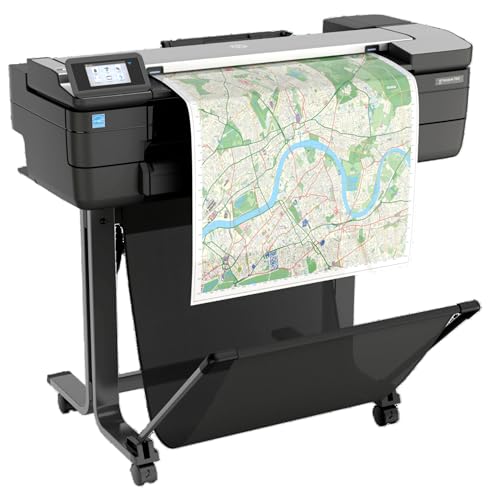
- Print, scan, and copy technical documents
- Handles 24-inch rolls and sheets
- Wi-Fi, Ethernet, and mobile printing support
Best For: Small architecture or construction offices needing multifunction output
Best Compact Option for Technical Drawings

- Prints CAD drawings, blueprints, maps, and posters
- Compact 24-inch design with automatic cutter
- Includes two-year Care Pack and network connectivity
Best For: Space-conscious professionals printing routine technical documents
Best Overall CAD Plotter – HP DesignJet T210 24-inch
HP DesignJet T210 Large Format 24-inch Plotter Printer, for Easy CAD & Poster Prints (8AG32D)
Check Price On AmazonFor architects and engineers comparing plotter printers, the HP DesignJet T210 is a practical 24-inch option for CAD drawings, maps, posters, and other wide-format documents. Its roll and sheet handling, automatic cutter, HP Click software, and broad file support are designed to simplify everyday technical printing.
Best For: Technical line drawings, CAD files, maps, posters, renders with crisp text, and professional sewing patterns.
Pros:
- Prints on media rolls up to 24 inches wide and supports optional sheet feeding up to 13 x 19 inches.
- HP Click provides PDF error checking, auto-nesting, print alerts, and drag-and-drop file submission.
- Supports Ethernet, USB 2.0, Wi-Fi, HP-GL/2, and remote printing through the HP Smart app.
- Offers up to 45 seconds per A1/D page, with 500MB of memory and a 2400 x 1200 dpi resolution.
Cons:
- The automatic sheet feeder is an optional accessory.
- It uses HP 712 cartridges and an HP 713 printhead, so replacement supplies are specific to the printer.
The T210 is a well-rounded choice when straightforward CAD workflow tools and flexible connectivity matter more than multifunction features. Its one-year limited hardware warranty adds basic coverage for office or studio use.
Best for Durable Site Documents – Canon imagePROGRAF TM-240
The Canon imagePROGRAF TM-240 is a strong candidate among plotter printers for architects and engineers who need clean technical output and documents suited to demanding environments. Its 24-inch format, five-color ink system, color calibration, and water-resistant ink support both office plans and selected outdoor applications.
Best For: Construction plans, technical drawings, outdoor posters, store signs, and color-consistent wide-format documents.
Pros:
- Produces clean lines and sharp text with a 2400 x 1200 dpi maximum resolution and 5-picoliter droplets.
- Water- and UV-resistant ink can help documents withstand many outdoor conditions when paired with suitable media.
- Color calibration helps maintain consistent output over time and across TM-series devices.
- The L-COA PRO II processor enables speeds up to 3.2 ppm for a 24 x 36-inch sheet.
Cons:
- At 88.2 pounds, it is substantially heavier than the listed HP T210 models.
- The specifications list a maximum sheet size of Arch C, while roll media is identified as 24 inches wide.
Choose the TM-240 if line clarity, color consistency, and resistance to outdoor conditions are central to your workflow. Ethernet, USB, and Wi-Fi connectivity provide flexibility for office-based printing.
Best Support Package – HP DesignJet T210 with Care Pack
This HP DesignJet T210 configuration is a sensible option for architects, engineers, and construction professionals who want a 24-inch CAD plotter with additional service coverage. It combines the T210’s roll and sheet workflow with a two-year HP Care Pack that includes onsite support.
Best For: Offices printing blueprints, technical drawings, maps, posters, indoor signage, and other professional wide-format documents.
Pros:
- Includes a two-year HP Care Pack with onsite support.
- Handles media rolls up to 24 inches wide and can use optional automatic sheet feeding for up to 13 x 19-inch sheets.
- HP Click offers PDF error checking, auto-nesting, alerts, and simplified multi-file printing.
- Supports Android, Apple AirPrint, ChromeOS, Windows, macOS, and remote management through HP Smart.
Cons:
- The automatic sheet feeder is optional.
- Only HP 712 ink cartridges and the HP 713 printhead are specified as compatible supplies.
The main advantage over the standard T210 listing is the included service package, making this version attractive for workplaces where onsite assistance and longer coverage can reduce operational interruptions. Its 45-second A1/D page speed and automatic cutter also suit recurring plan-printing tasks.
Best Multifunction Pick – Canon imagePROGRAF TC-21M
The Canon imagePROGRAF TC-21M stands out among plotter printers for architects and engineers because it adds scanning and copying to wide-format printing. Its flatbed scanner, enlargement function, USB flash drive port, cloud support, and automatic sheet feeder make it useful when drawings must be reproduced or digitized as well as printed.
Best For: Small offices that need large-format printing, enlargements, copying, scanning, and flexible paper handling in one device.
Pros:
- Flatbed scanning enables enlargements of smaller originals directly from the printer.
- Prints or scans through the cloud and supports direct printing from a USB flash drive.
- The automatic sheet feeder holds up to 100 letter-size sheets or 50 sheets of 11 x 17-inch paper.
- Supports roll media up to 24 inches wide and paper sizes from letter through A1.
Cons:
- It uses simplex printing rather than automatic duplex printing.
- The listed warranty is one year, shorter than the two-year coverage included with the HP Care Pack configuration.
The TC-21M is the most versatile choice here for teams that regularly copy or scan drawings instead of only producing prints. Its 2.7-inch tiltable touchscreen and 28-watt listed power draw add convenience for routine office operation.
Best Overall – HP DesignJet T650 36-Inch Plotter
For architects and engineers who need flexible, dependable output, the HP DesignJet T650 is a strong choice among plotter printers for architects and engineers. It handles 36-inch rolls, 13-by-19-inch sheets, technical drawings, maps, posters, and renders, while automatic media switching reduces hands-on setup.
Best For: Architecture, engineering, and construction offices printing precise CAD drawings and mixed-size projects.
Pros:
- Supports media rolls up to 36 inches wide plus sheets up to 13 by 19 inches
- Automatic sheet/roll switching, cutter, feeder, and media bin streamline production
- HP Click provides PDF checking, alerts, auto-nesting, and drag-and-drop printing
- Includes a 2-year HP Care Pack with onsite support
Cons:
- Large 52-inch-wide footprint requires dedicated space
- Uses HP 712 cartridges and an HP 713 printhead
The T650 is particularly compelling for teams that value broad media flexibility and included service coverage. Its 2400-by-1200-dpi resolution, CAD-oriented file support, and 25-second A1/D print speed suit everyday technical-document workflows.
Best Value – HP DesignJet T630 36-Inch Plotter
The HP DesignJet T630 offers the core capabilities many offices need from plotter printers for architects and engineers, including 36-inch roll printing, automatic sheet handling, and support for technical CAD documents. Its included stand, media bin, and feeder make it practical for a dedicated workspace.
Best For: Architecture, engineering, construction, GIS, and poster printing where wide-format capacity is a priority.
Pros:
- Prints on rolls up to 36 inches wide and sheets up to 13 by 19 inches
- Includes an automatic sheet feeder, stand, spindle, and media bin
- Automatic roll/sheet switching and horizontal cutting simplify multi-size jobs
- HP Click supports PDF checking, auto-nesting, and common CAD file formats
Cons:
- Heavier 123-pound design needs substantial floor space
- Includes a 1-year limited warranty rather than the 2-year coverage offered by some listed models
- Listed A1/D output speed is up to 2 pages per minute
The T630 is a practical wide-format workhorse for teams that need a complete stand-mounted setup without stepping beyond essential features. Ethernet, USB, and Wi-Fi connectivity also support shared office workflows.
Best Compact Option – HP DesignJet T870 24-Inch Plotter
When workspace is tighter but wide-format output remains essential, the HP DesignJet T870 is a useful option among plotter printers for architects and engineers. It supports 24-inch rolls and 13-by-19-inch sheets, with automatic media switching for technical drawings, posters, signage, maps, and renders.
Best For: Smaller architecture, engineering, construction, and education workspaces that need wide-format printing without a 36-inch unit.
Pros:
- More compact 24-inch maximum roll width than the 36-inch alternatives
- Automatic sheet/roll switching, cutter, feeder, and media bin support varied jobs
- Prints A1/D pages in up to 21 seconds, with up to 120 A1/D prints per hour
- Includes 2-year onsite and phone support
Cons:
- Cannot handle rolls wider than 24 inches
- Uses the HP 738 ink and HP 739 printhead system
- Wi-Fi and Gigabit Ethernet are listed, but USB connectivity is not specified in the supplied details
The T870 balances footprint and productivity well for teams whose documents fit within its 24-inch roll limit. HP Click, HP Smart management, and HP/GL-2 support add useful workflow conveniences for recurring CAD and technical-printing tasks.
Best for Consistent 36-Inch Prints – Canon imagePROGRAF TM-340
For architects and engineers comparing plotter printers, the Canon imagePROGRAF TM-340 is a strong choice when crisp technical lines, color consistency, and wide-format poster output matter. Its 36-inch roll capacity, automatic media detection, and 2400 x 1200 dpi resolution support a streamlined large-format workflow.
Best For: Architecture, engineering, and design offices that need wide 36-inch prints, posters, and dependable color output.
Pros:
- Five-color pigment ink system produces sharp lines, crisp text, and vibrant images.
- Automatically detects media type, width, and remaining roll length.
- Automatic color calibration helps maintain consistent prints.
- Includes a printer stand, catch basket, and 300 ml of starter ink.
Cons:
- Its 130.5-pound weight and nearly 58-inch width require substantial workspace.
- It is a print-only model without integrated scanning or copying.
The TM-340 stands out for offices that prioritize professional wide-format output and reduced setup effort. Ethernet and USB connectivity support office use, while wireless productivity features and the tiltable touchscreen add convenience.
Best Multifunction Choice for Small Studios – HP DesignJet T830
Among plotter printers for architects and engineers, the HP DesignJet T830 is especially practical for smaller offices that need printing, scanning, and copying in one machine. Its 24-inch format, wireless connectivity, and mobile-printing support make it convenient for project communication.
Best For: Architecture studios and construction offices that need compact multifunction output for technical documents and project sets.
Pros:
- Combines large-format printing, scanning, and copying.
- Supports 24-inch rolls and sheets from 8.3 to 24 inches wide.
- Prints up to 81 A1/D pages per hour, according to the supplied specifications.
- Offers Wi-Fi, Gigabit Ethernet, mobile printing, and HP Click software.
Cons:
- Its 24-inch maximum width is narrower than 36-inch plotter models.
- HP notes that non-HP cartridges may not work reliably because of dynamic security.
The T830 is a versatile communication hub for teams that regularly review, reproduce, and share drawings. Choose it when multifunction capability and flexible connectivity are more important than the widest possible print format.
Best Compact Option for Technical Drawings – HP DesignJet T230
The HP DesignJet T230 is a practical entry point for plotter printers for architects and engineers, particularly when space and operating simplicity are priorities. It supports 24-inch rolls, technical line drawings, blueprints, maps, and posters while remaining considerably lighter than many large-format office printers.
Best For: Architects, engineers, and construction professionals who need a compact 24-inch printer for CAD drawings and routine wide-format documents.
Pros:
- Supports technical line drawings, blueprints, maps, posters, and signage.
- Handles up to 24-inch rolls and optional 13-by-19-inch sheets.
- Automatic horizontal cutter and multi-size printing simplify media handling.
- Includes a two-year Care Pack and supports Wi-Fi, Ethernet, and USB.
Cons:
- It prints only and does not include scanning or copying functions.
- It uses HP OEM ink cartridges for optimal print quality and longevity.
- Its 24-inch maximum media width may not suit larger plan sets.
With a 47.4-pound design and a compact 40-inch-wide footprint, the T230 is easier to place than heavier professional plotters. It is a sensible fit for routine technical output when a smaller, network-ready printer and included extended warranty are key priorities.
How We Picked the Best Plotter Printers for Architects and Engineers
We focused on the capabilities that matter most in professional CAD and technical-document workflows: maximum paper width, line precision, color consistency, print speed, media flexibility, connectivity, physical footprint, and service coverage. The selection includes 24-inch printers for smaller offices and 36-inch models for larger plan sets, posters, and presentation boards.
We also considered practical features such as automatic sheet feeding, media detection, integrated stands or catch baskets, mobile printing, multifunction scanning, and included warranty support. These details can have as much effect on day-to-day productivity as headline print resolution.
Quick Comparison
| Best For | What to Prioritize | Recommended Size |
|---|---|---|
| Compact CAD offices | Low footprint, reliable line printing, wireless connectivity | 24 inches |
| Large plan sets | Wide rolls, faster throughput, stand and media handling | 36 inches |
| Mixed print and scan tasks | Multifunction capability, touchscreen workflow, copying | 24 inches |
| Client presentations | Color consistency, media flexibility, poster capability | 24 or 36 inches |
Key Buying Factors for Plotter Printers for Architects and Engineers
Print Width and Workflow
A 24-inch machine handles common architectural sheets, engineering drawings, and posters while taking up less room. Choose a 36-inch printer if your office regularly produces larger plan sets or wants to avoid tiling wide drawings across multiple pages.
CAD Line Quality and Scaling
Look for accurate scaling, crisp thin lines, and dependable handling of vector-based PDF and CAD files. Automatic alignment and media detection can reduce setup errors, especially when switching between roll paper and individual sheets.
Speed, Duty Cycle, and Media Handling
Estimate your busiest weekly volume rather than occasional use. A built-in stand, catch basket, automatic sheet feeder, or larger media capacity can save time when producing repeated sets. Confirm supported roll widths, sheet sizes, paper types, and core dimensions before buying.
Connectivity and Software
Ethernet is valuable for shared office use, while Wi-Fi and mobile printing simplify occasional or remote jobs. Check compatibility with your operating systems, CAD applications, cloud services, and network security requirements.
Ink, Maintenance, and Support
Compare replacement ink costs, cartridge capacities, printhead maintenance, and warranty terms—not just the purchase price. Onsite service packages can be especially worthwhile when missed deadlines or equipment downtime carry a high cost.
Who Should Buy Which Plotter Printers for Architects and Engineers?
Small architecture practices and independent engineers should favor a compact 24-inch model with straightforward CAD printing and wireless or Ethernet connectivity. Offices printing oversized plans frequently should step up to a 36-inch model with a stand and stronger media workflow. Teams that scan, copy, or digitize drawings should choose a multifunction option. Finally, firms producing client-facing posters and color boards should prioritize color management, media flexibility, and consistent calibration over the lowest operating cost.